Writing Your Own Mobile OS from Scratch in Rust
An engineer documents building a bare-metal mobile OS kernel entirely in Rust targeting a Xiaomi Redmi Note 7 (ARMv8). The project achieves UART debug output and framebuffer graphics by directly programming Qualcomm hardware without any Android or Linux abstractions.
This is an experimental project to develop a mobile OS kernel from scratch using Rust, targeting a Xiaomi Redmi Note 7 smartphone running an ARMv8 (ARM64) processor on a Qualcomm Snapdragon SoC.
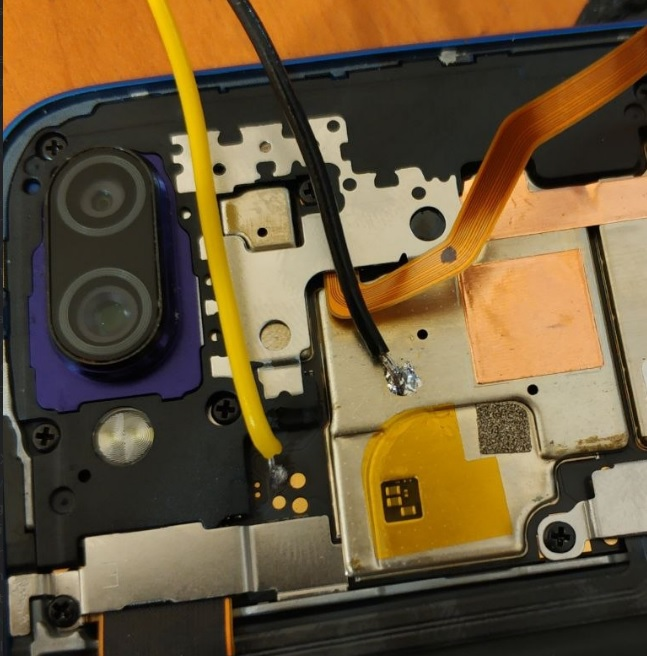
Hardware Requirements
- A smartphone with an unlocked bootloader
- A UART-TTL adapter (CH340-based)
- Soldering skills for connecting to UART pins
- Access to the Device Tree Blob (DTB) files for the device
Boot Process on Qualcomm SoCs
Qualcomm devices use a three-stage bootloader sequence. The Primary Bootloader (PBL) performs initial hardware setup and is burned into ROM. The Secondary Bootloader (SBL) continues hardware initialization and loads the next stage. Finally, the Application Bootloader (ABL) — based on UEFI/EDK2 — loads the actual kernel. The kernel receives a Device Tree Blob (DTB) that describes all hardware present on the board: memory ranges, peripheral addresses, interrupt lines, and more.
Project Setup
The project uses Rust's no_std environment targeting aarch64-unknown-none — a bare-metal target with no operating system underneath. Build automation is handled by cargo-make, and the kernel is deployed to the device via fastboot. The kernel is packaged as an Android Boot Image: a gzip-compressed kernel binary combined with the DTB, a format the Android bootloader already knows how to load.
The kernel entry point is written in assembly to set up an initial stack and branch to the Rust _start function. The image is structured with a Linux ARM64 header so the bootloader recognises it as a valid kernel. The load address is 0x40008000 — determined by analysing the bootloader's behaviour.
UART Driver
To get any debug output at all, the first milestone is a working UART driver. On this Qualcomm device the debug UART is a BLSP UARTDM (version 1.4) controller located at physical address 0x0C170000. The driver is implemented as a set of memory-mapped I/O operations using Rust's write_volatile to prevent the compiler from optimising away hardware writes. It implements non-blocking byte writes and converts bare \n newlines into the \r\n sequence the terminal expects.
// Simplified UART write — poll TX FIFO until space is available, then write byte
unsafe fn uart_write_byte(base: *mut u32, byte: u8) {
    // Wait for TX FIFO not full
    while read_volatile(base.add(UARTDM_SR)) & SR_TXEMT == 0 {}
    write_volatile(base.add(UARTDM_TF), byte as u32);
}
Framebuffer and DTB Parsing
After UART, the next goal is drawing pixels on the screen. The framebuffer parameters — resolution, pixel format, and physical memory address — are all described in the Device Tree Blob passed by the bootloader. Rather than hardcoding these values, the project implements a zero-copy FDT (Flattened Device Tree) parser in Rust that iterates over DTB nodes and properties at runtime.
The parser walks the binary FDT structure, locating the chosen node where the bootloader stores the framebuffer base address, width, height, stride, and colour format. With these values in hand, writing a pixel is simply a matter of computing the correct offset into the memory-mapped framebuffer and performing a write_volatile.
// Write a single ARGB pixel to the framebuffer
unsafe fn write_pixel(fb: *mut u32, stride: usize, x: usize, y: usize, colour: u32) {
    let offset = y * stride + x;
    write_volatile(fb.add(offset), colour);
}
Results
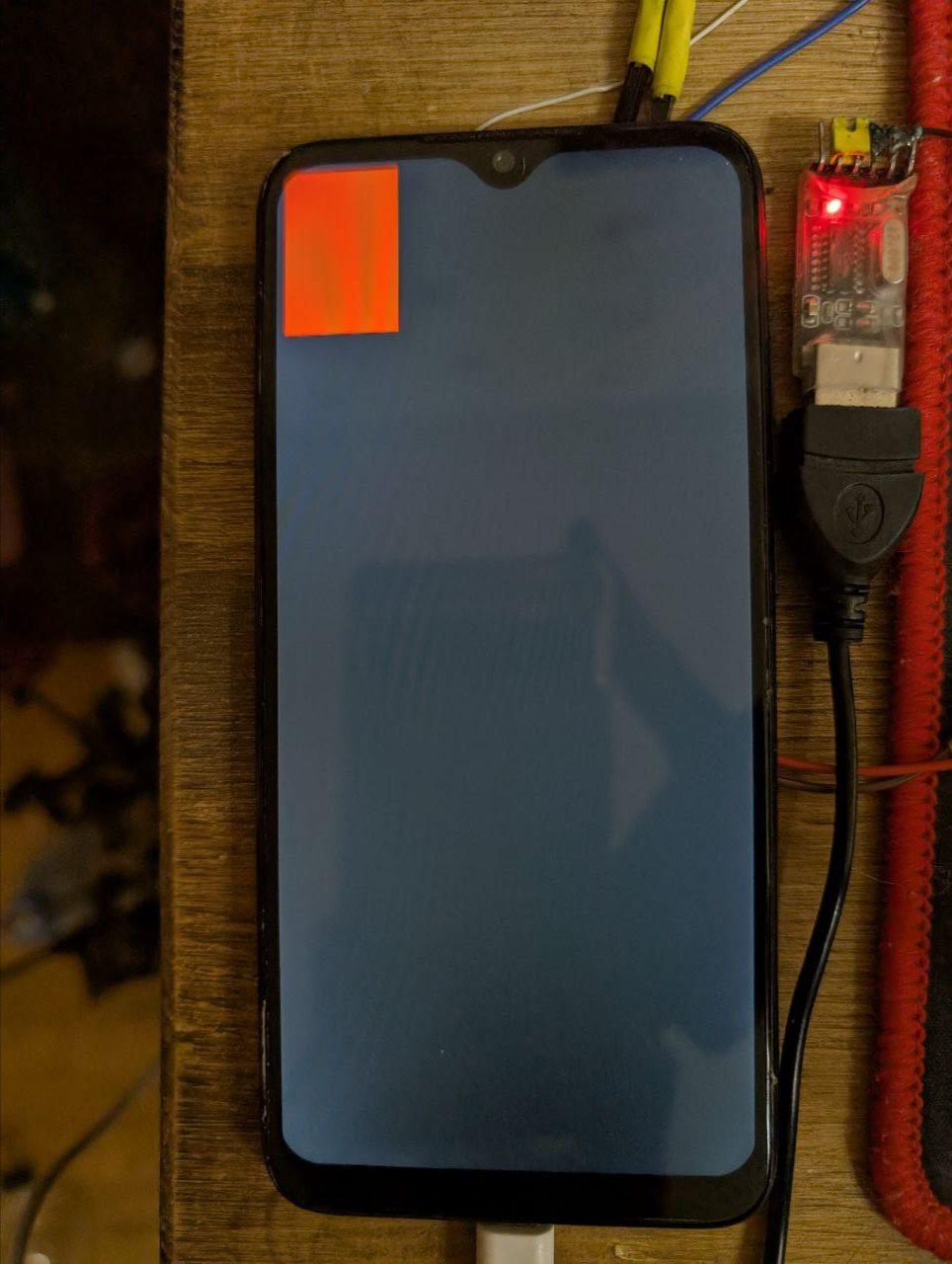
The kernel boots successfully via the stock Android bootloader. It prints "Hello, world" over UART and renders a solid orange rectangle on the phone's display — concrete proof that hardware initialisation, memory-mapped I/O, DTB parsing, and framebuffer access all work correctly without any Linux or Android layer in between.
The full source code is available on the author's GitHub. Future plans include implementing interrupt handling, a basic memory allocator, and eventually a simple task scheduler to lay the groundwork for a real-time OS running directly on Android hardware.



