What Happens If You Don't Use TCP or UDP?
An engineer experiments with sending IP packets using a made-up transport protocol number, testing what the OS, NAT devices, and the internet itself do with non-standard traffic. The results reveal how deeply the network stack assumes TCP/UDP.
Switches, routers, firewalls — these are the devices that hold the internet together. They relay, filter, duplicate, and cut traffic in ways most people don't even suspect. Without them, you wouldn't be able to read this text.
But the network is just one layer. The operating system plays by its own rules too: classification, queues, firewall rules, NAT — all of this affects what gets through and what gets dropped without a trace. Each layer works differently, and together they form the answer to the question: "Can this packet even be allowed through?"
One day I got curious: what happens if you send a packet with a non-existent transport protocol? Not TCP, not UDP, not ICMP — something completely made up. Will the OS let it through? Will it even reach the network interface? Won't some intermediary router kill it? And maybe it'll even arrive faster than usual, because nobody knows what to do with it?
I had no answer. So I decided to test it.
First — the simplest experiment: send such a packet to myself. See how my own computer handles this poison I cooked up. Then — try to send it across the ocean to a remote Linux machine, to check if they can actually get there.
A Bit of Background
You can skip this section if you know how the internet works. Everyone else — welcome.
What exactly is a "transport protocol"? Why does everyone talk about TCP and UDP, but nobody mentions protocol number 42?
The internet isn't magic, even if it sometimes looks like wizardry. In reality, it's a neat stack of protocols. Each one with its own task, its own area of responsibility. They pass data to each other, layer by layer, until the bytes end up where they need to be.
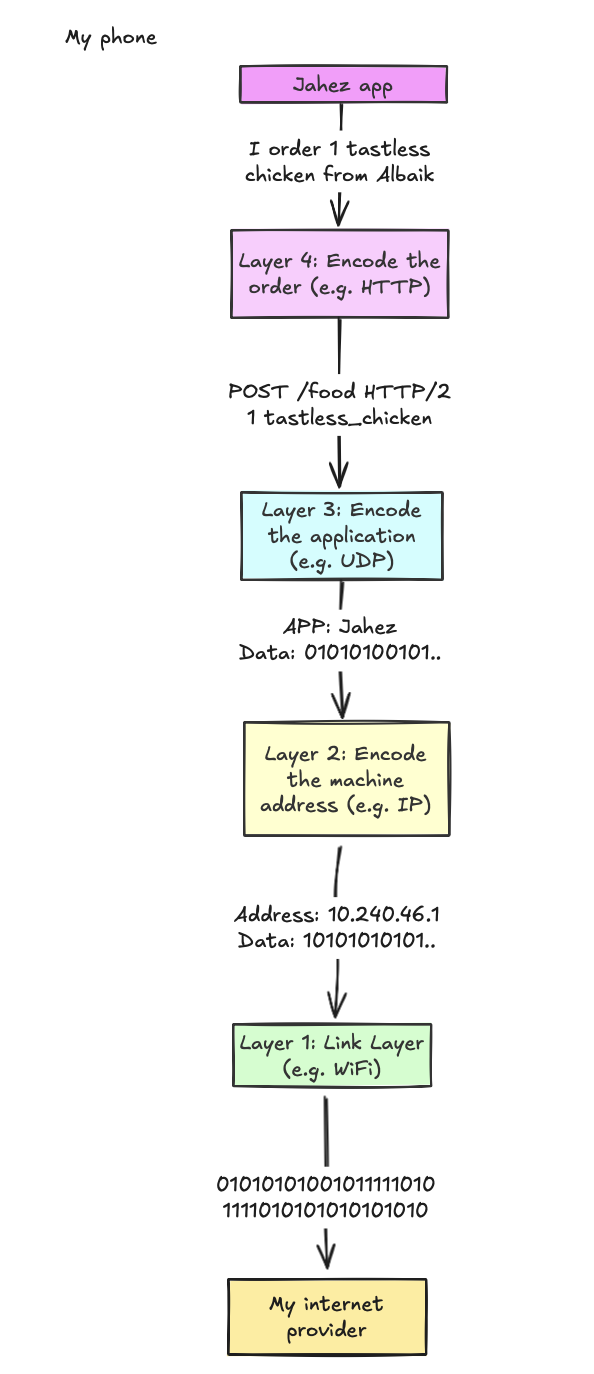
At the top — applications. Browsers, messengers, games. They say: "give me a page," "send a message," "connect me to a server." All of this turns into a request. And this request starts accumulating metadata: addresses, ports, headers. Layer by layer. Until all that's left is a stream of bits heading into the void.
IP says: "This packet goes there." It's responsible for delivery. The link layer handles physical transmission: Wi-Fi, Ethernet, fiber optics. We won't dwell on that, because the interesting stuff comes next.
And here it is — the transport layer. The first truly complex protocol layer. Here it's no longer just "send it somewhere." Here it's "deliver reliably," "distribute among applications," "check that everything arrived." This is where TCP and UDP live.
In the header of every IP packet there's a Protocol field. If it's 6 — that's TCP. If it's 17 — that's UDP. And there are dozens of other numbers. Some are documented. Some are reserved for the future. And some simply belong to no one.
What happens if you take one of these "ownerless" numbers and send a packet with it?
Experiment #1: Sending Traffic... to Yourself!
There are too many variables in this experiment: my OS, my router, the hypothetical receiver's OS, and a whole bunch of intermediary links on the internet. Trying to sort through that mess isn't the most rewarding task. So I decided to start with the simplest thing: send packets to myself.
This approach eliminates everything extraneous. Results will depend only on the behavior of my operating system and network stack.
I wrote my own transport protocol. Called it HDP. What it does doesn't matter. The important thing is that it doesn't resemble any known protocol. It's something completely alien — no OS expects it.
Then I wrote a server — it's also a listener. It simply waits for packets with a specific protocol number. And also — a client that sends these packets. Simple enough.
Action plan:
Start the HDP server
It will ask the OS to redirect all IP packets with protocol number 255 to its socket.
Start the HDP client
It will send a packet to 127.0.0.1 — the local address, aka loopback.
The OS will route the packet to the loopback interface.
The interface will decide: "Ah, this is for us" — and return the packet back to the system.
The OS will deliver this packet to the server socket — unchanged... at least, that's what I hope.
Let's try. I open two terminals. In the first — the server:
$ sudo cargo run --bin serverIn the second — the client:
$ fortune | cowsay | sudo cargo run --bin client 127.0.0.13... 2... 1... The server received the message!
$ sudo cargo run --bin server
~~~ IP Header ~~~
Version: 4
IHL: 5
DSCP: 0
ECN: 0
Total Length: 58625
Identification: 36455
Flags: 0
Fragment Offset: 0
TTL: 64
Protocol: 255
Header Checksum: 0
Source IP: [127, 0, 0, 1]
Destination IP: [127, 0, 0, 1]

~~~ HDP Header & Data ~~~
Source Port: 420
Destination Port: 420
Timestamp: 1739640243546134000
Data: _________________________________________
/ Marriage is not merely sharing the       \
| fettucine, but sharing the burden of     |
| finding the fettucine restaurant in the  |
| first place.                             |
|                                          |
\ -- Calvin Trillin                        /
 -----------------------------------------
        \   ^__^
         \  (oo)\_______
            (__)\       )\/\
                ||----w |
                ||     ||
Victory! The packet with number 255 wasn't just not dropped — it came back. The OS calmly accepted it and passed it to the server. I expected a catch. There wasn't one. But the experiment didn't end there. I got curious: what if I send a packet not with 255, but with something more... unusual?
For example:
- 6 — that's TCP;
- 2 — that's ICMP (everything related to ping);
- 256 — completely outside the valid range.
What will the OS do? Accept? Drop? Or just hang? Let's find out:
fortune | cowsay | sudo cargo run --bin client 127.0.0.1 # This time cycling through protocol numbersResults
I tested all protocol numbers from 0 to 256 and compiled the results into a table. Here's a summary:
| Protocol Number | Source IP (Server) | Received (Server) | Succeeded (Client) | Failure reason |
|---|---|---|---|---|
| 0 | 127.0.0.1 | Yes | Yes | - |
| 1 | n/a | No | Yes | - |
| 2 | n/a | No | Yes | - |
| 6 | n/a | No | Yes | - |
| 17 | n/a | No | Yes | - |
| 50 | n/a | No | No | Operation not supported on socket (os error 102) |
| 51 | n/a | No | No | Operation not supported on socket (os error 102) |
| 256 | n/a | No | No | Invalid argument (os error 22) |
| 3-49, 52-255 | 127.0.0.1 | Yes | Yes | - |
What Went Wrong?
Most protocol numbers worked fine — the OS accepted the packets, returned them on the loopback interface, and the server received them successfully. But not all numbers were so cooperative. Some packets got lost along the way, for different reasons:
- Protocols 1, 2, and 6 (e.g., ICMP and TCP) didn't reach the server. The client sent them, but the OS on the server side intercepted them before they reached the socket.
- Protocols 50 and 51 didn't even leave the client — the OS refused to send them.
- Protocol 256 didn't even pass the socket() call — the value is out of range, invalid.
Why? What exactly makes the OS behave differently?
System Calls: What Actually Matters
One of the most useful debugging techniques I learned during my experiment — when working with low-level code, track the system calls the process makes.
A system call, for the uninitiated, is simply a function that lets applications request privileged resources from the OS, whether it's opening a file, allocating memory, or in our case, sending a packet over the network.
In my Rust code, I used the socket2 library, which wraps system calls in a convenient interface. Here's the code that creates a socket:
int sockfd = socket(
    AF_INET,    // Domain: ARPA Internet protocols. This tells the OS we're interested in IP protocols
    SOCK_RAW,   // Type: Raw socket. Normally the OS handles the transport layer, but this gives us full control.
    255         // Protocol: This is the field we were cycling through.
);
This call tells the OS: "I want direct access to IP packets, here's the protocol I'll be working with." And then it's up to the OS — whether it lets us in or not.
Returning to the Failures
1, 2, and 6: The server doesn't see them
The client successfully sent these packets, but the server didn't see them at all. This means the OS did something with them along the way — possibly intercepted, dropped, or processed them differently.
I assumed my server would be able to receive absolutely all IP packets. I created the socket like this:
int sockfd = socket(
    AF_INET,    // Internet domain
    SOCK_RAW,   // Raw socket: should give us full control
    0           // Let the OS decide which protocol to use
);
I thought 0 was a universal option. Like, "pass everything you can." But it turned out that's not the case.
For context: I ran experiments on a Mac, which runs on Darwin. Darwin is similar to BSD, but with a ton of makeup. So it inherited not just the system calls, but all the quirks of BSD sockets.
After digging through the documentation, I found nothing useful about protocol = 0. But then I stumbled upon an annoyingly vague phrase in the BSD documentation:
A value of 0 for protocol will let the system select an appropriate protocol for the requested socket type.
So instead of honestly passing everything, the system silently and without explanation filters packets. For example, ICMP(1), IGMP(2), or TCP(6) simply don't reach my socket. Apparently, Darwin decided it knows better what I should receive.
There's the answer: not all sockets are equally useful. And with Darwin — they're also not always predictable.
50 and 51: The client can't even send them
At this point it became clear: there are protocol numbers that the OS treats as specially protected. Protocols 50 and 51 aren't just random values. They're IPSec: ESP and AH, used for encrypting VPN traffic.
Darwin categorically refused to send them. Why? There's no exact reason. But I suspect it's a built-in security measure: as in, if you're not a VPN, don't touch this.
256: The socket() call immediately fails
This case is straightforward:
- the protocol field in the IP header is 8-bit;
- the maximum value is 255;
- 256 simply doesn't fit.
The OS instantly rejected this argument, without even trying to process it.
Honestly, nothing surprising. But what truly surprised me was Linux's behavior.
After all these inconsistencies, I decided: let's see what Linux has to say. I spun up a VM, repeated all the steps — and immediately saw different behavior.
Linux, unlike Darwin, does not allow binding a raw socket to protocol 0. But it did allow using some non-standard values, including those that on macOS wouldn't even create a socket. Including 256.
I saved the results in results_no_server_linux_client_loopback. And was satisfied that at least some of my expectations were confirmed.
Lessons Learned
Writing your own transport protocol is technically possible. But the OS won't be thrilled about it. The network stack is packed with assumptions that aren't always obvious, and a "raw" socket turns out to be not so raw after all.
All of this, I think, explains why the vast majority of new protocols live at the application layer. Instead of butting heads with the OS and firewalls, engineers simply build on top of something that already works. For example, QUIC is essentially a new transport protocol, but it rides on UDP and avoids all this hassle.
If you ever decide to play with raw sockets — I beg you, test the code on different OSes. What Darwin allows might cause Linux to freeze. And what Linux allows might not work at all on Windows. The behavior isn't standardized, even if everyone swears POSIX compliance.
Next Step: What Happens Beyond Loopback?
Up to now, these packets never left my computer. Now I want to send HDP over the public internet:
- Will routers forward it or drop it?
- Will firewalls let it through or flag it as an attack?
- Will it have different latency compared to TCP?
- Will I accidentally bring down DigitalOcean?
Time to find out.
Experiment #2
Initially it seemed like this experiment would be simple (spoiler: NOPE). I wanted to get the cheapest VPS on DigitalOcean, run a server there, and start pelting it with everything: TCP, UDP, my custom HDP, and everything else. Count losses, measure latency, draw conclusions. In theory — simple.
In practice... everything went sideways. Not because something didn't configure properly. But because the results were strange. They didn't fit my expectations, and I wasn't mentally prepared to untangle them.
Server Setup
I rented the cheapest VPS on DigitalOcean I could find, then set up my server and all necessary tools. Great! Now I needed to figure out where it's physically located.
root@debian-s-1vcpu-512mb-10gb-fra1-01:~# curl myip.wtf
161.35.222.56
root@debian-s-1vcpu-512mb-10gb-fra1-01:~# curl ipinfo.io/161.35.222.56
{
  "ip": "161.35.222.56",
  "city": "Frankfurt am Main",
  "region": "Hesse",
  "country": "DE",
  "loc": "50.1155,8.6842",
  "org": "AS14061 DigitalOcean, LLC"
}
Frankfurt. Excellent. And my client is running from Saudi Arabia. The experiment is intercontinental. Before throwing packets around, I decided to check how the server pings:
$ ping 161.35.222.56
PING 161.35.222.56 (161.35.222.56): 56 data bytes
64 bytes from 161.35.222.56: icmp_seq=0 ttl=47 time=125.364 ms
64 bytes from 161.35.222.56: icmp_seq=1 ttl=47 time=128.061 ms
...
--- 161.35.222.56 ping statistics ---
19 packets transmitted, 19 packets received, 0.0% packet loss
Looks like it's pretty far away, but seems fine. Let's send a few packets using our new protocol!
First, I start the server on the DigitalOcean machine:
root@debian:~/hdp/hdp# sudo cargo run --bin server
Listening on protocol 255
And from my Mac, I send a packet:
$ fortune | cowsay | sudo cargo run --bin client 161.35.222.56Packet sent. Let's check the server again — it received it! Excellent. Looks like everything went well — at least, that's what I thought. In reality, from this point everything went downhill. I took a short break, then came back and tried to send a packet again:
Frozen? I don't see a second packet. Empty. The second packet doesn't arrive. I press Ctrl+C, try again. Zero. I dig into tcpdump:
$ sudo tcpdump -i any 'ip[9] == 255'
IP mac > 161.35.222.56:  reserved 427
IP mac > 161.35.222.56:  reserved 427
...
OK. So my client is definitely sending them. What about the server?
root@debian:~/hdp# tcpdump -i any 'ip[9] > 17'
tcpdump: data link type LINUX_SLL2
listening on any...
At this point my nerves started fraying. I re-checked old logs — no, I hadn't gone crazy. The packet did arrive. Timestamp, byte sum — everything matched. But the rest vanish into the void. Maybe Torvalds is personally gaslighting me?
Wait. How did my ISP's NAT device forward the packet? NAT relies on ports — but my protocol is pure black magic to it. So it's entirely possible it simply doesn't know what to do with it — and blocks it. After some research, I found confirmation: DigitalOcean doesn't support non-standard IP protocols.
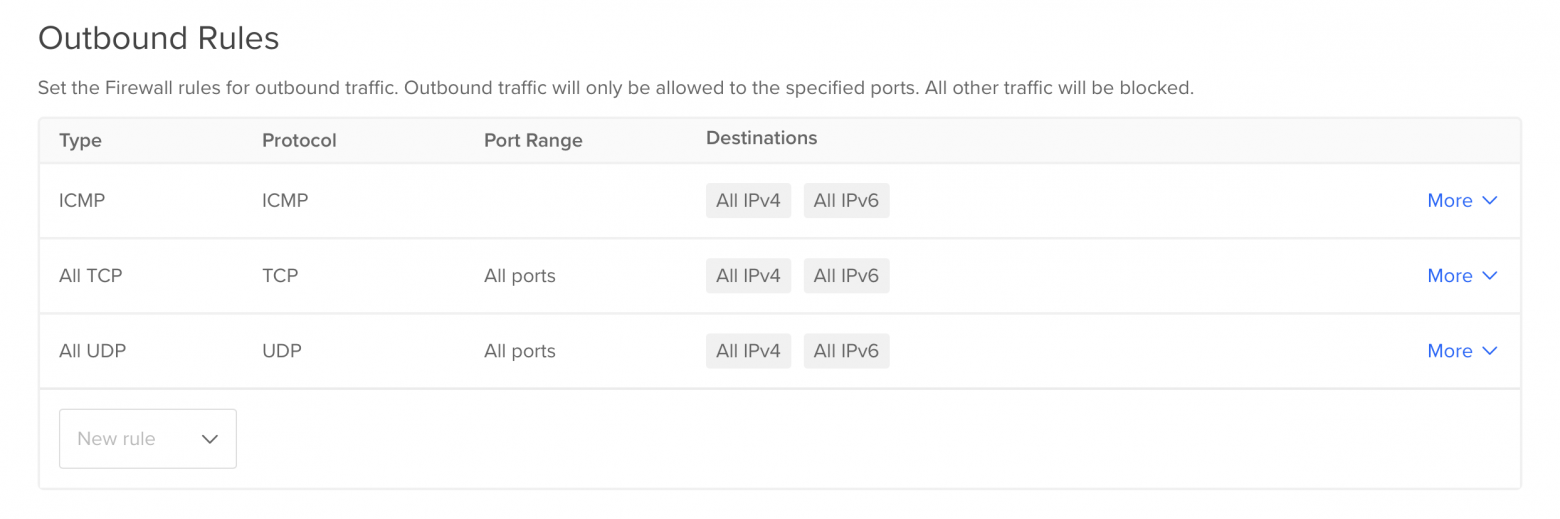
Which, however, only confused things even more. If they don't support it, how did the first packet get through? No answer. All I had left was a log proving it actually arrived.
The. Very. Last. Attempt.
If there's a cloud provider anywhere that supports non-standard IP protocols, it's AWS. I spun up two VMs, configured server and client. It works!
admin@ip-172-31-13-218:~/hdp$ sudo cargo run --bin server 255
| 255 | timestamp | 54.153.13.186 | 33 |
| 255 | timestamp | 54.153.13.186 | 34 |
| 255 | timestamp | 54.153.13.186 | 35 |
| 255 | timestamp | 54.153.13.186 | 36 |
Though the server was only two hops from the client, so there were no thrilling adventures across the entire internet.
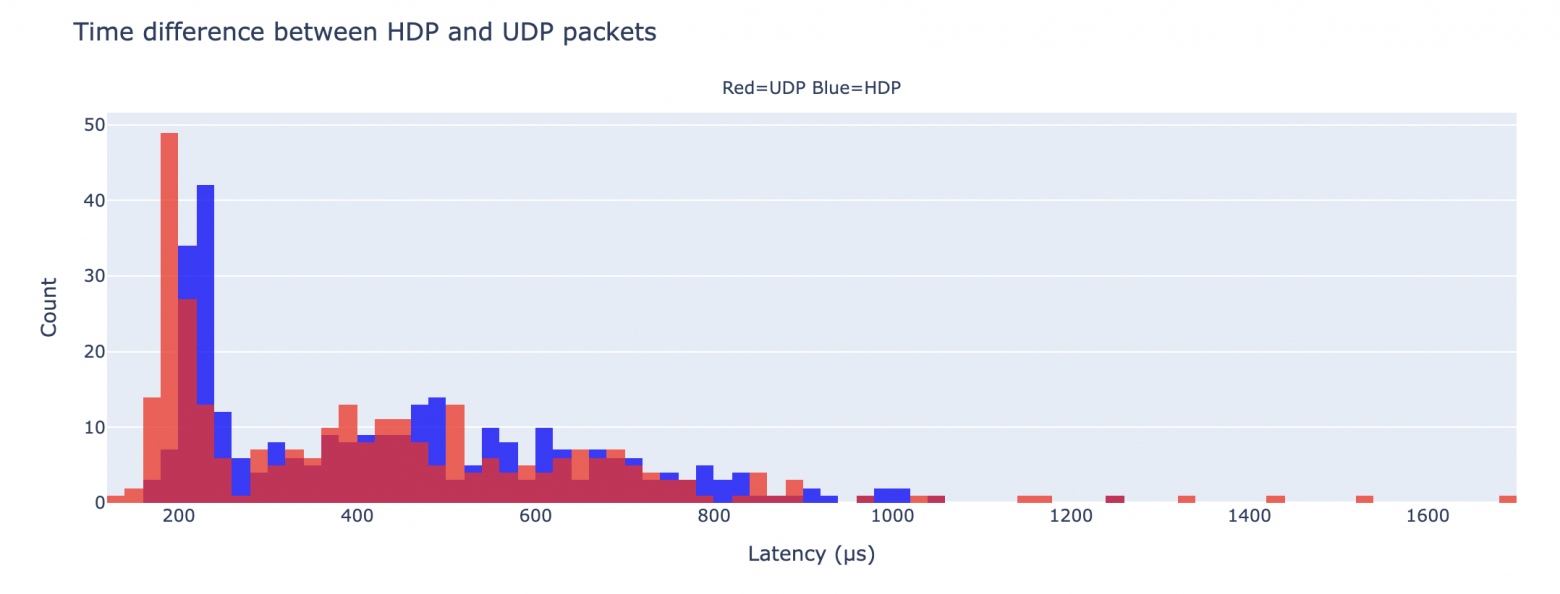
I measured the difference between HDP and UDP. There is a difference — but so tiny it's negligible: about 20 microseconds on average. No real benefit.
What about the internet?
I tried sending packets from my Mac to the AWS server — and got the same effect: the first packet arrives, and that's it. Only TCP, UDP, and ICMP work. Everything else — silence after the first request.
What I Understood
Theoretically — yes, you can use your own IP protocol. But if you're not a masochist — don't.
- The code will be tied to the OS. Cross-platform support is a separate circle of hell.
- NAT, firewalls, routers — everything will try to kill your packet. And in most cases — will succeed.
- Locally, it might work. On the internet — forget about it.
- And most importantly: zero latency gain from using a non-standard protocol.
TL;DR: Use UDP or TCP.
What About IPv6?
Several readers suggested trying my protocol over IPv6 — there's no NAT like in IPv4. Intriguing? You bet.
I added IPv6 support, connected to the same AWS server, and launched the client from my Mac, across oceans and continents. And — voila:
$ fortune | cowsay | sudo cargo run --bin client 200 '2600:1f1c:...' 255 hdp
| 255 | Yes | timestamp | 49 | - |
| 255 | Yes | timestamp | 50 | - |
| 255 | Yes | timestamp | 51 | - |
It appeared on the server too. It worked! This was a real roller coaster, and the ride was worth it.
Useful Links
- UDP protocol specification — so minimal it's actually funny.
- List of IP protocols assigned for testing.
- Protocols officially supported by IP.
- Article about differences in raw sockets between Linux and FreeBSD.
- Interesting answer on how to implement NAT for something other than TCP/UDP.



