We Launched Vector Search in YDB: Here's How It Works
Yandex's YDB database now supports three types of vector search — exact, approximate without index, and approximate with a scalable vector index — enabling RAG pipelines with billions of vectors across distributed clusters.
In the new version of YDB, two versions of vector search are available — exact and approximate. Approximate search can work with billions of vectors using a vector index. This technology is possessed by only a small number of technology companies worldwide.
The new release of Yandex's database makes vector search accessible to everyone. This article is based on a talk at the HighLoad++ conference, where the author presented on June 23 in St. Petersburg.
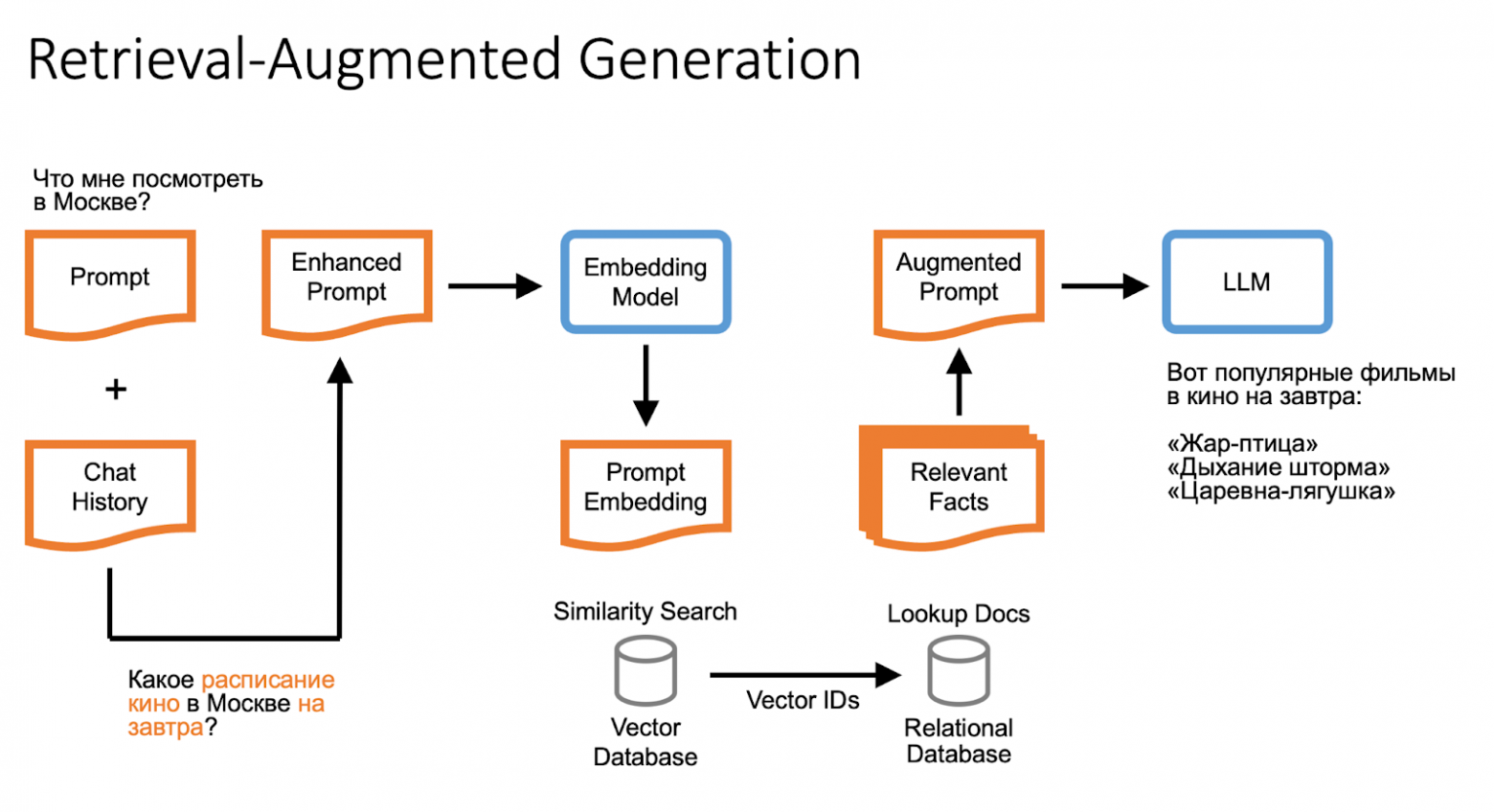
How Retrieval-Augmented Generation (RAG) Works
If a large language model wasn't trained on certain data, the missing information is searched for on the internet or in a database and added to the user's query. For example, when answering "Tell me about the movie schedule for tomorrow," the model can reference saved facts about the user and use internal knowledge bases.
A language model doesn't possess human understanding of the world, but the missing information can be found using embeddings and vector search, or search engine results.
Vectors and Vector Databases
Using a trained language model, any text can be turned into an array of numbers called a vector. If the model is well-trained and the texts have similar meanings, their vectors are located close to each other in multidimensional space.
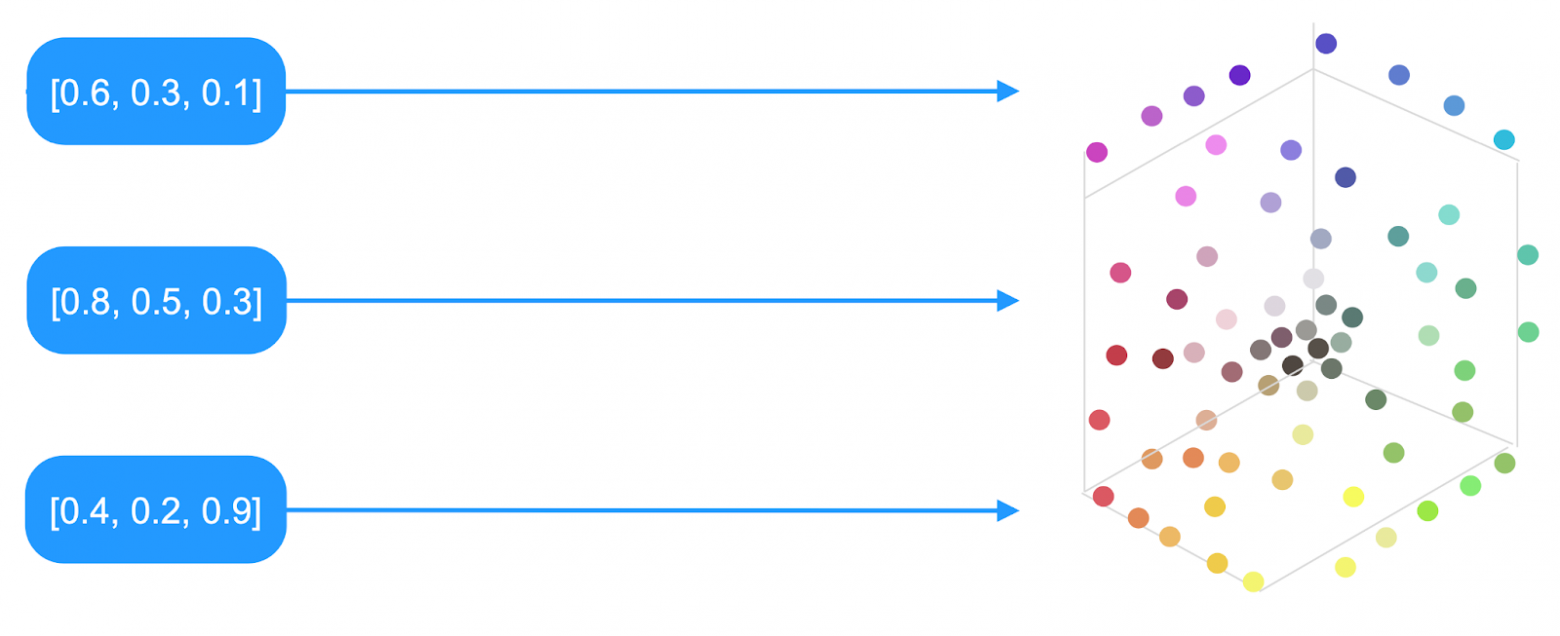
Using vectors in RAG consists of two parts: indexing and searching. First, data is split into chunks, then a vector is computed for each chunk and saved to a vector database along with references to the original text fragments.
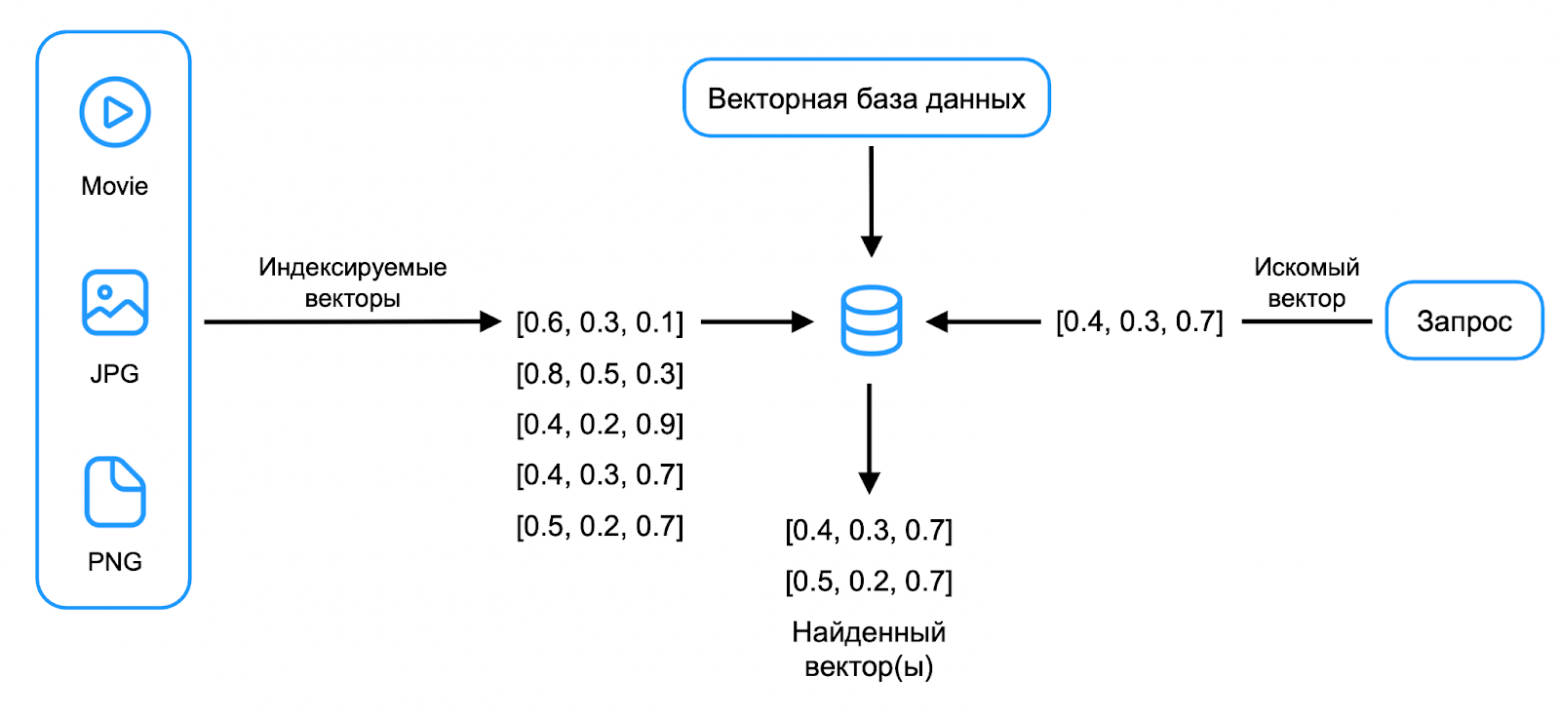
A vector database can store vectors and search for the nearest ones to a given query vector. In YDB 25.1, three vector search mechanisms are available: exact, approximate without an index, and approximate with an index.
Exact Vector Search in YDB
The simplest version is implemented using a YQL function to calculate the distance between two vectors. The example uses cosine distance, but other metrics can be applied as well.
CREATE TABLE facts (
  id Uint64,
  text String,
  user_id Uint64,
  vector Bytes,
  PRIMARY KEY (id)
)

SELECT id, text FROM facts
WHERE user_id = 1
ORDER BY Knn::CosineDistance(vector, $TargetVector)
LIMIT 10
Exact search has high computational complexity. During query execution, all vectors must be read, the cosine distance calculated for each, and results sorted.
Advantages of exact search:
- Built-in support for strict transactional consistency
- Instant insert/delete
- Support for the widest range of relational operations
This approach works well for searching through a specific user's history. With 1,000 vectors per user, the search takes 5 milliseconds. With 100,000 vectors, the time increases to 300 milliseconds.
Approximate Vector Search Without an Index
The process can be sped up by applying static quantization. Alongside the original vectors, versions with reduced precision are stored (8 bits or even 1 bit instead of 32 bits).
Approximate search without an index consists of two steps: a rough and fast search through bit vectors, then an exact search through full vectors for the found rows.
$BitIds = SELECT id
FROM bit_table
ORDER BY Knn::ManhattanDistance(bitEmbedding, $TargetBitEmbedding)
LIMIT 100

SELECT id, text, embedding
FROM float_table
WHERE id IN $BitIds
ORDER BY Knn::CosineDistance(floatEmbedding, $TargetFloatEmbedding)
LIMIT 10
This method speeds up search by tens of times without using indexes, but there remain areas requiring a full-fledged vector index for searching through enormous knowledge bases.
Vector Index for Approximate Search
When developing the vector index, the following requirements were formulated:
- Good scalability (supporting billions of vectors across thousands of servers)
- Consistent transactional insertion of new elements
The developed algorithm is similar to FAISS IVF and ScaNN. The index can be elastically distributed across many shards, enabling search in tens of milliseconds within a data center.
Using K-means, the vector space is divided into clusters, with a centroid and list of vectors stored for each:
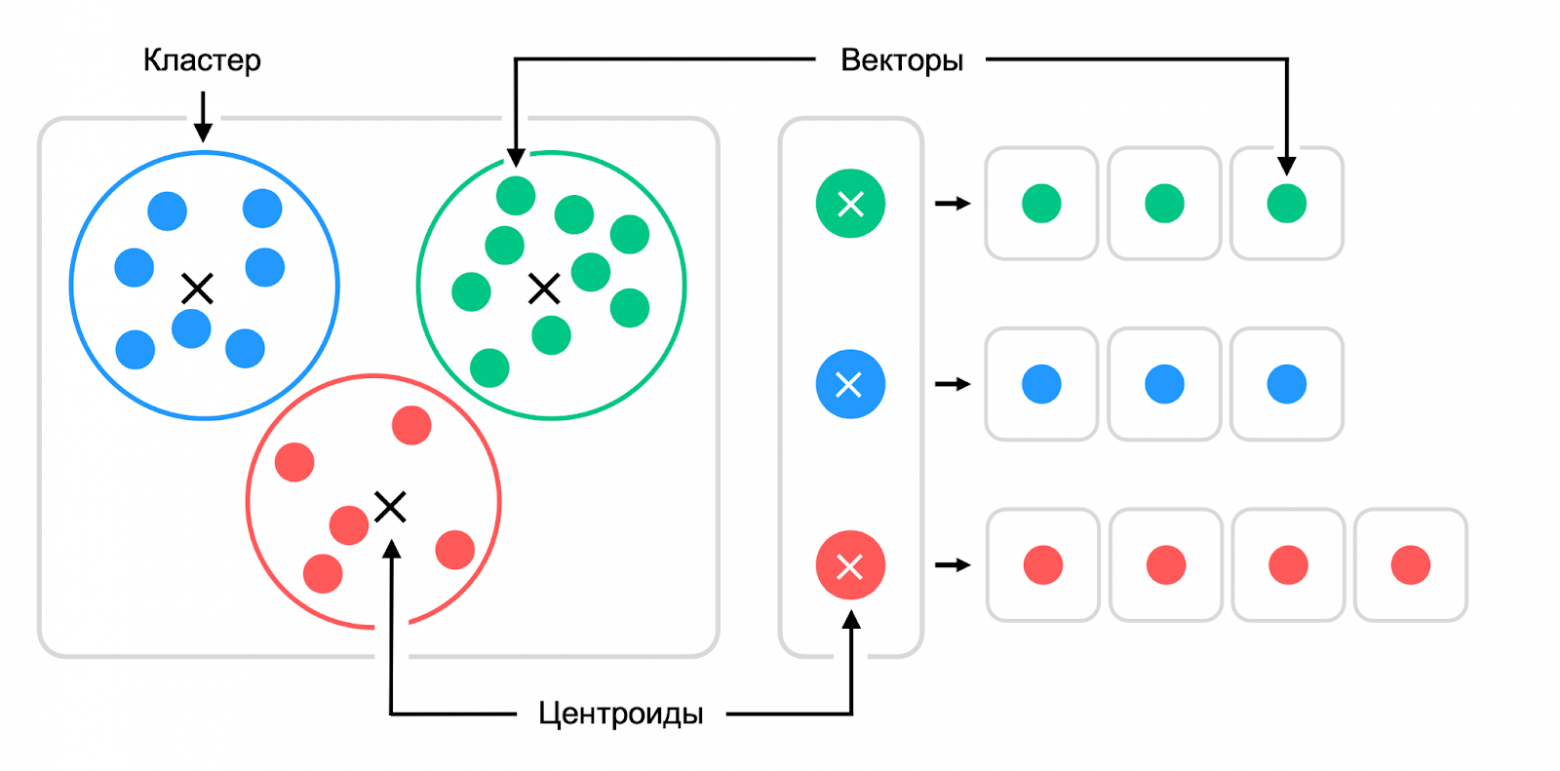
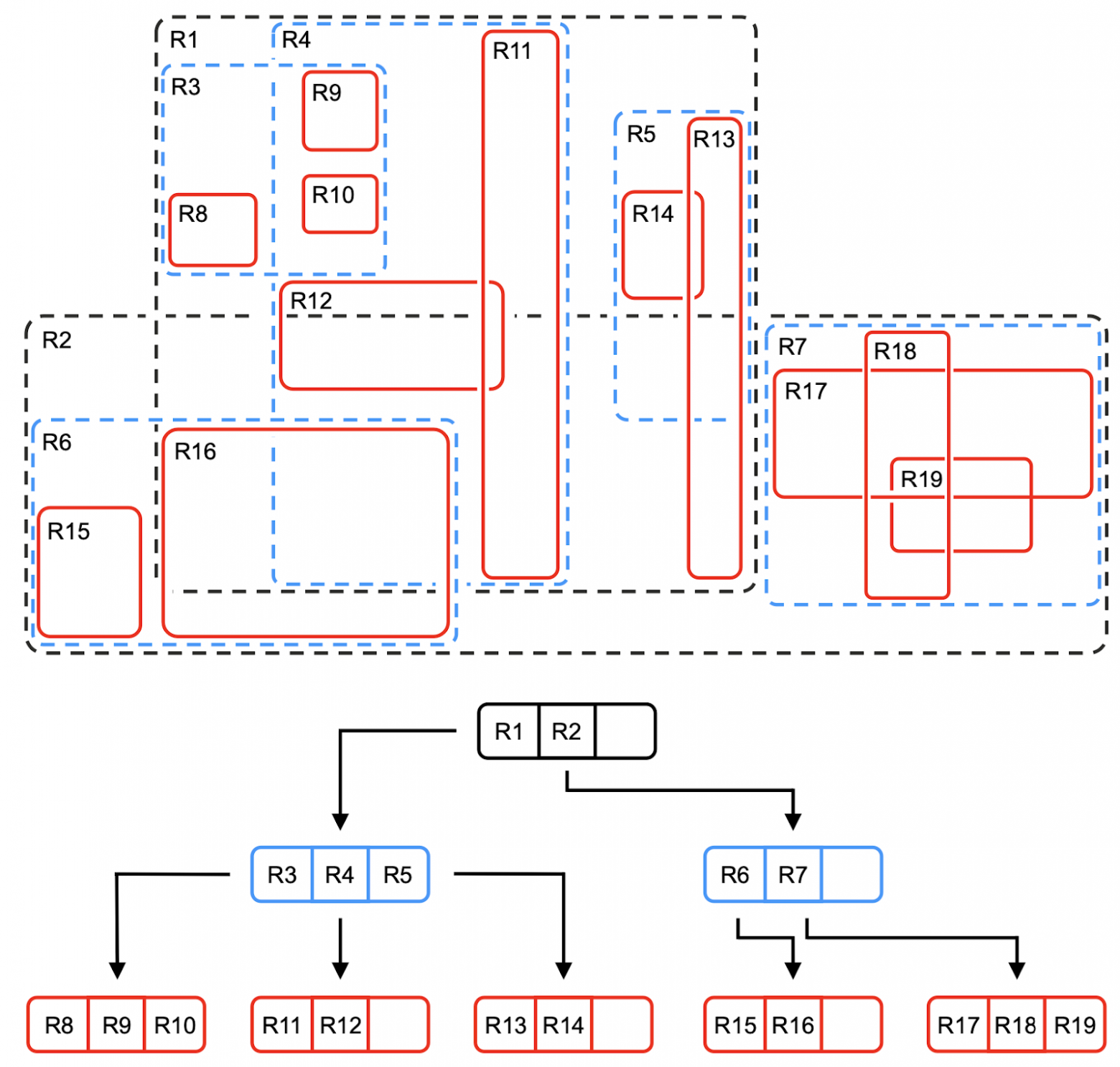
To find the right cluster among billions of vectors, a hierarchical algorithm similar to an R-tree is used. First, the appropriate top-level cluster is selected, then the second level — until the search reaches a cluster with a small number of vectors (for example, 100):
The index is implemented as two hidden YDB tables:
- Level Table — stores the centroid hierarchy for fast cluster search, organized in a tree structure
- Posting Table — stores information about vectors in each lowest-level cluster
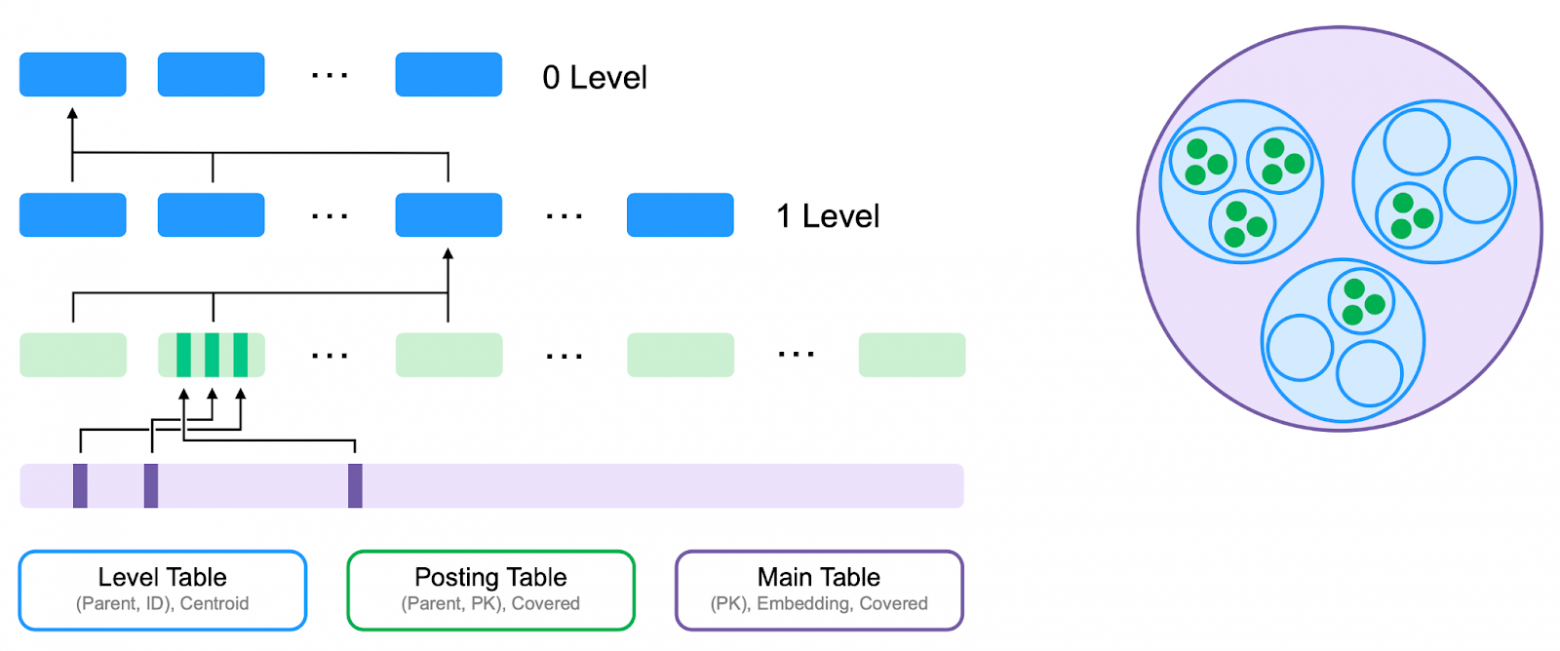
Tables in YDB are automatically distributed across servers, creating a global elastic index.
Adding a vector index:
ALTER TABLE facts
  ADD INDEX idx_vector
  GLOBAL USING vector_kmeans_tree
  ON (vector)
  WITH (
    distance=cosine,
    vector_type="float",
    vector_dimension=512,
    levels=2,
    clusters=128)
Using the index:
SELECT * FROM facts
VIEW idx_vector
ORDER BY Knn::CosineDistance(embedding, $Target)
LIMIT $k
Filtered Vector Index
Often, search is performed on elements satisfying additional conditions (for example, only within a specific user's message history). Filtering needs to happen inside the index, not before or after the search.
SELECT * FROM facts VIEW idx_vector
  WHERE user_id = $TargetUserId
  ORDER BY Knn::CosineDistance(embedding, $TargetEmbedding)
  LIMIT $k
The optimal solution was to build a separate vector index for each key in the leaves of a classic index:
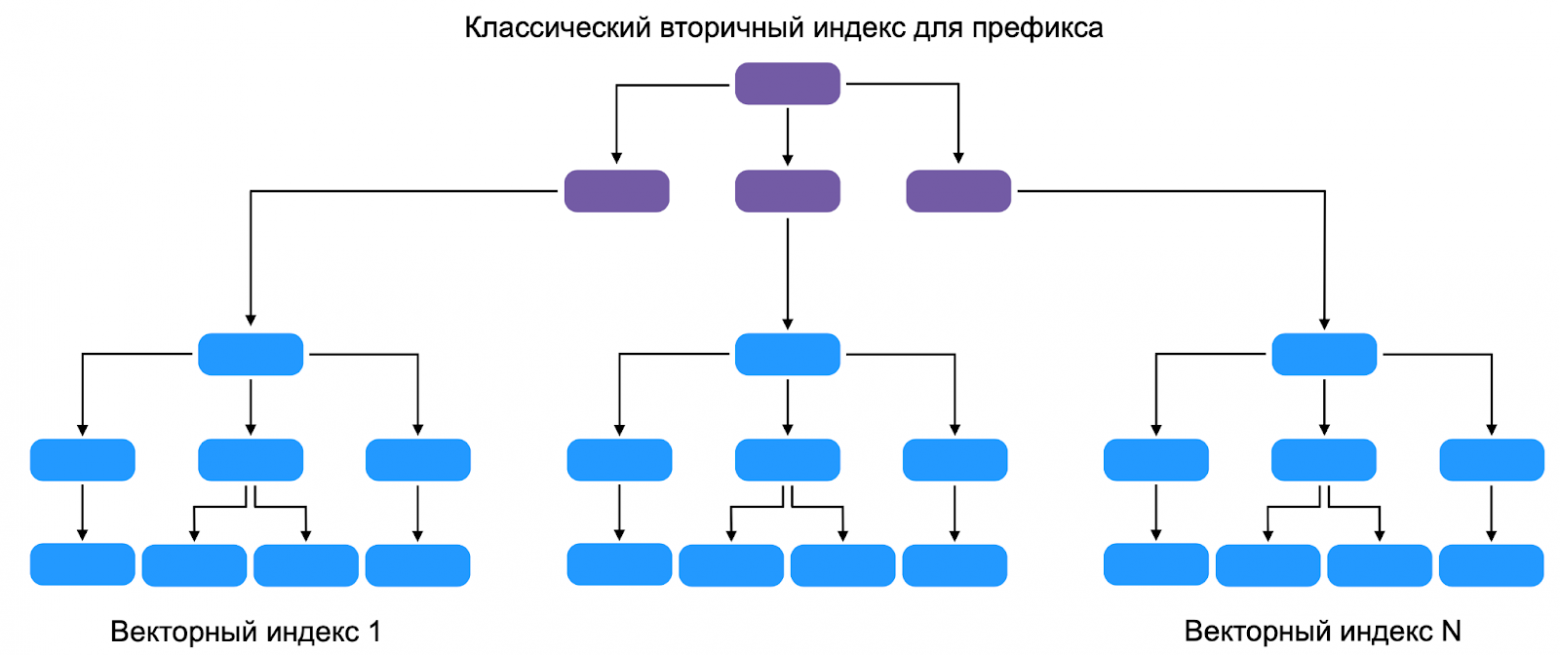
This adds a third index table — the Prefix Table. YDB finds all trees in the Level Table containing data with the specified value, then uses the algorithm to find the nearest vectors.
The team is working on adding vectors to the index: the added vector descends through the cluster tree, shifting their centroids, then is written to the Posting Table. This will allow the index to be automatically recalculated in constant time during insertions and deletions.
How YDB Vector Search Is Used in Alice
For the AI assistant Alice team, ACID guarantees when writing to multiple tables, the ability to perform JOINs, and elastic scalability are critical. The current implementation uses exact vector search: the database holds several thousand vectors per user, with search times in the tens of milliseconds. Volumes are growing, so the team is preparing to switch to the vector index.
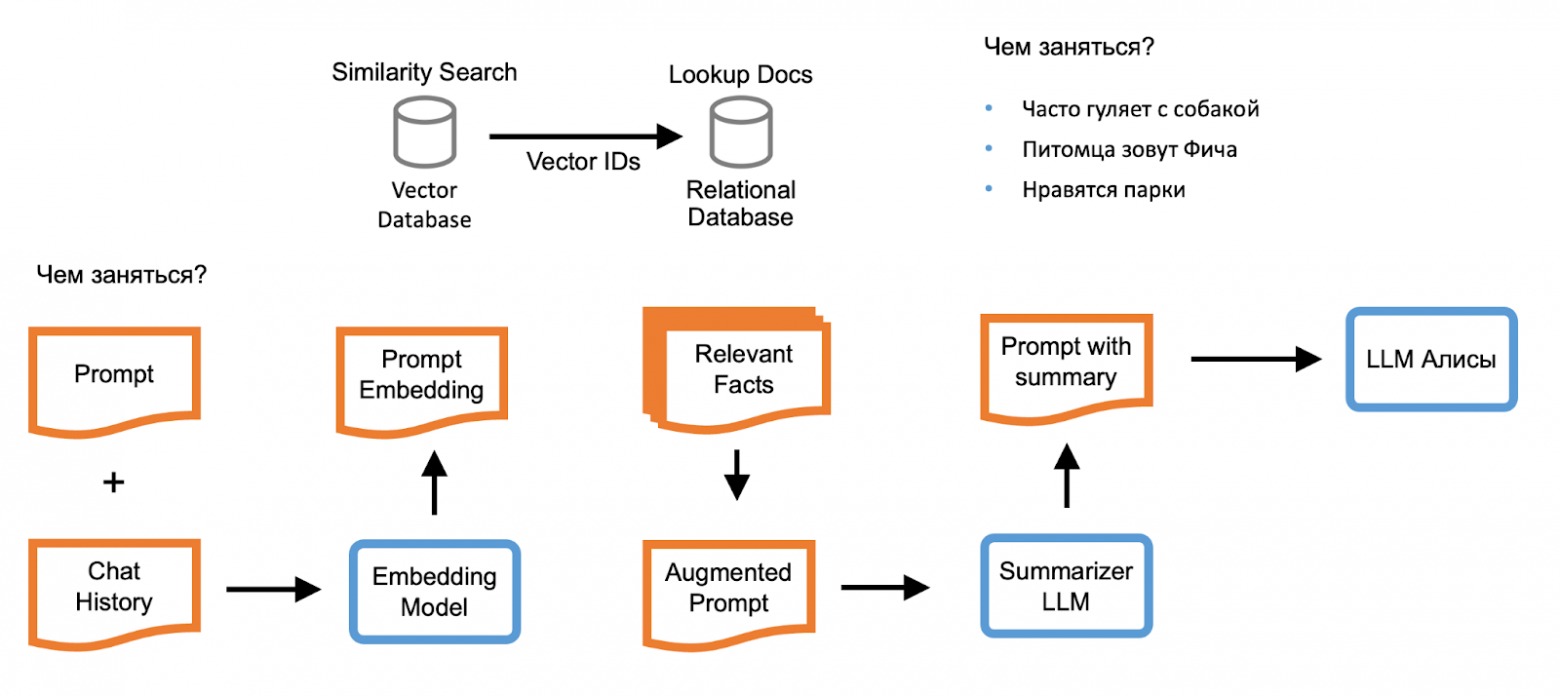
When the "Personalized Communication" option is enabled, Alice's backend computes phrase vectors accounting for context. During a query, several matching sessions are found and passed to the fact summarizer — a model trained to formulate key facts from phrases.
Facts are added to the query and passed to the final summarizer — Alice's main neural network. The response is delivered to the user as a stream of tokens, then placed into the personalization database for use in future responses.
Vector search is also used for "conversation starters" — when a conversation hits a dead end, Alice finds a topic that interests the user from a pre-known list, creating the feeling of natural communication.
Which Vector Search to Choose for Your Project
YDB offers three vector search mechanisms:
- Exact vector search — for searches limited to tens of thousands of elements. Simply add a column for vectors and use the distance function. Available in all YDB clusters and works in production.
- Approximate vector search without an index — increases speed by an order of magnitude with a few lines of YQL query, without using indexes. Available in all clusters.
- Vector index for approximate search — requires additional data structures and temporarily won't allow data updates, but provides search in tens of milliseconds for any number of elements.
YDB is available as an open-source project and as a commercial build with an open core. You can run it on your own servers or use the managed solution in Yandex Cloud.
FAQ
What is this article about in one sentence?
This article explains the core idea in practical terms and focuses on what you can apply in real work.
Who is this article for?
It is written for engineers, technical leaders, and curious readers who want a clear, implementation-focused explanation.
What should I read next?
Use the related articles below to continue with closely connected topics and concrete examples.





