Setting up alerts from Zabbix to Telegram
Dear friends, today we will tackle such a non-trivial task as alerting. Namely, we will force zabbix to send us messages to a telegram bot in case of failures and errors noticed on our servers. Zabbix version 7.0 has a built-in mechanism for sending messages to Telegram, but it i
Editor's Context
This article is an English adaptation with additional editorial framing for an international audience.
- Terminology and structure were localized for clarity.
- Examples were rewritten for practical readability.
- Technical claims were preserved with source attribution.
Source: original publication
Dear friends, today we will tackle such a non-trivial task as alerting. Namely, we will force zabbix to send us messages to a telegram bot in case of failures and errors noticed on our servers.
Zabbix version 7.0 has a built-in mechanism for sending messages to Telegram, but it is not finalized - there is no option for sending charts. This, by the way, is very much requested to be added ZBXNEXT-5611.
Fortunately, I found a library that will allow us to achieve what we want. True, it is designed for zabbix versions 2, 3 and 4, but I think we can make it work with zabbix 7.0.
My setup is very simple. These are 2 virtual machines. One is designed for a zabbix server, and the second is a client on which zabbix-agent runs. Both machines are connected to bridge with my Wi-Fi adapter. This means that I can reach them over the network from my work PC.
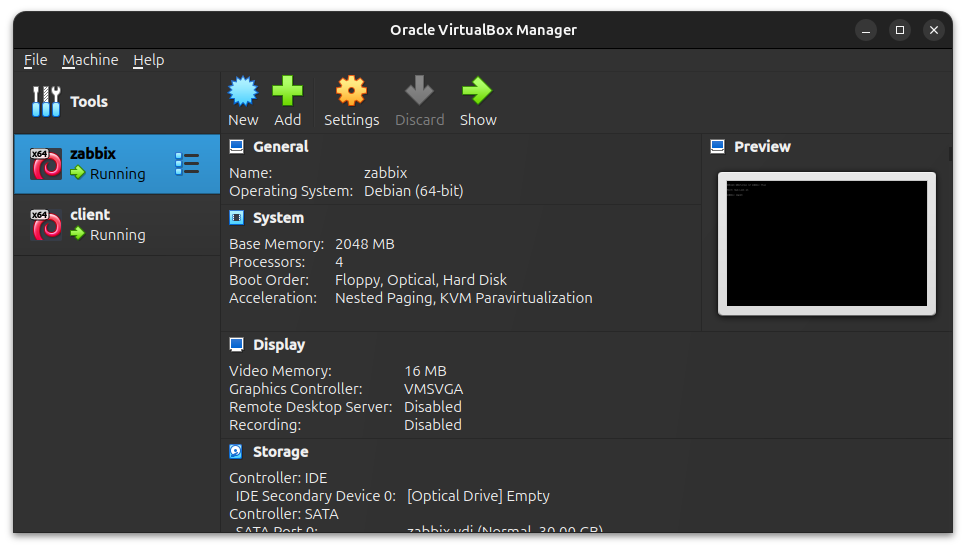
I will not describe the process of raising the zabbix server, as well as connecting the client. Many people are familiar with Zabbix, and there is enough official documentation for this.
❯ Creating a bot
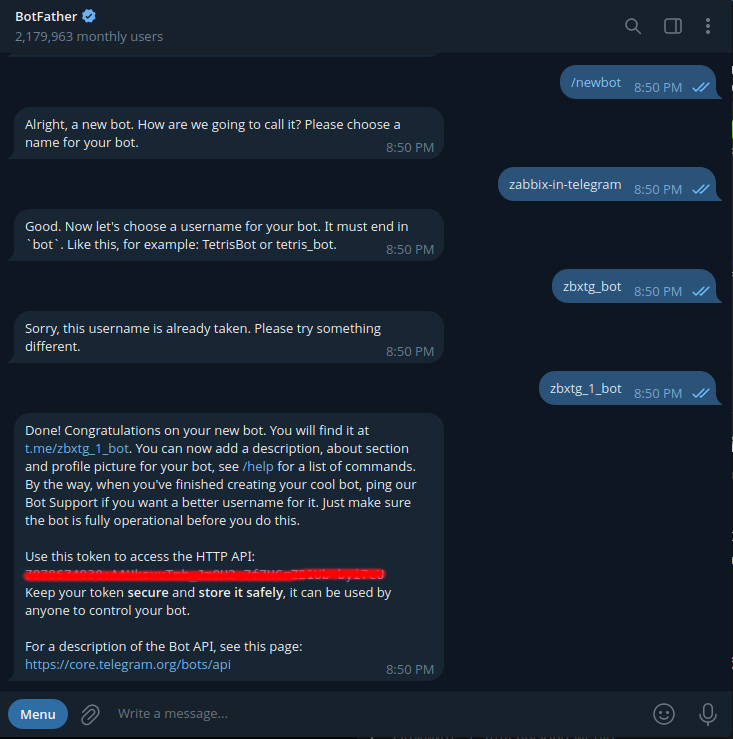
The first thing we need to do is create a bot via BotFather. The main thing we need here is to get an API token from it.
❯ Setting up the script
Now, we need to clone the scripts into the zabbixa workspace. This is a folder /usr/lib/zabbix/alertscripts. It is very important that the script just sits in this folder. There should be no subfolders.
root@zabbix:/usr/lib/zabbix/alertscripts# git clone https://github.com/ableev/Zabbix-in-Telegram.git .
Cloning into '.'...
remote: Enumerating objects: 536, done.
remote: Counting objects: 100% (6/6), done.
remote: Compressing objects: 100% (5/5), done.
remote: Total 536 (delta 1), reused 4 (delta 1), pack-reused 530 (from 1)
Receiving objects: 100% (536/536), 186.68 KiB | 2.46 MiB/s, done.
Resolving deltas: 100% (305/305), done.
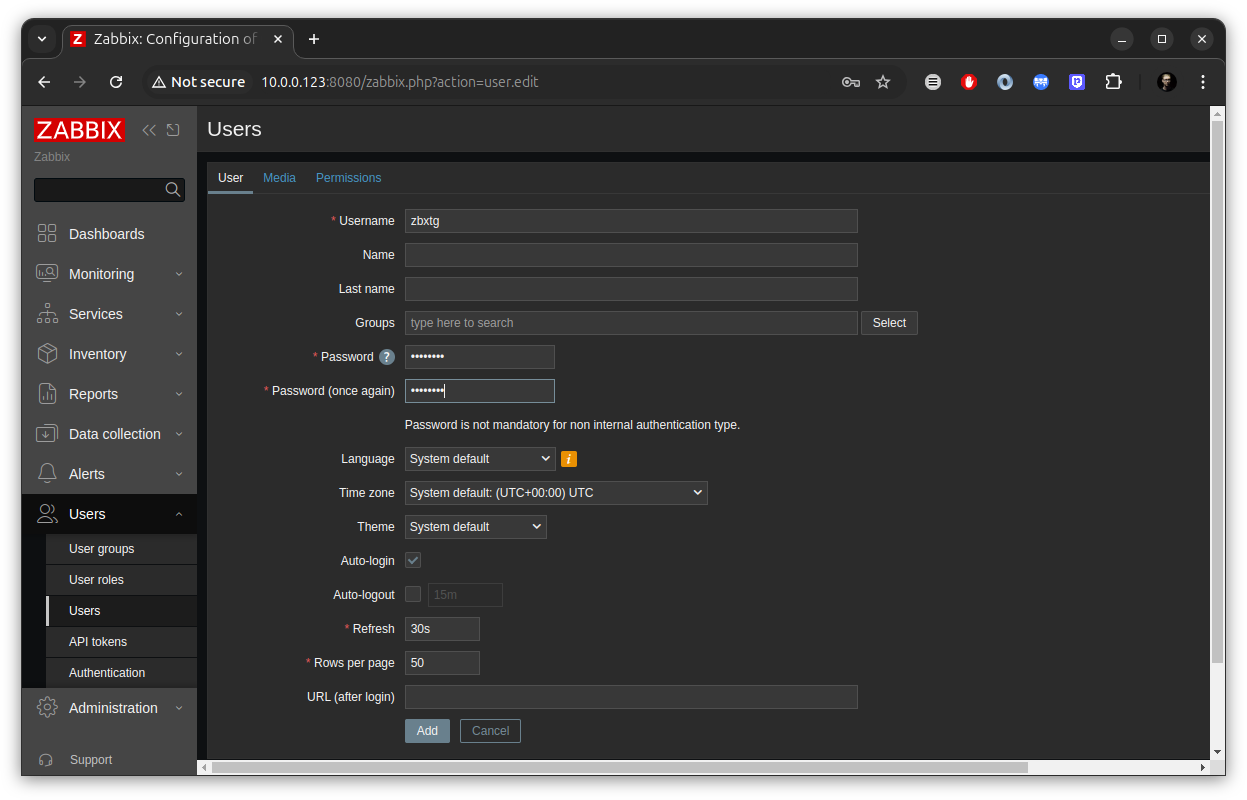
First, on the zabbix side, we need to create a user for the script. This is done so that he can go into Zabbix and tighten the schedule. Also, it is very important to give this user admin rights through the tab Permissions. Let's go to Users->Users and click Create user.
Next we are interested in the script configuration file. It is presented as zbxtg_settings.example.py. Make a copy and edit:
root@zabbix:/usr/lib/zabbix/alertscripts# cp zbxtg_settings.example.py zbxtg_settings.py
# -*- coding: utf-8 -*-

tg_key = ""  # telegram bot api key

zbx_tg_prefix = "zbxtg"  # variable for separating text from script info
zbx_tg_tmp_dir = "/var/tmp/" + zbx_tg_prefix  # directory for saving caches, uids, cookies, etc.
zbx_tg_signature = False

zbx_tg_update_messages = True
zbx_tg_matches = {
    "problem": "PROBLEM: ",
    "ok": "OK: "
}

zbx_server = "http://10.0.0.123:8080"  # zabbix server full url
zbx_api_user = "zbxtg"
zbx_api_pass = "yuJ0aith"
zbx_api_verify = True  # True - do not ignore self signed certificates, False - ignore

#zbx_server_version = 2  # for Zabbix 2.x version
zbx_server_version = 7  # for Zabbix 3.x version, by default, not everyone updated to 4.x yet
#zbx_server_version = 4  # for Zabbix 4.x version, default will be changed in the future with this

zbx_basic_auth = False
zbx_basic_auth_user = "zabbix"
zbx_basic_auth_pass = "zabbix"

proxy_to_zbx = None
proxy_to_tg = None

# proxy_to_zbx = "http://proxy.local:3128"
# proxy_to_tg = "https://proxy.local:3128"

# proxy_to_tg = "socks5://user1:password2@hostname:port" # socks5 with username and password
# proxy_to_tg = "socks5://hostname:port" # socks5 without username and password
# proxy_to_tg = "socks5h://hostname:port" # hostname resolution on SOCKS proxy.
                                          # This helps when internet provider alter DNS queries.
                                          # Found here: https://stackoverflow.com/a/43266186/957508

google_maps_api_key = None  # get your key, see https://developers.google.com/maps/documentation/geocoding/intro

zbx_tg_daemon_enabled = False
zbx_tg_daemon_enabled_ids = [6931850, ]
zbx_tg_daemon_enabled_users = ["ableev", ]
zbx_tg_daemon_enabled_chats = ["Zabbix in Telegram Script", ]

zbx_db_host = "localhost"
zbx_db_database = "zabbix"
zbx_db_user = "zabbix"
zbx_db_password = ""

emoji_map = {
    "Disaster": "🔥",
    "High": "🛑",
    "Average": "❗",
    "Warning": "⚠️",
    "Information": "ℹ️",
    "Not classified": "🔘",
    "OK": "✅",
    "PROBLEM": "❗",
    "info": "ℹ️",
    "WARNING": "⚠️",
    "DISASTER": "❌",
    "bomb": "💣",
    "fire": "🔥",
    "hankey": "💩",
}
In the configuration file we are interested in only a few parameters.
tg_key— here we write our API token from BotFather.zbx_server— here we indicate the address of zabbix UI.zbx_api_user— this is the user under which the script will log into zabbix.zbx_api_pass- his password.zbx_server_version— I don’t quite understand why this parameter is needed, but just in case we’ll set it to 7.
Also, there is a pack of parameters zbx_db. We fill them with connection settings to the zabbixa database.
❯ Setting up zabbix
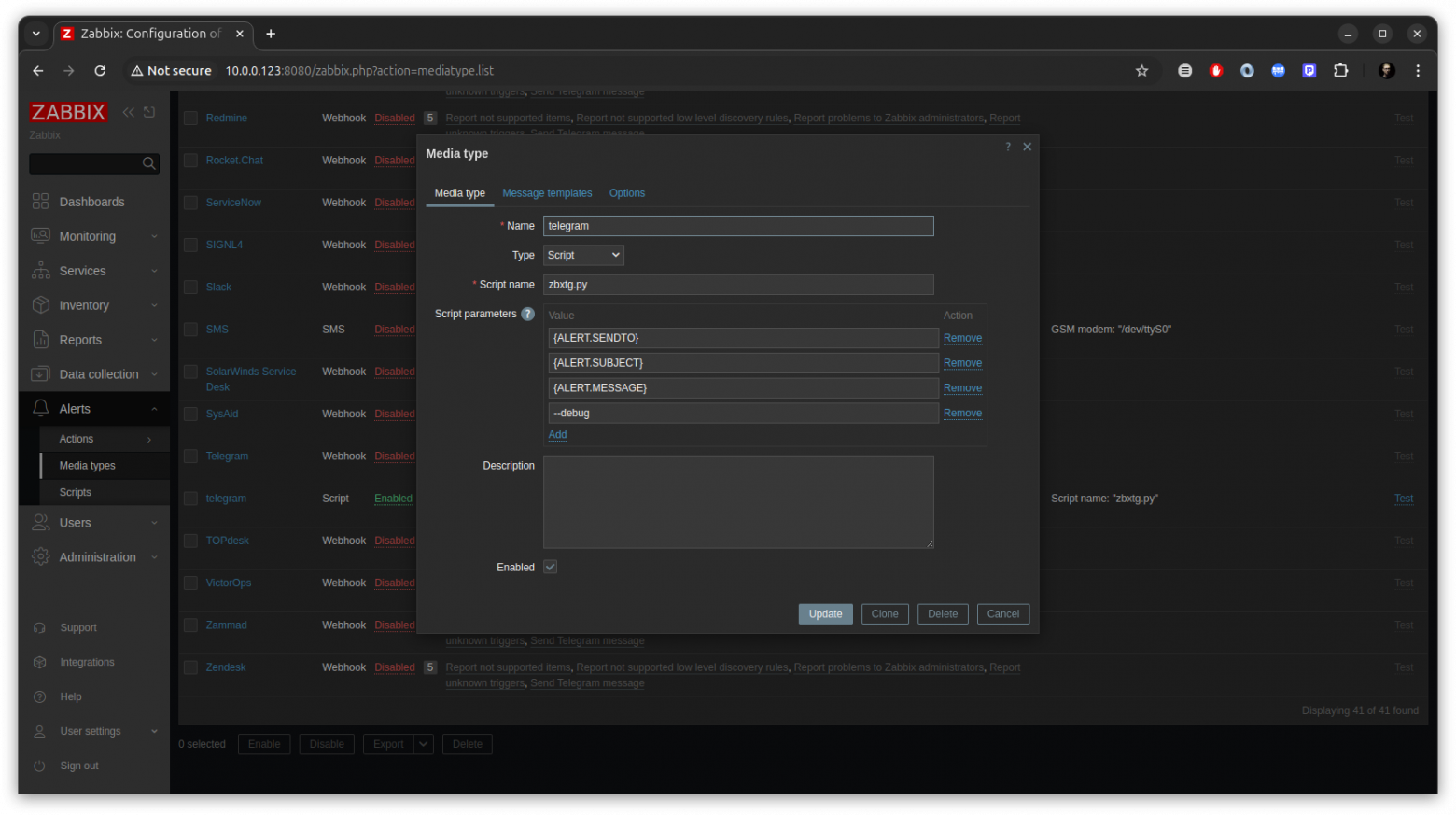
We're done with the script, now let's move on to setting up zabbixa itself. We are only interested in a few places. First is the setup Media types. Let's go to Alerts->Media types. Here we see a simply incredible number of integrations (including Telegram). Those who made zabbix are very well done :)
Our Media type should look like this. Here we are telling zabbix which script to execute and what parameters we need to pass to it. Last parameter --debug made so that the script reports on the work done. This is very useful if you run the script from the console. In a production setup, this should probably be removed.
zbxtg.py
{ALERT.SENDTO}
{ALERT.SUBJECT}
{ALERT.MESSAGE}
Next, let's go to Alerts->Actions->Trigger actions and create an action here. In addition to the name, go to the tab Operations and press the button Add opposite the parameter Operations.
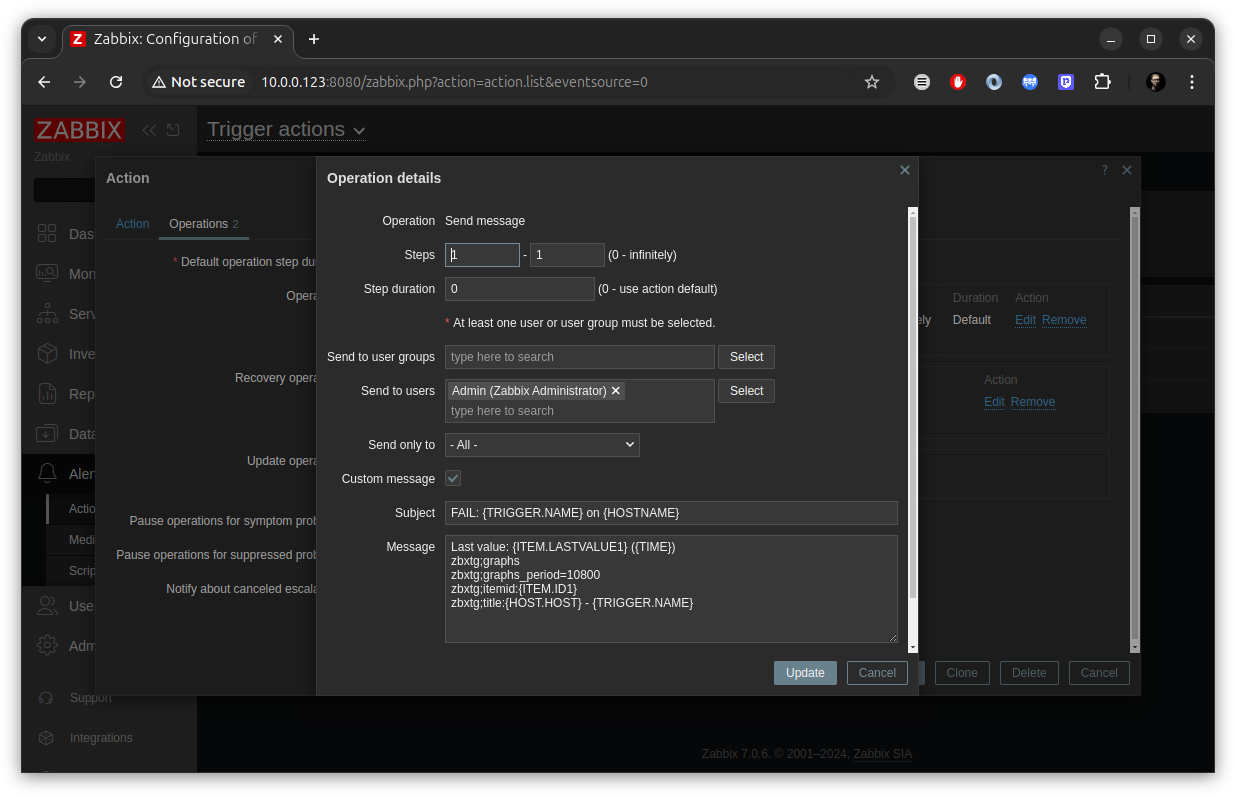
Here we define the message that zabbix will send as a parameter to the script. In the field Send to users I added my current zabbix user. Our Subject, for example, might look like this: FAIL: {TRIGGER.NAME} on {HOSTNAME}. Parameter zbxtg;graphs tells our script to go into zabbix and pull up the chart. For clarity, I will duplicate the Message in a separate field.
Last value: {ITEM.LASTVALUE1} ({TIME})
zbxtg;graphs
zbxtg;graphs_period=10800
zbxtg;itemid:{ITEM.ID1}
zbxtg;title:{HOST.HOST} - {TRIGGER.NAME}
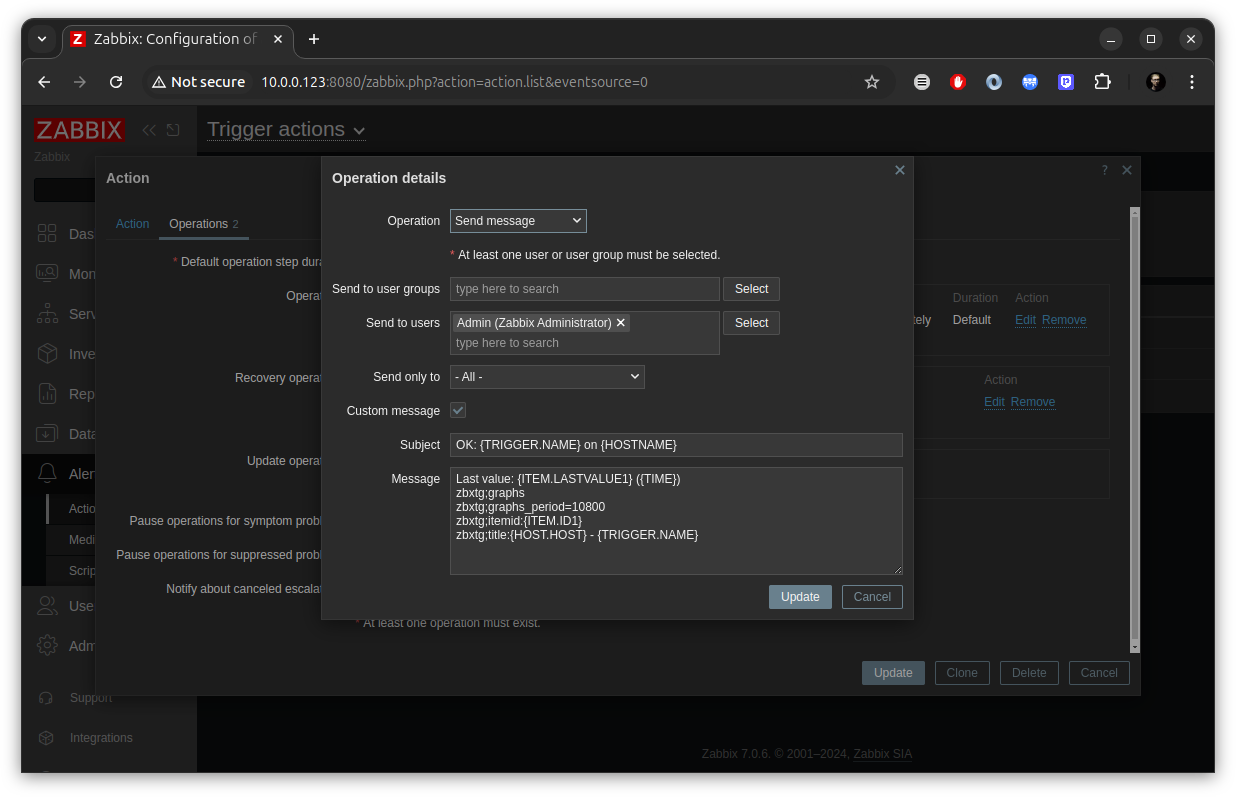
In addition to the alert itself, zabbixe provides a reaction to the exhaustion of the incident. This requires a separate operation. It will differ only in the parameter Subject. Adding a field to a parameter Recovery operations. Don't forget about the parameter Send to users — here we put your current zabbix user.
And the last thing you need to configure is Media type for the user. Let's go to Users->Users, select our zabbix user, go to the tab Media and add the parameter.
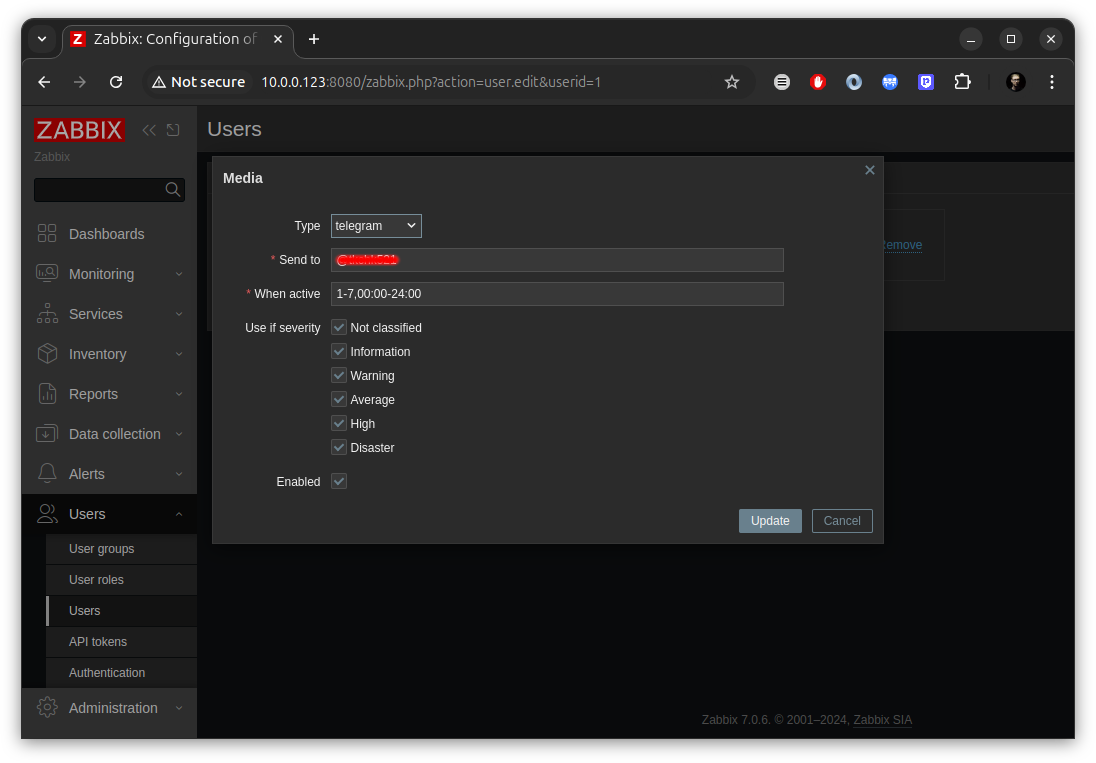
Type will be automatically filled with our Media type. But in the field Send to we need to indicate our telegram login with a dog. By the way, in Telegram you will need to first send something to the bot, otherwise the script will not be able to send you messages. This is done to protect against spam.
❯ Testing
For tests, I chose the default CPU utilization metric. We go to the client and load the system through a stress test.
root@client:/home/tkchk# stress --cpu 4
stress: info: [3242] dispatching hogs: 4 cpu, 0 io, 0 vm, 0 hdd
As a result, we will get something like this:
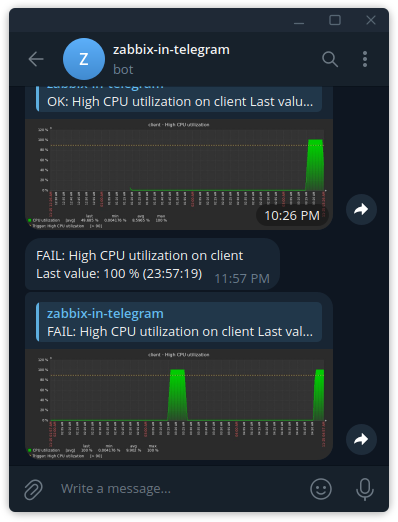
And, dear friends, that's all. We have successfully set up alerting. I’m only interested in one thing: did you like this publication? Don't be shy, like and comment. And I'll wrap it up here. See you!
News, product reviews and competitions from the Timeweb.Cloud team — in our Telegram channel ↩

Also read my series of articles about disk hacking from Red Balloon Security. Part 0x00
Why This Matters In Practice
Beyond the original publication, Setting up alerts from Zabbix to Telegram matters because teams need reusable decision patterns, not one-off anecdotes. Dear friends, today we will tackle such a non-trivial task as alerting. Namely, we will force zabbix to send us messages to a telegram bot i...
Operational Takeaways
- Separate core principles from context-specific details before implementation.
- Define measurable success criteria before adopting the approach.
- Validate assumptions on a small scope, then scale based on evidence.
Quick Applicability Checklist
- Can this be reproduced with your current team and constraints?
- Do you have observable signals to confirm improvement?
- What trade-off (speed, cost, complexity, risk) are you accepting?
FAQ
What is this article about in one sentence?
This article explains the core idea in practical terms and focuses on what you can apply in real work.
Who is this article for?
It is written for engineers, technical leaders, and curious readers who want a clear, implementation-focused explanation.
What should I read next?
Use the related articles below to continue with closely connected topics and concrete examples.





