It's complicated about simple things. The most popular tunneling protocols, dynamic routing and principles of their operation. Part 2
Greetings, colleagues! My name is @ProstoKirReal . Today I would like to continue the discussion with you about the most popular protocols, as well as the principles of their operation. In the previous part I talked about the protocols ARP, ICMP, IGMP, TCP, UDP, SCTP, DNS and DHC
Editor's Context
This article is an English adaptation with additional editorial framing for an international audience.
- Terminology and structure were localized for clarity.
- Examples were rewritten for practical readability.
- Technical claims were preserved with source attribution.
Source: original publication
Greetings, colleagues! My name is @ProstoKirReal. Today I would like to continue the discussion with you about the most popular protocols, as well as the principles of their operation. In the previous part I talked about the protocols ARP, ICMP, IGMP, TCP, UDP, SCTP, DNS and DHCP. Today I would like to talk about the tunneling protocols GRE, IPsec, L2TP, L2VPN, L3VPN, MPLS and dynamic routing OSPF, BGP.
❯ Tunneling protocols
Tunneling protocol is a set of rules and technologies that ensure data is encapsulated, transported securely or compliantly, and then unpacked at the receiving end. Importantly, such protocols allow data to be transmitted over networks that would otherwise be unable to handle the original traffic.
❯ How do most tunneling protocols work?
Tunneling protocols allow data from one network protocol to be transferred within another. This is achieved by encapsulating the original protocol's packets into another protocol to transport data over a disparate or insecure network (such as the Internet). Let's look at how tunneling protocols work, their types and examples.
❯ The basic principle of tunneling
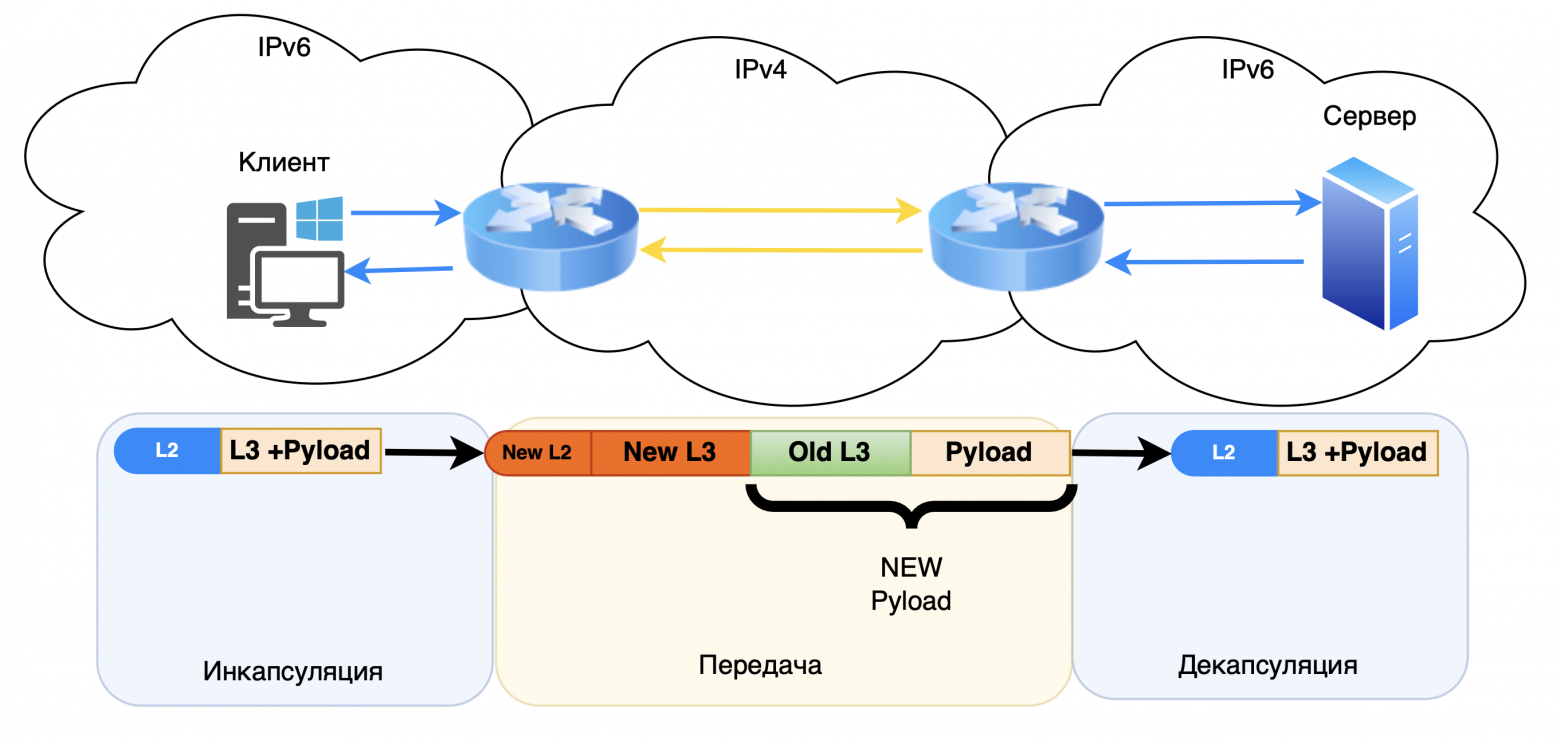
Tunneling uses encapsulation, the process of packaging packets from one protocol into a header of another protocol. Main stages:
Encapsulation. The original packet (for example, IPv4 or IPv6) is wrapped in a new header appropriate to the transport protocol;
Broadcast. The packaged packet is sent over a network that does not support the original protocol;
Decapsulation. At the end node, the packet is unpacked and the data is transferred to the original protocol.
Example:
An IPv6 packet can be encapsulated in IPv4 for transmission over a network where IPv6 is not yet supported.

❯ Main types of tunneling
There are two types of tunneling:
1. Transparent tunneling (Encapsulation without change):
Packets are transmitted without changes in content;
Example: Tunneling IPv6 over IPv4 using the 6to4.
2. Encapsulation with transformation:
May include packet conversion or encryption;
Example: VPN, where packets are encrypted for security.
❯ Basic tunneling protocols
❯ GRE
GRE (Generic Routing Encapsulation) is an encapsulation protocol that is widely used both independently and in conjunction with IPsec to create tunnels.
A GRE tunnel is a point-to-point connection and can be considered a type of VPN tunnel without encryption. The main advantage of GRE is its ability to transmit broadcast traffic, which allows routing protocols to be used through such a tunnel.
Unlike GRE, IPsec provides IP-level security for network traffic, but does not natively support broadcast traffic or routing protocols. Therefore, GRE is often used in conjunction with IPsec: GRE provides interoperability among routing protocols, while IPsec adds encryption and security.
The reasons for organizing a GRE tunnel can be different:
The need to forward your network through someone else's IP space;
Use routing protocols such as OSPF, RIPv2 and EIGRP in conjunction with IPsec to provide both security and routing.
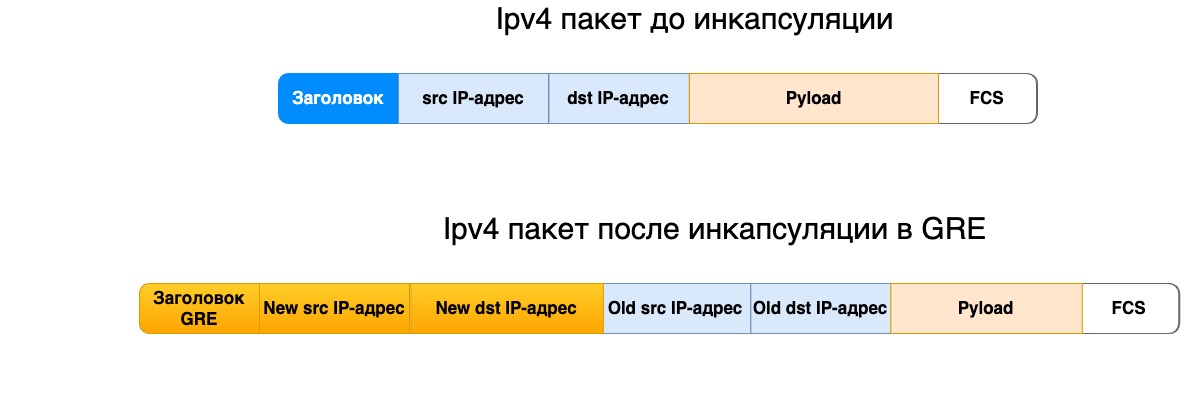
I talked about GRE headers in more detail in this article.
❯ IPsec
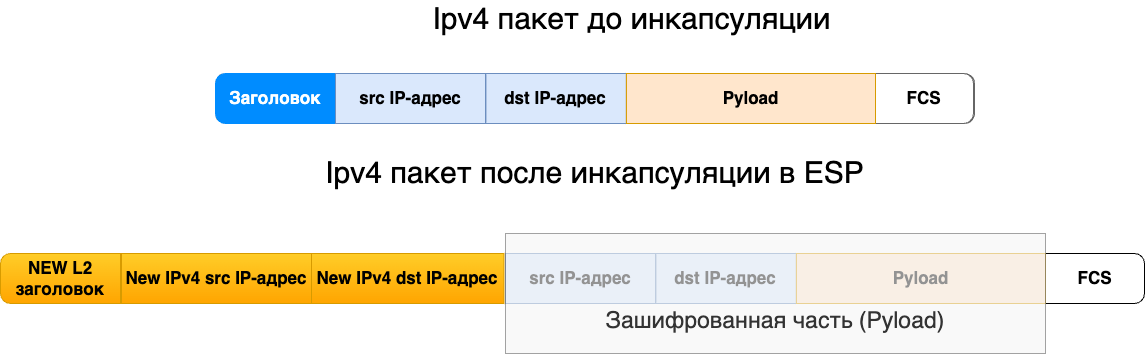
IPsec (Internet Protocol Security) is a set of protocols that provide secure data transmission over IP networks through encryption, authentication and integrity protection. IPsec is used to build VPN (Virtual Private Networks) and provides protection at the IP network protocol level. Its use helps prevent interception, tampering or modification of data during transmission.
Basic IPsec features:
Authentication. Ensures that the data is sent from an authorized source;
Encryption. Ensures data confidentiality;
Data integrity. Prevents data from being modified during transmission;
Replay Attack Protection. Detects and prevents attackers from resending packets.
IPsec Components
1. Authentication and encryption protocols:
AH (Authentication Header). Provides sender authentication and integrity protection, but does not encrypt data;
ESP (Encapsulating Security Payload). Provides both authentication and encryption. ESP is a more popular choice because it provides privacy in addition to authentication.
2. IPsec operating modes
Transport mode:
Only the payload (data) of the packet is protected;
The IP header is left open, allowing the packet to be routed;
Used, for example, to protect data between nodes (hosts) or host and server.
Tunnel mode:
Entire IP packet (including the header) is encapsulated in a new IP packet with a new header;
Used in construction VPN between networks or between a node and a gateway.
Stages of establishing an IPsec connection
Authentication and Key Exchange:
Used by IKE to negotiate encryption and authentication parameters;
Security Associations (SA) are installed.
Encryption and data transfer:
Data is encapsulated using ESP or AH;
Packets are transmitted between nodes over an IP network.
3. Ending a session:
Once the data transfer is complete, the SAs are broken and the keys are destroyed.
IPsec Application Scenarios
VPN connection between offices:
Two routers create an IPsec tunnel in tunnel mode;
Traffic between branches is encrypted and transmitted over the Internet.
Remote Access VPN:
The user connects to the corporate network via IPsec VPN;
All data is transmitted through a secure tunnel.
Securing Routed Traffic:
IPsec protects traffic between routers to prevent route spoofing or data integrity attacks.
Advantages and Disadvantages of IPsec
Advantages:
High security thanks to encryption and authentication;
Flexibility. Can operate in both transport and tunnel modes;
Compatibility. It works at the IP level, so it supports any upper-level protocol (TCP, UDP, etc.).
Flaws:
Complex setup. Requires configuration of SA and encryption settings;
Delays. Encryption and authentication can increase latency;
Not always compatible with NAT. Problems arise when passing through devices that perform network address translation.
❯ L2TP
L2TP (Layer 2 Tunneling Protocol) is a tunneling protocol that enables the creation of virtual private networks (VPN) by encapsulating traffic at the data link layer. It allows data to be transmitted over public networks such as the Internet and can work in conjunction with other protocols such as IPsec to ensure the security of transmitted data.
❯ How does L2TP work?
L2TP uses encapsulation for data transmission, transporting link-layer packets over IP networks. The main stages of L2TP operation:
Encapsulation. Original frames (eg Ethernet) are placed in the L2TP header;
Broadcast. Encapsulated frames are sent across the network;
Decapsulation. At the receiving side, the frames are unpacked and transmitted to the appropriate protocol.
Example: Ethernet frames can be encapsulated in L2TP for transmission over the Internet, allowing other protocols to be used at the data link layer.
Advantages of L2TP:
Support for various protocols at the data link level;
Easy to deploy and integrate with other technologies such as IPsec.
Disadvantages of L2TP:
Does not provide data encryption on its own, must be used in conjunction with IPsec for security;
Higher complexity to configure compared to other tunneling protocols.
❯ L2VPN
L2VPN (Layer 2 Virtual Private Network) is a technology that allows you to create virtual private networks at the link level, ensuring transparency of data transfer between local networks through a common infrastructure. L2VPN is used to connect remote networks, allowing them to communicate as if they were on the same local network.
How does L2VPN work?
L2VPN encapsulates link frames into IP packets for transmission over public networks. The main stages of L2VPN operation:
Encapsulation. Link frames are placed in the L2VPN header;
Broadcast. Encapsulated frames are transmitted through the provider's network;
Decapsulation. At the end node, the frames are decompressed and transmitted to the recipient.
Example: Ethernet frames can be encapsulated and transmitted over L2VPN, allowing different LANs to interoperate over a common network.
Advantages of L2VPN:
Ease of use and deployment;
Possibility of combining networks of different types at the data link level.
Disadvantages of L2VPN:
The need for control at the link level;
Dependence on the quality and reliability of provider networks.
❯ L3VPN
L3VPN (Layer 3 Virtual Private Network) is a solution for creating virtual private networks at the network protocol level. It is used to connect different networks over a common infrastructure, providing security and isolation for traffic between them.
How does L3VPN work?
L3VPN uses IP packet encapsulation to transmit data over public networks. The main stages of L3VPN operation:
Encapsulation. IP packets are encapsulated in the L3VPN header;
Broadcast. Encapsulated packets are transmitted through the provider's network;
Decapsulation. At the end node, the packets are unpacked and transmitted to the recipient.
Example: Two remote office networks can be connected via L3VPN, providing secure access to each other's resources over the public network.
Advantages of L3VPN:
High level of security and traffic isolation;
Routing support, allowing different protocols to be used at Layer 3.
Disadvantages of L3VPN:
The need for support from providers;
Difficulty in setting up and managing.
❯ MPLS
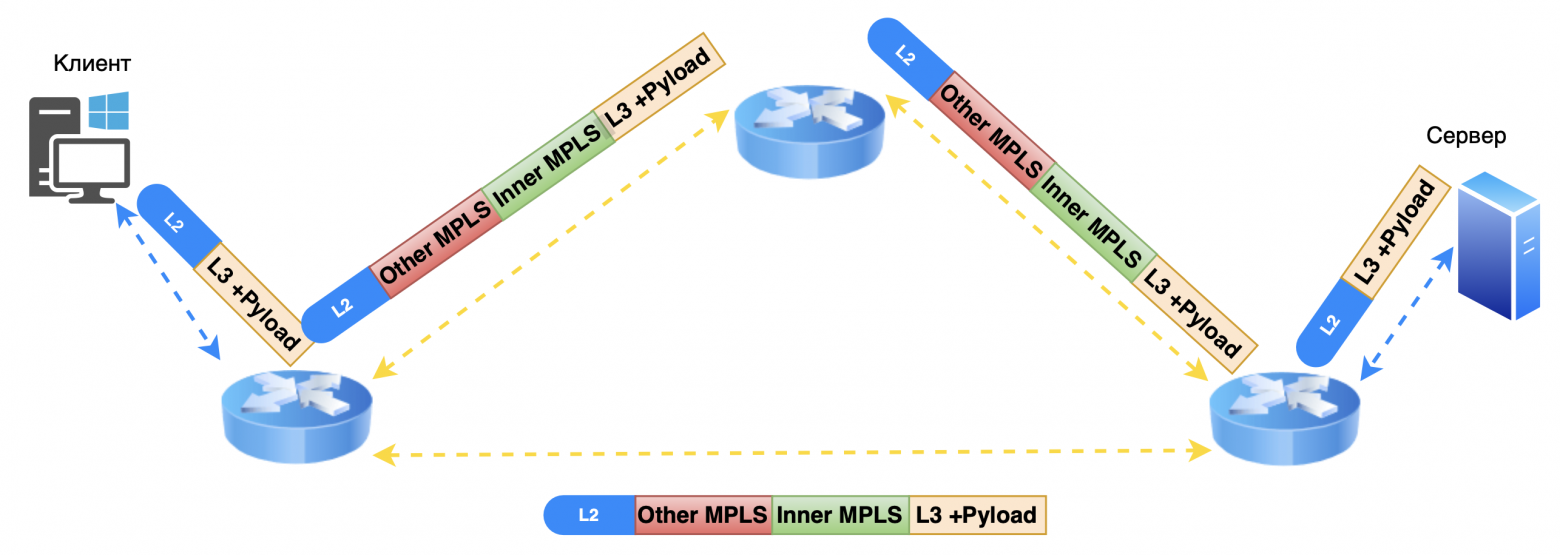
MPLS (Multiprotocol Label Switching) is a mechanism in high-performance telecommunications networks that allows data to be transferred from one node to another using tags.
MPLS technology is based on adding a special header to each data packet. A header can contain one or more labels, and multiple labels form a label stack. Although MPLS is not tied to any specific network type, in modern environments it is used primarily over IP networks. At the same time, MPLS can transport data from many different protocols.
❯ How MPLS works
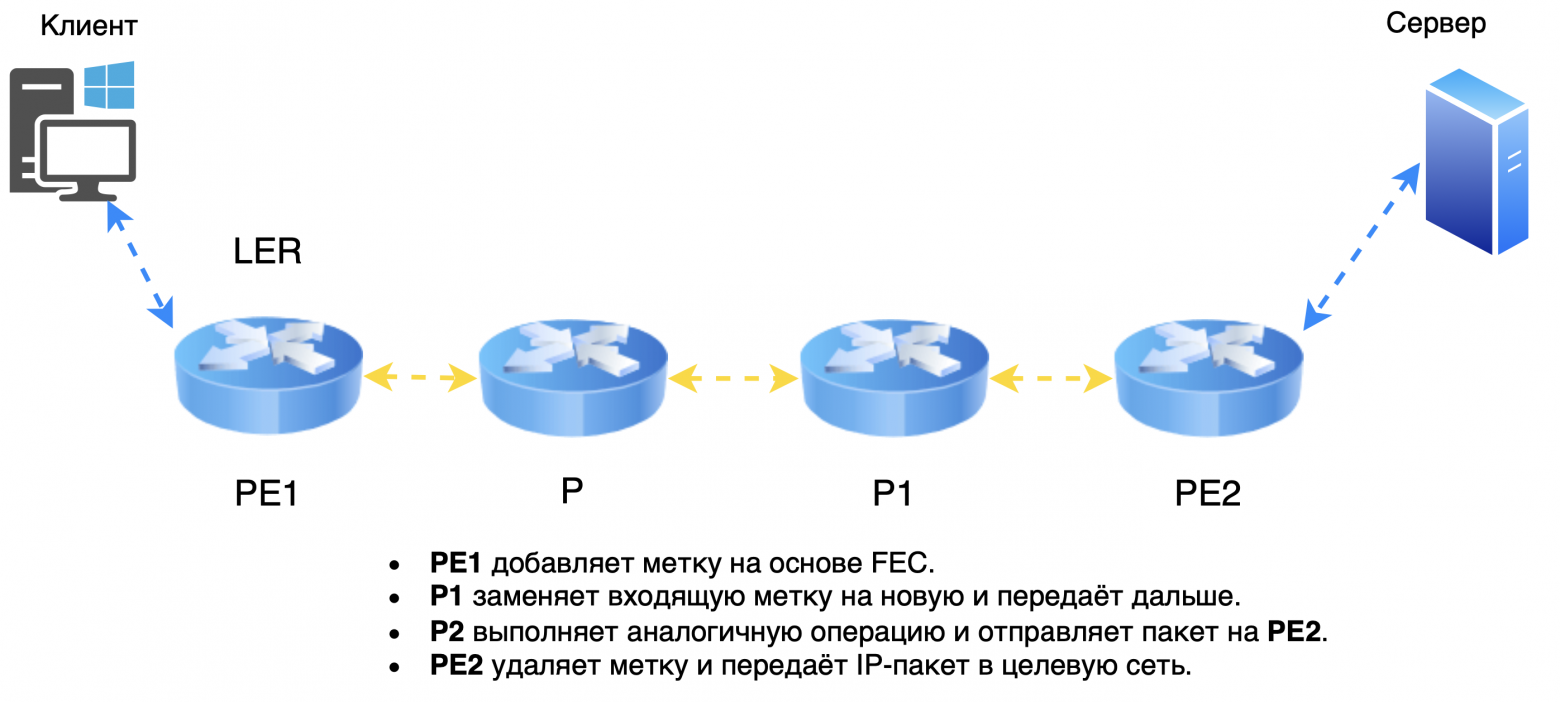
When an IP packet enters an MPLS network, the first router (sometimes called LER — Label Edge Router) assigns a label to the package. The packet is transmitted over the network, and each subsequent router (LSR — Label Switching Router) replaces the old label with a new one corresponding to the route. When the packet leaves the MPLS network, the label is removed and the original IP packet is transmitted.
Main features of MPLS:
MPLS can handle a variety of protocols, providing versatility and flexibility;
Incoming packets are quickly routed based on labels, reducing latency and improving network performance;
Although MPLS is formally independent of IP, in modern networks it primarily operates on top of an IP infrastructure.
Thus, MPLS not only provides optimal routing, but also supports many data transmission scenarios, including quality of service (QoS), virtual private networks (VPN) and multi-protocol environments.
❯ Basic elements and nodes in MPLS
PE (Provider Edge) — provider border router.
PE devices are located at the edge of the operator’s network and interact with client networks.
Responsible for assigning and deleting MPLS labels.
Examples: PE1 And PE2 — two border routers at different points of the operator.
P (Provider) — internal router of the provider’s network core.
These routers are located inside the core of the network and perform label switching.
They do not interact directly with client networks and do not process IP packets.
LSR (Label Switch Router) - a router that performs label switching.
PE And P - both are LSR types.
LSR assigns, replaces or removes labels based on label tables and forwards packets.
MPLS Key Concepts
LSP (Label Switched Path) - switched path based on labels.
This is a predefined route through the MPLS network along which packets are transmitted.
The path starts at PE1, passes through one or more P-routers, and terminates at PE2.
During the transmission process, routers replace labels to determine the next hop in the route.
FEC (Forwarding Equivalence Class) — equivalent transmission class (not to be confused with the FEC function on optical modules).
Defines a group of packets that are treated in the same way (for example, sent on the same LSP).
Examples: all packets addressed to the same network, or traffic of the same QoS class.
3. LIB (Label Information Base) — tag base.
Contains information about which labels are used for incoming and outgoing packets.
Each entry indicates incoming label and corresponding outgoing label and interface.
LFIB (Label Forwarding Information Base) — an information base for transmitting packets based on labels.
Used to transmit packets in real time.
Based on LFIB The router determines which label to assign to the next hop and which interface to send the packet to.
❯ Example of MPLS network operation
PE1 receives an IP packet from the client and, based on FEC, assigns label.
The packet is transmitted over the network after several P-routers, each of which replaces the label in accordance with LIB and forwards the packet further.
Each node uses LFIB for fast packet switching based on the current label.
When the package reaches PE2, the label is deleted (operation penultimate hop popping can remove the label on the penultimate node), and the packet is transmitted to the target network without a label.
Label propagation modes
Downstream Unsolicited (unauthorized label distribution)
Node (LSR) assigns the label himself for a prefix and transmits it to neighbors without asking.
This method is used in LDP and speeds up LSP construction because labels are distributed in advance.
Downstream on Demand (distribution of labels upon request)
Node (LSR) requests a label at the next node only when it needs to transmit a packet for a specific prefix.
Used in cases where you need to optimize the use of tags and resources, for example, in RSVP-TE.
Label management methods
3. Ordered Control (orderly management)
The label is assigned only on the node PE (edge router) or on a router that already received the label from the next node.
This method prevents the creation of incomplete routes and ensures that the LSP is constructed correctly.
4. Independent Control (independent control)
Each node (LSR) assigns a label independentlywithout waiting for a tag from the next router.
Speeds up the LSP creation process, but may cause temporary label mismatches on routers.
Label storage modes
Liberal Label Retention Mode (liberal label storage regime)
The node saves all received tags from neighbors, even if they are not currently in use.
Provides flexibility if the route changes because the labels are already known and do not need to be re-acquired.
Suitable for networks with frequent route changes.
Conservative Label Retention Mode (conservative label storage mode)
The node saves only labels used for active routes.
Saves memory, but if the route changes, labels must be requested again, which can cause delays.
These mechanisms help configure MPLS based on network needs, balancing speed, flexibility, and resource efficiency.
❯ Now I would like to look at the most common dynamic routing protocols - OSPF and BGP.
❯ OSPF
OSPF (Open Shortest Path First) is a dynamic routing protocol based on link-state technology and uses Dijkstra's algorithm to find the shortest path.
How OSPF works
1. Establishing neighborly relations:
Routers exchange small HELLO packages;
After exchanging packets, they establish neighborly relationships and add each other to neighbor tables.
2. Formation of LSA:
Routers collect information about the state of their links, including:
ID of the router and its neighbor;
network and prefix between them;
network type;
channel cost (metric).
This data is combined into a package LSA (Link State Advertisement).
3. LSA Propagation and Network Mapping:
The router sends LSAs to its neighbors, who forward them further along the network;
All received LSAs are added to LSDB (Link State Database) database;
Based on the LSDB, a complete network map is built, including all routers and their connections.
4. Finding the shortest routes:
Each router uses a network map to calculate the shortest routes using Dijkstra's algorithm;
The results are added to the routing table.
OSPF Packet Types
1. Hello
Sent regularly to locate neighbors and establish neighborly relationships.
2. Database Description (DBD)
Used to check LSDB synchronization between neighbors.
3. Link State Request (LSR)
Requests an LSA from a neighboring router.
Used when turning on the router or to update data if the network topology has changed.
4. Link State Update (LSU)
Contains current data on the status of channels.
5. Link State Acknowledgment (LSAck)
Acknowledges receipt of LSA, DBD or other packets.
OSPF does not use TCP, so the acknowledgment mechanism guarantees the reliability of data exchange.
Thus, OSPF provides accurate and efficient routing, maintains up-to-date network information, and minimizes delays when topology changes.
Key OSPF Link Parameters and States
1. Channel Events: Link Down / Link Up
Link Down — the channel between the routers has become unavailable.
Example: physical interface disconnection or hardware failure.
Routers send LSA with an update that the channel is unavailable, and they start recalculating routes.
Link Up — the channel became available again.
Example: the interface has been restored or a new channel has been connected.
Routers send LSA, notifying neighbors, and recalculating routes.
These events help maintain up-to-date topology information and ensure rapid response to changes in the network.
2. Channel capacity
Bandwidth affects the cost of the route (OSPF Cost).
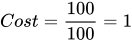
By default the cost is calculated as:

Example:
For channel 100 Mbit/s:
For channel 10 Mbit/s:
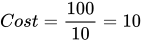
The higher the throughput, the less cost of the route. OSPF prefers the least cost routes.
The administrator can manually configure interface costs for more flexible routing management.
Interface type | Bandwidth | OSPF Cost |
Ethernet | 10 Mbit/s | 10 |
Fast Ethernet | 100 Mbit/s | 1 |
Gigabit Ethernet | 1 Gbit/s | 1 (default) |
10 Gigabit Ethernet | 10 Gbps | 1 (with standard formula) |
Frame Relay (T1) | 1.544 Mbps | 64 |
DSL | 2 Mbit/s | 50 |
E1 | 2.048 Mbps | 48 |
ATM | 155 Mbit/s | 1 |
ISDN BRI | 128 Kbps | 781 |
Dial-up (modem) | 56 Kbps | 1785 |
Reference Bandwidth on Cisco
If the network uses 10/25/40/100 Gbit/s interfaces, it is recommended to set the reference bandwidth to 100000 Mbit/s (100 Gbit/s) to adequately differentiate the cost of channels.
At reference throughput of 100 Gbps

Bandwidth | OSPF Cost |
25 Gbps | 4 |
40 Gbps | 3 |
100 Gbps | 1 |
3. Router ID
Router ID (RID) is a unique 32-bit router identifier (usually in IPv4 address format, such as 192.168.1.1).
How Router ID is selected:
1. Manual setting:
The administrator sets the ID with a command (for example, on Cisco: router-id 1.1.1.1).
2. Automatic selection:
If ID is not specified, select highest IP address among loopback interfaces;
In the absence of loopback is used highest IP address active interface.
Purpose:
Router ID is used to identify the router in OSPF and exchange LSAs;
Does not change until the OSPF process is restarted.
Basic OSPF states
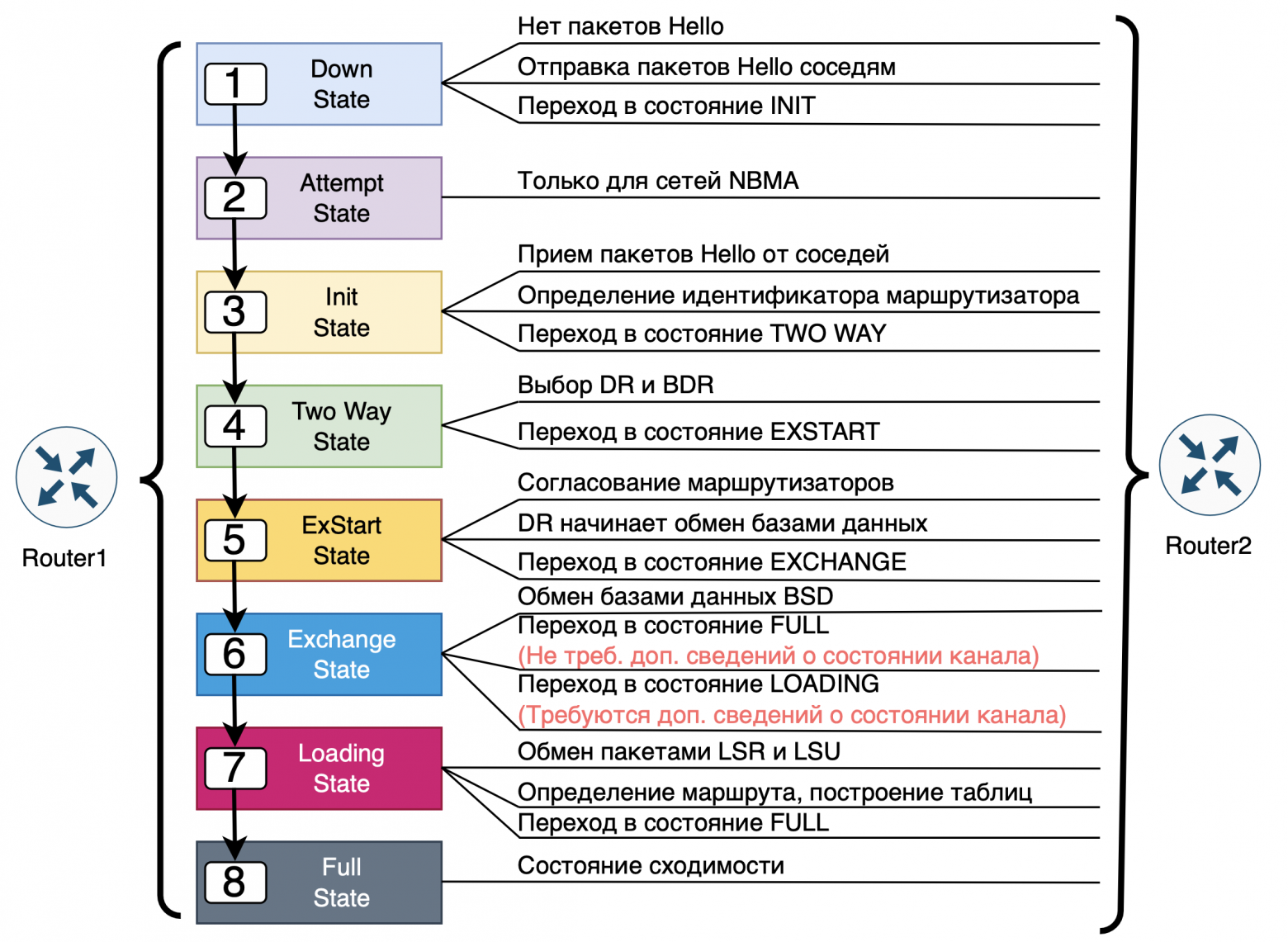
1. Down:
Initial state, the router did not receive the Hello packet or the connection was completed.
2. Init:
The router received the Hello packet, but has not yet confirmed its presence.
3. Two-Way:
The routers recognized each other's Hello packets;
With a common channel (for example, Ethernet), select DR And BDR.
4. ExStart:
The exchange of routing information begins;
One router becomes Master, another - Slave.
5. Exchange:
Exchange DBD packages, containing descriptions of routes.
6. Loading:
If there is not enough information, data is requested via LSR packets, and the neighbors answer LSU packages.
7. Full:
Full synchronization. Routers have the same LSDB.
There is another state in OSPF Attempt (attempt) it is used on some types of networks such as NBMA (Non-Broadcast Multi-Access), for example, in a Frame Relay or ATM network, where routers cannot automatically discover neighbors via broadcast HELLO packets.
What is Attempt state?
Attempt is an intermediate state in which the router attempts to establish neighbor relationships by sending HELLO packets to manually configured neighbors.
Unlike broadcast networks, where neighbor discovery occurs automatically, in NBMA networks routers must know the IP addresses of neighbors in advance and send HELLO packets specifically.
When is the Attempt state used?
Used on interfaces with type NBMAif neighboring routers are specified manually using the command neighbor.
This state signals that the router is attempting to initiate communication with the specified neighbor by sending it HELLO packets at intervals set by a timer. Hello Interval.
The process of transition from Attempt to other states
Attempt → Init:
If the router sent a HELLO packet but did not receive a response.
In this case, the neighbor has not yet recognized him, but the route session continues.
Attempt → Two-Way:
If both routers received and recognized each other's HELLO packets.
Failure:
If HELLO packets do not receive a response within a certain time (Dead Interval timer), the adjacency is not established.
DR (Designated Router) And BDR (Backup Designated Router) are special roles of routers in OSPF networks that use a common channel, such as Ethernet. These roles help reduce the number of routing information exchanges, reducing network load.
❯ Why are DR and BDR needed?
If every router on a multi-access network exchanged routing information with every other router, the volume of traffic would grow exponentially. To avoid this, OSPF chooses one designated router (DR) and one backup (BDR)who coordinate the exchange of information.
❯ How do DR and BDR work?
DR: the main router, which receives LSAs from other routers and forwards them to the rest of the network. It reduces the number of direct connections and makes the network more efficient.
BDR: a backup router that takes over the DR role in the event of a failure.
The other routers on this network are called DROther. They do not exchange routing information directly with each other, but only with the DR and BDR.
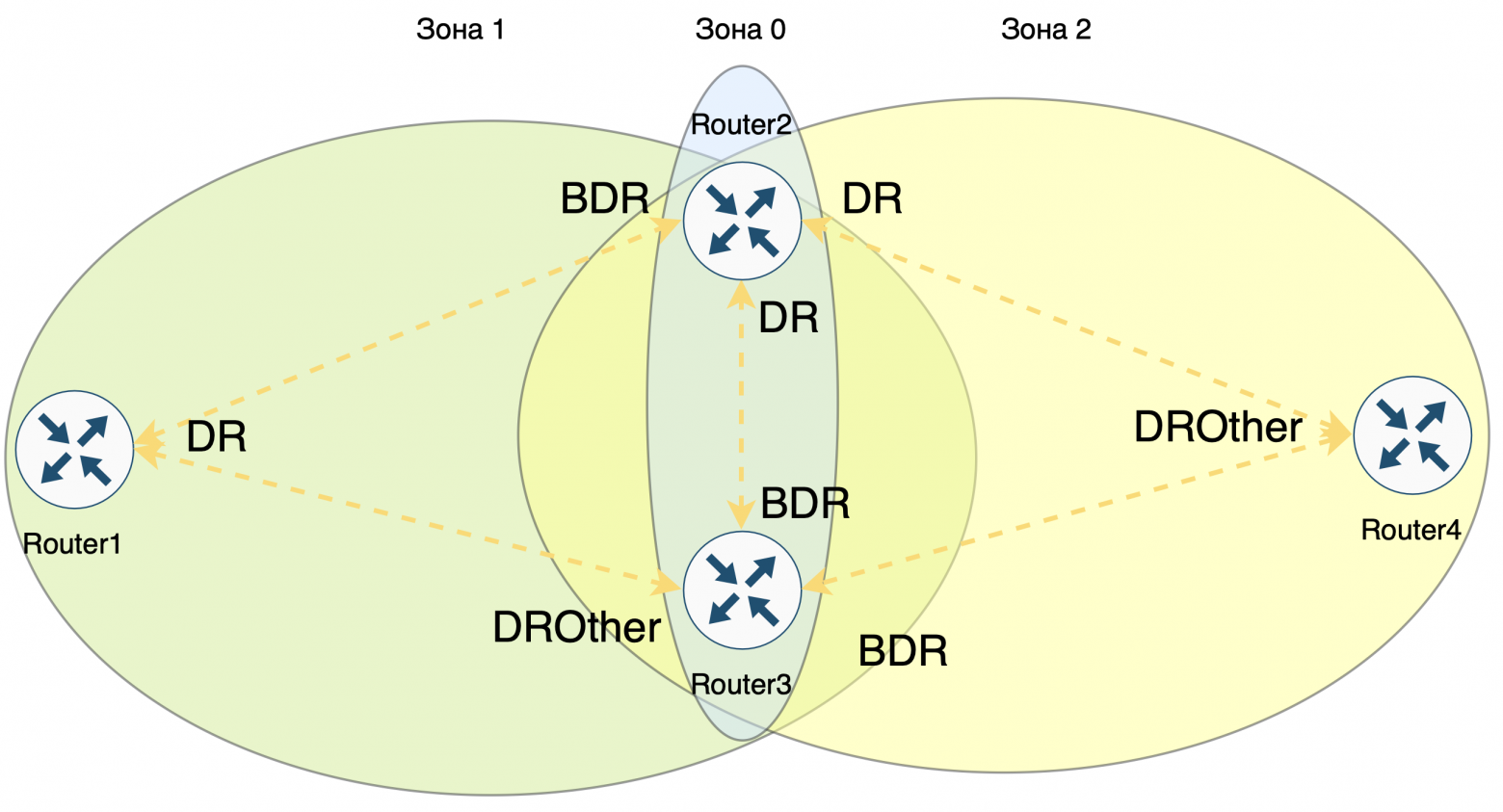
Algorithm for selecting DR and BDR
1. Interface priority
Each router interface in OSPF has priority.
The priority value can be manually adjusted in the range from 0 to 255 (default is 1).
The router with the highest priority becomes DR, and the next priority is BDR.
Note: If router priority = 0, it not participating in the DR/BDR choice, but continues to be a neighbor and participates in OSPF to exchange routes.
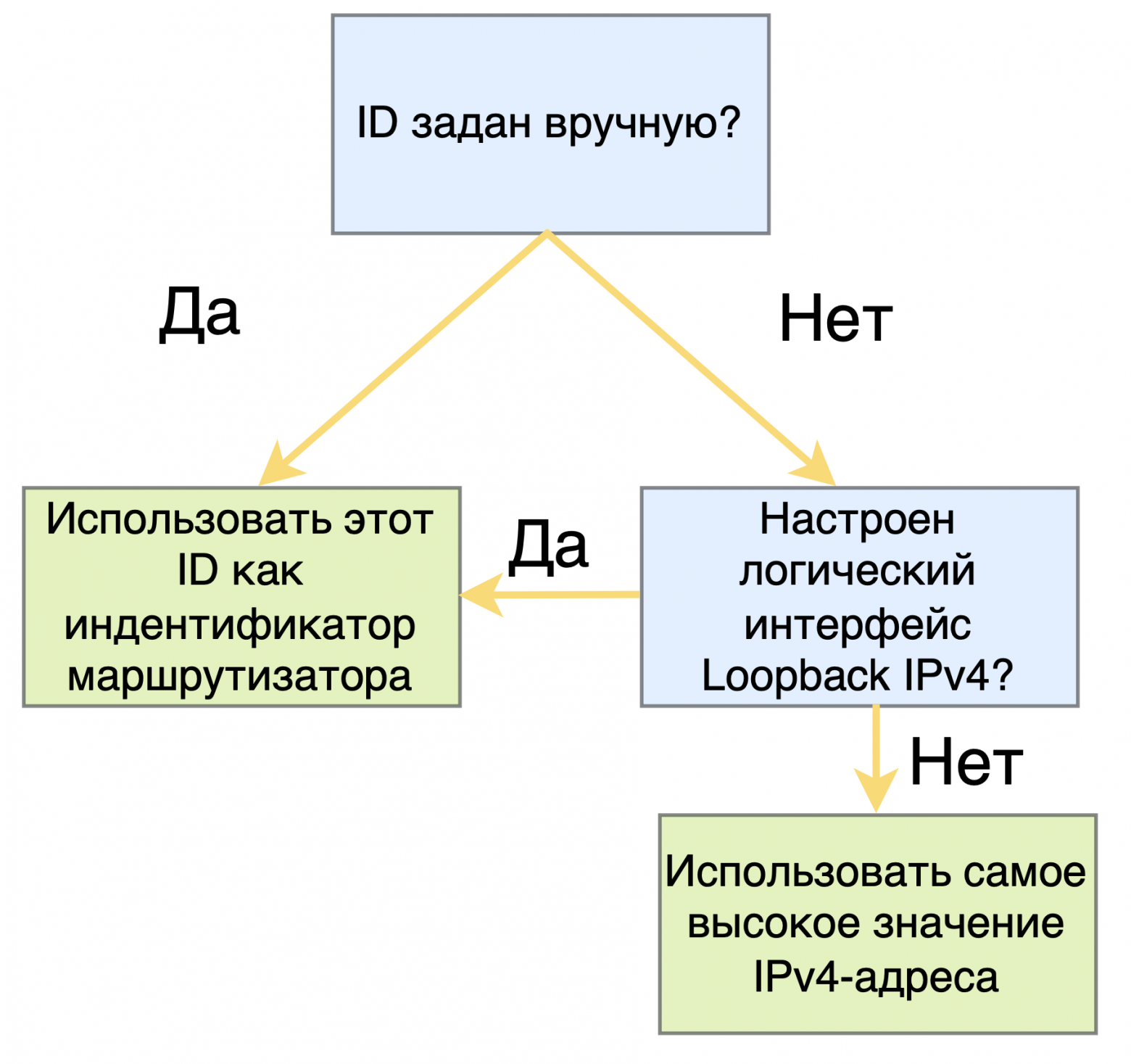
2. Router ID (RID)
If multiple routers have same priority, the router with the largest Router ID.
Router ID is a unique 32-bit identifier that usually looks like an IPv4 address. It is selected as follows:
Manual setting: the administrator can manually set the RID (for example, with the router-id 1.1.1.1 command).
Automatic selection: If RID is not set manually:
OSPF selects highest IP address among available loopback interfaces;
If loopback interfaces are not configured, use highest IP address among active physical interfaces.
❯ When is the new DR and BDR selected?
If DR fails, his role is automatically assumed BDR, and then a new BDR is selected.
If BDR fails,OSPF immediately selects a new BDR from among the ,highest priority routers and RIDs.
Using DR and BDR simplifies the exchange of routes in OSPF shared-channel networks, reducing load and speeding up synchronization between routers. Important note: DR and BD are selected within the same subnet.
❯ BGP
BGP (Border Gateway Protocol) is a dynamic routing protocol that manages the exchange of routing information between autonomous systems (AS). Unlike Interior Gateway Protocols (IGP), BGP belongs to the class Exterior Gateway Protocol (EGP) and is the primary routing protocol on the Internet. It is used to determine optimal routes between autonomous systems, taking into account administrative and political constraints.
Basic principles of BGP operation
1. Autonomous systems (AS):
The Internet is a multitude of autonomous systems, each of which is independently controlled.
Each AS has its own unique identifier − autonomous system number (ASN).
2. Sessions and peering:
BGP uses TCP connections on port 179 to establish and maintain sessions.
Neighboring BGP routers that have established peering exchange routing information.
3. Peering types:
eBGP (External BGP): exchange of routes between different autonomous systems.
iBGP (Internal BGP): exchange of routes between routers within the same autonomous system.
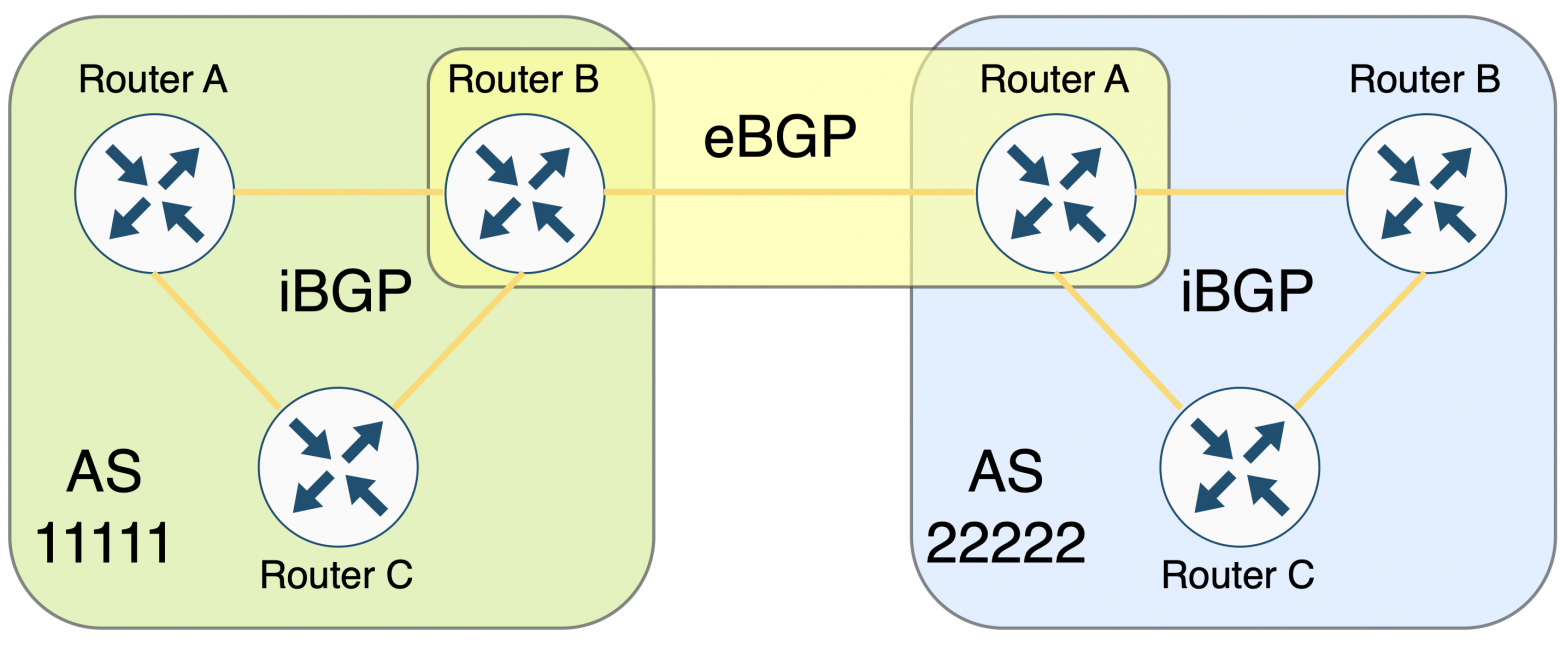
BGP Message Types
BGP uses four main message types:
Message Type | Description |
OPEN | Establishes a BGP session and negotiates connection parameters such as BGP version, router ASN, Hold Time, and BGP Router ID. |
UPDATE | Sends information about new routes, updates existing ones, or revokes previously announced routes. Includes NLRI (Network Layer Reachability Information) with BGP prefixes and attributes. |
NOTIFICATION | Notifies you when errors occur (such as a timeout or configuration change). Sending this message causes the BGP session to end. |
KEEPALIVE | Keeps the BGP session active. These messages are exchanged regularly to confirm the health of neighbors. |
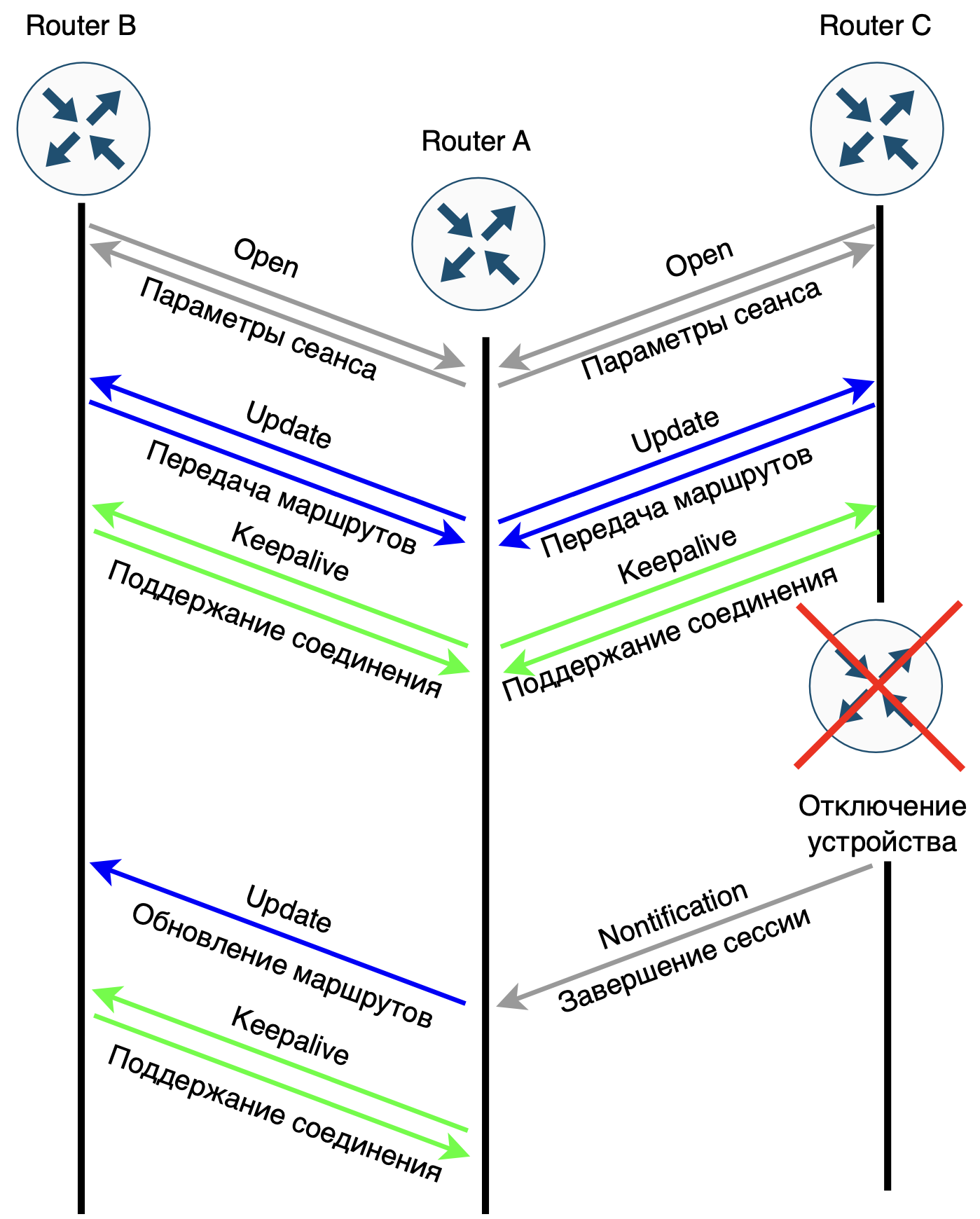
Route exchange in BGP
1. Establishing peering:
Routers exchange OPEN messagesto agree on session parameters;
If the parameters are agreed upon, route transfer begins.
2. Transferring routes:
BGP only transmits best routes between neighboring routers, which reduces the amount of transmitted information;
Message UPDATE includes route attributes such as network prefix, AS-Path, Next-Hop, and advertisement policy.
3. Maintaining connection:
If an error is detected during operation, it is sent NOTIFICATION, and the session is terminated;
Regular exchange KEEPALIVE ensures that the connection remains active.
Key BGP Parameters
1. ASN (Autonomous System Number):
Unique identifier of the autonomous system. Used to identify ASs in routes.
2. Router ID:
A 32-bit router identifier, usually in IPv4 address format. If the ID is not manually specified, the router selects the largest IP address from the loopback or physical interfaces.
3. AS-Path:
Indicates the sequence of autonomous systems through which the route passes. Allows you to prevent loops by avoiding re-advertising routes to the source AS.
4. Next-Hop:
Specifies the IP address of the next router to forward packets to.
5. MED (Multi-Exit Discriminator):
Used to select the preferred path when there are multiple exits from the AS.
Example of how BGP works
1. Establishing a session between AS:
Two routers from different autonomous systems install eBGP session;
Exchange routes via OPEN And UPDATE messages.
2. Choosing the optimal route:
If there are several paths, the route with smaller AS-Path will be selected;
If the paths are equal, use Next-Hop and other attributes for route selection.
Basic states of a BGP session
State | Description |
Idle | Initial state. Waits for the neighbor to be available. |
Connect | Tries to establish a TCP connection with a neighbor. |
Active | Tries to reestablish a connection when a previous attempt fails. |
OpenSent | An OPEN message has been sent and a response from the neighbor is awaited. |
OpenConfirm | OPEN message received, Keepalive awaited. |
Established | The connection is established and routes are exchanged. |
OSPF uses metrics to determine route costs. Are there metrics in BGP?
Yes, they are used in BGP route attributes, which play the role of metrics for choosing the best path. These attributes allow BGP routers to determine the preferred routes among several options. Unlike IGP protocols (such as OSPF or EIGRP), which use numeric metrics (such as cost), BGP selects a route based on a sequence of attributes.
Basic attributes of BGP routes
Attribute | Description | Role in route selection |
Weight (weight) | A local attribute specific to the router. The higher the value, the more preferable the route. | Only used on the local router. The highest value takes precedence. |
Local Preference | Indicates the priority of routes within one AS. The higher the value, the more preferable the route. | Applicable in iBGP. Allows you to control outgoing traffic from the AS. |
AS-Path | List of autonomous systems through which the route passed. | The shorter the path (fewer ASes in the list), the more preferable the route. |
Next-Hop | The IP address of the next router through which the packet should be sent. | Specifies which router to send traffic through. |
MED (Multi-Exit Discriminator) | Specifies the preferred path for ingress traffic when there are multiple entry points into the AS. The lower value takes precedence. | Used to select an ingress route between neighboring ASes. |
Origin | Indicates the source of the route (for example, IGP, EGP, or "incomplete"). | IGP < EGP < Incomplete. Routes with the IGP attribute have the highest priority. |
Community | Routes can be tagged (community) for group processing. | Does not directly affect route selection, but allows policies to be applied. |
Aggregator | Indicates which router aggregated (combined) the routes. | Affects the processing of aggregated routes. |
The order of route selection in BGP (best path selection algorithm)
Weight: the route with the highest Weight value is selected.
Local Preference: with equal Weight values, preference is given to the route with a higher Local Preference.
AS-Path: with the same Local Preference, the route with short AS-Path.
Origin: if the AS-Path is the same, priority is given to the route with the lower Origin value (IGP > EGP > incomplete).
MED: if Origin is equal, the route with the lowest MED value is selected.
eBGP vs iBGP: if all attributes are equal, the route obtained through eBGP (external neighbor), not iBGP.
Next-Hop Reachability: The availability of the Next-Hop IP address is checked.
Tie-breaking (additional criteria): for example, the route with the smallest Router ID or the smallest neighbor IP address is selected.
Example
Let's assume a BGP router receives the following routes:
Route 1. AS-Path = 2, Local Preference = 100, MED = 50;
Route 2. AS-Path = 3, Local Preference = 150, MED = 20.
Selection result:
Route 2 will be chosen because it has large Local Preference (150), despite the longer AS-Path and larger MED;
If Local Preference were the same, then the deciding factor would be short AS-Path (route 1).
BGP plays a key role in Internet routing by enabling the exchange of routes between autonomous systems. With its flexibility and support for routing policies, BGP allows an administrator to control which routes are advertised and accepted from other systems.
❯ Conclusion
Tunneling plays a key role in modern networks, providing protocol compatibility, data protection and the creation of virtual networks. Protocols such as GRE, IPsec, L2TP, and MPLS serve a variety of purposes, from simple encapsulation to security and routing optimization. Tunneling is actively used in VPNs, internetworking, and in the transition to new protocols such as IPv6.
Dynamic routing protocols such as OSPF And BGP. OSPF is responsible for finding shortest paths within autonomous systems using Dijkstra's algorithm and ensuring fast response to topology changes. BGP manages routing between autonomous systems, determining the optimal paths for data transmission on the global Internet based on route attributes and policies. Together, these protocols and tunneling create a flexible and reliable infrastructure for data transfer, providing both local and global connectivity with security and performance requirements in mind.
In the next article I plan to analyze the HTTP and HTTPS protocol.
News, product reviews and competitions from the Timeweb.Cloud team — in our Telegram channel ↩

📚 Read also:
➤ The Long Road to Lazy Preemption;
➤ Setting up alerts from Zabbix to Telegram;
➤ How to create your own web framework in Python;
➤ Not (loneliness online) NOW;
➤ Comments are our everything! Online comment history.
Why This Matters In Practice
Beyond the original publication, It's complicated about simple things. The most popular tunneling protocols, dynamic routing and principles of their operation. Part 2 matters because teams need reusable decision patterns, not one-off anecdotes. Greetings, colleagues! My name is @ProstoKirReal . Today I would like to continue the discussion with you about the most popular protocols,...
Operational Takeaways
- Separate core principles from context-specific details before implementation.
- Define measurable success criteria before adopting the approach.
- Validate assumptions on a small scope, then scale based on evidence.
Quick Applicability Checklist
- Can this be reproduced with your current team and constraints?
- Do you have observable signals to confirm improvement?
- What trade-off (speed, cost, complexity, risk) are you accepting?
FAQ
What is this article about in one sentence?
This article explains the core idea in practical terms and focuses on what you can apply in real work.
Who is this article for?
It is written for engineers, technical leaders, and curious readers who want a clear, implementation-focused explanation.
What should I read next?
Use the related articles below to continue with closely connected topics and concrete examples.





