It's complicated about simple things. The most popular protocols and principles of their operation. HTTP, HTTPS, SSL and TLS. Part 3
Greetings, colleagues! My name is @ProstoKirReal . Today I would like to continue the discussion with you about the most popular protocols, as well as the principles of their operation. In the previous part I talked about dynamic routing protocols and how they work. Today I would
Editor's Context
This article is an English adaptation with additional editorial framing for an international audience.
- Terminology and structure were localized for clarity.
- Examples were rewritten for practical readability.
- Technical claims were preserved with source attribution.
Source: original publication
Greetings, colleagues! My name is @ProstoKirReal. Today I would like to continue the discussion with you about the most popular protocols, as well as the principles of their operation. In the previous part I talked about dynamic routing protocols and how they work.
Today I would like to talk about the HTTP and HTTPS protocols, and also touch a little on SSL/TLS encryption.
❯ Why is this article needed?
In the previous two articles (Part 1 And part 2) I wrote about the most popular protocols, as well as the principles of their operation. But these protocols are used by a limited number of users, mainly network engineers. It is very important for us networkers to know about such protocols.
But there is one very important protocol that is used by a huge number of people around the world when accessing the Internet. Its name is HTTP and I would like to talk about it separately.
At the time of writing this blog article Timeweb Cloud, quite an interesting article came out "HTTP Requests: Parameters, Methods, and Status Codes". This article and many articles on the Internet mainly talk about the history, why it is needed, methods, status codes, etc. Many articles cover information that is fairly superficial or targeted at application developers who work with HTTP requests. I, in turn, would like to talk about the operating principle of this protocol and its evolution.
❯ What is HTTP?
HTTP (HyperText Transfer Protocol, or Hypertext Transfer Protocol) is an application layer protocol (OSI model L7) designed for the exchange of data between a client and a server on the Internet. HTTP is used to transport HTML pages, images, videos, text, and other types of data that make up web resources.
❯ What is hypertext?
Hypertext is text that contains links to other pieces of text or resources, such as images, videos, pages, and documents. Unlike plain text, hypertext allows the user to instantly follow these links, thereby making information navigation convenient and intuitive. It is a key technology underlying the World Wide Web, as it provides flexible connections between pages and allows users to easily find and explore information.
In books, hypertext are references to other books, so-called cross-references. An example of hyperlinks in books are links to books of one series by an author or to other books by another author. This method is mainly used by books of a scientific or educational nature. But they are also found in ordinary books. The oldest hyperlinks are quotes, commandments and prophecies in the Bible.
HTTP has become a key component of the Internet as it provides access to web pages and APIs. Due to its simplicity and extensibility, HTTP is used not only for browsers, but also for communication between various services and applications.
❯ Main features of HTTP
1. Stateless protocol: HTTP is a stateless protocol, which means that each connection between client and server is treated as independent. The server does not "remember" previous client requests, although techniques such as cookies and sessions allow session data to be temporarily stored.
2. Text and human readable format: HTTP requests and responses are in text format and are easy to read by humans. This makes the protocol easy to understand and debug.
3. Client-server architecture: HTTP is built on the interaction between a client (such as a web browser) and a server. The client sends a request and the server responds by sending the required data.
4. Extensibility and Compatibility: HTTP supports headers and methods that allow for enhanced interoperability. It was designed to be compatible with new versions, allowing it to evolve
❯ How HTTP works
The HTTP communication process usually goes through several stages:
1. Establishing a connection: A client (e.g. a browser) initiates a connection to the server at a URL, e.g. http://timeweb.cloud
2. Sending an HTTP request: The client sends an HTTP request that contains:
• Request method (for example, GET, POST, PUT, DELETE, etc.),
• URI resource (page or file address),
• HTTP version,
• Additional headers (headers) and body request (if necessary, for example, when sending data via POST).
3. Processing the request by the server: The server receives a request, processes it by accessing the desired resource, and generates a response.
4. Sending an HTTP response: The server sends a response consisting of:
• Status line with a status code (for example, 200 OK, 404 Not Found),
• Response headers (for example, Content-Type, Content-Length, Server),
• Response bodies with the contents of the requested resource (for example, the HTML code of the page).
5. Closing a connection: The connection is closed if it is not intended to be reused.
❯ What is the difference between a URL and a URI?
A URI is a Uniform Resource Identifier that points to a resource in a unique way.
A URL is a special case of a URI that describes the exact location of a resource and how to obtain it.
Examples of use
URI can be used to identify resources regardless of their location. Например, URI может ссылаться на ресурс с уникальным именем в системе идентификации, где его не обязательно можно будет сразу получить.
URL used to pinpoint the location of a resource on the Internet and retrieve it.
Key Differences Between URI and URL
Characteristic | URI | URL |
Purpose | Indicates the resource or its name | Indicates the exact location of the resource |
Type | Common identifier, includes URL and URN | Specific URI type |
Example |
|
|
Availability of protocol | May not contain (eg URN) | Contains protocol (HTTP, HTTPS, FTP, etc.) |
Access to resource | Doesn't always allow you to get a resource | Always indicates how the resource is accessed |
❯ HTTP methods
HTTP supports various methods, which indicate the type of action the client wants to perform:
GET: resource request. The most common method.
POST: Sends data to the server for processing (for example, form data).
PUT: Uploading a resource to the server or updating a resource.
DELETE: Remove the resource from the server.
HEAD: Request only response headers (no body).
OPTIONS: Request for available methods for a resource.
More details about the methods in the article "HTTP Requests: Parameters, Methods, and Status Codes" from Timeweb Cloud
❯ HTTP versions
Over time, HTTP has gone through several evolutionary phases:
HTTP/0.9: first version, GET method only, no headers and metadata.
HTTP/1.0: Added headers, methods and status codes.
HTTP/1.1: improved connection management (persistent connections), more efficient use of resources.
HTTP/2: bit rate optimization, header compression and multiplexing support.
HTTP/3: new transport layer (QUIC instead of TCP), to improve speed and reliability.
All versions except HTTP/3 use the TCP transport layer protocol. HTTP/3 uses the QUIC protocol, also known as UDP. I will tell you more about why the transition from the “high-quality” TCP protocol to the “low-quality” UDP took place in the section on HTTP/3
❯ Evolution of HTTP
❯ HTTP 0.9
The first version of this protocol was not 1.0, as many people think, but 0.9.
This protocol was very simple, like the Internet at that time, and contained only text files. HTTP was proposed in March 1991 by Tim Berners-Lee.
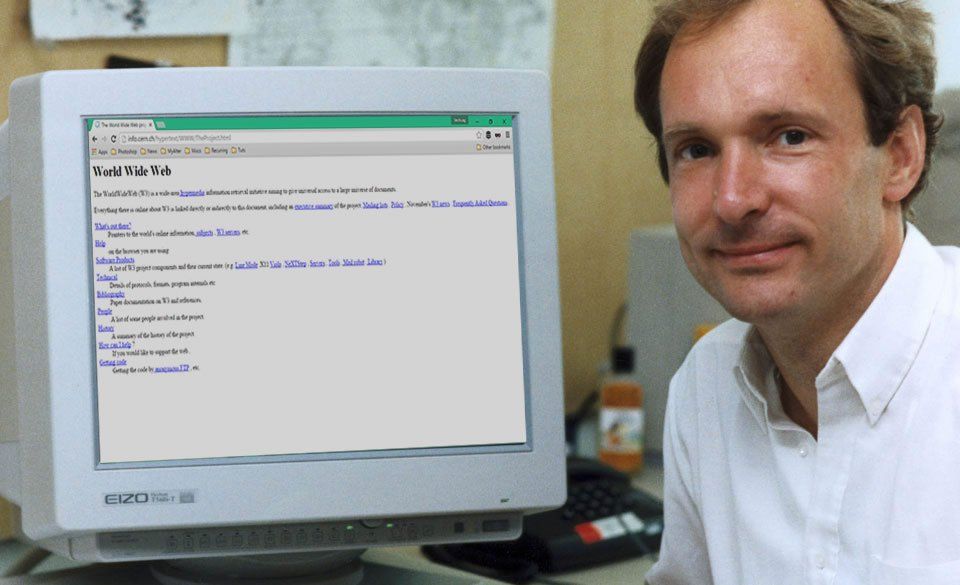
August 6, 1991 was the second birthday of the Internet. On this day, Tim Berners-Lee launched the world's first website on the first web server available at info.cern.ch. This site introduced the concept of the World Wide Web, contained instructions on installing a web server, using a browser, and other useful materials. This site also became the first Internet directory, as Tim Berners-Lee later added and maintained a list of links to other sites on it. It was a landmark event that shaped the Internet as we know it today.
In HTTP/0.9, there was a simplified package structure at the application level, since only one method was supported - GET, and headers for metadata were completely eliminated. To look at the possible fields at the application layer, let's focus on what constituted the contents of the request and response.
Application layer request structure in HTTP/0.9
In HTTP/0.9, the request at the application level consisted of a single line, and therefore there were no fields as such. However, in essence, we can think of it as being made up of the following logical parts:
Method: HTTP/0.9 only supported the GET method, which was sent as the first word in the request. This method indicated that the client wanted to obtain a resource from the server.
URI (Uniform Resource Identifier): After the GET method, the path to the resource, that is, the URI, was specified. The path determined which specific file or resource the client was trying to obtain. In HTTP/0.9, this path began with / and pointed to a resource relative to the web server's root directory.
Example: /
timeweb.cloud.html
In later versions (HTTP/1.0 and higher) it was also added HTTP path option, which included the hostname in the URI, allowing servers to process requests for different domains.
Application layer response structure in HTTP/0.9
The response at the application level in HTTP/0.9 was also minimalistic and consisted only of the body, that is, the contents of the requested resource. There were no additional fields or headers.
1. Response body: The content of a file or resource that the server sent to the client. This could be an HTML document, plain text, or other text content.
Unlike later versions where headers were added such as Content-Type (defines the content type), Content-Length (response body size) and Server (server information), these fields were not present in HTTP/0.9.
How was the request sent?
In HTTP/0.9, sending a request was as simple as possible and consisted of one line. To request a resource from the server, the client (usually a web browser) would send a string with the method GET, followed by the path to the resource.
Everything worked very similarly to modern versions when it comes to using the browser: the user just had to enter the site address (URL), and the browser automatically generated and sent the request GET to the server.
Important: Lack of support for virtual hosts
There was no header in HTTP/0.9 Host, so queries could not specify a specific site if the server was serving multiple sites (virtual hosts). This meant that one server could only serve one site by default, since it could not differentiate between requests for different domains on the same IP address.
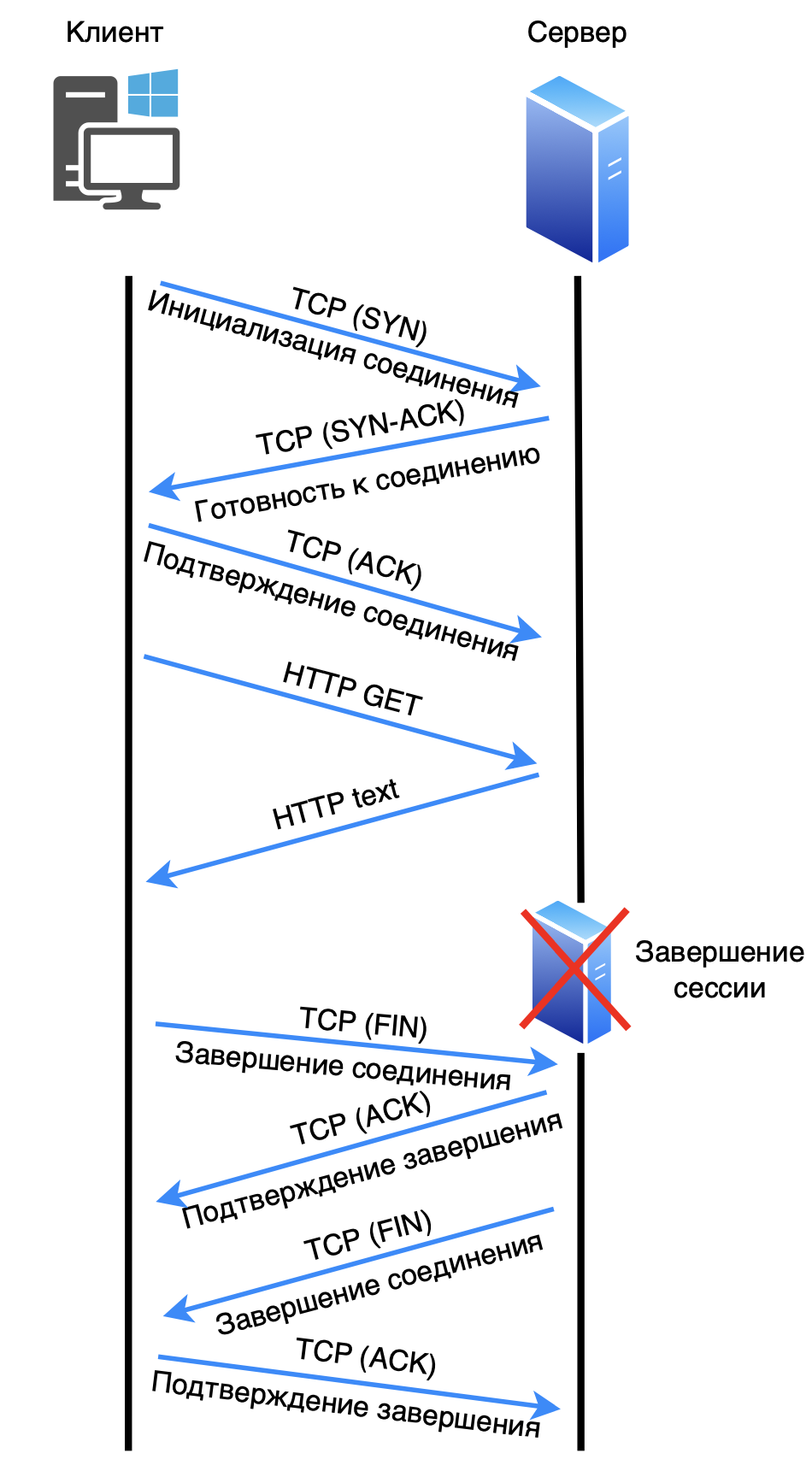
Now let's take a closer look at how packets are transmitted on the network.
1. The client initiates a connection to the server via TCP port 80 (SYN).
2. The server responds with readiness to connect (SYN-ACK).
3. The client acknowledges the connection (ACK).
4. The client sends a request (GET).
5. The server processes the request and sends a response.
6. The client initiates termination of the session (FIN).
7. The server acknowledges the completion of the connection (ACK).
8. The server initiates termination of the session (FIN).
9. The client acknowledges the completion of the connection (ACK).
In order to load the next resource, you need to open a new connection. But since there were few resources on the page, this was not much of a problem.
❯ HTTP 1.0
First official version of the protocol HTTP/1.0 - was developed in 1996, providing a more formal and structured foundation for web communication compared to HTTP/0.9. Unlike its predecessor, HTTP/1.0 supported more methods and headers, enhancing the ability of clients and servers to exchange more detailed information about requests and responses.
Major improvements in HTTP/1.0
Multiple Method Support. HTTP/1.0 introduced new methods along with GET, such as:
POST — allowed the client to send data to the server, for example, forms or files;
HEAD - allowed you to query only resource headers to get metadata without downloading the content itself.
Introduction of headings. HTTP/1.0 introduced headers that provided context and controlled client and server behavior. The most important of them:
Host: Specifies the domain to which the request is sent. Thanks to this, servers could serve multiple websites on one IP address (virtual hosts);
Content-Type: the type of content that the server sends to the client (for example, text/html);
Content-Length: size of the response body in bytes, which allowed the client to predict the amount of data received;
User-Agent: information about the client (such as the browser or application) making the request;
Server: Identification of the web server from which the response was received.
Response Status Codes. HTTP/1.0 expanded the status code system for greater transparency. The most common:
200 OK: successful request;
404 Not Found: the requested resource was not found;
500 Internal Server Error: server side error.
Request structure in HTTP/1.0
A request in HTTP/1.0 consisted of three main parts:
Start line: contained the method, URI and protocol version:
GET /timeweb.cloud.html HTTP/1.0
Request headers: Specified request metadata and client expectations (e.g., Host: example.com,User-Agent: Mozilla/5.0).
Request body (for methods such as POST): passed data to the server (for example, the contents of a form).
Response structure in HTTP/1.0
The answer consisted of the following parts:
Start line: protocol version, status code and explanation.
HTTP/1.0 200 OK
Response headers: Information about the resource, such as Content-Type, Content-Length, and Server.
Response body: Contents of the requested resource.
Data exchange scheme (at the TCP level)
In HTTP/1.0, requests were sent over serial TCP connections, which were closed after each response. It looked like this:
The client initiates a TCP connection to the server on port 80 (SYN).
The server responds with a connection confirmation (SYN-ACK).
The client acknowledges the connection (ACK).
The client sends an HTTP request (GET, POST, or HEAD).
The server processes the request and sends a response.
After receiving the response, the connection is closed (FIN).
In order to load the next resource, you need to open a new connection. This feature will play a bad joke in the future. After each request, the server closed the connection, which meant that for each new resource, such as images, styles, or scripts, the browser had to open a new TCP connection. This resulted in significant delays and increased overhead due to the need to repeatedly establish and tear down connections.
Some servers and browsers experimentally implemented support for persistent connections in HTTP/1.0 using a header Connection: keep-alive. This header allowed the connection to be left open for reuse and subsequent requests, but this solution was not part of the official HTTP/1.0 standard. Therefore, his support was limited and unstable.
Important features of HTTP/1.0
No permanent connections: The connection was closed after each request, which increased overhead as a new connection was opened for each resource.
Virtual host support: The Host header allowed servers to serve multiple domains on a single IP address.
Standard methods and headers: The formalized system of methods and headers made HTTP/1.0 more flexible and suitable for the modern Internet.
HTTP/1.0 was the first HTTP standard, laying the foundation for the evolution of the web protocol and becoming an important milestone in the development of the Internet.
❯ HTTP 1.1
HTTP/1.1, released in 1997, was a significant advance in the development of the web protocol, addressing many of the limitations of HTTP/1.0 and improving the performance and flexibility of communication between clients and servers.
Major improvements in HTTP/1.1
Permanent connections (keep-alive). One of the key improvements in HTTP/1.1 was support for persistent connections, which remained open for multiple requests and responses between the client and server. This solved the problem of HTTP/1.0, which closed the connection after each request, requiring a new connection to be opened for each resource.
In HTTP/1.1, persistent connections are used by default, and the connection remains active until the client or server decides to close it.
Header Connection: keep-alive is no longer required, since "keep-alive" support is included as part of the protocol's standard operation. However, you can send a Connection: close header to explicitly close the connection once the data transfer has completed.
Request pipeline: HTTP/1.1 also supports pipelines - the ability to send multiple requests in a single connection without waiting for a response to each request. This further increased page loading speeds, especially when transferring multiple small resources, as it reduced latency.
Support for additional methods: in addition to the standard GET, POST, and HEAD methods, HTTP/1.1 added the following methods:
PUT — to upload a resource to the server,
DELETE — to delete a resource,
OPTIONS - to determine the methods supported by the server,
TRACE — to check the request path to the server and convert it.
Improved headers: HTTP/1.1 introduced several new headers, increasing the flexibility and performance of the protocol:
Host - has now become mandatory, which allowed the use of virtual hosts serving multiple domains on one IP;
Cache-Control — improved management of resource caching on the client and server sides;
Transfer-Encoding: chunked — allowed data to be transferred in parts, which became useful for large files and streaming data.
Caching management: HTTP/1.1 provided enhanced caching control capabilities. Instead of the outdated Expires and Pragma headers, the following headers appeared:
Cache-Control — specifies how long and where to cache resources;
ETag And If-Modified-Since — support caching at the level of changed resources, which allows clients to download only updated versions of resources.
Request structure in HTTP/1.1
In HTTP/1.1, requests and responses were more structured than in HTTP/1.0.
Start line: Specifies the method, path, and protocol version.
Request headers: added the ability to specify more complex conditions for a request, such as
Accept-Encoding(for compression),User-Agent,Host(now mandatory).Request body: used to pass data with method
POSTor other methods such asPUT.
Response structure in HTTP/1.1
Start response line: included the protocol version, status code and its explanation.
Response headers: The server sent detailed information about the resource, its type, length, caching status, and more. In HTTP/1.1 these headers became more extensive.
Response body: Contents of the requested resource.
Permanent connections: operation diagram
Using persistent HTTP/1.1 connections reduced the loading time of web pages. Now there was no need to open a new TCP connection for each resource.
The data exchange scheme looks like this:
The client opens a connection to the server (SYN, SYN-ACK, ACK).
The client sends multiple requests sequentially or in parallel over a single connection (for example,
GET /timeweb.cloud.htmlAndGET /style.css).The server responds to each request by sending data over the same connection.
The client can leave the connection open for future requests.
When a client or server decides to end the interaction, they send a connection termination request (
Connection: closeor FIN).
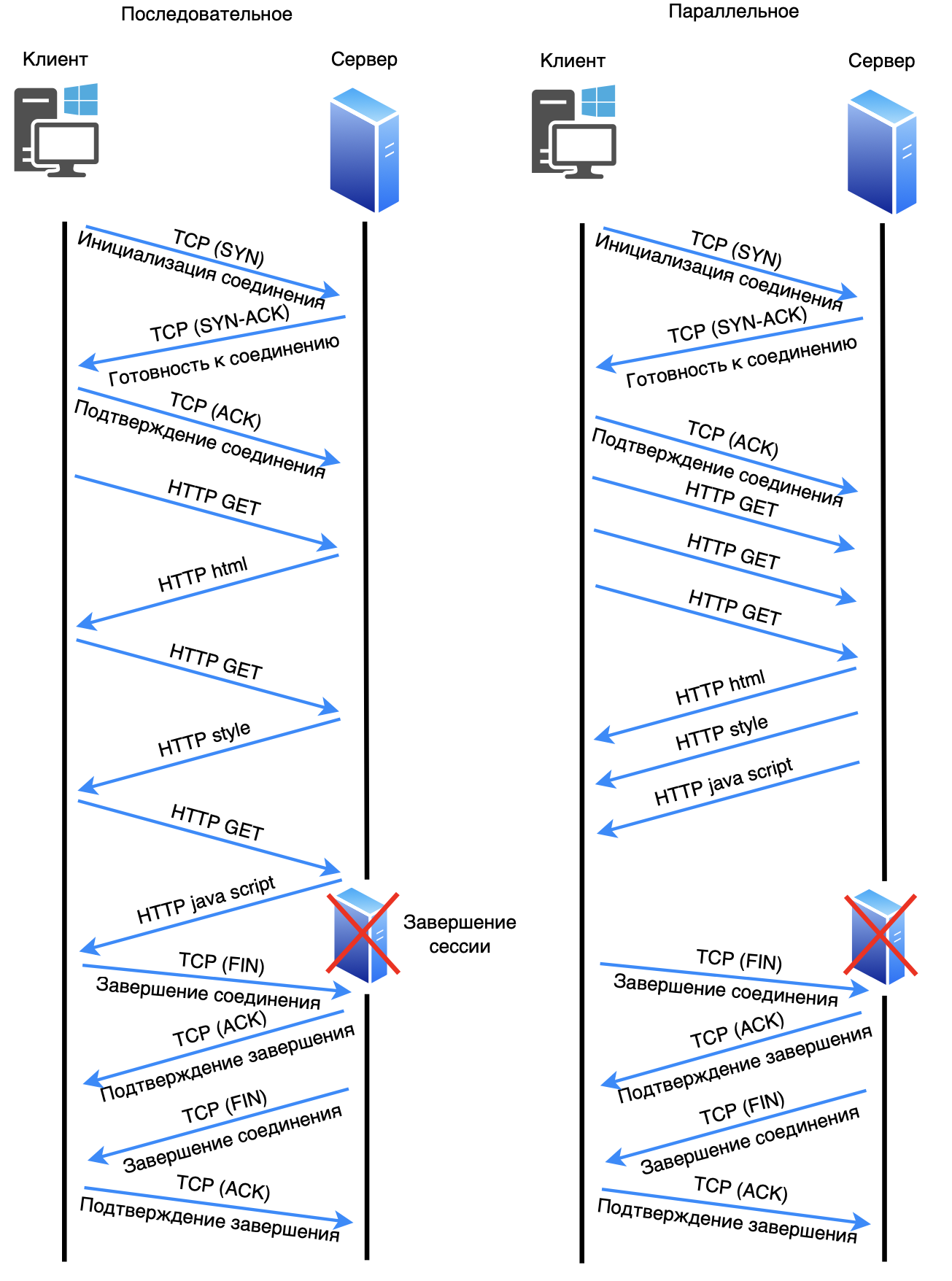
Modern browsers that use HTTP/1.1 typically use multiple persistent connections to transmit multiple requests/responses between server and client. In each such connection, requests/responses can be transmitted sequentially or in parallel. Browsers usually use from 4 to 8 such connections. This type of transmission significantly increases the speed of work.
Important note. If one packet in a TCP connection is lost, data transmission stops completely until the lost packet is retransmitted, and only then data transmission continues. This compounds the delays for all subsequent data on the same connection.
Advantages of HTTP/1.1
HTTP/1.1 improved Internet performance through persistent connections and additional features such as:
Reduced overhead costs for setting up TCP connections;
Support for virtual hosts and more flexible caching;
Ability to send multiple requests in one pipeline connection.
HTTP/1.1 became the standard for many years and is still used today, although HTTP/2 and HTTP/3 have already introduced new technologies to improve speed and reliability.
❯ HTTP 2
Major improvements and comparison with SPDY
HTTP/2 was created to improve the speed and efficiency of data transfer, and much of its capabilities were borrowed from the SPDY protocol. Major improvements over HTTP/1.1 include:
Multiplexing. HTTP/2 allows multiple requests and responses to be sent in parallel on a single connection, eliminating the blocking problem associated with HTTP/1.1.
Header Compression. Using the HPACK algorithm to compress headers allows for less data to be transferred, especially useful when dealing with frequently repeated headers.
Server Push. The server can send additional resources, anticipating their need, which helps reduce latency on the client side.
Binary protocol. HTTP/2 uses a binary format instead of a text format, which reduces overhead and improves request processing at the network level.
Comparison with SPDY: SPDY was Google's experimental protocol from which HTTP/2 adopted most of the concepts. However, HTTP/2 has become an official standard with wider support and compatibility. Unlike the experimental SPDY, HTTP/2 became an official IETF specification.
Request structure
An HTTP/2 request consists of a set of frames, each of which can contain different types of data, such as headers or content. Main types of frames:
HEADERS. Contains HTTP headers that use HPACK for compression;
DATA. Data frames containing the body of the request.;
PRIORITY. Specifies the priority of request processing, allowing the client to control the load;
SETTINGS. Passes connection parameters between client and server.
Each request and response is sent as a unique stream, making multiplexing possible.
Response structure
The HTTP/2 response also consists of several frames:
HEADERS. Contains the response status (for example, code 200 OK) and all headers;
DATA. Transmits response data;
PUSH_PROMISE. Informs the client about additional resources that the server is ready to send;
WINDOW_UPDATE. Controls the data transfer rate by controlling the flow window.
The response is sent in the same thread structure, which allows the server to allocate resources efficiently.
Operation scheme
HTTP/2 begins with establishing a TCP connection and exchanging frames SETTINGS to configure connection parameters. The client then sends the request in the form of frames HEADERS And DATA. The server responds with frames HEADERS (for status) and DATA (for content), and can send PUSH_PROMISE to speed up resource loading.
1. The client establishes a connection with the server via TCP (the process involves sending SYN, SYN-ACK and ACK packets).
2. The client sends several requests in parallel over the same connection (for example, GET /timeweb.cloud.html And GET /style.css), using multiplexing technology. This allows multiple requests and responses to be sent simultaneously without blocking.
3. The server processes each request and sends responses as streams, managed independently by priority, over the same connection.
4. The client can leave the connection open for future requests, avoiding the need to re-establish the connection.
5. When the client or server wants to end the interaction, they send a request to close the connection (usually FIN).
To be compatible with existing infrastructure, some clients and servers may first establish an HTTP/1.1 connection and use ALPN (Application-Layer Protocol Negotiation) is a TLS mechanism (more on it a little later) that allows you to negotiate the protocol version in order to “agree” on an upgrade to HTTP/2. If the server supports HTTP/2, the connection switches to this protocol and the client begins to use all the features of HTTP/2, such as multiplexing, header compression, and stream priorities.
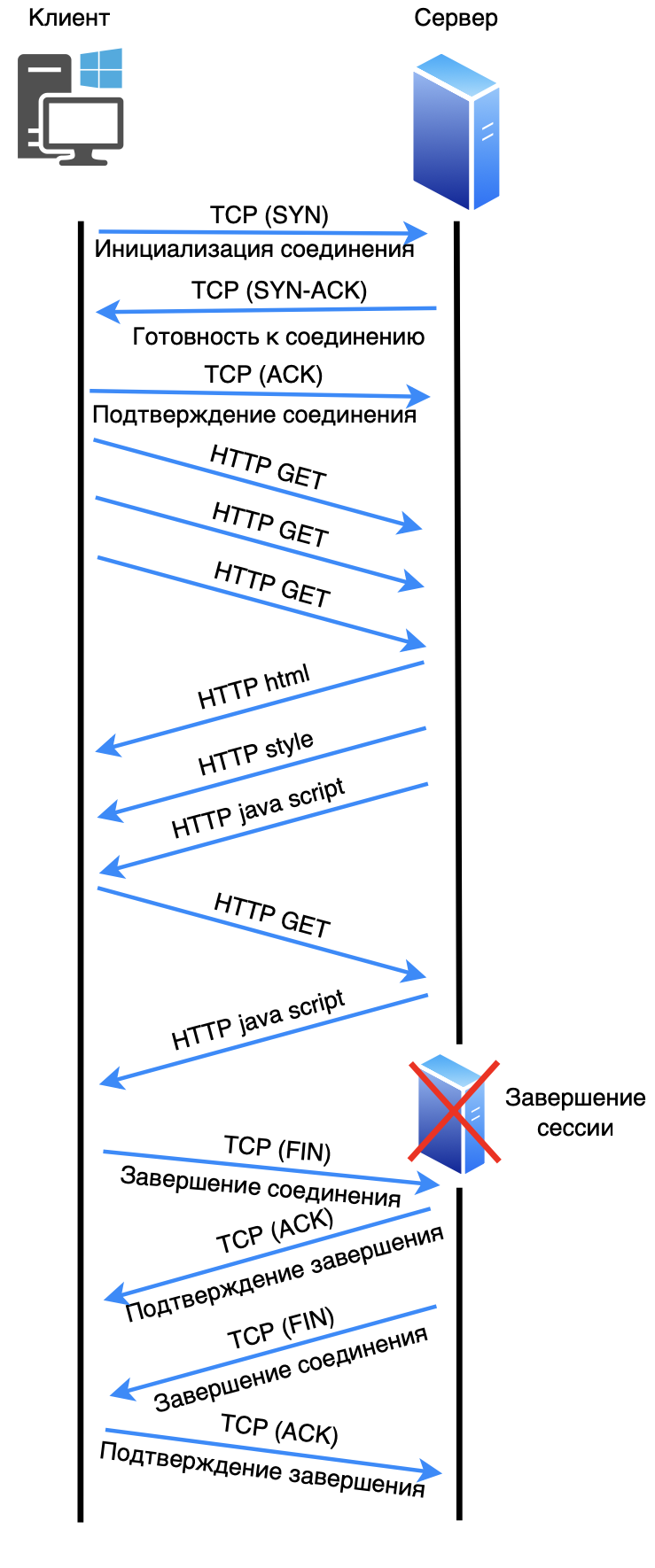
Important note. HTTP/2 by default uses TCP port 443. All versions below use TCP port 80 (Meaning HTTP without encryption).
Advantages
Improved performance through multiplexing and header compression.
Fewer connections by combining multiple streams into a single TCP connection.
Reduce Latency thanks to Server Push and header compression.
❯ HTTP 3
Major improvements and comparison with QUIC
HTTP/3 is based on the QUIC protocol, which is designed to improve data transfer over UDP instead of TCP, which solves many of the limitations of TCP:
Using QUIC over UDP. QUIC eliminates the need for multiple connection establishments inherent in TCP and works even during short-term connection interruptions;
Fast connection establishment. With built-in TLS support, QUIC minimizes connection setup delays;
Independent streams. HTTP/3 eliminates the thread blocking inherent in HTTP/2 because each thread operates independently.
Comparison with QUIC: HTTP/3 is fully integrated with QUIC, which allows you to use all the capabilities of this transport protocol. Unlike TCP, QUIC reduces latency for repeated requests and provides resilience to packet loss.
Request structure
The HTTP/3 request is also built on frames, but they run on top of independent threads, allowing them to be transmitted autonomously. Main frames:
HEADERS. Request headers;
DATA. Request body;
CONTROL. Control data for flow coordination.
Each request is sent in a separate thread QUIC, which eliminates blocking problems and reduces latency.
Response structure
HTTP/3 response includes:
HEADERS. Status code and headers;
DATA. Main content of the response;
CONTROL. To update the state of a thread.
Responses are also processed independently, which is especially useful when transferring large amounts of data.
Operation scheme
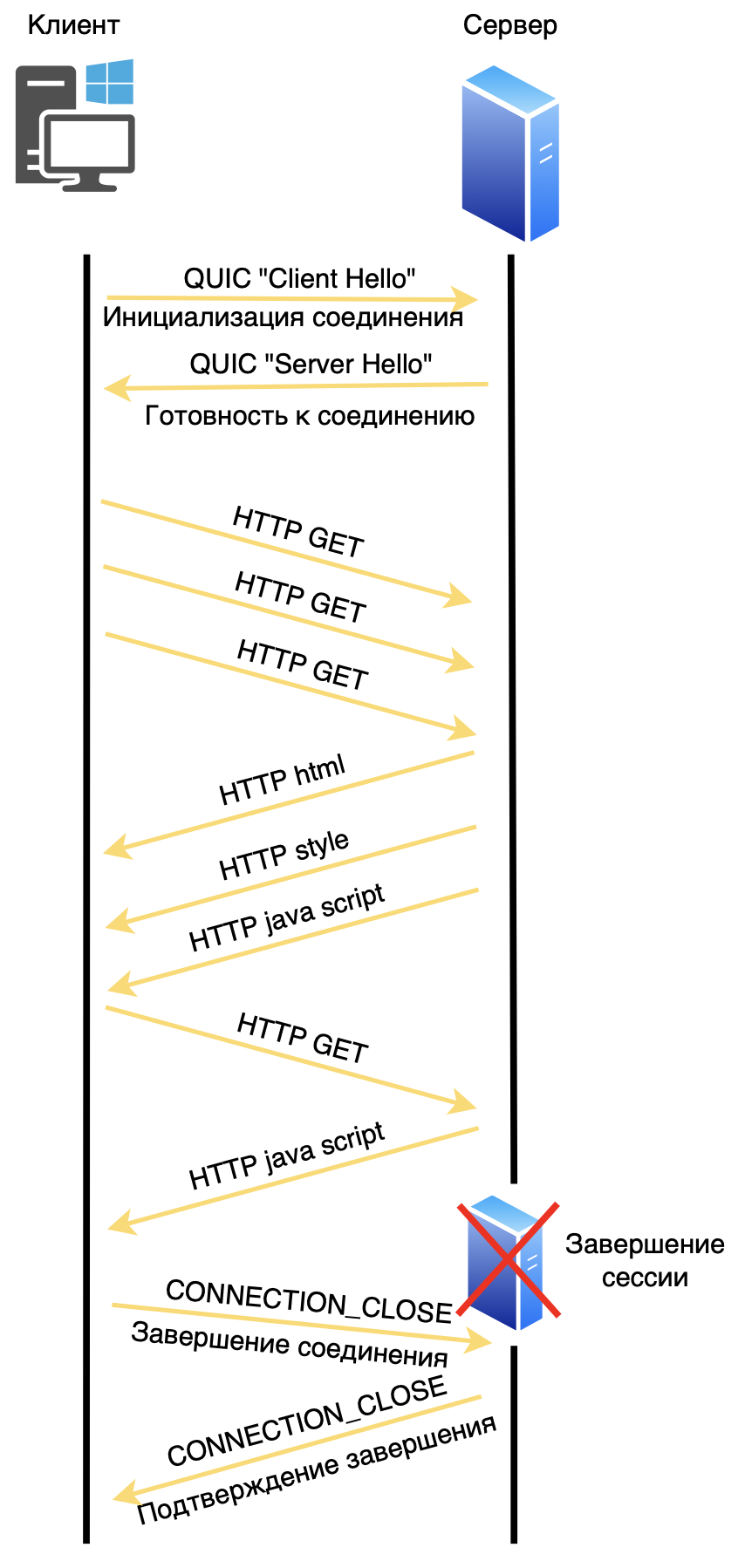
HTTP/3 operates over UDP and uses QUIC to manage the connection. After frame exchange HEADERS And DATA, the client can begin processing data, and QUIC ensures a reliable connection even in the face of network losses.
1. The client opens a connection to the server using the QUIC protocol over UDP.
2. When a connection is established, there is an initial encryption setup built into the QUIC protocol, which is faster than TCP.
3. The client sends several requests (for example, GET /timeweb.cloud.html And GET /style.css) simultaneously as independent threads, where each thread is processed independently, eliminating possible blocking.
4. The server responds to each request by sending data over the same QUIC connection, with each thread remaining independent—a delay or loss of data in one thread does not block the others.
5. The connection can remain open for future requests, which reduces delays when contacting the server again.
6. When shutting down, the client or server sends a message to close the connection and QUIC terminates it, freeing the resources.
As soon as the party receiving the message CONNECTION_CLOSE, confirms its receipt, the connection is considered closed. This is different from TCP, where termination occurs in stages using a three-phase close (FIN, FIN-ACK, ACK). QUIC simplifies this process, allowing for faster and more efficient release of resources.
Advantages
Fast connection and low latency by eliminating the need for multiple connection establishments.
No thread blocking. Each stream in HTTP/3 is independent, eliminating the problem of packet loss.
Flexibility and reliability in mobile networks by working with a dynamically changing connection.
Difference between HTTP/2 and HTTP/3
Although HTTP/2 and HTTP/3 both support parallel streams for data transfer, the key differences between them are in the transport layer mechanisms and stream management:
1. Transport protocol
HTTP/2 works on top TCP (Transmission Control Protocol), where data streams are transmitted over a single TCP connection. TCP provides reliability by ensuring that packets are delivered in the correct order. However, when a packet is lost in TCP, all threads on that connection wait for it to be retransmitted - this causes a phenomenon known as Head-of-Line Blocking. Despite multithreading at the HTTP/2 level, packet loss at the TCP level blocks other threads.
HTTP/3 uses QUIC instead of TCP. QUIC is a transport protocol built on top of UDP that supports independent streams within a single connection. It solves the problem of head node blocking: the loss of a packet in one thread does not stop data transmission in other threads. This allows HTTP/3 to be more efficient, especially on unstable connections such as mobile networks.
2. Headend blocking problem
HTTP/2 depends on TCP, which provides reliable delivery but does not have built-in flow separation at the packet loss level. Thus, if packet loss occurs on a TCP connection, all HTTP/2 flows are suspended until the packet is delivered, creating delays.
HTTP/3 and QUIC eliminate this problem because each stream is transmitted independently. Packet losses in one flow do not affect other flows, reducing latency.
3. Performance and latency
HTTP/3 significantly reduces connection setup time thanks to the faster QUIC handshake procedure, which is also combined with the initial TLS (encryption) stage. When reconnecting, QUIC can skip some of the handshake steps, which reduces latency.
HTTP/2, on the other hand, requires TCP connection establishment and a separate TLS handshake. This complicates the connection procedure, especially when network latency is high.
4. Resilience to network changes
QUIC allows you to bind one connection to several IP addresses, supporting data transfer even when changing the network interface (for example, from Wi-Fi to a cellular network). This makes HTTP/3 more stable in mobile networks.
HTTP/2 and TCP do not support multithreading at the IP level, and changing the network interface causes the connection to break.
Final comparison
Peculiarity | HTTP/2 (TCP) | HTTP/3 (QUIC) |
Transport protocol | TCP | QUIC (UDP based) |
Headend blocking | Eat | No |
Connection delay | Above (TCP+TLS) | Below (QUIC quick handshake) |
Thread independence | HTTP level only | At the transport protocol level |
Resilience to network changes | Low | High |
Thus, HTTP/3 provides higher performance and stability by eliminating TCP and using QUIC, which allows efficient and independent flow control and reduced latency.
❯ HTTPS
❯ What is HTTP?
HTTPS (HyperText Transfer Protocol Secure) is an extension of the HTTP protocol that ensures secure data transfer on the Internet. It is used to protect data transmitted between a client (usually a web browser) and a server. Here's a more detailed explanation:
Data Security
HTTPS uses encryption to protect data sent over the network. This prevents third parties from intercepting information. All data sent and received via HTTPS is encrypted using SSL (Secure Sockets Layer) or TLS (Transport Layer Security) protocols.
Encryption
SSL and TLS: These protocols provide encryption for the connection, making it secure. TLS is a more modern and secure version of SSL. During the connection process, the client and server exchange encryption keys, which are then used to encrypt the data.
Protection against MITM attacks: Encryption helps prevent man-in-the-middle (MITM) attacks, in which an attacker can intercept and modify the information being transmitted.
Authentication
HTTPS also provides website authentication using certificates. When a client connects to a server, the server presents a digital certificate that verifies its identity. This certificate is issued by a trusted third party called a certification authority (CA).
Certificate verification. Browsers check the validity of the certificate before establishing a secure connection. If the certificate is invalid or untrusted, the browser can warn the user of a potential threat.
Data integrity
HTTPS обеспечивает целостность передаваемых данных, гарантируя, что информация не была изменена или повреждена в процессе передачи. Это достигается за счет использования криптографических хеш-функций, которые проверяют, что данные не были изменены.
❯ How does HTTPS work?
Establishing a connection: The client (browser) initiates a request to create an HTTPS connection to the server.
Certificate exchange: The server sends its digital certificate to the client.
Certificate verification: The client verifies the certificate and, if it is valid, generates a symmetric key to encrypt the data.
Data encryption: Все передаваемые данные между клиентом и сервером шифруются с использованием этого ключа.
Ending the connection: После обмена данными соединение может быть закрыто, или клиент и сервер могут оставить его открытым для дальнейших запросов.
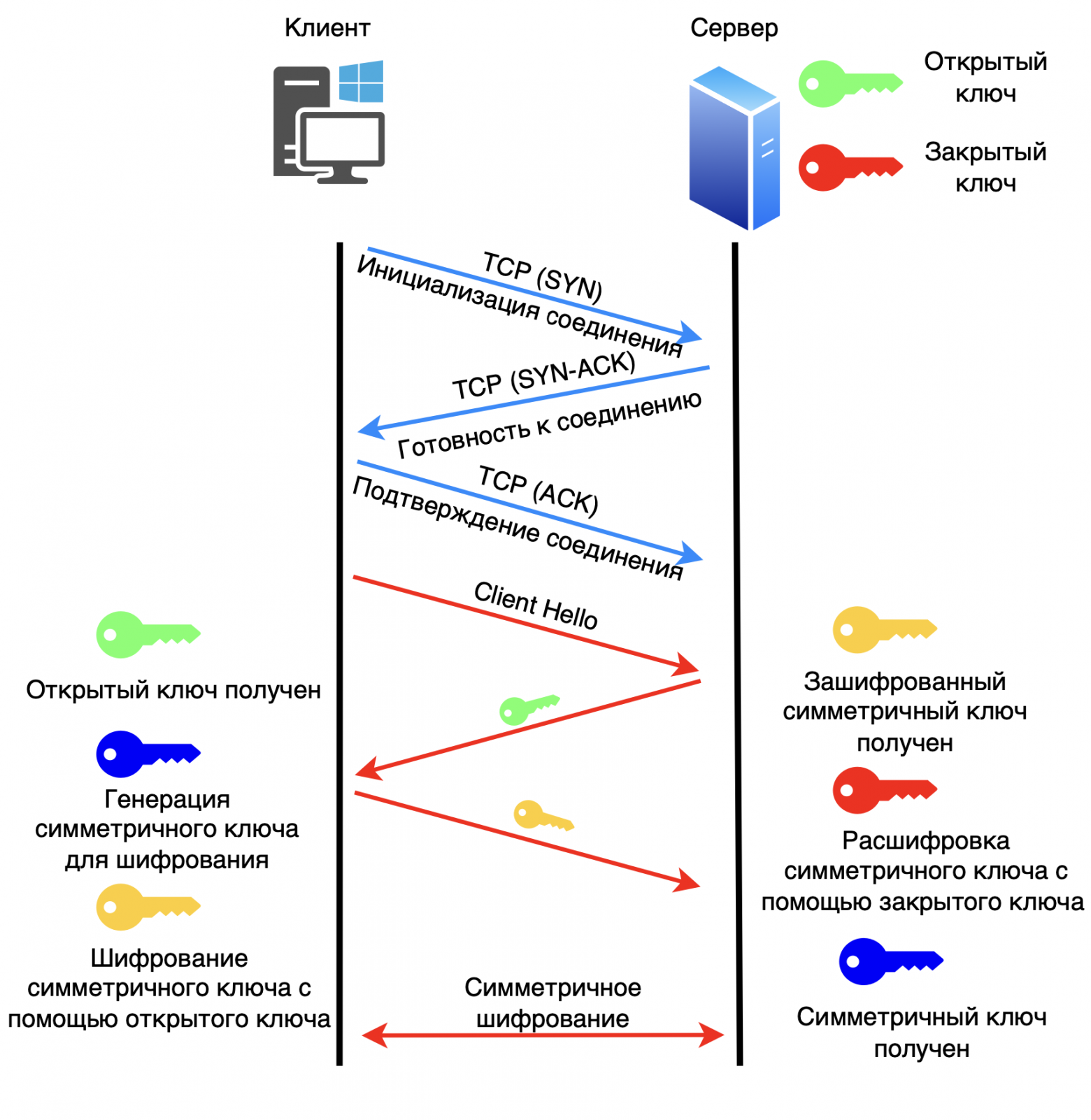
Let's look at the example of the RSA key exchange algorithm (Rivest, Shamir and Adleman).
1. The client establishes a connection with the server via TCP (the process involves sending SYN, SYN-ACK, and ACK packets).
2. The client sends a “Hello” message to the server.
3. The server passes the public key to the client.
4. The client generates a key for symmetric encryption. Encrypts this key using the public key it received from the server. Sends this encrypted key to the server.
5. The server receives the encrypted key and decrypts it using the private key. This way the server obtains a shared key for symmetric encryption between the server and the client.
6. HTTP transmission with encryption begins.
Benefits of using HTTPS
Increased security. Protect users' personal information, such as passwords and credit card numbers.
SEO Improvement. Search engines like Google favor sites with HTTPS, which can improve a site's ranking.
User trust. The padlock symbol in the browser's address bar shows users that the connection is secure, which increases trust in the site.
Applications
HTTPS is widely used on websites, especially those that handle sensitive information, such as online stores, banks and social networks. However, in recent years, many sites have begun to use HTTPS by default, even if they do not process sensitive data, to improve overall security and protect against attacks.
Thus, HTTPS is an important element of Internet security, ensuring data protection and user trust in websites.
The HTTPS protocol uses different versions of TLS (Transport Layer Security) depending on the version of HTTP. Here's how it works:
1. HTTP/1.1 and HTTP/2
TLS version used. Typically TLS 1.2 is used, but TLS 1.3 can also be used.
Cause:
TLS 1.2 has been a security standard for many years and has been widely supported. It provides improved security and performance compared to previous versions;
TLS 1.3, introduced in 2018, significantly improves performance and security by simplifying the handshake process and removing legacy features that could expose the system to risks. Because HTTP/2 was designed with modern security and performance requirements in mind, implementing it with TLS 1.3 is common practice.
2. HTTP/3
TLS version used: TLS 1.3.
Cause:
HTTP/3 runs on top of QUIC, which itself already includes encryption similar to TLS. QUIC provides built-in encryption, making it more efficient and secure to use. Therefore, TLS 1.3 is used for HTTP/3 because it is optimized to work with QUIC, improving both security and performance;
Using TLS 1.3 in combination with QUIC reduces connection setup time with a faster handshake, which is important for making web applications more responsive.
Summary table:
HTTP version | TLS version used | Rationale |
HTTP/1.1 | TLS 1.2 / TLS 1.3 | Broad support, improved security and performance. |
HTTP/2 | TLS 1.2 / TLS 1.3 | Supports modern security and performance requirements. |
HTTP/3 | TLS 1.3 | Built-in QUIC encryption, optimized connection. |
There are security and performance considerations associated with using different versions of TLS with different versions of HTTP. New protocol versions, such as TLS 1.3, have been developed to meet modern security requirements and also improve the efficiency of data transfer, which is especially important for modern web applications.
❯ Conclusion
The evolution of HTTP from version 0.9 to 3 reflects the constant desire to improve the speed, security and efficiency of web communications. Each version has brought significant improvements, from the addition of basic methods in HTTP/1.0 to the transition to a binary protocol and multiplexing in HTTP/2 and the complete modernization of data transfer via QUIC in HTTP/3. These changes helped overcome key challenges such as network congestion and security vulnerabilities.
In addition, the integration of TLS as an important component of data protection has become the basis for ensuring confidentiality and integrity of information, which meets modern Internet security requirements. HTTP/3, together with the use of UDP and encryption at the transport protocol level, provides an even faster and more reliable way to transfer data, which makes it especially relevant in the era of widespread use of mobile devices and cloud services.
In this way, HTTP continues to adapt to the needs of the modern Internet, laying the foundation for future improvements and remaining the central technology for web applications and services around the world.
News, product reviews and competitions from the Timeweb.Cloud team — in our Telegram channel ↩
📚 Read also:
➤ What to do when you want to crack a password, crack a sensor and try Python? Ch1: exploring capacitive touch screen;
➤ To the stars on the domestic BIS 1537ХМ2: we look at the module of the integrated inertial-astrosatellite system;
➤ Comments are our everything! Online comment history;
➤ Not (loneliness online) NOW;
➤ Flashback Runner.
Why This Matters In Practice
Beyond the original publication, It's complicated about simple things. The most popular protocols and principles of their operation. HTTP, HTTPS, SSL and TLS. Part 3 matters because teams need reusable decision patterns, not one-off anecdotes. Greetings, colleagues! My name is @ProstoKirReal . Today I would like to continue the discussion with you about the most popular protocols,...
Operational Takeaways
- Separate core principles from context-specific details before implementation.
- Define measurable success criteria before adopting the approach.
- Validate assumptions on a small scope, then scale based on evidence.
Quick Applicability Checklist
- Can this be reproduced with your current team and constraints?
- Do you have observable signals to confirm improvement?
- What trade-off (speed, cost, complexity, risk) are you accepting?
FAQ
What is this article about in one sentence?
This article explains the core idea in practical terms and focuses on what you can apply in real work.
Who is this article for?
It is written for engineers, technical leaders, and curious readers who want a clear, implementation-focused explanation.
What should I read next?
Use the related articles below to continue with closely connected topics and concrete examples.





