It's complicated about simple things. The most popular protocols and principles of their operation. ARP, ICMP, IGMP, TCP, UDP, SCTP, DNS and DHCP. Part 1
Greetings, colleagues! My name is @ProstoKirReal . Today I would like to discuss with you the most common protocols, as well as the principles of their operation. ❯ Why is this article needed? Previous two articles ( Part 1 And part 2 ) I wrote with the goal of creating a kind of
Editor's Context
This article is an English adaptation with additional editorial framing for an international audience.
- Terminology and structure were localized for clarity.
- Examples were rewritten for practical readability.
- Technical claims were preserved with source attribution.
Source: original publication
Greetings, colleagues! My name is @ProstoKirReal. Today I would like to discuss with you the most common protocols, as well as the principles of their operation.
❯ Why is this article needed?
Previous two articles (Part 1 And part 2) I wrote with the goal of creating a kind of “cheat sheet” for headings at levels L2, L3 And L4 models OSI.
These several articles will describe the most popular protocols and principles of their operation.
❯ ARP
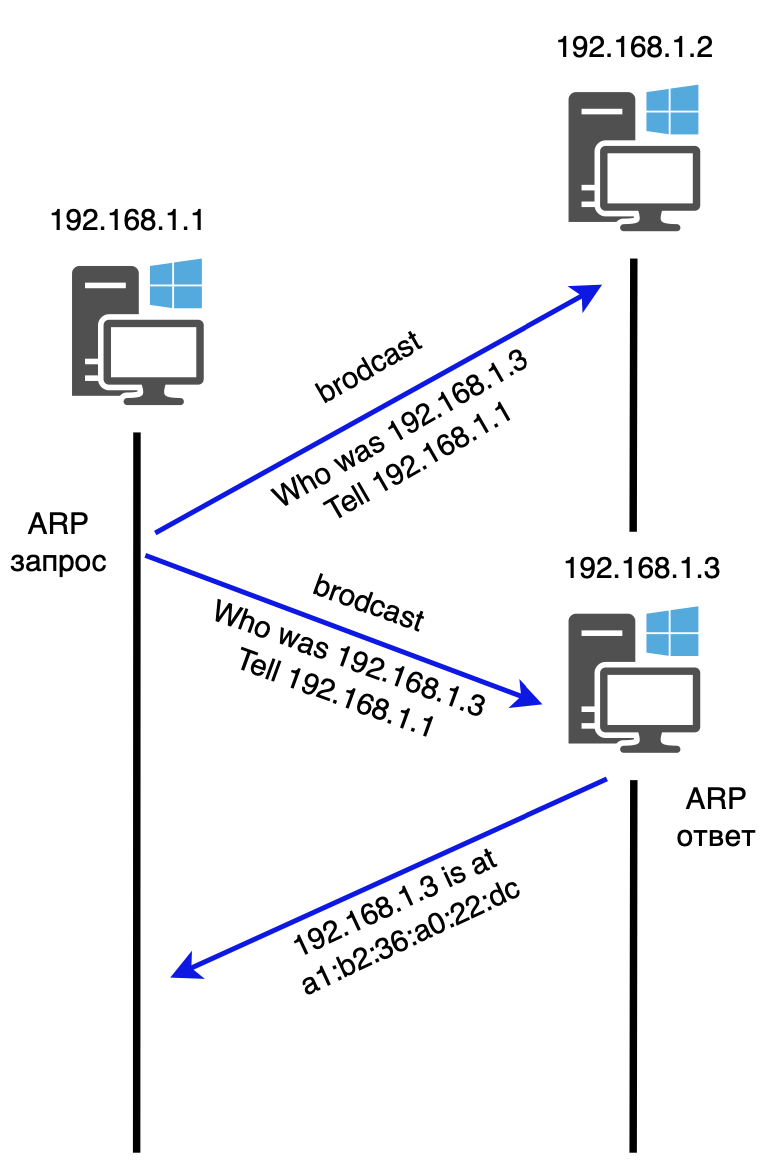
ARP (Address Resolution Protocol) is the most important protocol in computer networks, designed to determine the MAC address of another computer based on a known IP.
No computer or network device will start sending data packets unless it knows the MAC address of the target device (default gateway or next hop in routing). The ARP protocol allows you to automatically determine the MAC address from the IP address. The protocol operates in request-response mode.
The device sends an ARP request to the broadcast MAC address. All devices on the network receive this request. The device whose IP address matches the one specified in the request sends an ARP response containing its MAC address. The device sending the request receives the response, extracts the MAC address from it and stores it in its ARP table (MAC address table) to use it for further data transmission at the data link layer.
❯ IPv4
IPv4 (Internet Protocol version 4) is one of the main protocols used for internetworking on the Internet and other packet-switched networks. IPv4 supports several payload types. The most common ones are:
ICMP - control message protocol;
IGMP - Internet Group Management Protocol;
TCP - Transmission Control Protocol;
UDP - User Datagram Protocol;
SCTP is the Stream Transmission Control Protocol.
❯ ICMP
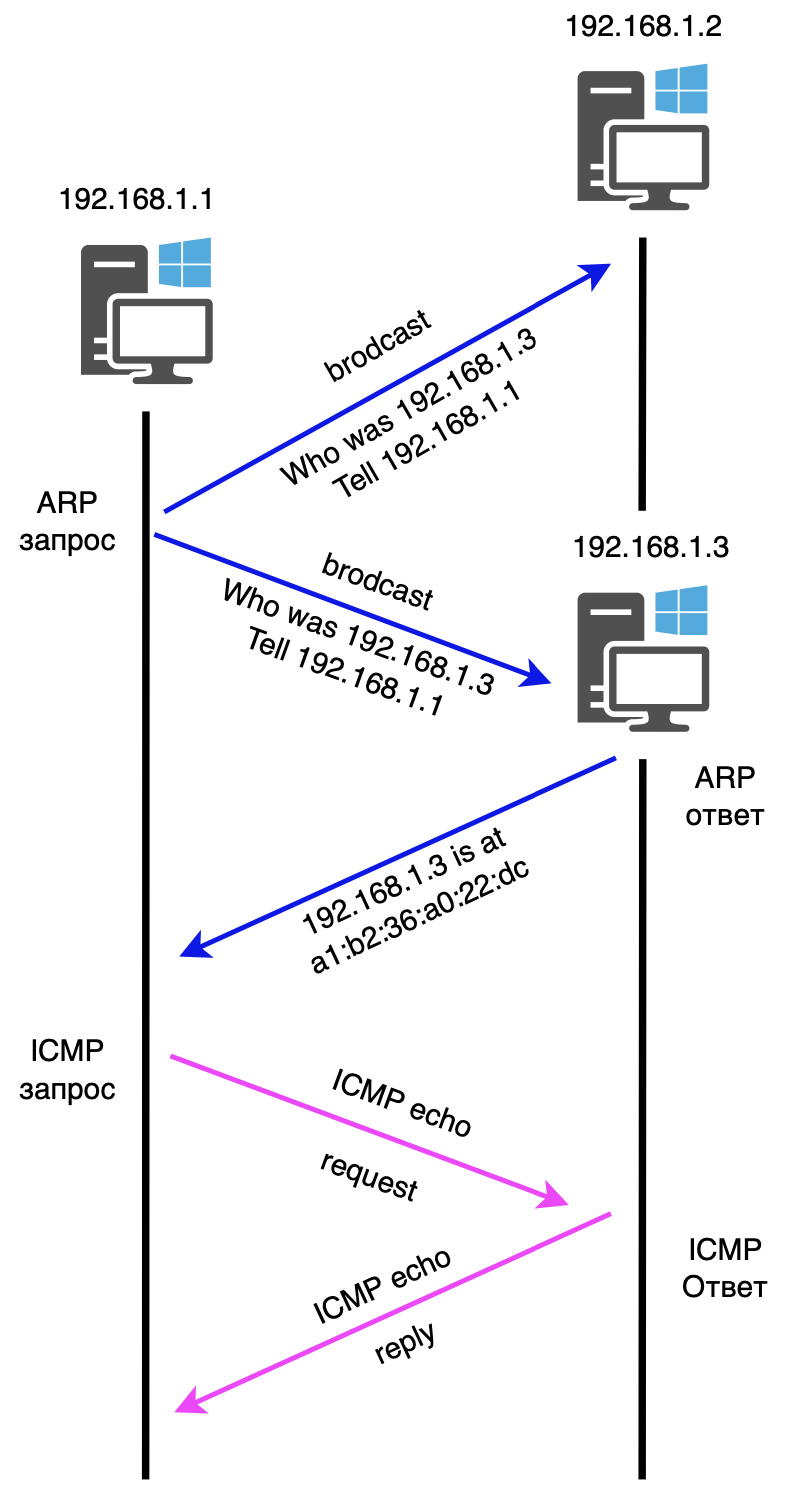
ICMP (Internet Control Message Protocol) is a protocol designed to send error messages and transmit service information that indicates the success or failure of communication with another IP address. Typically, ICMP is not used to transfer data between devices, but is used to test communications between two hosts using programs such as ping or traceroute.
For example, you can enter the command “ping 192.168.1.1” to see if that IP address is reachable.
The ICMP header comes after the IPv4 header and is identified as protocol 1. ICMP packets contain an 8-bit header and variable-sized data. The Type field indicates the packet type. If the value is 8 it is an ICMP echo (ping) request, if 0 it is an ICMP echo (ping) response.
❯ IGMP
IGMP (Internet Group Management Protocol) is a network protocol used to communicate with clients that receive multicast traffic. It manages multicast connections and plays a key role in organizing multicast data transmission, providing dynamic distribution of packets in the network. IGMP is part of the TCP/IP protocol suite and is used for data transmission using the multicast principle.
Multicast is a method of transmitting data over IPv4 networks that allows you to send one data stream to a large number of recipients at once. In multicast mode, the sender transmits data not to one recipient, but to a whole group of recipients, which can include both private users and corporate networks connected to different subnets.
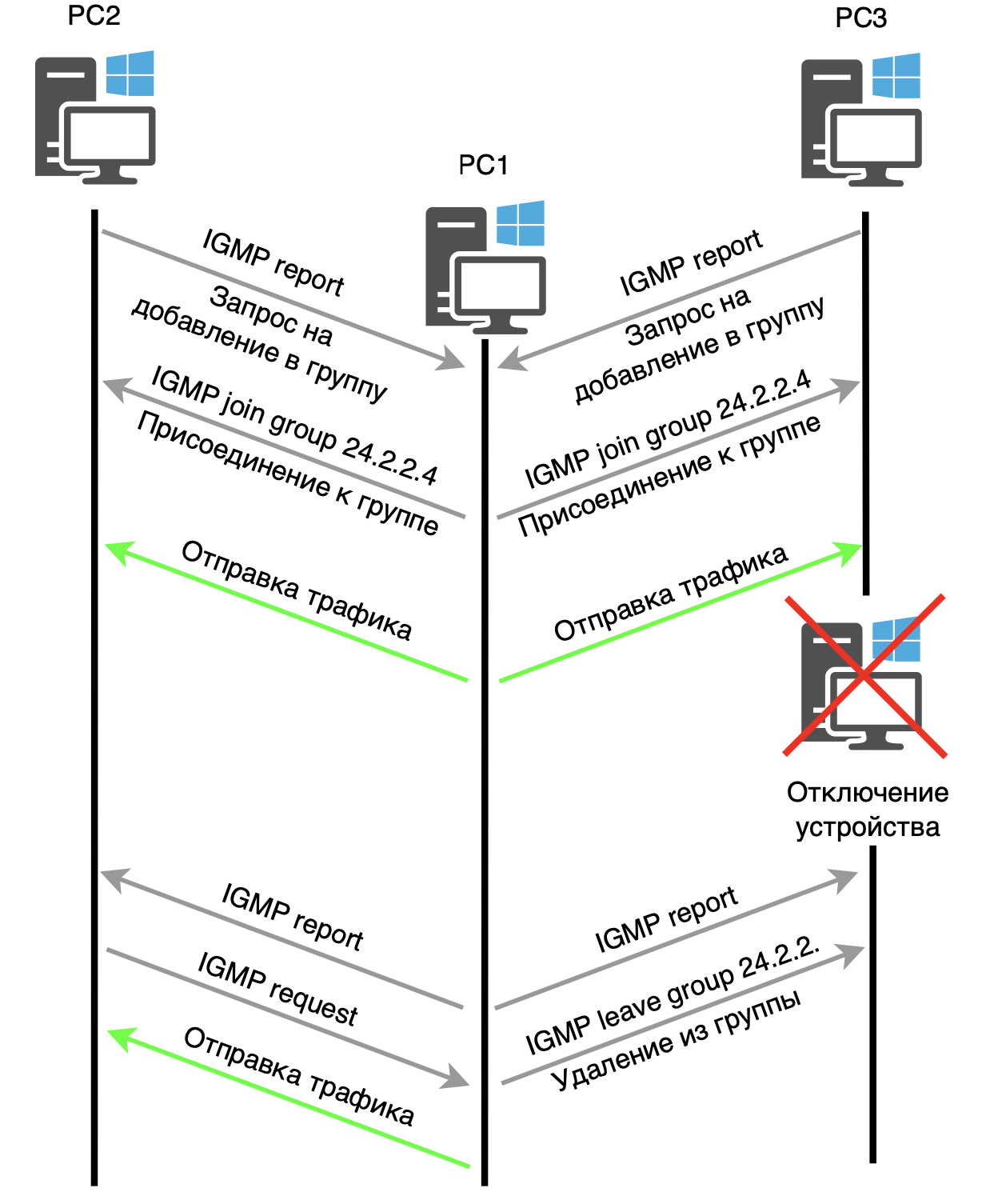
When a client starts a connection to a multicast group, for example, with the address 224.2.2.4, it sends an IGMP Membership Report request indicating that it wants to receive multicast traffic. This request is valid only within its network segment and is not forwarded by routers to other networks.
After receiving a request, the router registers the presence of a client on the corresponding interface and enters information about it into its table. From this moment, the router begins to forward multicast traffic to the corresponding device. When a client disconnects, the router sends a request to all connected devices, and those that want to continue receiving traffic respond. After receiving responses, the router updates its tables and continues delivering traffic only to those remaining in the group. If a device leaves the group, an IGMP packet is sent to it informing about this.
IGMP comes in three versions, each of which is backward compatible with its predecessors. Today the most common versions are IGMPv2 And IGMPv3.
❯ UDP
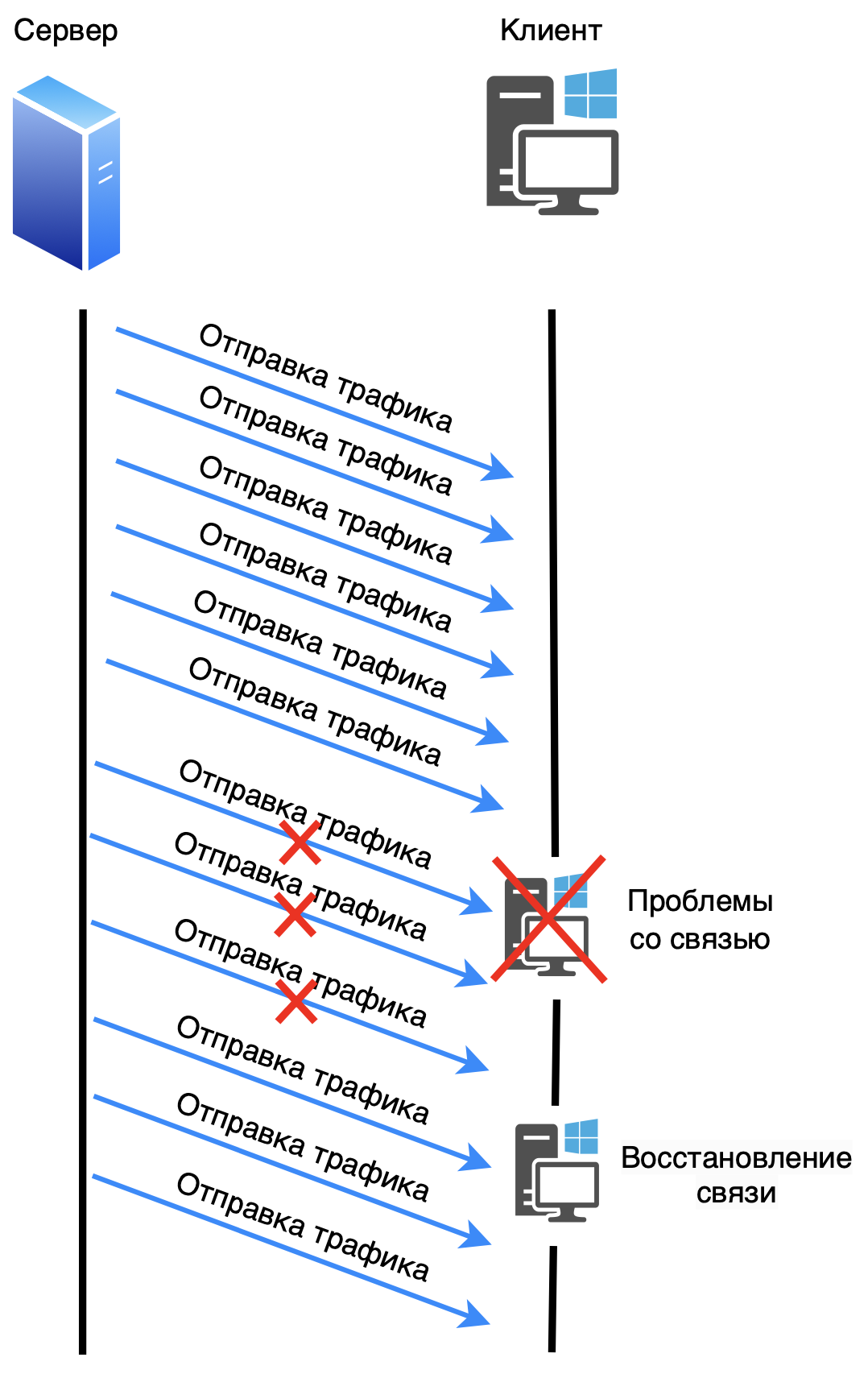
UDP (User Datagram Protocol) is one of the key elements of the network protocol suite for the Internet. With UDP, applications can send messages to other hosts over an IP network without having to establish a connection, as required by TCP.
UDP is a connectionless protocol, which means that it is not necessary to establish special data channels before sending messages.
UDP does not provide guarantees of delivery, order of receipt, or message integrity to its superior protocol, and does not store the state of sent messages. It provides simple data transfer with minimal latency and also includes header and data integrity control using a checksum.
When an application using UDP sends data to another host on the network, UDP appends to that data an 8-byte header containing the source and destination port numbers, the total length of the datagram, and a checksum. The IP protocol then adds its header on top of the UDP datagram, forming an IP datagram. The theoretical maximum size of an IP datagram is 65535 bytes, including the IP and UDP headers.
The UDP checksum is used to verify the integrity of the data and header. It includes both the data and the UDP header, as well as a pseudo-header consisting of part of the IP header information. If the checksum does not match, the receiver determines that the data is corrupt and can discard the packet. It's important to note that if the checksum is zero (in IPv4), it means it is not used.
After UDP adds its header, the IP layer imposes a header that includes fields such as TTL, source and destination IP address.
❯ TCP
TCP (Transmission Control Protocol) is a digital data transfer protocol that is part of the TCP/IP stack. The TCP protocol describes data transfer rules and standards for interaction between devices on a network, and also supports routing and internetworking mechanisms. Unlike UDP, TCP is connection-oriented protocol, that is, TCP requires that a connection be established between two nodes before transmitting data. Once the data transfer is complete, the connection must also be closed.
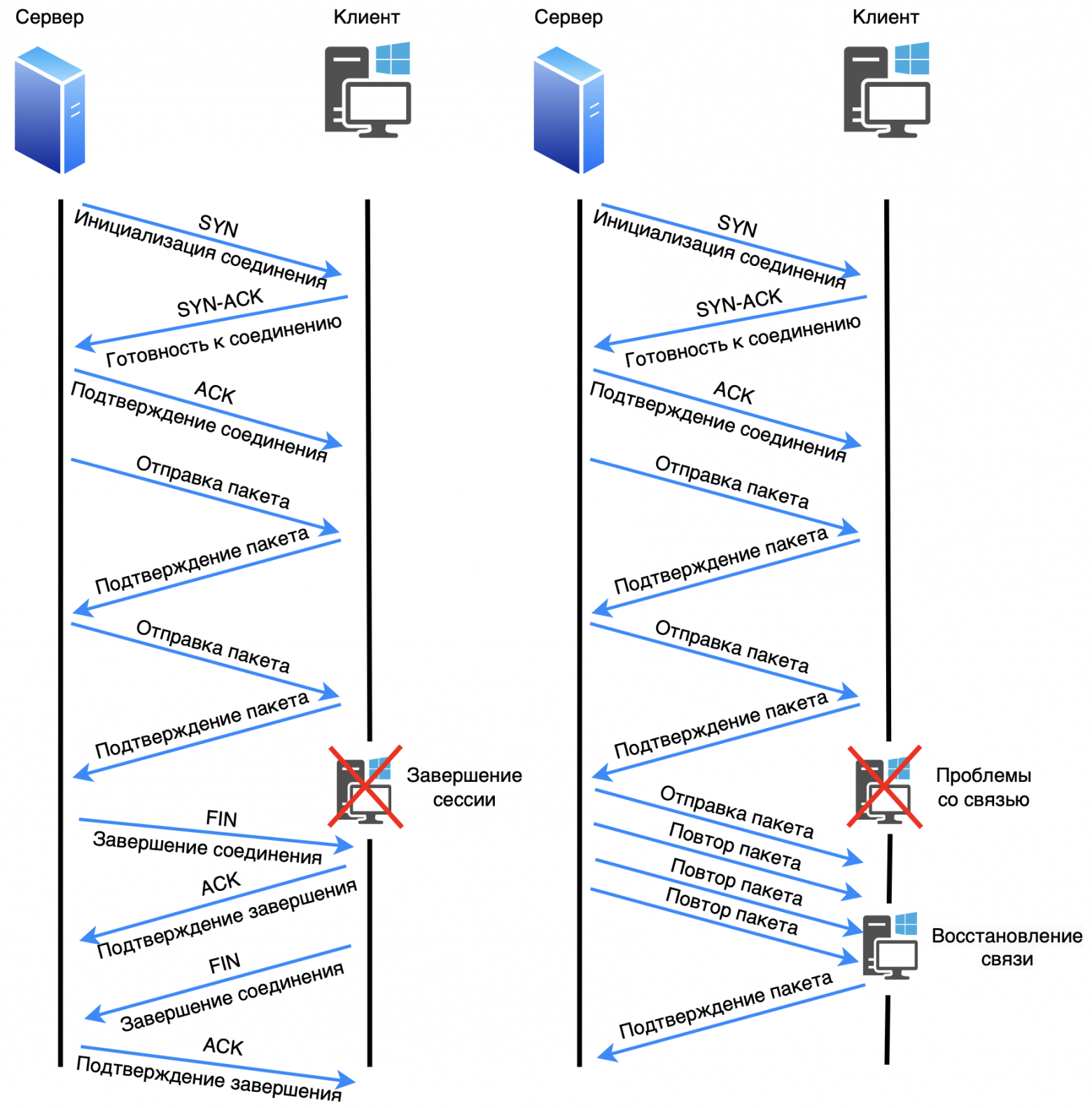
Before transmitting data, TCP establishes a connection between the sender and the recipient using the three way handshake (three-way handshake). This process ensures that the recipient exists, is listening on the correct port, and is ready to receive data.
The three-way handshake process includes the following steps:
The sender sends a segment with a flag SYN (synchronize) to initialize the connection.
The recipient responds with a flag segment SYN-ACK, confirming readiness for connection.
The sender sends a segment with a flag ACK, completing the connection setup.
Once the connection is established, the transfer of useful data begins. TCP provides reliable data transmission using an acknowledgment mechanism. The recipient of the data acknowledges receipt of each segment by sending a message to the sender with the sequence number of the next segment it expects to receive. If the acknowledgment does not arrive within the specified time, the segment is retransmitted. After several unsuccessful attempts, TCP may decide that the connection has been lost and terminate the session.
When all data has been transferred, TCP initiates the connection termination process. This also happens in several steps:
The sender sends a segment with a flag FIN (finish), indicating completion of data transfer.
The recipient acknowledges this with a flag segment ACK and sends its segment with the flag FIN.
The sender confirms this with a flag segment ACK, and the connection is closed.
❯ SCTP
SCTP (Stream Control Transmission Protocol) is a transport protocol that was designed for data transmission over highly reliable and secure networks, such as IP networks. The main purpose of creating SCTP was to combine the best features of other transport protocols such as TCP (reliable data transmission with confirmation) and UDP (low latency and multi-threading support), providing the capabilities they were missing.
SCTP Key Features
1. Multithreading: SCTP supports the transmission of multiple independent data streams within a single connection. This means that if one data stream is blocked (due to packet loss, for example), other streams can continue to flow without delay. This significantly improves the performance of applications that use multiple data streams simultaneously.
2. Multihoming: SCTP supports the concept of multihoming, which allows one host to have multiple IP addresses within a single connection. This provides fault tolerance—if one route between nodes is lost, the protocol can automatically switch to another IP address without losing the connection.
3. Data integrity control: SCTP uses 32-bit CRC checksums to verify the integrity of the data in each packet transmitted, which provides higher reliability than the TCP checksum, which is based on a modulo-16 checksum algorithm.
4. Overload control: The protocol includes congestion control mechanisms similar to those used in TCP to prevent excessive use of network resources and data loss.
5. Connection management: Like TCP, SCTP is a connection-oriented protocol. This means that nodes must first establish a connection before transmitting data. However, unlike TCP, SCTP uses a four-way handshake process, which makes it less vulnerable to attacks like SYN-flood.
6. Messaging: SCTP is designed to transport entire messages, not just streams of bytes like TCP does. This simplifies the protocol for applications that deal with logical units of data, such as telephone calls or alarms.
SCTP packet structure
An SCTP packet consists of several parts:
1. Common Header:
Source Port And Destination Port: Sender and Destination ports.
Verification Tag: An identifier used to validate packets to ensure that the packet belongs to the correct connection.
Checksum: CRC32 checksum to check data integrity.
2. Chunks: The general header is followed by one or more chunks, which may contain control or payload data. Each chunk has its own header, consisting of:
Chunk type: Indicates the type of data (such as connection control or payload transfer).
Flags: Additional options.
Chunk lengths: length of the chunk along with its data.
Useful data: In the case of data chunks, they contain segments of the messages being transmitted.
Basic Applications of SCTP
1. Telephony and alarm: SCTP was designed to meet the needs of IP telephony and signaling systems such as SS7. It was designed for signaling in telecommunications systems, ensuring reliable data delivery.
2. Internet applications: Applications that require reliable multi-streaming of data, such as streaming media and video conferencing, can use SCTP to improve performance and resilience to failures.
3. High Availability Systems: In distributed systems where continuous data availability is critical (for example, in the banking or financial industries), SCTP can be used due to its multihoming support.
Advantages of SCTP over TCP and UDP
Unlike TCP,SCTP supports multithreading and multihoming, making it more flexible and reliable in complex network environments.
Unlike UDP,SCTP provides reliable data delivery, which is especially important ,for applications that need to guarantee message delivery.
SCTP combines the strengths of both TCP and UDP and extends them with additional capabilities, making it ideal for mission-critical applications.
Comparison table of SCTP with TCP and UDP:
Parameter | UDP | TCP | SCTP |
Establishing a connection | No | Yes | Yes |
Reliable transmission | No | Yes | Yes |
Maintaining boundaries | Yes | No | Yes |
Ordered Delivery | No | Yes | Yes |
Unordered delivery | Yes | No | Yes |
Data checksums | Yes | Yes | Yes |
Checksum size (bits) | 16 | 16 | 32 |
MTU Path | No | Yes | Yes |
Accumulation management | No | No | Yes |
Multithreading | No | No | Yes |
Multiple Interface Support | No | No | Yes |
Bundle of threads | No | Yes | Yes |
❯ DNS
DNS (Domain Name System) - a protocol that provides conversion of domain names to IP addresses. DNS is an integral part of the Internet and private networks because it is easier for users to remember domain names rather than long numeric IP addresses.
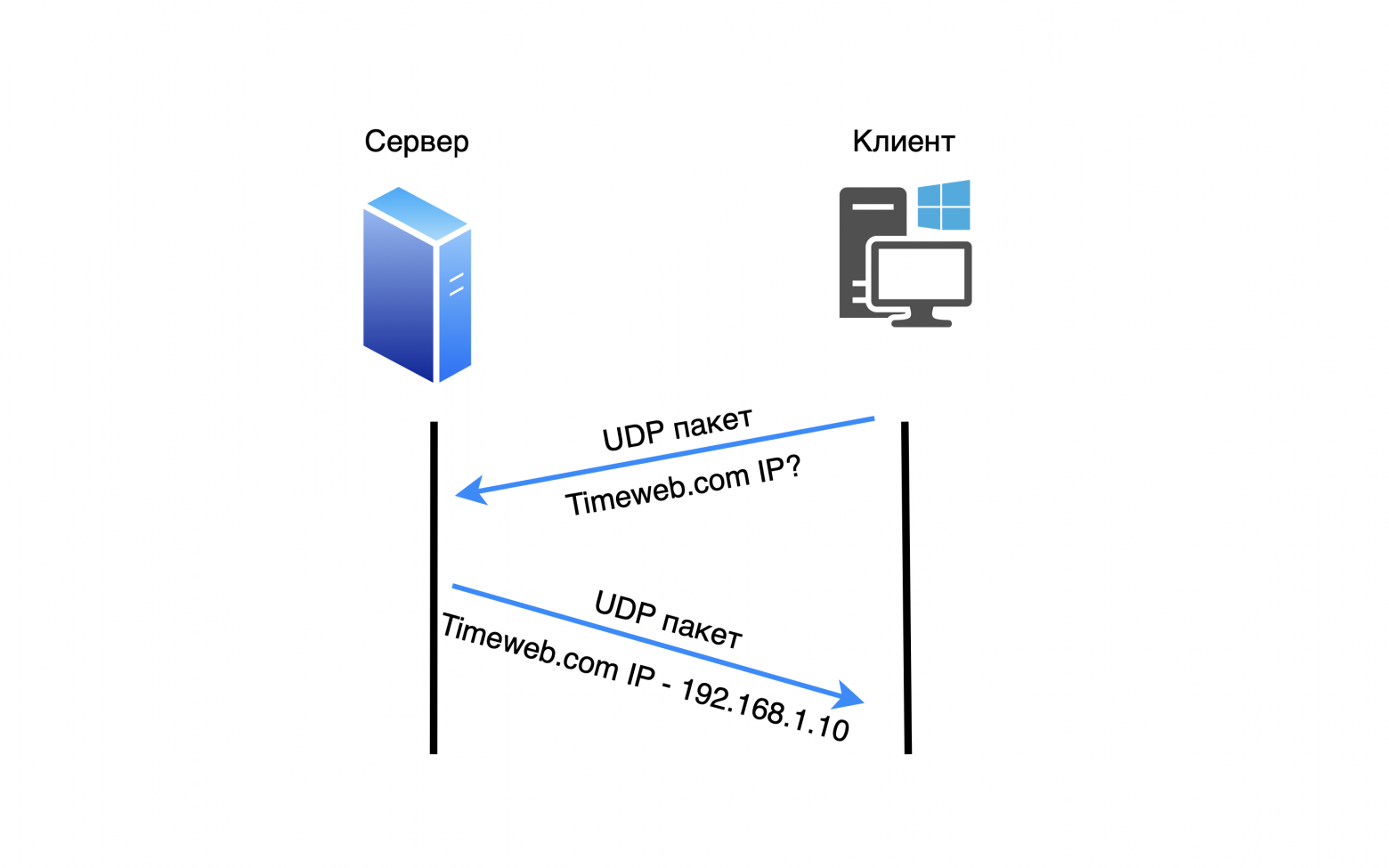
DNS primarily uses the UDP transport layer protocol. TCP is used with TCP fallback if the response size is more than 512 bytes (Zone Transfer). TCP uses the same port, as UDP - 53.
When a user enters a domain name (for example, timeweb.com), the request is sent to the DNS server, which looks up the corresponding IP address in its tables. If the server cannot find the information, it redirects the request to other DNS servers until the correct IP address is found. When the address is found, it is returned to the user and the device sends a request across the network to the resulting IP address.
Name resolution steps:
Recursive query: When a device sends a request to resolve a domain name, the DNS server begins a sequential search, going through several layers of servers.
Caching: To speed up the process, DNS servers and clients temporarily store information about the resolved domains, which reduces the time for subsequent queries.
Zones and domains: The Internet is divided into zones, each of which is controlled by a specific DNS server. For example, the ".com" zone has its own root server, which manages all domains ending in ".com".
DNS works through several types of records:
A record: Maps a domain name to an IPv4 address.
AAAA record: Maps a domain name to an IPv6 address.
MX Record: Points to the server for processing email.
CNAME: Creates an alias for another domain name.
❯ DHCP
DHCP (Dynamic Host Configuration Protocol) is a protocol that automatically assigns IP addresses and other network parameters to devices on a network. It simplifies configuration because devices do not need to manually configure IP addresses, subnet masks, gateways and DNS servers.
DHCP uses the UDP transport layer protocol.
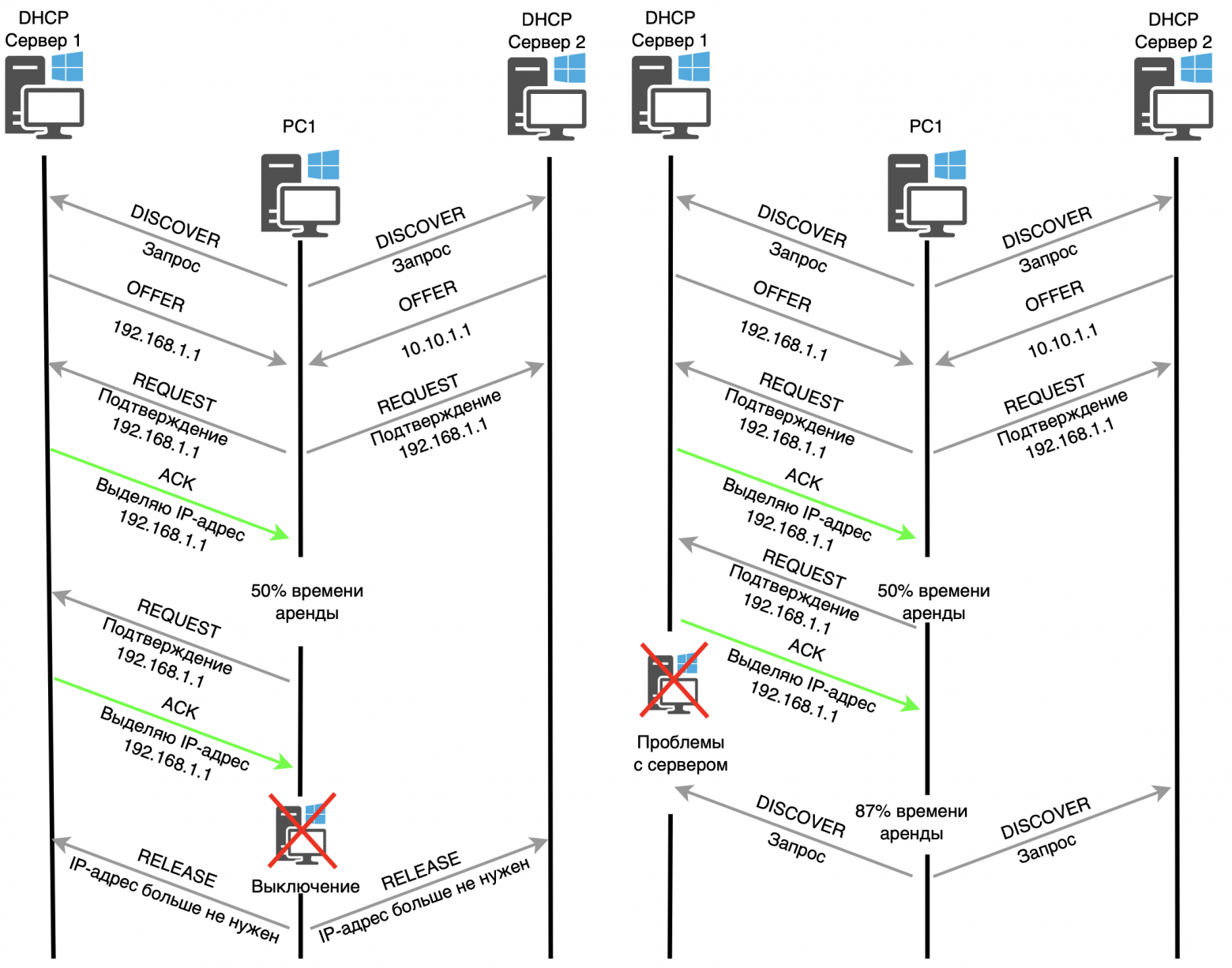
When a device connects to a network, it sends a DHCP broadcast request (DHCP DISCOVER) to find a DHCP server. The server responds with an offer (DHCP OFFER) containing an available IP address and other network information. The device sends a request (DHCP REQUEST) to obtain the proposed IP address, and the server finally confirms the allocation of the IP address (DHCP ACK). When a device is disconnected, a RELEASE message is sent to the DHCP server notifying it that the allocated IP address is no longer needed.
Process steps:
Discover: The device sends a broadcast request to find a DHCP server.
Offer: The server offers an available IP address.
Request: The device selects the suggested address and requests its use.
Ack: The server confirms the assignment of the IP address.
There can be several DHCP servers on the same network. If they receive a broadcast request, both will offer their IP addresses. The device will select one of the proposed IP addresses and send a DHCP REQUEST to all servers indicating the selected IP address. In response to the fourth message (DHCP ACK), only the server whose IP address was selected will respond.
After 50% of the IP address lease time has passed, you must either renew the current IP address or get a new one. To renew, devices immediately send a DHCP REQUEST, indicating the IP address that needs to be renewed. If the server does not respond and 87% of the lease time has passed, a DHCP DISCOVER broadcast request is sent again to obtain a new IP address.
Additional parameters that DHCP can send:
Subnet mask
Default Gateway
DNS servers
IP address lease time (lease)
DHCP greatly simplifies network management, especially in large organizations where manually assigning IP addresses would be impractical.
❯ Conclusion
In conclusion of this article, I would like to emphasize the importance of the described protocols for the operation of modern networks. All of these protocols play key roles at various levels of the OSI model, ensuring the exchange of data and its reliable delivery in network interactions. Understanding how these protocols work helps you manage networks more effectively and solve problems that arise.
In the next article, I plan to take a closer look at tunneling and dynamic routing protocols.
News, product reviews and competitions from the Timeweb.Cloud team — in our Telegram channel ↩

📚 Read also:
➤ Deshman TV repair;
➤ Convex Guide;
➤ We create an audiobook generator with personal translation;
➤ Not (loneliness online) NOW;
➤ I recommend playing: Cats and the Other Lives.
Why This Matters In Practice
Beyond the original publication, It's complicated about simple things. The most popular protocols and principles of their operation. ARP, ICMP, IGMP, TCP, UDP, SCTP, DNS and DHCP. Part 1 matters because teams need reusable decision patterns, not one-off anecdotes. Greetings, colleagues! My name is @ProstoKirReal . Today I would like to discuss with you the most common protocols, as well as the principl...
Operational Takeaways
- Separate core principles from context-specific details before implementation.
- Define measurable success criteria before adopting the approach.
- Validate assumptions on a small scope, then scale based on evidence.
Quick Applicability Checklist
- Can this be reproduced with your current team and constraints?
- Do you have observable signals to confirm improvement?
- What trade-off (speed, cost, complexity, risk) are you accepting?
FAQ
What is this article about in one sentence?
This article explains the core idea in practical terms and focuses on what you can apply in real work.
Who is this article for?
It is written for engineers, technical leaders, and curious readers who want a clear, implementation-focused explanation.
What should I read next?
Use the related articles below to continue with closely connected topics and concrete examples.





