It's complicated about simple things. Network layer (L3) of the OSI model
Greetings, colleagues! My name is ProstoKirReal , and today we will continue our journey through the OSI model by discussing the network layer (L3). This layer is responsible for routing data between different networks. Previous parts: It's complicated about simple things. Physic
Editor's Context
This article is an English adaptation with additional editorial framing for an international audience.
- Terminology and structure were localized for clarity.
- Examples were rewritten for practical readability.
- Technical claims were preserved with source attribution.
Source: original publication

Greetings, colleagues! My name is ProstoKirReal, and today we will continue our journey through the OSI model by discussing the network layer (L3). This layer is responsible for routing data between different networks.
Previous parts:
- It's complicated about simple things. Physical layer (L1) of the OSI model
- It's complicated about simple things. Link layer (L2) of the OSI model
❯ Network layer and the mail analogy
This level is very often compared to mail, and I will not stand aside. If in the previous article we compared the MAC address with the number and series in the passport, then the IP address at this level can be compared with the first and last name. When you want to send a paper letter to your friend, you write from whom (Ivan Ivanov) and where (Petr Petrov). If both of these people are in the same mail field (within the same local network), then the letter is immediately sent to the neighboring house of Peter.
If you want to send a letter to your friend in another city, then in the letter you write from whom (Ivan Ivanov) and your city (for example, Moscow), as well as to whom (Seryozha Sidorov) and the city of your friend (for example, Vladivostok). Another city can be compared to addressing a packet to another network (for example, from the LAN you send a packet to the WAN). The network layer (L3) of the OSI model is responsible for transmitting data packets to another network.
❯ IP packet and its structure
What is a data packet at this level?
An IP packet is a unit of data transmitted through a network at the internetwork layer. It includes a header and a payload (data).
IP packet contents:
- IP packet header: contains information necessary to route and deliver the packet. Includes fields such as source and destination IP addresses, packet length, flags, checksum, and others.
- Payload: the data that is transmitted may include transport layer segments (such as TCP or UDP segments).
Main components of an IP packet (for IPv4):
1. Heading:
- Version: Indicates the IP protocol version (4 for IPv4).
- Header Length: Length of the header in 32-bit words.
- Type of Service: Service quality and priority.
- Total Length: The total length of the packet in bytes.
- Identification: The unique identifier of the package.
- Flags: Fragmentation control.
- Fragment Offset: The position of the fragment in the original packet.
- Time to Live: Maximum number of routers.
- Protocol: Transport layer protocol (such as TCP or UDP).
- Header Checksum: Header checksum.
- Source IP Address: Source IP address.
- Destination IP Address: Destination IP address.
- Options: Additional options, if any.
2. Payload:
Data that can be a TCP segment, a UDP datagram, or other transport layer protocol data.

I will not analyze each title within the framework of this article; this is a separate topic for discussion, since there is a lot of information on them.
❯ Network layer and its functions
What is the network layer?
The Network Layer is the third layer of the OSI model. It is responsible for routing data packets between network nodes, logical addressing, and determining the path for data transmission across various networks.
Main functions of the network layer:
- Routing: determination of optimal paths for data transfer between networks.
- Logical addressing: assignment and management of IP addresses.
- Fragmentation: splitting large data packets into smaller pieces for transmission.
- Redirect: ensuring data transmission through intermediate nodes.
❯ Explanation about fragmentation
Some network devices can transmit large packet lengths, while other devices have restrictions on the maximum size of a transmitted packet (MTU - Maximum Transmission Unit). When a packet larger than the MTU size must pass through such a device, it is broken into several smaller fragments. This process is called fragmentation.
Fragmentation allows large amounts of data to be transferred over a network by dividing it into smaller pieces that can be processed and transmitted over networks with a smaller MTU. In this case, each fragment receives a header containing the information necessary for its reassembly into the original packet at the recipient's side.
Sending larger packets can be more efficient because it reduces the overhead of processing each packet. The larger the packet size, the lower the relative cost of processing each byte of data. This reduces overall processing costs and increases data transfer rates. At the same time, when transmitting smaller packets, the number of headers increases and, accordingly, the overhead for processing each packet.
❯ What happens if there are two identical IP addresses on the network?
On a network, each node must have a unique IP address. If two devices have the same IP address, this results in an address conflict, which can cause serious problems.
Consequences of IP address conflict:
- Network instability: Devices may occasionally lose network connectivity or experience problems accessing resources.
- Communication problems: Data packets may be delivered to the wrong device, resulting in data loss.
- Decreased performance: IP address conflicts can cause your network to slow down as devices and routers try to resolve the conflict.
- Network errors: Error messages may appear on devices, making it difficult to diagnose and resolve other network problems.
- Using DHCP: Dynamically assigning IP addresses using a DHCP server can help avoid address conflicts because the server ensures that the addresses assigned are unique.
- Static addressing: With static addressing, it is important to carefully plan and document IP address assignments to avoid duplication.
- Network monitoring: Regular network scanning and monitoring will help you quickly identify and resolve IP address conflicts.
❯ Core technologies and protocols
1. IP (Internet Protocol):
- Internet Protocol (IP) is the primary protocol used to transmit data on the Internet and other networks. IP packets contain routing and addressing information, allowing data to travel between devices on a network. There are two versions of IP: IPv4 and IPv6.
- IPv4: Uses 32-bit addresses (for example, 192.168.0.1), which allows for approximately 4.3 billion unique addresses.
- IPv6: Uses 128-bit addresses (for example, 2001:0db8:85a3:0000:0000:8a2e:0370:7334), which allows for significantly more unique addresses to be created.
2. ARP (Address Resolution Protocol):
- Address Resolution Protocol (ARP) is a protocol used to map IP addresses to physical (MAC) addresses of devices on a local area network (LAN). When a device sends data to another host on the same LAN, it uses ARP to determine the MAC address of the target device based on its IP address.
3. IPsec (Internet Protocol Security):
- Internet Protocol Security (IPsec) is a set of protocols for ensuring the security of data transmission over IP networks. It provides three main functions:
— Authentication: confirmation of the authenticity of the data source.
— Data integrity: ensures that data has not been modified during transmission.
— Encryption: protecting data from unauthorized access.
- IPsec is often used to create VPNs (Virtual Private Networks).
4. ICMP (Internet Control Message Protocol):
- Internet Control Message Protocol (ICMP) - Used to diagnose network problems and communicate error messages. The most well-known use of ICMP is the ping command, which checks the reachability of a host on a network.
5. IGMP (Internet Group Management Protocol):
- Internet Group Management Protocol (IGMP) - used to manage membership in multicast groups. Multicast is a method of transmitting data from one sender to several recipients simultaneously. IGMP allows routers to learn which devices on the local network want to receive data from specific multicast groups.
6. OSPF (Open Shortest Path First):
- Open Shortest Path First (OSPF) is a routing protocol used to determine the most efficient path for data to travel over an IP network. OSPF is an Interior Gateway Protocol (IGP) and uses Dijkstra's algorithm to find the shortest path between routers.
Additional protocols and technologies
1. BGP (Border Gateway Protocol):
- A routing protocol between autonomous systems on the Internet. BGP is responsible for exchanging routing information between networks, allowing data to find paths across many different networks.
2. RIP (Routing Information Protocol):
- A simple routing protocol using a distance vector algorithm. RIP updates routing tables at regular intervals, making it suitable for small networks.
3. NAT (Network Address Translation):
- NAT allows multiple devices on a local network to use one common public IP address to access the Internet. This helps save IP addresses and provides an additional level of security.
4. SDN (Software-Defined Networking):
- SDN allows you to centrally manage your network infrastructure using software. This provides greater flexibility and scalability when managing networks.
❯ Application of the network layer in practice
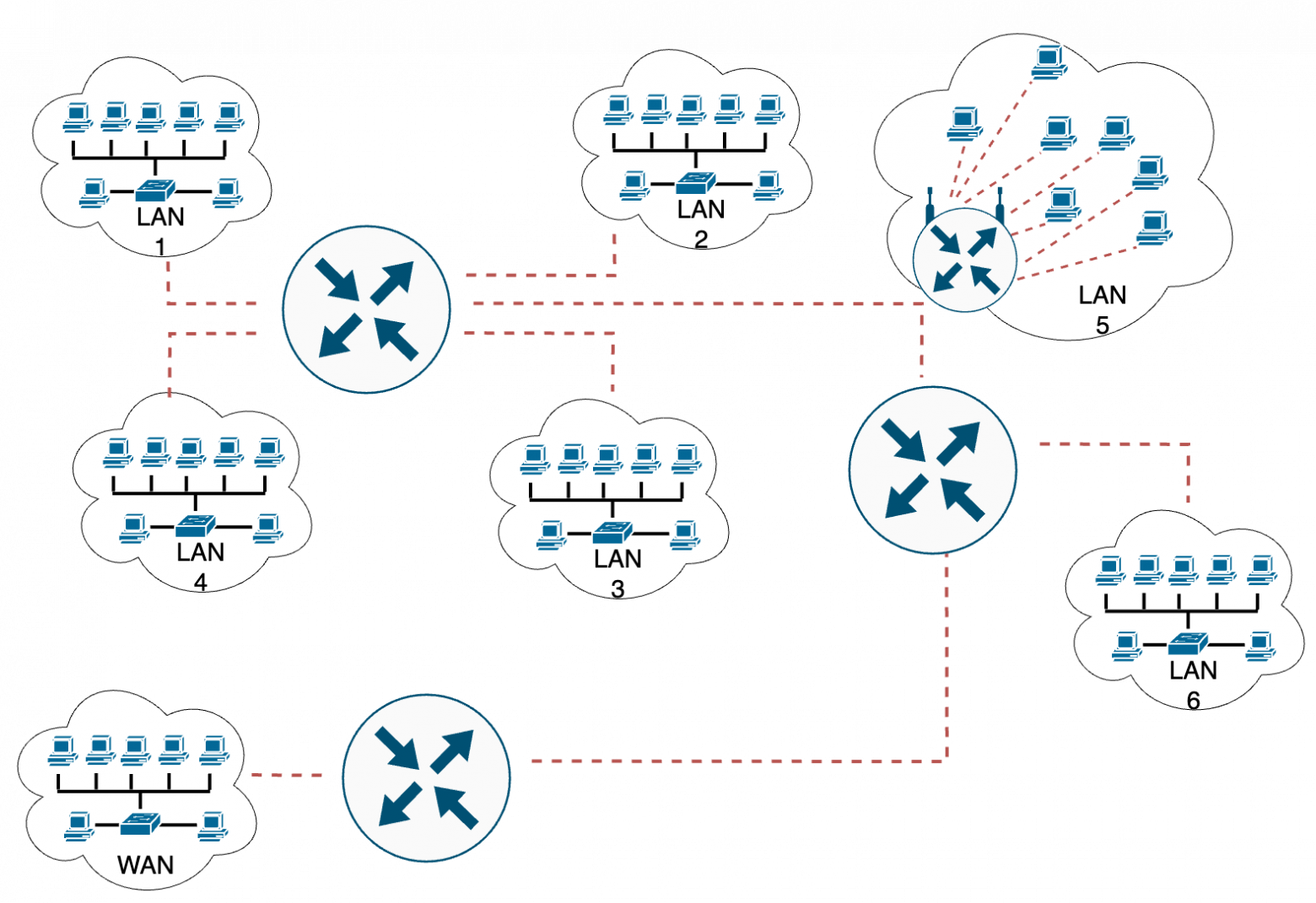
The network layer is used to transfer data between different networks. For example, when you send a message over the Internet, routers determine the best path to take your message from your computer to the recipient's server.
Diagnostic utilities:
- * Traceroute: a utility used to determine the route that data packets take to reach the destination host. Traceroute helps identify routing and network latency issues.
- * Wireshark: a program for analyzing network packets, which allows you to study traffic on the network in detail and identify various problems at the network level.
❯ Conclusion
The network layer of the OSI model provides data routing between networks and logical addressing control. Understanding this layer will help you effectively configure and maintain routers and other network devices.
In the next article, we'll look at the transport layer (L4) and its role in ensuring reliable data transfer.
Thank you for your attention, and see you in the next article!
📚 Read also:
- ➤ How smartphones are made: look at a rare devkit of the Qualcomm Snapdragon 410 processor
- ➤ We broadcast the game on ZX-Spectrum
- ➤ Gary Kildall - inventor, entrepreneur, legend
- ➤ React: one interesting feature of portals
- ➤ A wild adventure: visiting the developer of "GEG"
News, product reviews and competitions from the Timeweb.Cloud team - in our Telegram channel ↩

Why This Matters In Practice
Beyond the original publication, It's complicated about simple things. Network layer (L3) of the OSI model matters because teams need reusable decision patterns, not one-off anecdotes. Greetings, colleagues! My name is ProstoKirReal , and today we will continue our journey through the OSI model by discussing the network lay...
Operational Takeaways
- Separate core principles from context-specific details before implementation.
- Define measurable success criteria before adopting the approach.
- Validate assumptions on a small scope, then scale based on evidence.
Quick Applicability Checklist
- Can this be reproduced with your current team and constraints?
- Do you have observable signals to confirm improvement?
- What trade-off (speed, cost, complexity, risk) are you accepting?
FAQ
What is this article about in one sentence?
This article explains the core idea in practical terms and focuses on what you can apply in real work.
Who is this article for?
It is written for engineers, technical leaders, and curious readers who want a clear, implementation-focused explanation.
What should I read next?
Use the related articles below to continue with closely connected topics and concrete examples.





