It's complicated about simple things. How the Internet works. Part 5. The future (is it?) of networks: IPv6, SDN and Overlay networks
Greetings, colleagues! My name is @ProstoKirReal . I'd like to discuss how the Internet works. We'll start with twisted pair cables that connect simple local area networks, and end with submarine communications cables that connect continents and major carrier networks. IN previou
Editor's Context
This article is an English adaptation with additional editorial framing for an international audience.
- Terminology and structure were localized for clarity.
- Examples were rewritten for practical readability.
- Technical claims were preserved with source attribution.
Source: original publication
Series Navigation
- It's complicated about simple things. How the Internet works. Part 1. What is a switch, router and examples of how simple networks work
- It's complicated about simple things. How the Internet works. Part 2. What is a network, subnet mask, network segmentation using VLAN and mask
- It's complicated about simple things. How the Internet works. Part 3. What is Routing, Proxy ARP and Super VLAN
- It's complicated about simple things. How the Internet works. Part 4. What are LAN, MAN, WAN, Clos networks and operator hierarchy
- It's complicated about simple things. How the Internet works. Part 5. The future (is it?) of networks: IPv6, SDN and Overlay networks (Current)
Greetings, colleagues! My name is @ProstoKirReal. I'd like to discuss how the Internet works. We'll start with twisted pair cables that connect simple local area networks, and end with submarine communications cables that connect continents and major carrier networks.
IN previous article I talked about the differences between LAN, MAN, WAN, what Clos networks are and the hierarchy of operators.
In this series, I will not teach you how to configure equipment and design networks. I will talk about the basic (and not only) principles of network construction, as well as the functioning of the network and network protocols in the TCP/IP stack.
I will often refer to previous articles where I have already described network protocols. This will allow me to shorten the lengthy text.
I recommend that you read the previous articles before reading:
It's complicated about simple things. How the Internet works. Part 1. What is a switch, router and examples of simple local networks;
It's complicated about simple things. How the Internet works. Part 2. What is a network, subnet mask, network segmentation using VLAN and mask;
It's complicated about simple things. How the Internet works. Part 3. What is Routing, Proxy ARP and Super VLAN;
It's complicated about simple things. How the Internet works. Part 4. What are LAN, MAN, WAN, Clos networks and operator hierarchy.
❯ Why is this article needed?
We need this article in order to understand the basic knowledge and understand:
what is IPv6 and what is the fundamental difference from IPv4;
what is SDN networks;
what is Overlay network;
summarize this cycle.
❯ Background
In the 1980s, IPv4, with its 4.3 billion addresses, seemed endless. But by the mid-90s it became clear: the Internet was growing faster than the supply of addresses. In 1994, the IETF began developing IPv6, a protocol with 128-bit addresses. 340 sextillion addresses - enough to assign 10^27 addresses to each of the stars in the Milky Way. This is such a huge number of addresses that each star will receive an address space 1018 times larger than the entire IPv4 Internet.
In 1994, the IETF began work on IPv6. The new protocol proposed:
• 128-bit addresses (340 sextillion is 340,282,366,920,938,463,463,374,607,431,768,211,456 addresses).
• built-in security (IPsec) and simplified routing.
Obviously, IPv6 is better suited to today's realities, since any kettle already has a connection with a smart home. And each host on the network needs its own unique IP address.
❯ What is IPv6?
In essence, IPv6 is the ideological successor of IPv4. It should completely replace IPv4, since the current IP protocol has some errors, and also the number of addresses is not enough for future development.
IPv6 is a 128-bit recording system and has eight 16-bit blocks separated by colons. The IP address is for IPv6 and looks like this: 2001:db8:0:0:0:0:2:1.
At the same time, to simplify the recording, storage and processing of code, a code compression option is used. Adjacent sequences of zero blocks are replaced with paired colon characters. 2001:db8:0:0:0:0:2:1 turns into 2001:db8::2:1.
❯ What is an IPv6 prefix?
Prefixes in IPv6 is the part of the IPv6 address that determines where the network or subnet is.
The prefix denotes the network part of the address, and the remaining bits indicate the interface (host) identifier.
Prefixes provide flexibility, scalability, and ease of routing. They allow you to effectively organize networks of any size, from global providers to home subnets.
The prefix is written as IPv6 address/prefix_length, Where prefix_length indicates the number of bits related to the network.
Example: 2001:db8::/32 means that the first 32 bits of the address define the network.
Prefix types:
Global unicast addresses (Global Unicast). Starts with 2000::/3 (prefixes from 2000 to 3fff). Used for public addresses on the Internet;
Unique local addresses (ULA, Unique Local Addresses). They start with fc00::/7, but actually use fd00::/8 (random prefixes for local networks, analogous to IPv4 Private IP);
Channel local addresses (Link-Local). Starts with fe80::/10. Used for communication within one network segment (without routing);
Multicast addresses. Starts with ff00::/8. For group mailing;
Anycast addresses. Use prefixes from global or local ranges, but are assigned to multiple devices;
Reserved prefix. Starts with ::ffff:0:0/96. Required for compatibility with IPv4 addresses. (example: :ffff:192.168.1.1).
How are IPv6 addresses generated?
Automatic configuration is usually used SLAAC or DHCPv6 (more about them below).
Routers broadcast the network prefix (for example, /64) through RA messages (Router Advertisements). Devices generate their address by combining a prefix and a MAC address (EUI-64) or using a random number generator (Privacy IPv6 generation).
You can read about how to build a small IPv6 network in this article.
❯ Differences between IPv4 and IPv6
1. Heading
I was earlier in this article I’ve already described the IPv4 and IPv6 headers, so let’s not spread the porridge on a plate here, but pay attention to the specific differences between IPv4 and IPv6.
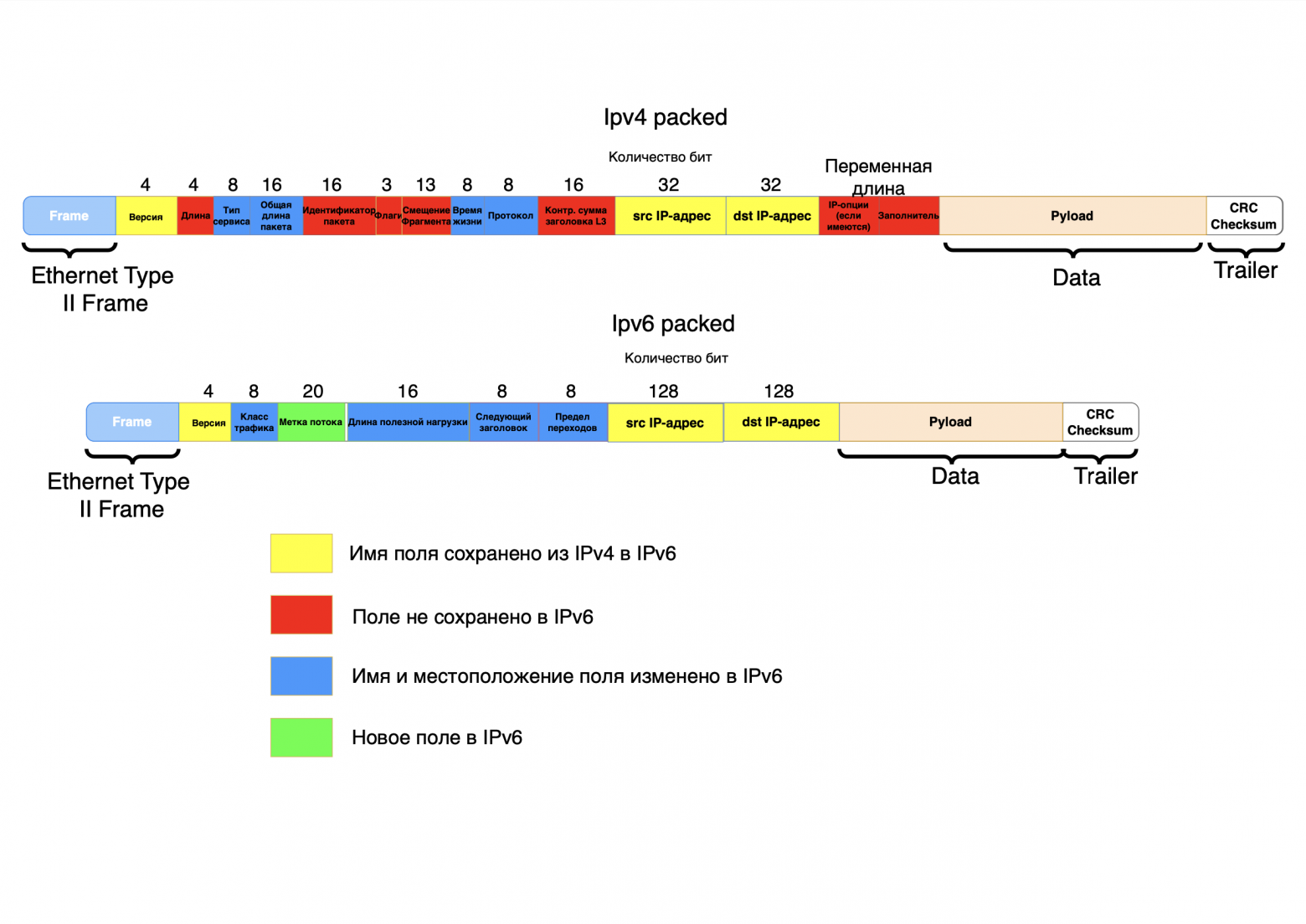
As you can see from the picture above, IPv6 uses a simpler header. It excludes non-essential fields such as header length, packet identifier, flags, fragment offset, header checksum, options and padding. Some fields were retained, but changed their name and location in the header (type of service - traffic class, total packet length - payload length, lifetime - hop limit, protocol - next header). A new field has also been added - flow label.
All these changes have reduced the load on routers when processing packets; for example, it is no longer necessary to calculate the checksum for each packet. Adding the flow label field (Quality of Service feature) made it possible to identify delay-sensitive packets.
2. Scalability
As mentioned earlier, the main problem with IPv4 is its limited address space and difficult scalability. But the main idea of the ideal Internet is that each device has its own unique identifier and can communicate with any device on the global network using a P2P (peer-to-peer) connection directly, without using workarounds such as NAT.
3. Routing
Due to IPv6's simplified header and fixed length, it is easier for routers to digest such packets. For example, the absence of a checksum (in the L3 header, not to be confused with the checksum at the end of the packet) significantly speeds up routing during proxying, since when the IP address in the header changes, the entire L3 checksum must be recalculated. The absence of this field in IPv6 reduces the load on the processor and proxying occurs much faster; you can use a more budget-friendly server solution when using HAProxy.
Although IPv4 can compete with IPv6 in the “quality” of routing when using firewalls (the same routers, only in profile) without stateless firewalls. The point is that the IPv6 header does not contain a field that points directly to an upper-layer protocol, such as TCP. In IPv6, the upper layer protocol is defined by the last extension header - the Upper Layer Header (ULH).
There is no need to confuse the Next Header field in IPv6 and the Protocol field in IPv4.
In IPv4, the Protocol field in the header directly specifies the protocol (TCP/UDP/ICMP). The firewall quickly detects it.
In IPv6, the packet header contains a Next Header field (8 bits), which indicates the type of the next header in the chain. This may be an IPv6 extended header (for example, Routing, Fragment, Hop-by-Hop, Destination Options, AH/ESP) followed by a higher layer protocol (for example, TCP, UDP, ICMPv6). The result is a certain chain of headers (IPv6 Main Header → Routing Header → Fragment Header → TCP Header → Data).
Therefore, to determine the upper layer protocol, you need to go through the entire chain of extended headers until the ULH (Upper Layer Header) is found. This requires additional analysis of all extension headers (there may be several of them).
If a packet contains 3 extended headers, the firewall needs to read 4 headers (basic + 3 extended) to determine what is TCP at the end.
4. Built-in security
IPSec provides encryption and authentication at the protocol level. In IPv6 it is built into the standard, in IPv4 it is optional.
It seems that everything is obvious, in this regard IPv6 is better, but here, as always, the devil is in the details. IPv4 has been studied for a long time and there are popular methods for encrypting and protecting this protocol, but IPv6 is a “new” and unstudied protocol that may have vulnerabilities.
For example, the IPv6 specification originally defined the Routing Extensions Header (Routing EH), as well as its subtype Routing Header Type 0, or RH0. The RH0 field may contain multiple addresses of intermediate nodes through which the packet must be transmitted, and the same address may be specified more than once. This means that there is a possibility that packets will oscillate between two nodes, thereby causing congestion on the channel between them. This capability can be used by an attacker to create a Denial of Service (DoS) attack. Therefore, in 2007, the IETF removed this functionality from the IPv6 specification.
5. Automatic configuration (SLAAC)
SLAAC allows devices to automatically generate IPv6 addresses without a DHCP server, using information from routers.
SLAAC allows devices to automatically:
Get network prefix from the router;
Create global IPv6 address (Global Unicast);
Set up address local communication (Link-Local).
Disadvantages of SLAAC:
No parameter control. Does not transmit DNS servers, NTP, etc.;
Random addresses. May complicate diagnosis;
Limited information. There is no way to assign static addresses via SLAAC.
DHCPv6 (Dynamic Host Configuration Protocol for IPv6) is a protocol for dynamically configuring IPv6 addresses and transferring additional network parameters (DNS, NTP, domains, etc.). Unlike SLAAC, DHCPv6 provides centralized address management, which is useful in enterprise networks.
Types of DHCPv6
Stateful DHCPv6:
server manages full configuration clients:
- allocates IPv6 addresses;
- transmits DNS, NTP and other parameters;
- used when SLAAC is not enough (for example, control over addresses is needed).Stateless DHCPv6 (Combines with SLAAC):
server does not provide addresses (they are configured via SLAAC), but provides additional options (DNS, domains).
6. Effective work with multicast/anycast
❯ What is multicast?
Group mailing. The package is delivered all devices in the group, and not to each individual separately as in IPv4 broadcast (in IPv6 broadcast it is replaced by targeted multicast).
Examples of addresses:
- ff02::1 – all nodes in the local segment;
- ff02::2 – all routers;
- ff05::1:3 – all DHCPv6 servers on the local network.
Advantages of multicast in IPv6:
Load reduction. Traffic goes only to interested devices (unlike broadcast in IPv4);
Energy efficiency. Devices may not be processing unnecessary traffic;
Routing optimization. Routers cache paths for multicast groups.
By the way, IPv4 has this support, but is rarely used due to complexity and NAT.
❯ What is anycast?
Group of devices with one address. The package is delivered nearest node in the group.
Example: Google DNS servers (2001:4860:4860::8888 are deployed in dozens of data centers).
How does this work:
1. Multiple servers are configured to one anycast address;
2. Routers advertise this address via BGP;
3. Traffic is automatically routed to the nearest server.
Advantages of anycast:
Reduced latency. Users connect to the nearest node;
Fault tolerance. If one node fails, traffic is redirected to another;
Load Balancing. Traffic is distributed between servers.
7. Improved QoS handling
In IPv6 field Flow Label (20 bits) is used to identify flows and prioritize traffic. IPv4 uses DSCP (6 bits), it is less flexible; identification requires analysis of IP addresses, ports, DSCP, while in IPv6 Flow Label + addresses are sufficient.
Flow Label is a 20-bit field in the IPv6 header designed to identify packets belonging to the same data stream. It allows routers and network devices to quickly classify traffic and apply QoS (Quality of Service) policies to it without deep analysis of the packet content.
8. Fragmentation
For IPv4 routers can fragment packets to IPv6. Fragmentation in progress only by sender (via Fragment Header), which reduces the load on the network.
IPv6 routers don't produce fragmentation, so the fields related to this function have been moved to the corresponding extension header (Fragmentation EH). If an IPv6 packet exceeds the size allowed for subsequent transmission, the router generates an ICMP "packet too big" message and sends it back to the sender. Depending on the application, the sender either chooses a packet size that will allow it to follow the entire path without fragmentation, or splits the packet itself. As a result, the transmission of IPv6 packets requires less overhead from intermediate network equipment.
Problems associated with the transition to IPv6
The final structure of IPv6 appeared almost 20 years ago, in 2006, but IPv4 has not disappeared from our lives.
According to Google, 45% of traffic is already using IPv6. But most of the Internet is still tied to IPv4.
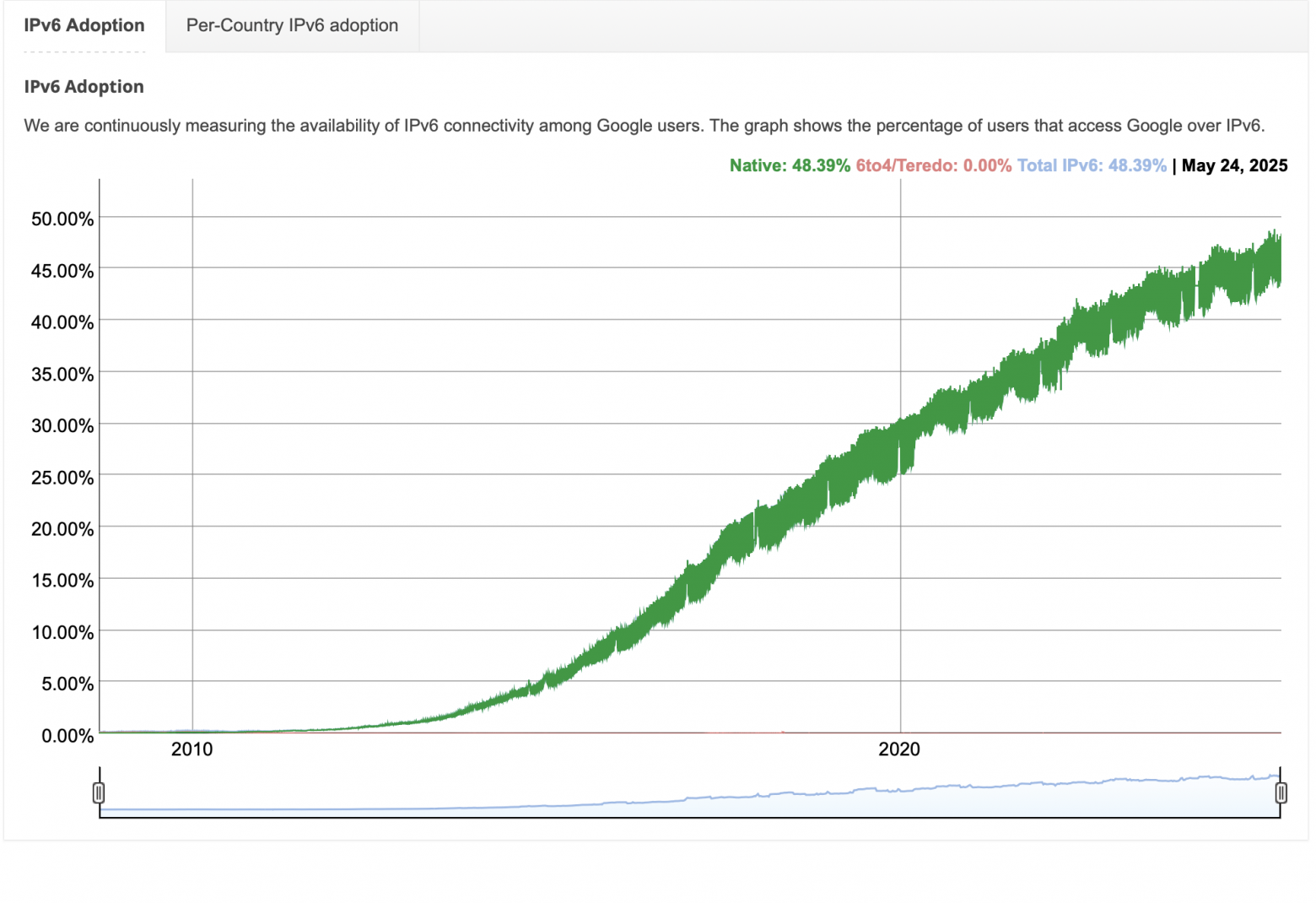
❯ Why did the transition take so long? Six main reasons.
1. Network effect
Network effect is a phenomenon where the value of a technology depends on the large number of players using it.
Technology won't be widely used if only a couple of people use it. For example, Facebook completely switched to IPv6 in 2012, but a year later returned IPv4 mirrors due to the low availability of IPv6 among users.
2. NAT
NAT (Network Address Translation) – is a more realistic alternative or additional solution. NAT allows you to reduce the use of white IPv4 addresses. Without it, IPv4 addresses would have run out in 2010.
Also, some providers create another layer (NAT cascading) in the service provider's network. This scheme works in general, but it results in significant limitations for many of today's and future applications, as well as difficulty in maintenance.
3. Difficulty of migration
Double stacks. Servers and routers must support both protocols. This increases the load and cost of the equipment.
Safety. As I wrote above, the RH0 header in IPv6 can contain multiple addresses of intermediate nodes through which the packet must be transmitted, and the same address can be specified more than once. This means you can create routing loops for DDoS attacks. The IETF removed this functionality from the IPv6 specification in 2007, but many devices still handle it.
4. Infrastructure integration
Providers. Replacing equipment with IPv6-capable equipment requires a good investment.
Corporations. They use legacy systems that are outdated and impossible to update.
Users. Cheap routers do not support IPv6.
5. “Bridge” technologies between IPv4 and IPv6
DS-Lite. The provider distributes IPv6, and IPv4 traffic goes through a tunnel to NAT.
Plus – Saving IPv4 addresses.
Minus – Additional delay, complexity of setup.
6rd (IPv6 Rapid Deployment): IPv6 over the provider's IPv4 infrastructure.
NAT64 + DNS64. Gateways translate IPv4 addresses to IPv6 and vice versa. But this is “a crutch on a crutch.
6. Insufficient staff training
Probably my most darling cause. Insufficient experience and training of personnel in detecting and solving IPv6-related problems, as well as a lack of good understanding of the various new features are significant security risks.
Many organizations still view IPv6 as an experimental protocol, even if it is deployed to production infrastructure. As a result, security policies are often less rigorously developed and enforced. This is compounded by the fact that in many cases mechanical replication of an existing IPv4 policy is not possible due to both differences in the IPv6 protocol and hardware capabilities.
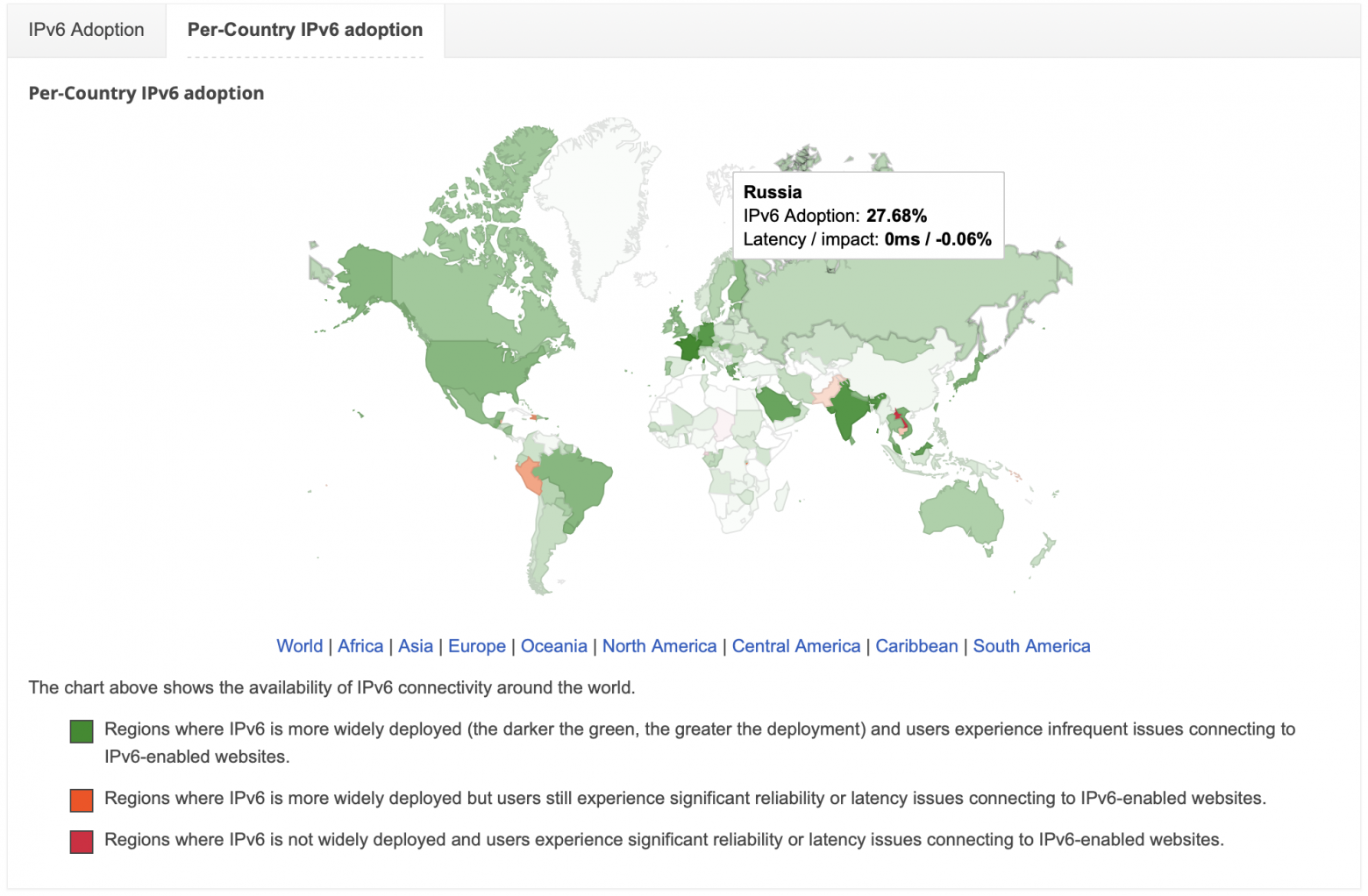
According to the same Google, 28% of IPv6 addresses are used in Russia. But in my experience, they are used in data centers or large operators. Smaller regional operators, small or even some large businesses make do with the usual proven IPv4, with all its advantages and disadvantages.
❯ What is SDN?
❯ Background
We all know what traditional networks are. Let me remind you.
Traditional network – fully distributed network structure. Every router, switch, etc. independently of each other they collect information about the network (in which they are located), the state of the channels and constantly update the poppy table or routing table. Any topology changes lead to an avalanche of routing information between routers. For a small network this is not a problem; if a link falls off somewhere, the network will not be overwhelmed by service packets.
❯ But what if this is a large data center with thousands of network devices?
Convergence of this network can be minutes, which is critical for time-sensitive applications where a delay in convergence can negatively impact their performance.
The volumes and processing of huge amounts of data, as well as the support of thousands of users, led to the development and implementation of the concept of SDN.
The basic ideas of SDN were formulated by specialists from Stanford and Berkeley universities back in 2006. In March 2011, the Open Networking Foundation (ONF) consortium was formed. ONF mainly develops the OpenFlow protocol; it implements the interaction of the controller with network devices. But some companies (Cisco, Citrix and IBM) have formulated the OpenDaylight framework.
❯ But what is SDN?
SDN is a software-controlled network, where all the logic for managing network devices is taken over by a special controller. The controller collects all information about the network it manages and determines how all devices will process traffic. In this case, the devices themselves no longer participate in collecting and storing information, but follow the instructions of the controller.
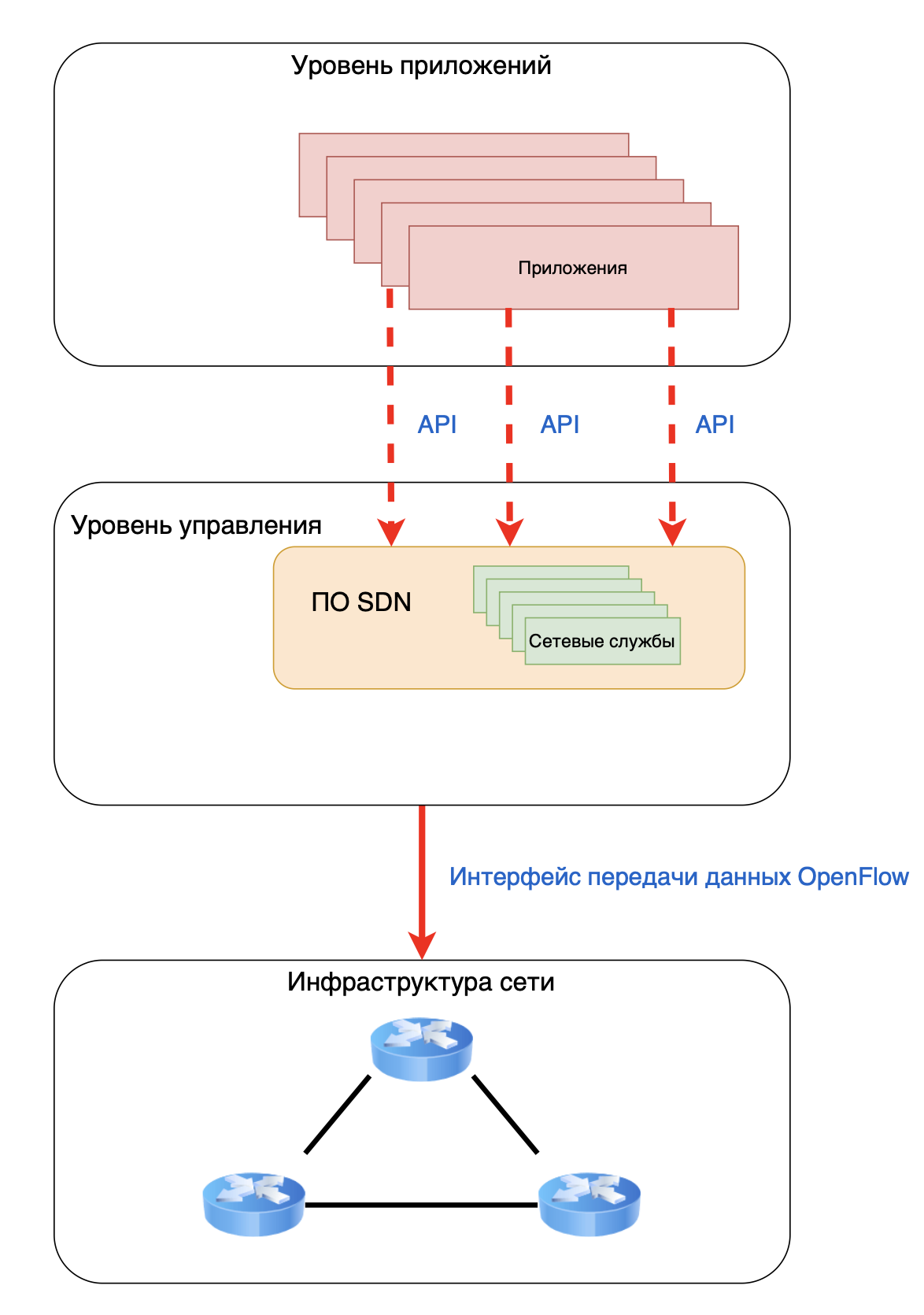
In terms of network devices, the network control plane is physically separated from the data plane.
In a traditional network, the control plane is responsible for the operating logic of the network device and is closely related to the data plane (it is essentially not needed in an SDN network).
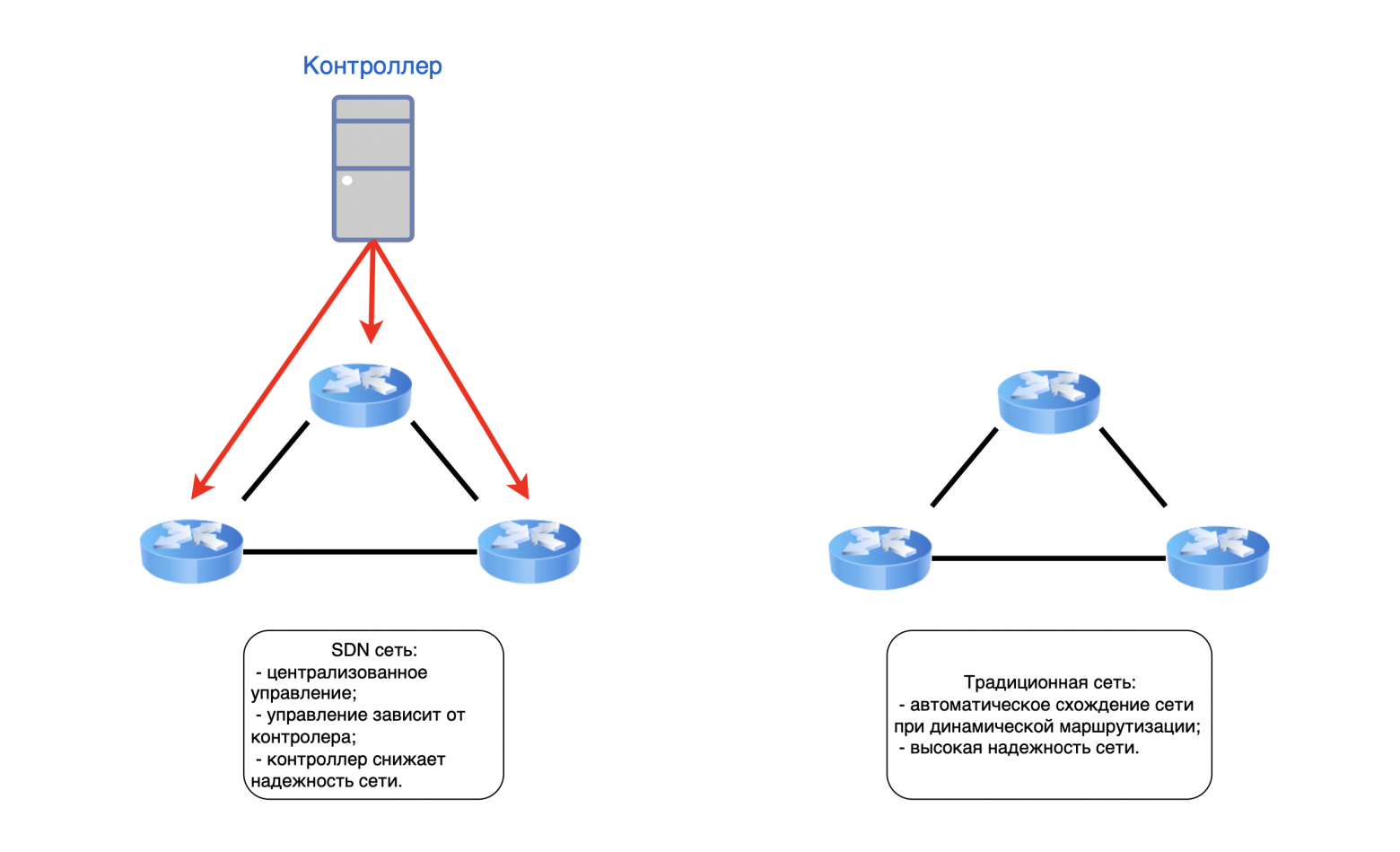
A traditional switch processes each transmitted packet separately and redirects it based on its MAC table.
I talked about this in first part of this cycle.
If the switch supports the protocol OpenFlow and is integrated into the SDN network, then it no longer works with packets, but with data streams. Now the flow table becomes the main element of the switch. Moreover, each individual thread has its own priority. The more important the stream, the higher its position in the table, which means the transmission of this stream is more stable.
SDN allows you to simplify network configuration and management, easily scale services, and increase the power of physical infrastructure at the expense of virtual infrastructure.
Pros and cons of using SDN
Main advantages.
Centralized management:
- a single point of control for the entire network, instead of configuring each individual device;
- the controller has a complete understanding of the network topology, channel status and traffic, which allows it to make quick and accurate decisions about redirecting traffic flows.Automation and programming:
- network behavior is determined by software and does not depend on fixed protocols on each individual device;
- the ability to automate routine processes, such as setting up security policies or creating VLANs, through the controller API. (Northbound API).Independence from manufacturers:
- if the device supports OpenFlow, the controller can control this equipment regardless of vendor and proprietary protocols. Thus, it is possible to build a homogeneous network infrastructure without using a single vendor.Network adaptability:
- the network can quickly adapt to changes in traffic, application requirements or failures;
- more efficient use of network resources, such as balancing traffic to application servers or dynamic redistribution of bandwidth.
Main disadvantages
Fault tolerance:
- since the entire infrastructure is managed from a single place (controller), it can become a single point of failure;
- the control system can become a bottleneck when processing a large number of events in the network, which affects the delay between the switch and the controller.Safety:
- the controller can become an attractive target for attack by intruders; compromise of the control system provides control over the entire network;Price:
- it may be necessary to replace or upgrade current equipment to support the OpenFlow protocol;
- additional costs for integration and debugging of the controller and specific automation scenarios;
- additional costs for redundancy/clustering of the control system;
- additional protection of communication channels between the management controller and switch controllers.Complexity of implementation and management:
- complexity of legacy infrastructure integration;
- additional skills for network engineers for a deep understanding of SDN architecture, in addition to existing knowledge;
- additional employees with programming skills and DevOps engineers.Standardization:
- Despite OpenFlow, the SDN ecosystem is still not fully standardized. There are proprietary solutions and different implementations, restrictions from different vendors;
- Some aspects of SDN and related technologies are still evolving and may be less attractive than traditional solutions.
You can read about the difficulties of implementing SDN, in particular Neutron, in this article.
Modern trends, such as the growth in traffic volumes and the number of devices connected to the Internet, are changing the rules of the game, forcing businesses to increasingly configure large-scale networks and introduce new trends in them, such as SDN. But in this way, technical specialists are faced with new problems with which they previously had no experience, much less open information on solving these problems.
Like any technology, SDN has inherent advantages over a traditional network, but you may encounter unforeseen problems and additional expenses that businesses often do not want to incur. Business counts money and makes a choice towards proven and predictable solutions.
In Russia, the SDN market is still small and is mainly used by hyperscale data centers and large businesses.
But some SDN concepts, in particular SD-WAN, have attracted the interest of small and medium-sized businesses.
❯ What is SD-WAN?
SD-WAN is a software-defined WAN network that allows you to connect remote offices into a single network, where there is unified management using an SD-WAN controller.
SD-WAN is not standard but a general term that does not belong to a specific vendor. At the same time, there are generally recognized and frequently used SD-WAN controllers (vManage, vBond and vSmart.)
SD-WAN allows companies with distributed branches to reduce costs for communication channels and increase the speed of connecting new branches to the existing network.
Main advantages of SD-WAN:
Each new device no longer needs to be configured from scratch. All devices are configured through templates, and policies are applied from the controller. This ensures simplified connection of new offices;
Using the controller, the system detects degradation and failure in the network and makes a centralized decision on traffic distribution;
Centralized monitoring improves reliability and monitors the health of the entire network in real time.
Main disadvantages of SD-WAN:
Difficulty in migrating from traditional WAN solutions (especially MPLS);
The need for additional protection using security measures;
The effectiveness of the controller often depends on the quality and stability of the Internet connection, since the controller is located remotely or in the cloud;
Sensitive applications (VoIP, video conferencing, real-time systems) may suffer from latency or jitter, especially when switching between communication channels;
Additional costs for licensing, implementation of edge devices (hardware or virtual - vCPE) in all branches, and also require specialists with new skills.
Failure of the central controller or loss of communication with edge devices can limit the ability to manage the network, monitoring failure, and the inability to connect new devices.
SD-WAN offers powerful benefits in flexibility and manageability, but its implementation requires careful planning, consideration of security risks and an understanding of the total cost of ownership. It is not a universal panacea and is not suitable for all scenarios.
❯ What is Overlay Network
This is where I agree with the commentators and say “Everything has already been written in SDSM/ADSM a long time ago.” Indeed, an article about Overlay networks was published on linkmeup a long time ago and I think I can’t better explain what it is. And why, just go and read.
Here I will briefly tell you what it is and why it is needed.
Overlay Network This is a virtual network built “on top” of an existing physical network (underlay). Overlay network nodes are connected by logical tunnels that use underlay network routes to transmit data.
The key idea of an overlay is to separate the logical topology and services from the physical one.
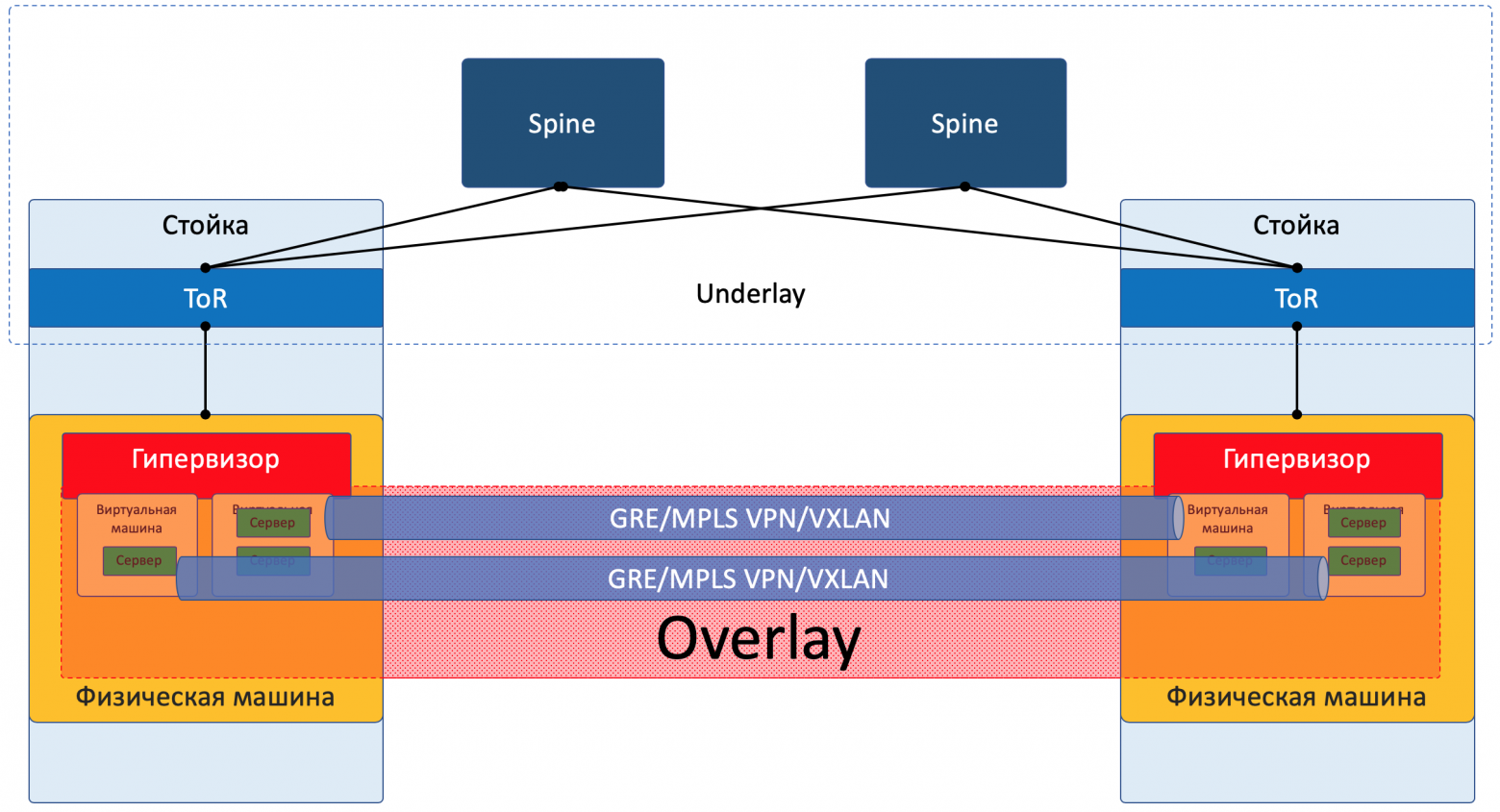
You could say that this is pure SDN, but no.
SDN, as described above, separates the control plane from the data plane and provides full control over the network. Overlay works on top of the regular network and is completely dependent on it. If there are problems in the underlay, then the overlay will not work.
The concepts of SDN and Overlay are closely related to network virtualization, but are still different in nature.
Overlay's main goals:
Introduction of new features without replacing existing hardware (in SDN it often needs to be changed), which allows you to deploy modern services without losing significant funds;
Create isolated environments by providing logical segmentation of clients/applications/test environments without physical separation;
Additional opportunities for implementing functionality not originally included in the underlying protocols (complex QoS policies, distributed storage and specific routing schemes).
Often used on the Internet CDN (Content Delivery Network) for global content delivery (Akamai, Cloudflare). Overlay technologies are needed there to optimally redirect user traffic to the nearest caching server.
Corporate networks often use VPN to connect employees remotely or communicate between company branches.
For home networks, the same VPN or P2P connections (Peer-to-Peer) are used, like BitTorrent, or old file hosting services form dynamic overlays on top of the Internet for direct data exchange between users.
Data centers use VXLAN, NVGRE, GENEVE. These are key overlay protocols that solve VLAN scaling issues and 4094 network limitations, and also enable encapsulated traffic between virtual machines (or containers), allowing tens of thousands of isolated logical networks (Layer 2 on top of Layer 3) to be created on top of the physical data center IP network. Critical to cloud and agility.
Containerization networks (Kubernetes CNI) provide connectivity between containers on different physical hosts, abstracting from the underlying details.
SD-WANs use overlay tunnels (often IPsec or similar) over multiple physical links (MPLS, Internet, LTE) to centrally manage traffic and policies between branches.
Main disadvantage Overlay – additional overhead. Encapsulating traffic increases packet size (which can lead to fragmentation) and requires additional processing power. Also, routing in an overlay may not be optimal from the point of view of the physical topology of the underlay.
Overlay technologies is an integral and rapidly growing part of the future of networking. They have become the de facto standard for clouds, data centers and modern enterprise WANs due to their flexibility and ability to solve current problems.
❯ Let's summarize
The future of networks is not in the victory of one technology, but in the harmonious combination of many.
IPv6 will provide a huge address space for the growing Internet of things and services.
SDN will provide tools for centralized, automated management of complex infrastructures.
Overlay will become a key mechanism for building flexible, isolated virtual networks, no matter Ipv4 or Ipv6.
The future is in the evolution of the entire network, where Underlay will remain a critical foundation, and new technologies such as IPv6 will slowly replace the old ones. SDN and Overlay are becoming standards for new networks, making them more manageable, flexible and service-oriented.
But at the same time, it is impossible to say that all these technologies are the future of the Internet. New protocols are increasingly appearing that should “kill” the old ones, but often this does not happen. Each technology has both pros and cons, but we have already become accustomed to old technologies, and every ordinary system administrator knows how to cope with the limitations and problems.
Therefore, we see that all these solutions (Ipv6, SDN, Overlay) are used by a number of organizations, many adherents of the old principles, and the average user does not care at all, the main thing is that videos with cats load.
❯ P. S.
Phew. Behind you are five parts about how the Internet works. When I started the first part, I thought that everything was easy: take a couple of pictures, set aside a couple of evenings - and you’re done. It turned out that it is not so easy to tell about everything.
Even now, looking at the huge amount of text, I understand that my articles are more of a review. If only you knew how much text went under the knife and how the structure didn’t fit together! It could have been done better, yes. It would be possible to spend a couple more months to “comb” the text. But many people are already writing to me in PM and asking for new parts.
With this I finish this cycle, then I’ll start another one - on SFP modules. Together with you, we will figure out what it is, how it works, how to choose an optical budget and, most importantly, what all these letters in the name of the modules mean.
I want to thank you all so much for your comments and feedback. It was thanks to you, dear readers, that I started my telegram and communicate with you there. I want to do more than I can.
See you later, colleagues!
News, product reviews and competitions from the team Timeweb.Cloud — in our Telegram channel ↩
Why This Matters In Practice
Beyond the original publication, It's complicated about simple things. How the Internet works. Part 5. The future (is it?) of networks: IPv6, SDN and Overlay networks matters because teams need reusable decision patterns, not one-off anecdotes. Greetings, colleagues! My name is @ProstoKirReal . I'd like to discuss how the Internet works. We'll start with twisted pair cables that con...
Operational Takeaways
- Separate core principles from context-specific details before implementation.
- Define measurable success criteria before adopting the approach.
- Validate assumptions on a small scope, then scale based on evidence.
Quick Applicability Checklist
- Can this be reproduced with your current team and constraints?
- Do you have observable signals to confirm improvement?
- What trade-off (speed, cost, complexity, risk) are you accepting?
FAQ
What is this article about in one sentence?
This article explains the core idea in practical terms and focuses on what you can apply in real work.
Who is this article for?
It is written for engineers, technical leaders, and curious readers who want a clear, implementation-focused explanation.
What should I read next?
Use the related articles below to continue with closely connected topics and concrete examples.





