It's complicated about simple things. How the Internet works. Part 4. What are LAN, MAN, WAN, Clos networks and operator hierarchy
Greetings, colleagues! My name is @ProstoKirReal . I would like to discuss with you how the Internet works from twisted pair cables connecting simple local networks to submarine communication cables connecting continents and major operator networks. IN previous article I talked a
Editor's Context
This article is an English adaptation with additional editorial framing for an international audience.
- Terminology and structure were localized for clarity.
- Examples were rewritten for practical readability.
- Technical claims were preserved with source attribution.
Source: original publication
Series Navigation
- It's complicated about simple things. How the Internet works. Part 1. What is a switch, router and examples of how simple networks work
- It's complicated about simple things. How the Internet works. Part 2. What is a network, subnet mask, network segmentation using VLAN and mask
- It's complicated about simple things. How the Internet works. Part 3. What is Routing, Proxy ARP and Super VLAN
- It's complicated about simple things. How the Internet works. Part 4. What are LAN, MAN, WAN, Clos networks and operator hierarchy (Current)
- It's complicated about simple things. How the Internet works. Part 5. The future (is it?) of networks: IPv6, SDN and Overlay networks
Greetings, colleagues! My name is @ProstoKirReal. I would like to discuss with you how the Internet works from twisted pair cables connecting simple local networks to submarine communication cables connecting continents and major operator networks.
IN previous article I talked about routing in local networks, and also looked at some narrowly targeted “features” related to routing - Proxy ARP and super VLAN.
In this series of articles, I will not teach you how to configure equipment and design networks. I will talk about the basic (and not only) principles of network construction, as well as the functioning of the network and network protocols in the TCP/IP stack.
I will often refer to previous articles where I have already described network protocols. This will allow me to shorten the lengthy text.
I recommend that you read the previous articles before reading:
It's complicated about simple things. How the Internet works. Part 1. What is a switch, router and examples of simple local networks;
It's complicated about simple things. How the Internet works. Part 2. What is a network, subnet mask, network segmentation using VLAN and mask;
It's complicated about simple things. How the Internet works. Part 3. What is Routing, Proxy ARP and Super VLAN.
❯ Why is this article needed?
We need this article in order to understand the basic knowledge and understand:
what are local LAN networks;
what are global WAN, MAN and operator networks;
what are Fat-Trees and Clos networks;
what is operator hierarchy;
Let's summarize by answering the question of how the Internet works.
❯ Why is it important to understand the layers of networks?
Before we can understand how computer networks, including global ones, are designed, we must first understand what exactly a computer network is.
At one time, the term "network" meant a set of serial lines used to connect terminals to mainframes (a large, general-purpose, high-performance, fault-tolerant server).
Other important networks include the voice telephone network and the cable television network used to distribute video signals.
The main thing that these networks have in common is that they are specialized to process one specific type of data (keystrokes, voice or video) and are usually connected to special-purpose devices (terminals, computers, phones and televisions).
Now the term “network” refers to a complex structure consisting of a variety of devices and systems capable of transmitting, receiving and processing data.
The essence of the network is to establish connections between various network nodes (computers, landline/mobile phones, tablets, servers, etc. Essentially, this network connects individual nodes into a single whole, ensuring interaction and data exchange.
In order for a local or global network to work without problems and delays (everyone wants to watch videos with cats without lags), the network is divided into levels. Each layer is responsible for its own functions and helps the entire network operate stably.
In order for the network to work without failures, it is organized into a hierarchy of levels, similar to how a city is structured:
houses connected by streets as nodes (PCs, servers) connected by cables (patch cords);
areas with common communications as access level switches that unite nodes into segments (VLAN);
city highways as the core of the network (Core Layer) - high-speed channels between switches;
roads between cities as connections between local networks through telecom operators;
international routes as global highways for operators, forming the “skeleton” of the Internet.
Each level of this one global network “Internet” plays a huge role in our lives.
Understanding the structure of networks helps:
network engineer: design fault-tolerant and scalable solutions.
developer: optimize the interaction of applications with the network.
user: understand how data gets from point A to point B in a fraction of a second.
❯ Network layers: access, aggregation, core
Let's not rush and move on to discussing the hierarchy of operators for now, but first let's look at ordinary local networks.
Previously, in previous articles in this series, we examined in detail how a simple local network functions. However, we have not yet touched upon the process of designing and connecting networks.
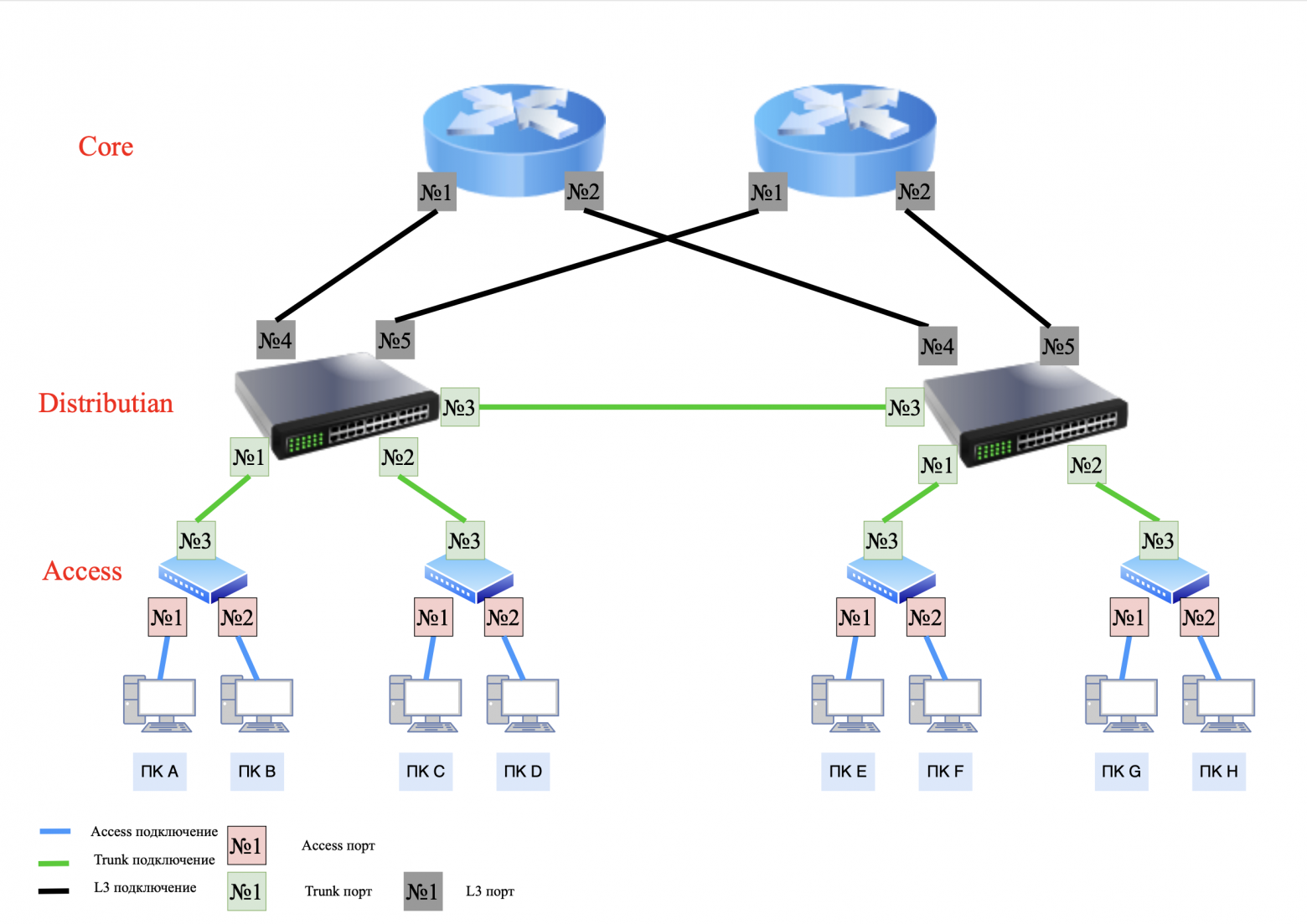
Let's look at the “classic” three-level (Access - Distribution/Aggregation - Core) network structure.
What tasks does each level perform:
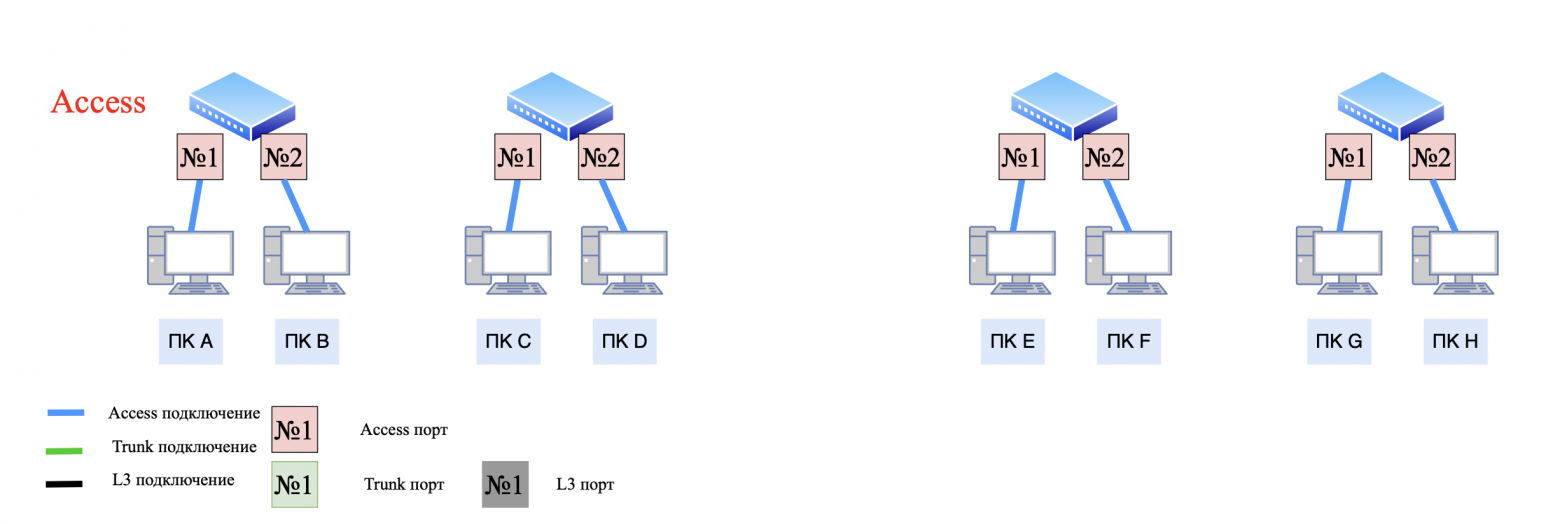
Access Layer:
- connecting end devices using L2 switches;
- main task: switching on L2 (OSI models).
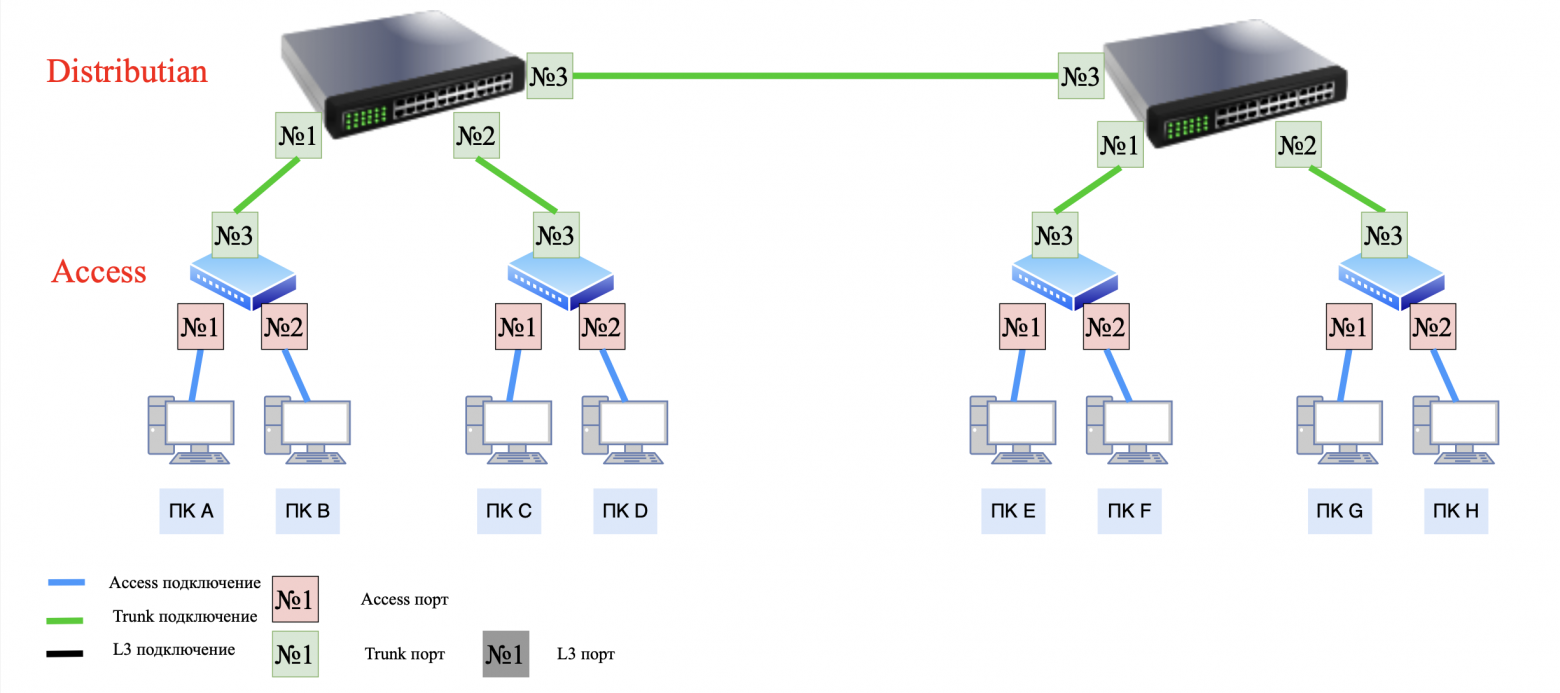
aggregation level (Distribution/Aggregation Layer):
- routing between VLANs/subnets, using L3 (OSI models) switches;
- security policies (ACL), QoS.
Core Layer:
- data transfer between aggregation nodes using routers.
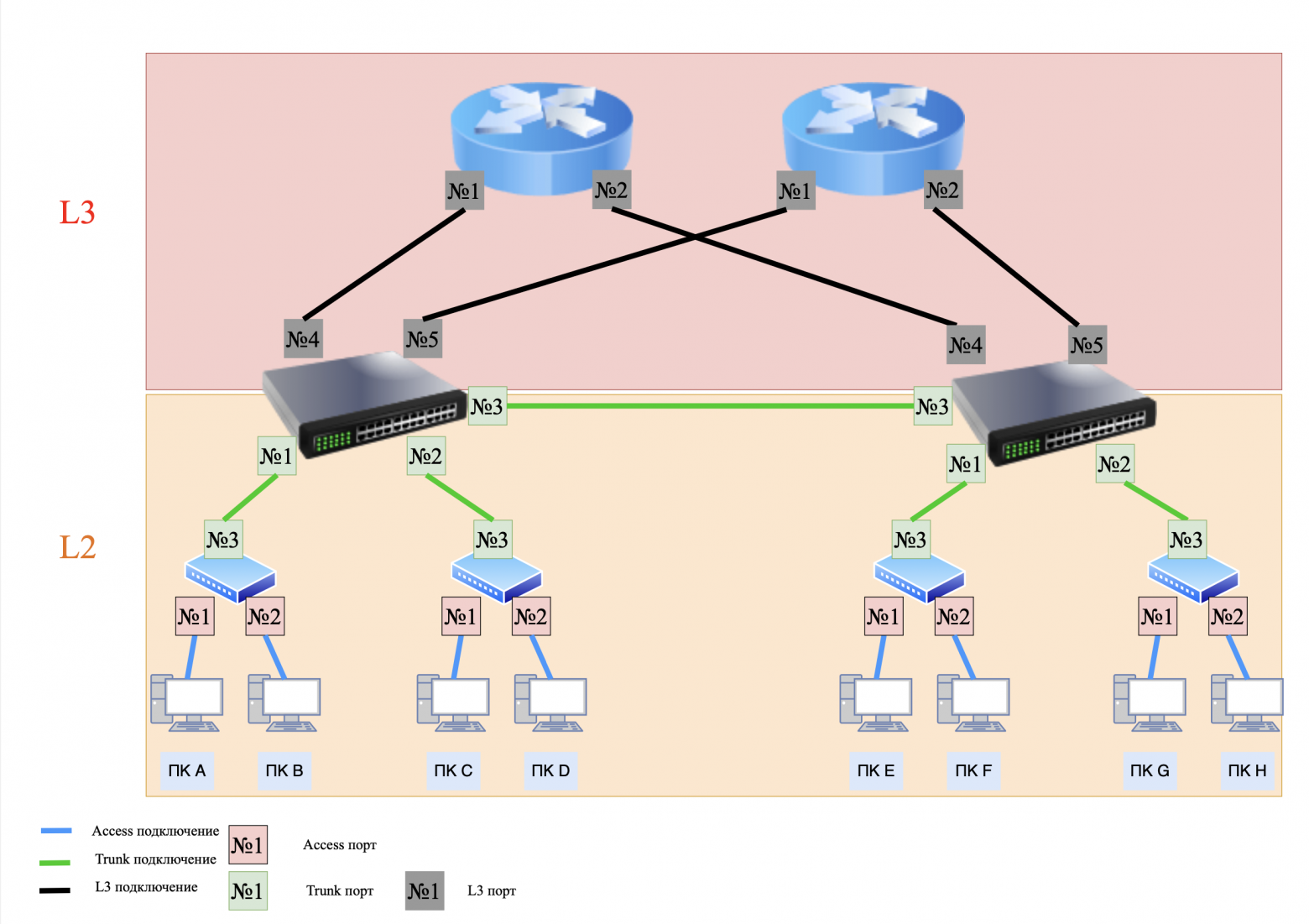
It turns out that our entire network is divided into two segments.
The first segment is the L2 segment, which uses access and trunk ports to transmit traffic within the L2 network. This uses network segmentation using VLANs (virtual local area networks) and subnet masks. This allows you to divide the network into several independent subnetworks. Communication between these subnets occurs only through upstream routing.
The second segment is the L3 segment, which uses traffic routing within the L3 network.
❯ Access ports vs Trunk ports, switchport/no switchport. What's the difference?
In previous articles we have already touched on the topic of access and trunk ports, but let me remind you about them once again.
Access port:
- transmits traffic of only one VLAN.Trunk port:
- transmits traffic of several VLANs through tagging (802.1Q).
❯ Switchport and no switchport commands (for Cisco).
In Cisco networks, these commands are used to control the operating mode of switch ports. They determine whether the port will work on channel (L2) or network (L3) level.
switchport — Layer 2 (L2) mode This mode is used to switch traffic between devices within one subnet or VLAN and is applied at the access level. Accordingly, it has 2 types of interaction - access and trunk.
no switchport - Level 3 (L3) mode This mode turns the port into routed interface, which can process IP packets and participate in routing and is used at the aggregation and kernel levels.
❯ Routing on Access and Distribution: what's the difference?
❯ Routing to Distribution
The network we looked at above is "classical" and is called a three-layer network with aggregation-level routing.
Such a network has both pros and cons.
Advantages:
the ability to build end-to-end VLANs (end-to-end VLANs). In this model, VLANs are located throughout the organization, regardless of where the end devices are physically located;
uniform security policies and quality of service (QoS) are applied to the same users regardless of their physical location;
the ability to use inexpensive L2/L2+ switches without routing support.
Flaws:broadcast messages are distributed to all switches;
the need to use a spanning-tree, since “extra” connections (loop) arise in the L2 network, which can lead to a broadcast storm;
sophisticated troubleshooting in the network;
Aggregation switches (Distribution) must know about all VLANs. If your network uses a large number of VLANs, then each VLAN will need to be configured on each aggregation switch;
scalability limitations.
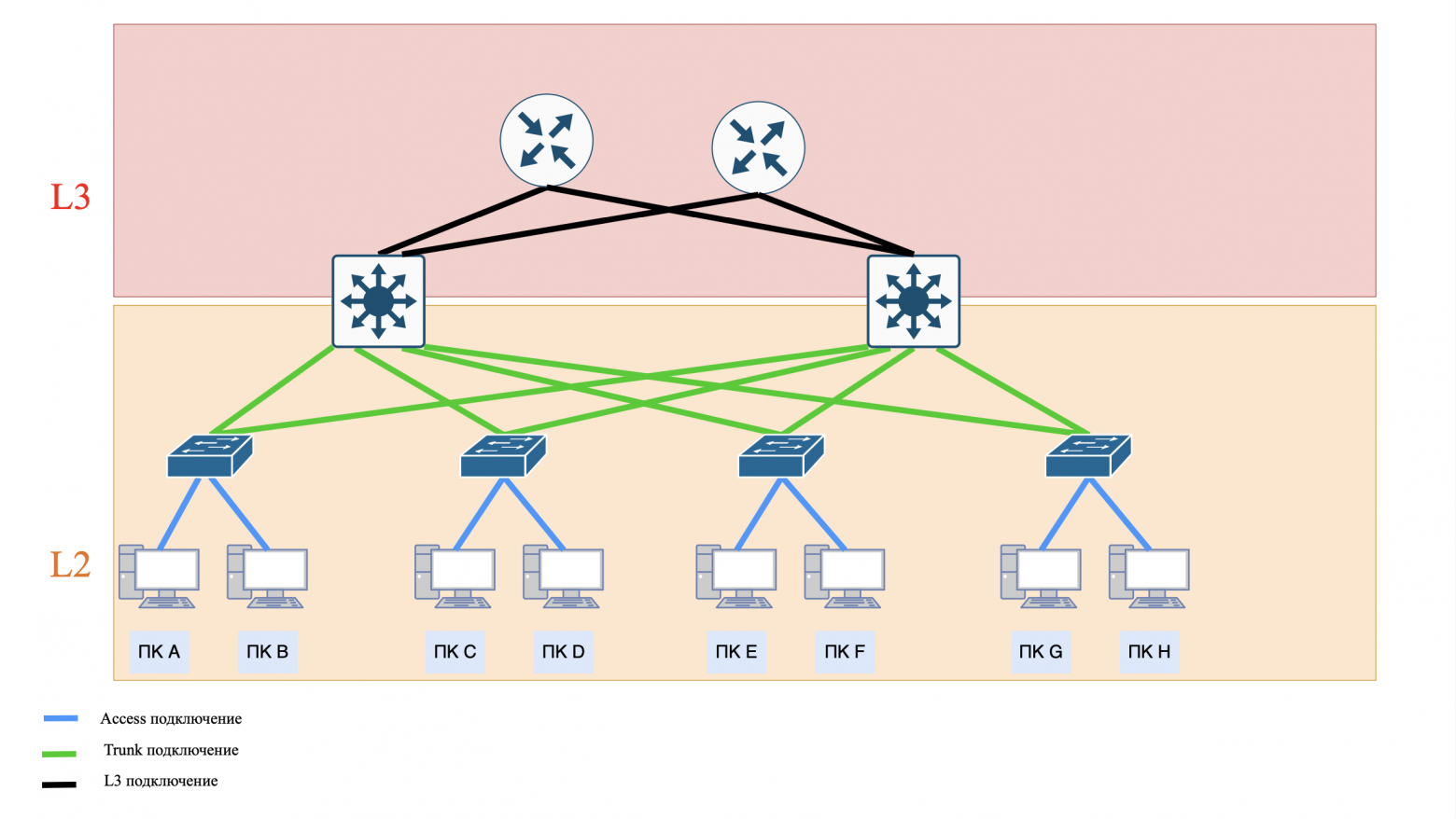
❯ An alternative to this scheme (Distribution) is routing at the access level (Access) or in Cisco terminology this is “Routed Campus Architecture”.
Advantages:
there is no need to use a spanning-tree, since there are no “extra” connections (loops) to this network. When routing, a packet follows a strict path rather than moving around endlessly;
simplified troubleshooting (troubleshooting);
there is no need to create VLANs on aggregation switches (Distribution);
Broadcast messages are distributed only within one Access switch.
Flaws:
only local VLANs. VLAN No. 2 on one switch is not VLAN No. 2 on another switch, these are two different VLANs with the same number;
Users belong to the same broadcast domain when connected to the same Access switch;
it is necessary to use L3 switches with routing support, which are more expensive than L2/L2+;
The same security and QoS policies do not apply to the same users connected to different Access switches.
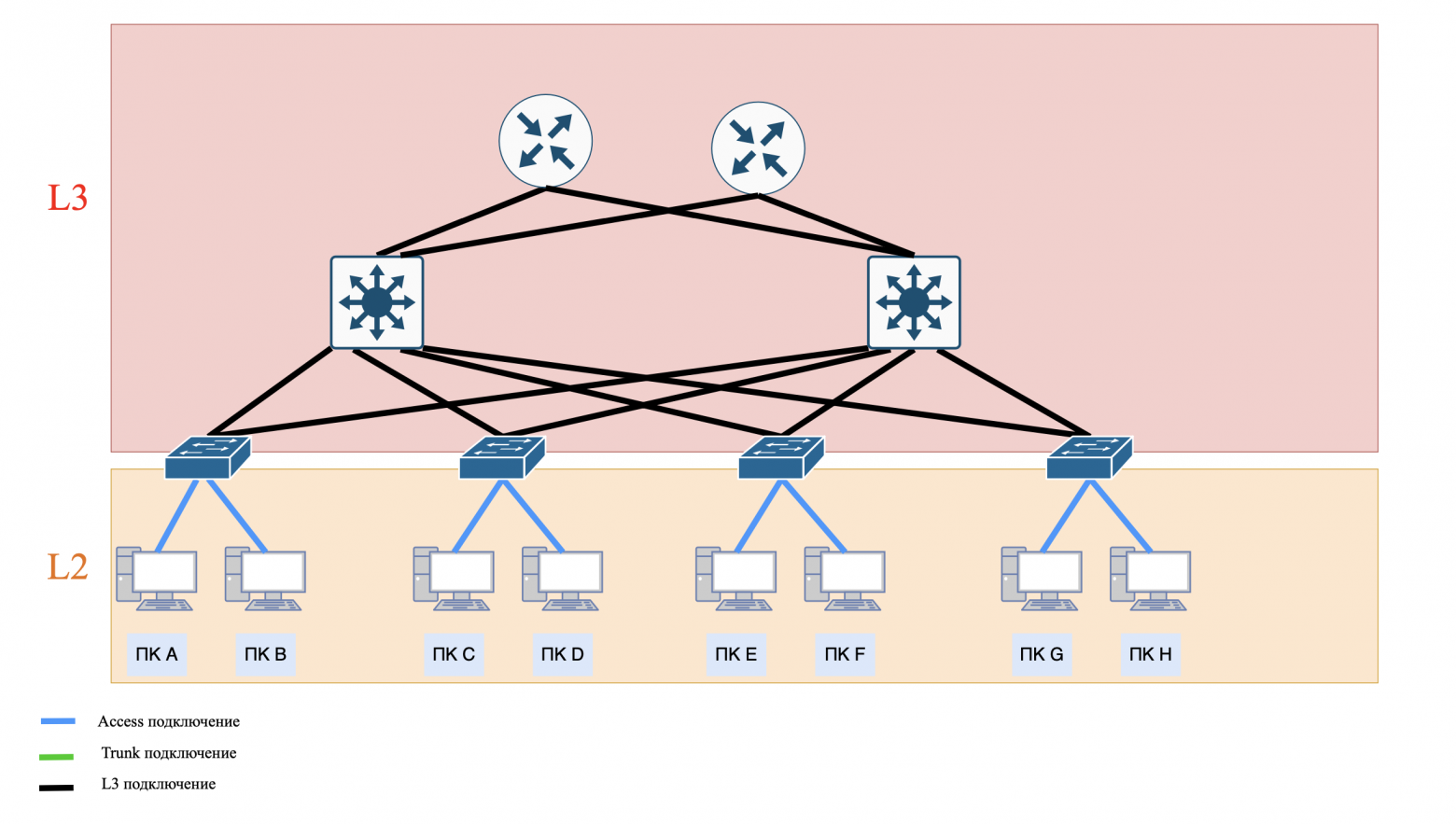
❯ How to choose between routing to Distribution and Access?
The choice of architecture depends on the network scale, budget, security requirements and flexibility.
Aggregation level routing (Distribution) suitable for:
medium and large corporate networks that require unified management of security policies and QoS;
networks with mobile users who need end-to-end VLANs (for example, employees moving between floors or buildings);
budget solutions that use inexpensive L2/L2+ switches at the access level.
Access Layer Routing (Access) suitable for:
modern networks where scalability and fault tolerance are important;
networks with high traffic between subnets - minimizing broadcast storm;
projects where end-to-end VLAN is not required (for example, branches with local services).
Hybrid solutions are suitable for:
use L3 on Access for critical segments (for example, server farms), and L2 on Aggregation for user VLANs.
❯ What if we need to implement a corporate email server, DHCP or DNS server into our network?
If you need to implement a corporate email server, as well as DHCP or DNS servers into your corporate network, it is important to carefully consider their placement to ensure optimal performance and security.
❯ Demilitarized network
Option 1: Flat network
Essence: all devices (servers and PCs) are on the same network without division into zones.
Pros:
- ease of setup and management;
- low infrastructure costs.
Cons:
- zero security: hacking one device puts the entire network at risk;
- broadcast traffic slows down work;
- it is impossible to isolate critical services.
Where to use:
- small home networks;
- test environments where security is not important.
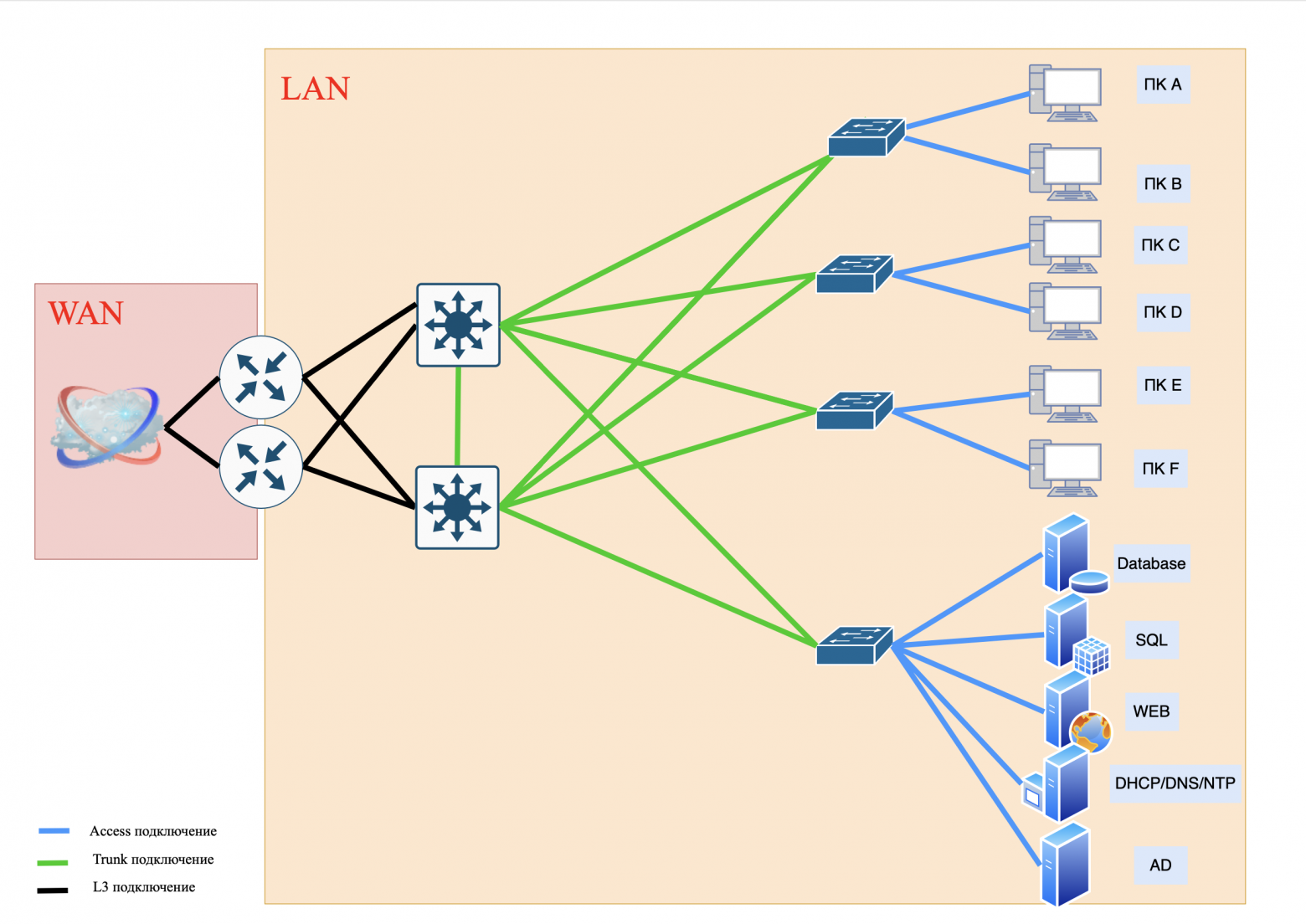
Option 2. DMZ
Essence: public services are placed in a separate demilitarized zone (DMZ), separated from the internal network by a firewall.
❯ What is a DMZ?
DMZ (Demilitarized Zone, demilitarized zone) is an isolated network segment that hosts public services accessible from the Internet (web servers, email services). The DMZ is separate from the internal network (LAN) and serves as a “buffer” between the Internet and critical resources.
Example:
the company's web server, available at company.com, is in the DMZ;
the database with client information is stored on an internal network that is not directly accessible from the Internet.
❯ What is a firewall?
Firewall (Firewall - “fire wall”) is a security system that monitors and filters network traffic between different network areas (for example, between the Internet and a local network). Its main purpose is to block unauthorized access, attacks and data leaks, allowing only authorized traffic to pass through.
❯ How does a firewall work?
Traffic filtering: The firewall analyzes incoming and outgoing data based on specified rules. For example:
- allow access to websites via port 80 (HTTP) and 443 (HTTPS);
- block connections from suspicious IP addresses.Filtering methods:
- by IP addresses and ports: blocks traffic from specific sources or to specific ports;
- according to protocols: allows or denies the use of protocols (TCP, UDP, ICMP);
- Stateful check: monitors the state of TCP sessions (for example, confirms that the incoming packet is a response to an outgoing request within one session).ITU types:
- hardware: individual devices (for example, routers with security features). Suitable for protecting corporate networks;
- software: applications on your computer or server (for example, Windows Defender Firewall). Used for personal protection;
- cloudy: services like AWS WAF that protect web applications from DDoS attacks.
Whatever firewall you choose, it protects your network or network segment from unauthorized access.
Pros:
- protection of the internal network: even if the DMZ is hacked, the attacker will not gain access to the LAN;
- traffic control: firewall filters requests to servers (domain controllers, SQL, etc.).
Cons:
- complication of settings;
- risk of errors in firewall rules.
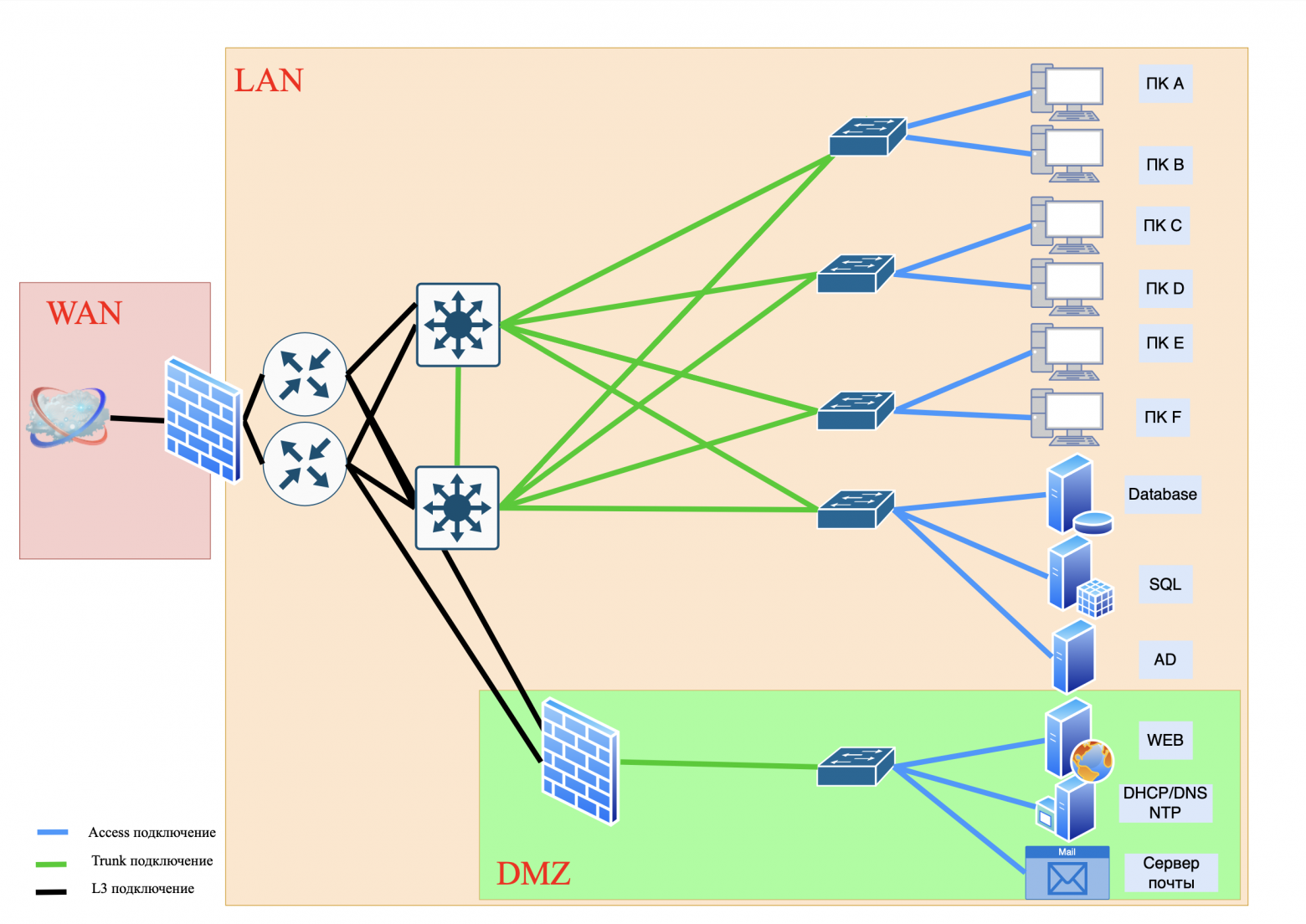
Option 3. Dividing services into Front-End and Back-End
❯ What is Front-End and Back-End
Front-End (client part):
- interface with which users interact (website, mobile application);
- processes requests, displays data, but does not store it;
- example: online store web page.
Back-End (server part):
- provides application logic, data storage and processing;
- works with databases, authentication, API;
- example: a server that checks the user's password and returns data from the Database.
Pros:
- maximum safety: Back-End is not accessible from the outside;
- scalability: Front-End and Back-End capacities can be increased separately.
Cons:
- high infrastructure costs;
- difficulty of synchronization between components.
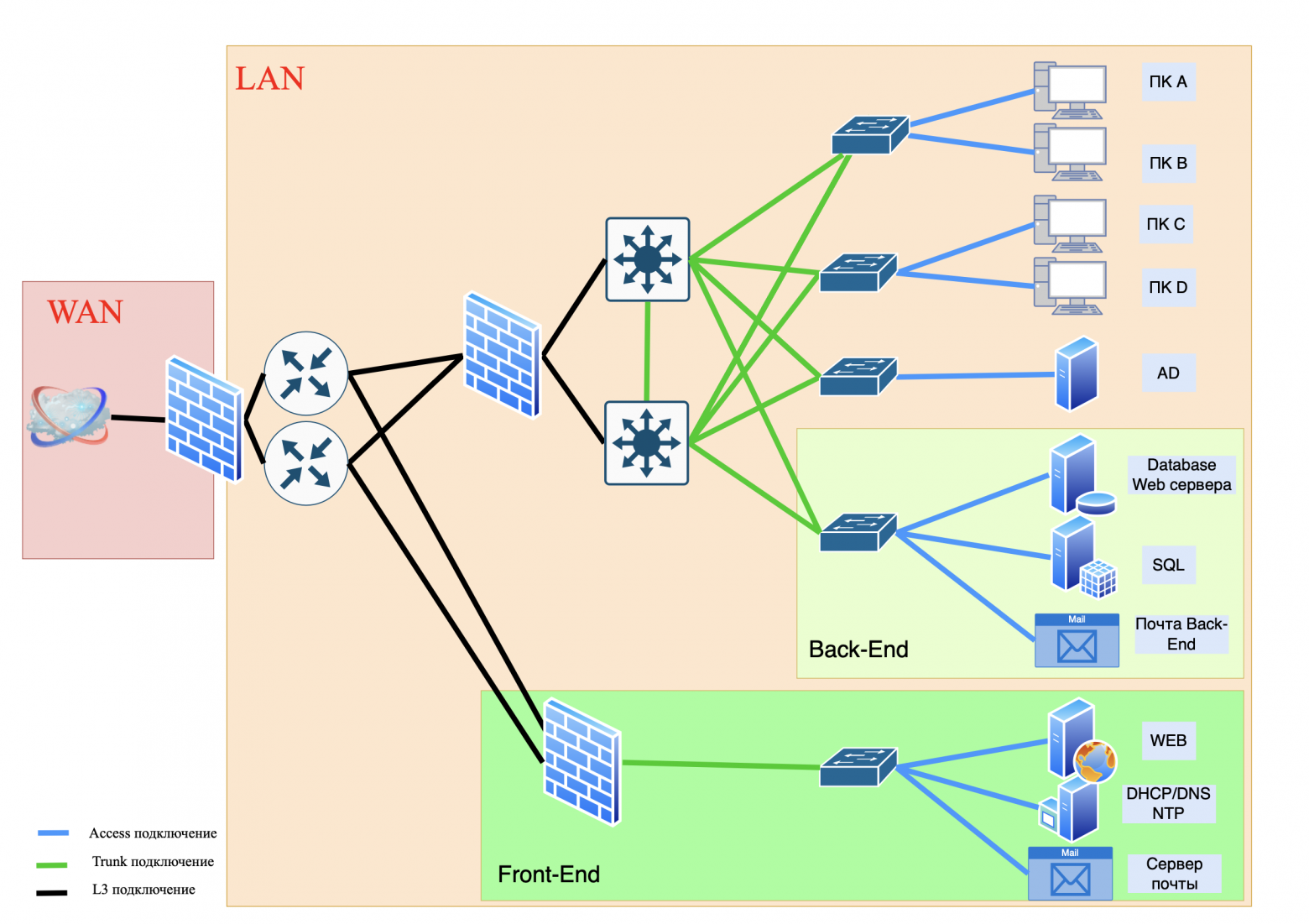
To build ordinary corporate networks, the “classical” three-level network model is often used. Its advantage is that it is quite simple to implement. However, this model has a significant drawback.
If you need to provide access to your servers from the Internet, where thousands of users connect to your web resources, then the “classic” three-tier model will not be enough.
The data center comes to the rescue.
❯ What is a data center?
DPC (Data Processing Center) is a specialized building that houses servers, network equipment and data storage systems.
It provides:
reliability: backup power, cooling, protection from physical threats (fires, floods);
high performance: powerful servers for processing large volumes of data;
safety: access control, protection against cyber attacks.
Examples of companies that need a data center:
cloud providers (AWS, cloud servers);
financial institutions (banks, exchanges);
IT giants (Google, Microsoft);
startups in the field of Big Data or machine learning.
❯ What if my company is small?
You most likely don't need your own data center. You can rent capacity from a provider or use cloud services (for example, rent virtual servers).
❯ When might your company need its own data center?
You are growing:
- if your company has started working with big data or AI, renting capacity in a data center is cheaper than buying your own servers;High availability required:
- for example, an online store with a million users cannot afford downtime.Safety:
- If you store personal customer data (such as medical records or chart data), the data center will provide physical and network security.
❯ But what if we don’t want to rent servers in data centers, but want to build our own similar network?
This is where the Fat-Trees and Clos networking methods come to the rescue.
❯ Fat-Trees and Clos networks: the basis of data centers and corporate networks
Clos topology: "Lego" for networks.
Structure:
- levels: Leaf (leaves) → Spine (spines) → Border Leaf (border devices);
- principle: Each leaf switch connects to all spine switches of its layer.
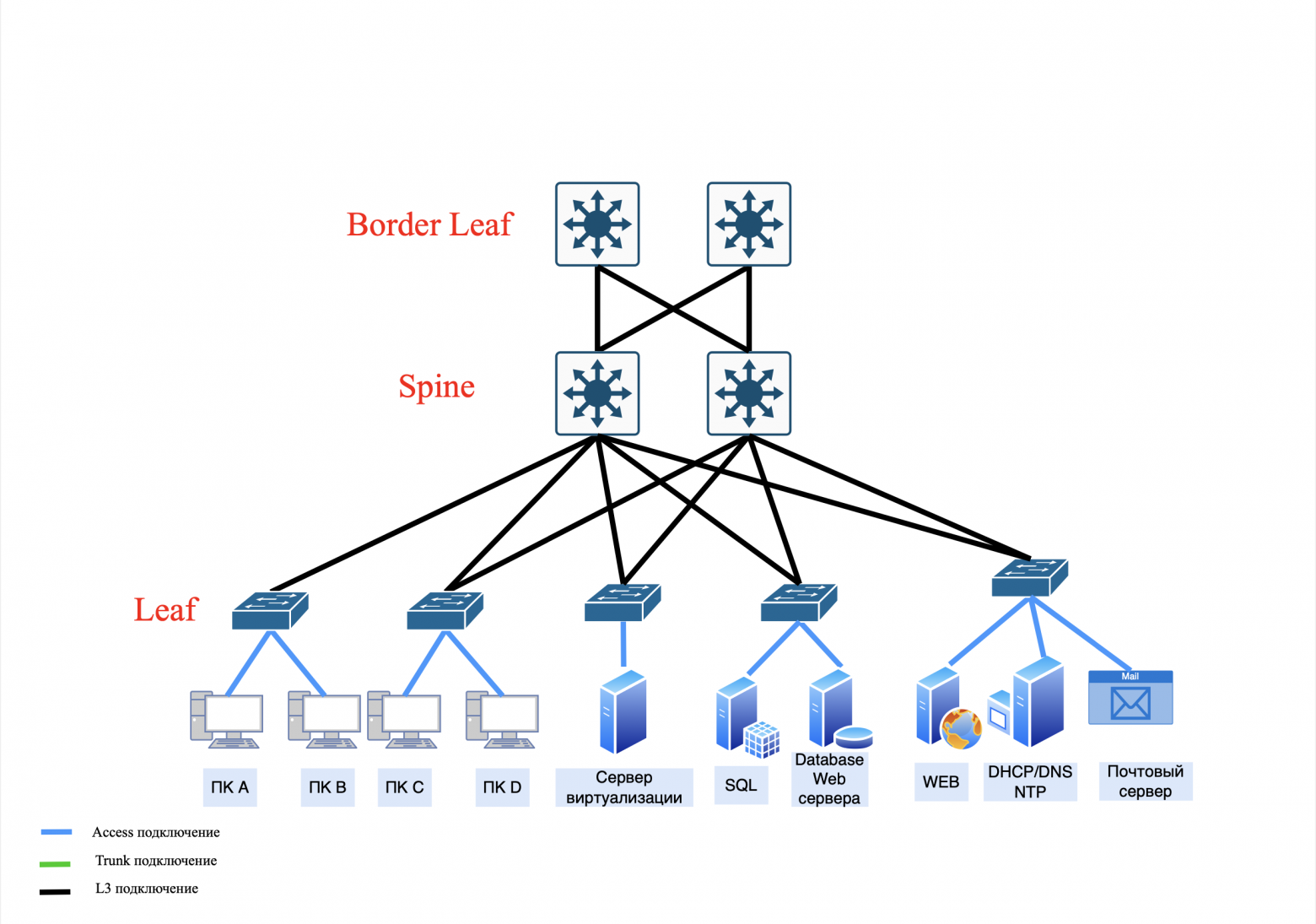
How does this work:
- the server sends traffic through leaf → spine → another leaf → target server;
- if one spine (or a link from a spine) fails, traffic is automatically redirected through the remaining ones.
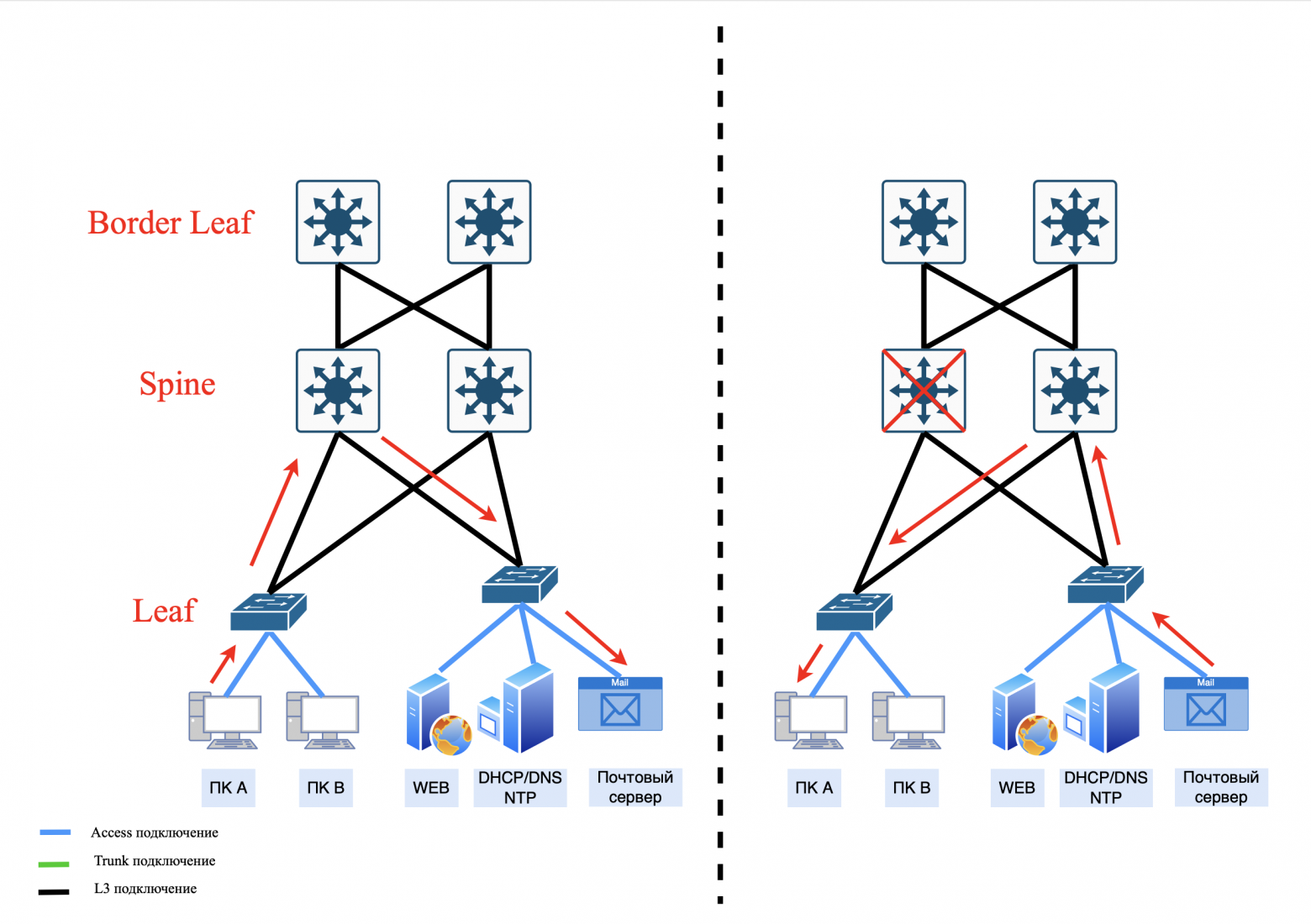
Advantages:
scalability: easy addition of new nodes and spine levels, which increases throughput;
fault tolerance: there is no single point of failure;
uniform load: traffic is distributed through all available paths (in Clos networks, ECMP is used for this).
Previously, we looked at a three-layer Clos network, but it can be scaled up to a five-layer network.
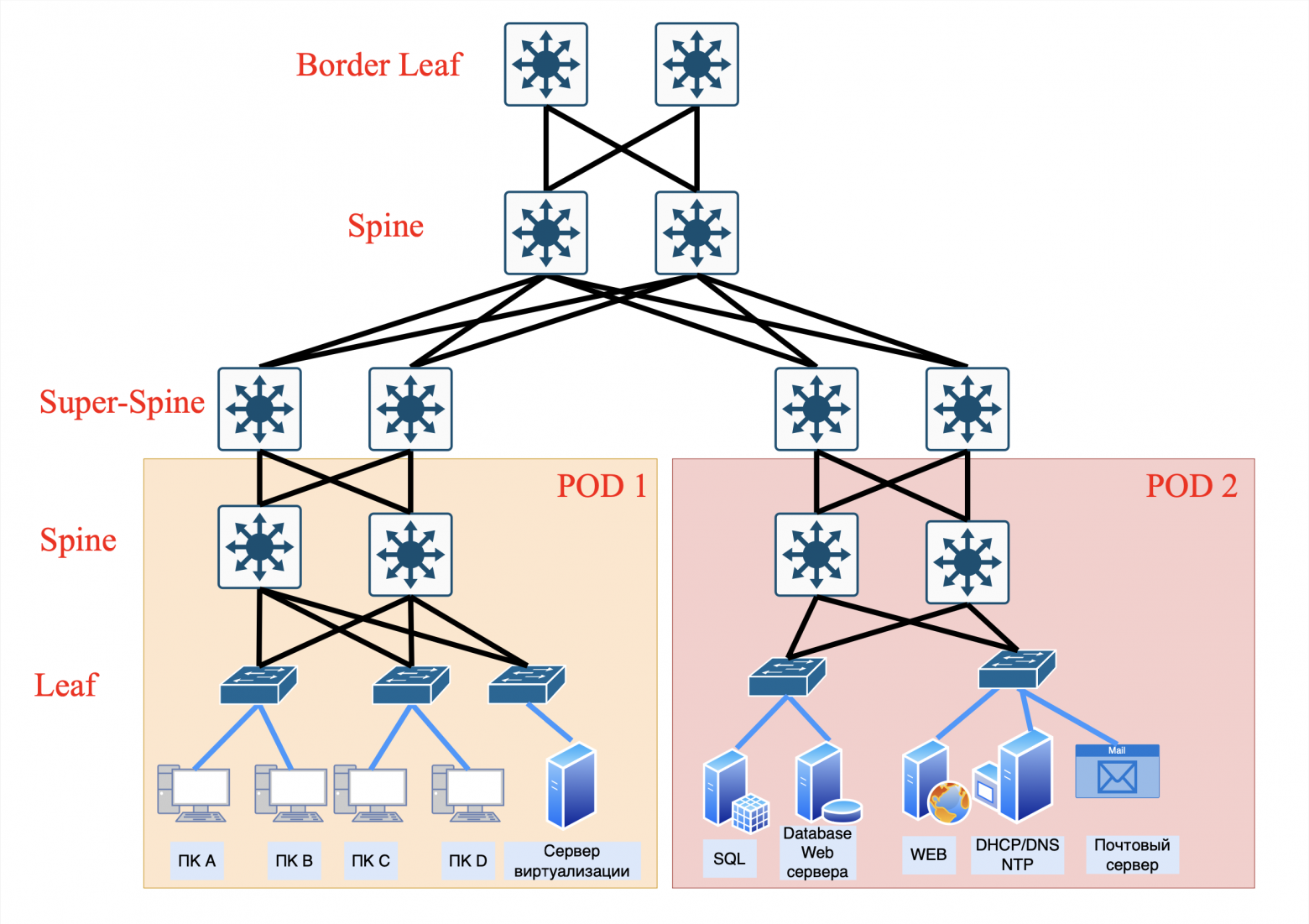
❯ Multi-layer network Clos.
Structure: PODs connected to their Super-Spine pair
Levels: Leaf → Spine → Super-Spine → Border Leaf.
The operating principle is as follows: Each pair of leaf switches that is connected to a pair of spines forms a group of devices called PODs (Point Of Delivery). Each POD is then paired with a pair of Super-Spines. In turn, each Super-Spine is connected to a Border Leaf.
Pros:
• ease of control:
- local routing rules for each Super-Spine pair;
- easier to diagnose problems (traffic isolation).
• Failure Isolation:
- if the Super-Spine fails, only “his” POD is affected;
• less cables:
- Fewer connections between switches are required.
Cons:
• limited scalability:
- adding new PODs requires deploying new Super-Spine pairs.
• uneven load:
- If traffic between PODs increases, dedicated Super-Spines can become a bottleneck for traffic.
• risk of redundancy:
- redundant Super-Spines may be idle if the load is unevenly distributed.
Where used:
- small data centers with a fixed number of PODs;
- networks where simplicity and predictability are critical.
Structure: POD connected to all Super-Spines
Levels: Leaf → Spine → Super-Spine → Border Leaf.
The operating principle is as follows: Each pair of leaf switches that is connected to a pair of Spine forms a POD (Point Of Delivery). Each POD is then connected to all Super-Spines. In turn, each Super-Spine is connected to a Border Leaf.
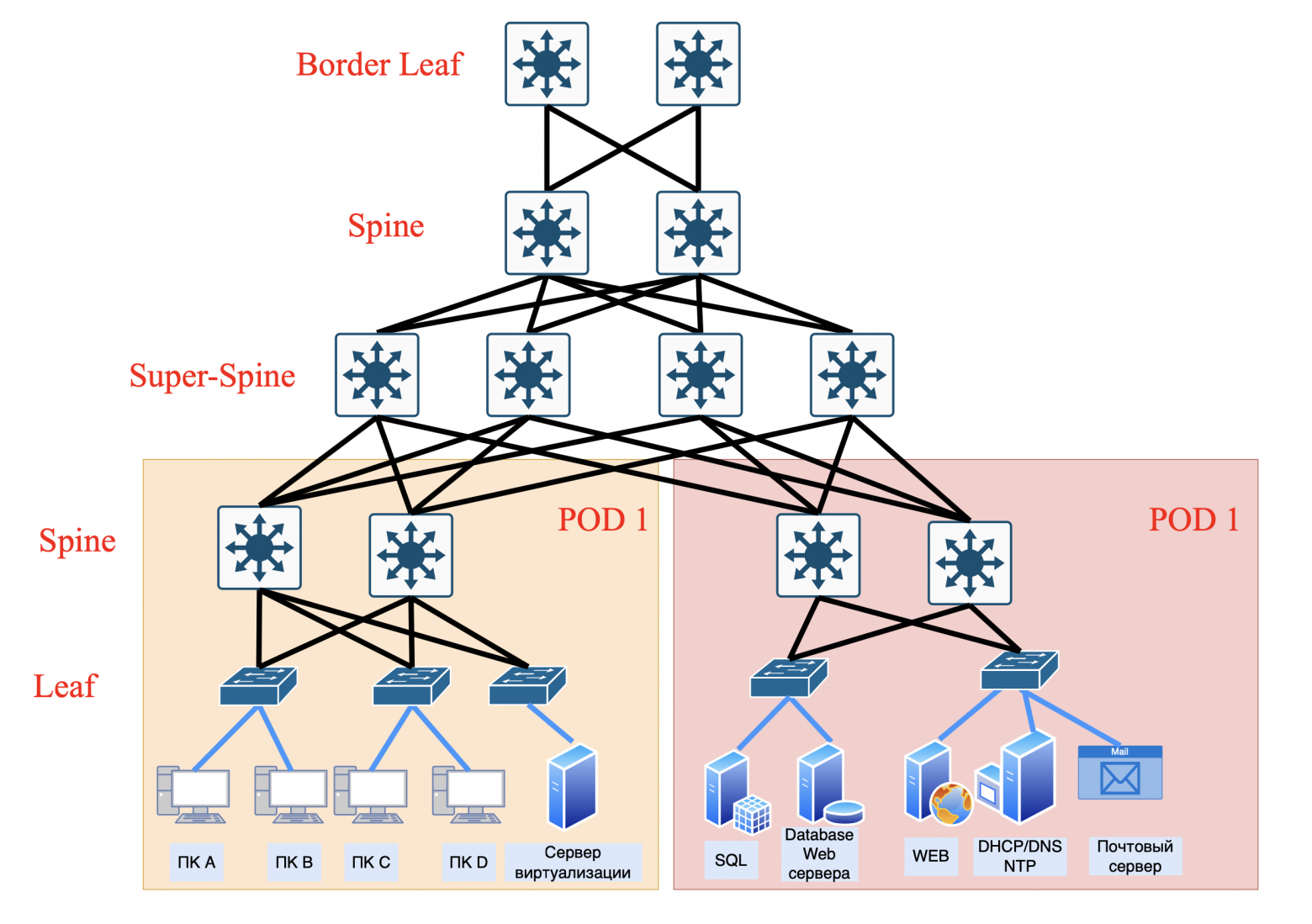
Pros:
• high fault tolerance:
- if any Super-Spine fails, traffic is automatically redistributed.
• better load balancing:
- ECMP uses all paths, minimizing delays.
• scalability:
- new PODs can be added without changing the existing Super-Spine infrastructure.
Cons:
• configuration complexity:
- BGP/OSPF configuration is required to work with multiple paths.
• high costs:
- a large number of cables and ports on the Super-Spine.
• risk of control overload:
- routing tables may become too large (for example, with 1000 PODs).
Where used:
- large hyperscale data centers (Google, Yandex and the like);
- networks with dynamically growing load.
❯ Fat-Trees (thick tree) as a special case of the Clos network: maximum throughput
Structure resembles an upside-down tree with “thick” trunks (hence the name Fat-Tree).
Fat-Tree was born as a response to industry demands where performance, zero blocking and minimal latency are more important than resource savings. While Clos remains the general-purpose standard, Fat-Tree dominates in niche, high-traffic applications.
Fat-Trees often uses doubling the bandwidth (or number of connections) at each level. To transmit a message from one node to another, you need to use switches at different levels.
Principle:
• provides minimal latency due to multiple parallel paths.
Advantages:
• high throughput: no bottlenecks;
• ideal for HPC (High Performance Computing): Suitable for tasks requiring synchronous computing.
Flaws:
• high cost: a large number of cables and ports;
• scaling difficulty: adding new devices requires restructuring the entire structure.
Where used:
- supercomputers (for example, Summit at Oak Ridge National Laboratory);
- clusters for machine learning.
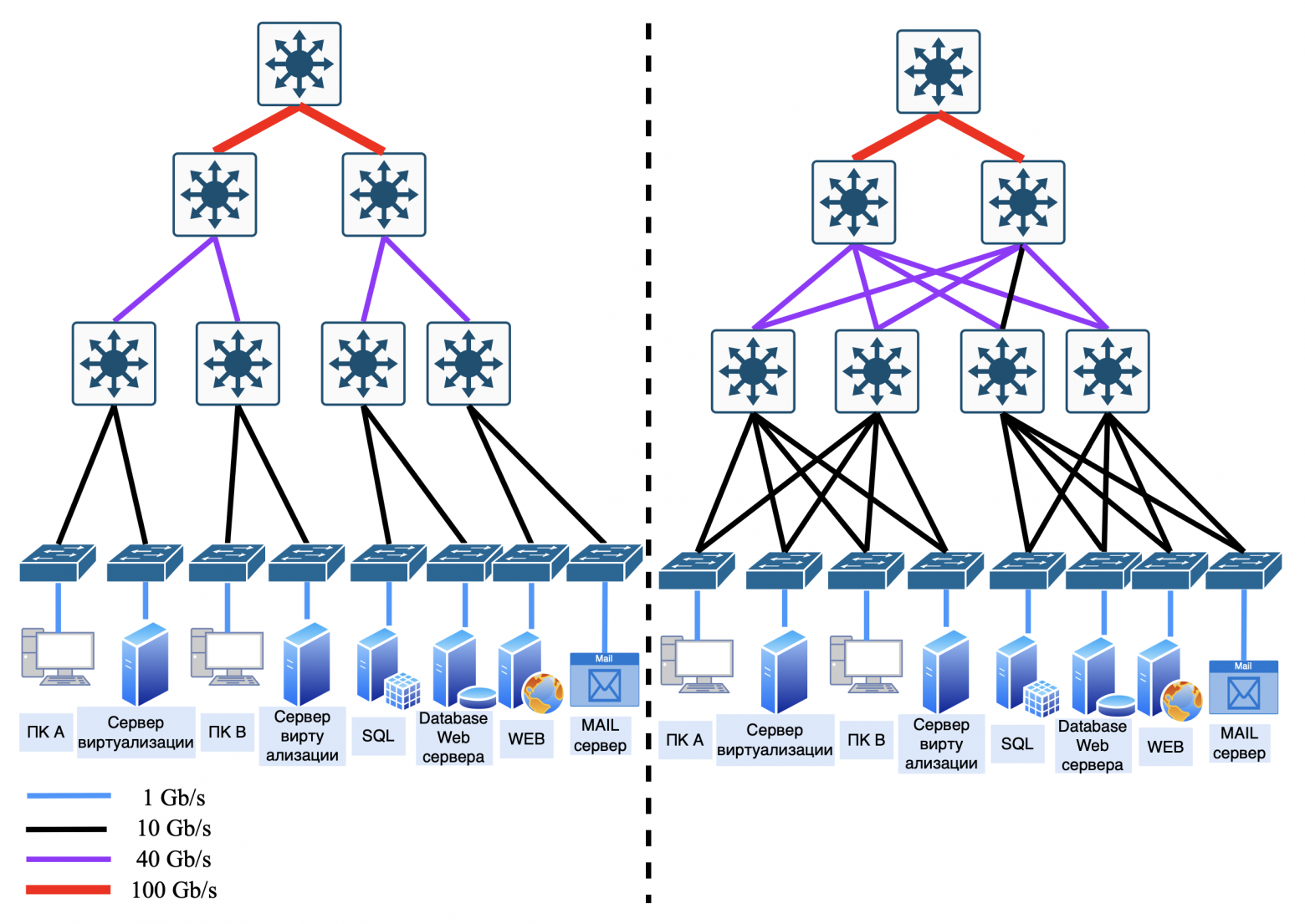
Comparison of Clos and Fat-Trees
Clos | Fat-Trees | |
Scalability | Easily scaled by adding spine levels | Difficult to scale due to redundant connections |
Price | More economical (less cables) | More expensive (lots of cables and ports) |
Delay | Stable, but higher than Fat-Trees | Minimal due to parallel paths |
Usage | Data centers, cloud networks | HPC, supercomputers |
❯ Why does Clos dominate the data center?
Flexibility: you can start small and build up the infrastructure gradually.
Easy to control: standard protocols (BGP, OSPF) work out of the box.
Saving: 100G optical links are cheaper than running thousands of cables for Fat-Trees.
When to choose what?
• select Clos if:
- you need a scalable and cost-effective network for cloud or web services;
- ease of management is important (for example, for startups).
• choose Fat-Trees if:
- requires maximum performance for scientific computing;
- the budget allows you to cover high infrastructure costs.
When building a network, it is important to consider all the advantages and disadvantages of each model. It is recommended to use hybrid solutions that combine elements of the “classic” three-tier model and the Clos topology for accessing servers. Also, do not forget about a dedicated demilitarized zone (DMZ) to increase network security.
❯ What is LAN, WAN, MAN?
Everything that we considered earlier, including previous articles, applies to the local area network (LAN — Local area network).
LAN can be organized either within your apartment with a router and connected devices such as a laptop, phone, TV and smart speaker, or in the form of a large data center (data center) with edge router (Edge Router). But usually LAN still means local area networks of enterprises or offices.
Edge Router (or firewall) connects the local network to the WAN (Wide Area Network). WAN is a network connecting devices and multiple local networks over long distances between cities, countries and continents
There is also a subtype of local networks - MAN (Metropolitan Area Network). MAN is a network covering the territory of a city or large region.
This type of network occupies an intermediate position between WAN and LAN.
Examples of use:
a city provider network that provides Internet to residential buildings;
a transport system with cameras and sensors throughout the city;
smart city: management of traffic lights, public transport.
❯ It turns out that the Internet is just a network where, when we connect our home router to the provider’s cable, we immediately get into this large local network?
Not really.
The Internet is not actually a single network, but millions of autonomous systems (AS) operated by different providers, companies and countries. In order for traffic to reach YouTube's servers from your smartphone, these systems must "agree" on which path to send the data. This is where it comes on stage BGP (Border Gateway Protocol) is the main “hard worker” of the Internet.
❯ How does BGP connect the world?
Autonomous systems (AS)
Each provider, hosting or corporation has its own AS (Autonomous System) - like a network passport. AS has a unique number (for example, AS15169 - Google).
How are AS assigned?
Public AS are issued by a regulator, such as the regional Internet registrar RIR.
Private AS are used for internal needs, within the same network (for example, for iBGP)
For private ASes, use the range 64512-65534. But for isolated networks not connected to the Internet, you can use any. But for local networks, preference goes to using ospf.BGP sessions
Providers establish “trust sessions” (BGP peers) between their ASes. Through them they exchange routes: “Hey, I know the path to the network 192.168.1.0/24!”Choosing the best path
BGP selects a route based on the following criteria:
— short path (minimum number of AS on the path);
— reliability of the provider (prefix “verified”);
— policies (for example, “do not allow traffic through country R...”).
❯ Why is it dangerous?
BGP works on trust: if an ISP says "I own the 8.8.8.0/24 network" (even though 8.8.8.8 is Google's DNS), others may believe it. This is how prefix hijacking occurs:
2018: attackers redirected Amazon traffic through their network to steal cryptocurrency.
2021: A glitch in Facebook's BGP settings shut down its servers for 6 hours. I wrote about this glitch in a post in telegram.
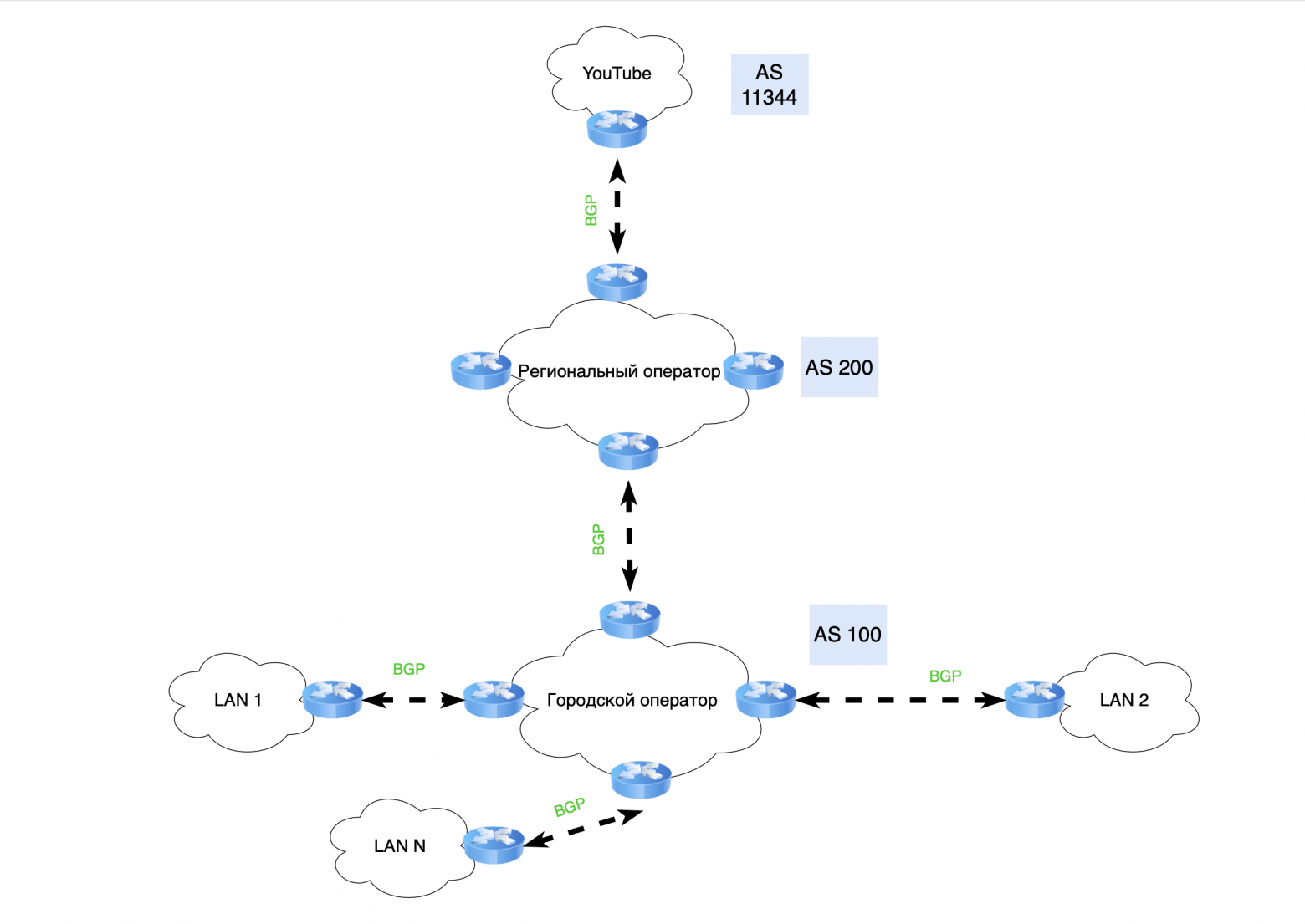
Each Autonomous System (AS) is responsible not only for managing its networks, but also acts as a transit node for data transfer between end clients, telecom operators and the resources to which they connect.
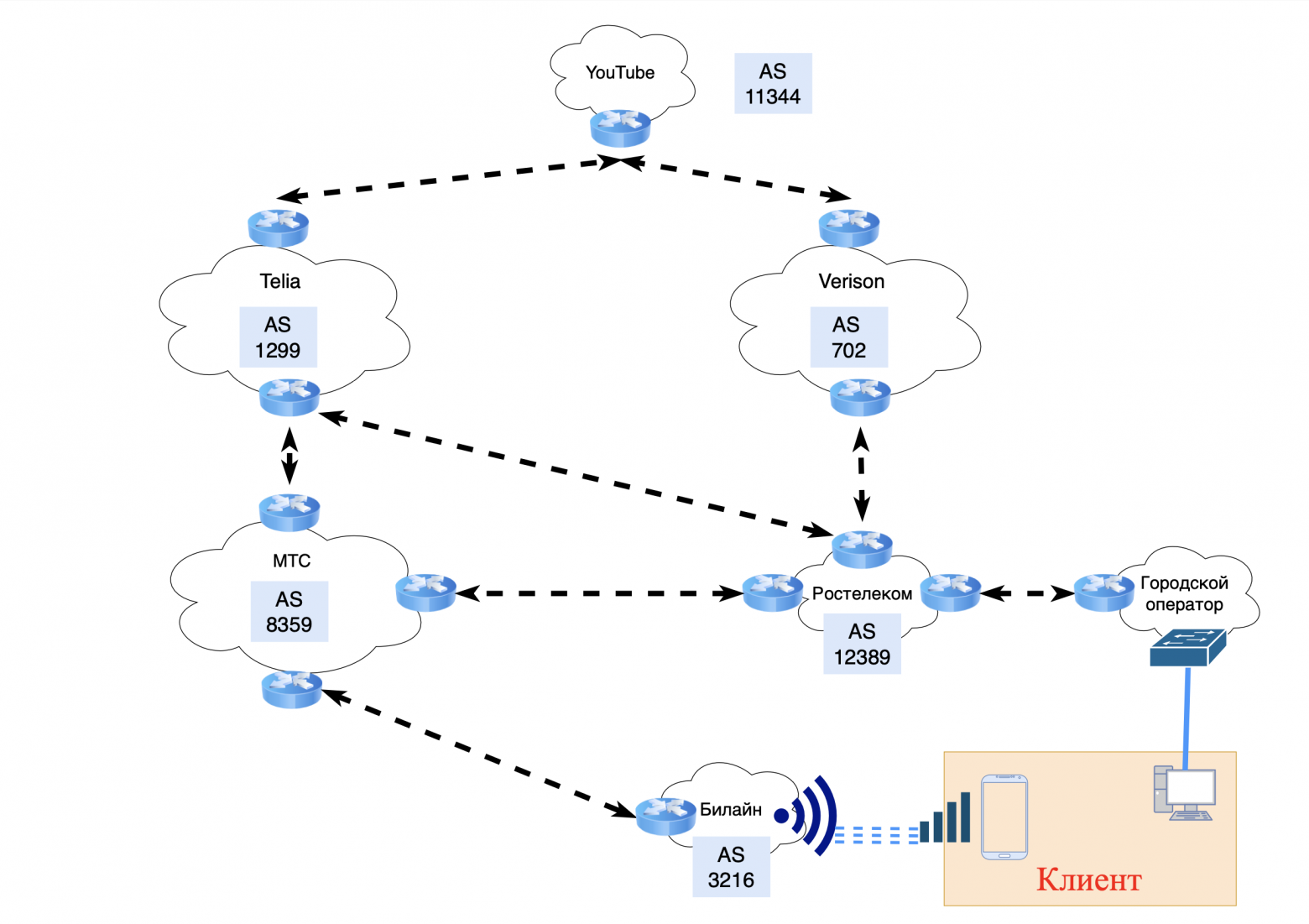
For example, when you use YouTube on your phone, the data passes through several transit ASs from your telecom operator (for example, Beeline, Megafon, etc.) to the video hosting AS. However, if you connect to the same YouTube from your desktop computer, the data passes through other transit ASs belonging to your city communication provider (for example, Rostelecom, TTK, etc.).
Thus, even being in the same apartment, traffic can pass along different paths to connect to the same resource.
❯ What does the network look like for large autonomous systems (AS)?
Everything is quite simple. If we are talking about a city or regional operator that delivers traffic in transit to higher-level operators or large servers, then such networks are built according to the “classical” three-level system, which we talked about above, but slightly modified.
If such operators have their own servers, then they are combined with the core of the network. This allows for efficient interaction between various network components and improves the quality of services provided.
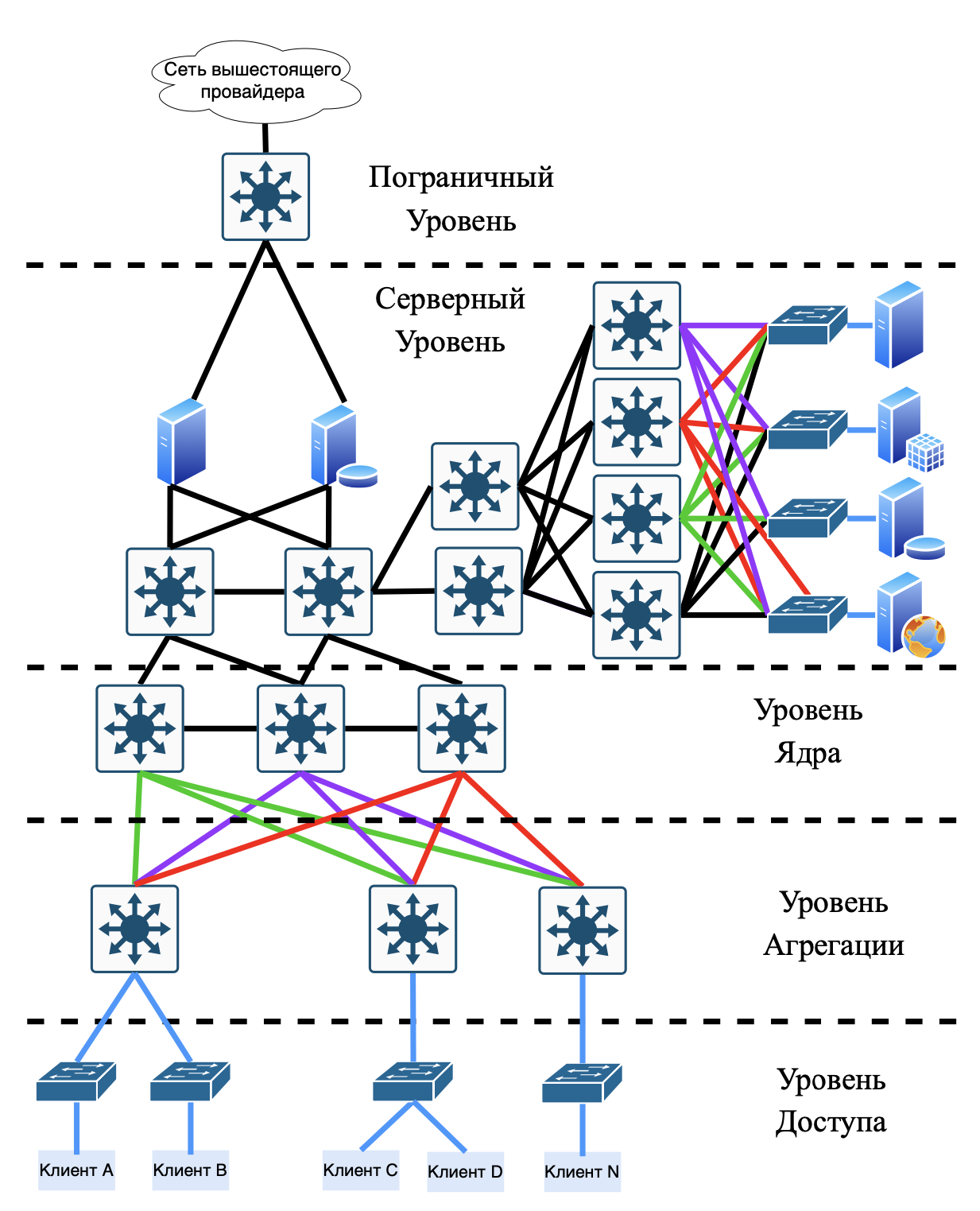
If an autonomous network provides access exclusively to its servers, its topology uses Clos or Fat-Trees networks, depending on the needs. Large companies are already moving to more modern topologies, such as Dragonfly, for data center networks.
❯ Hierarchy of telecom operators on the Internet
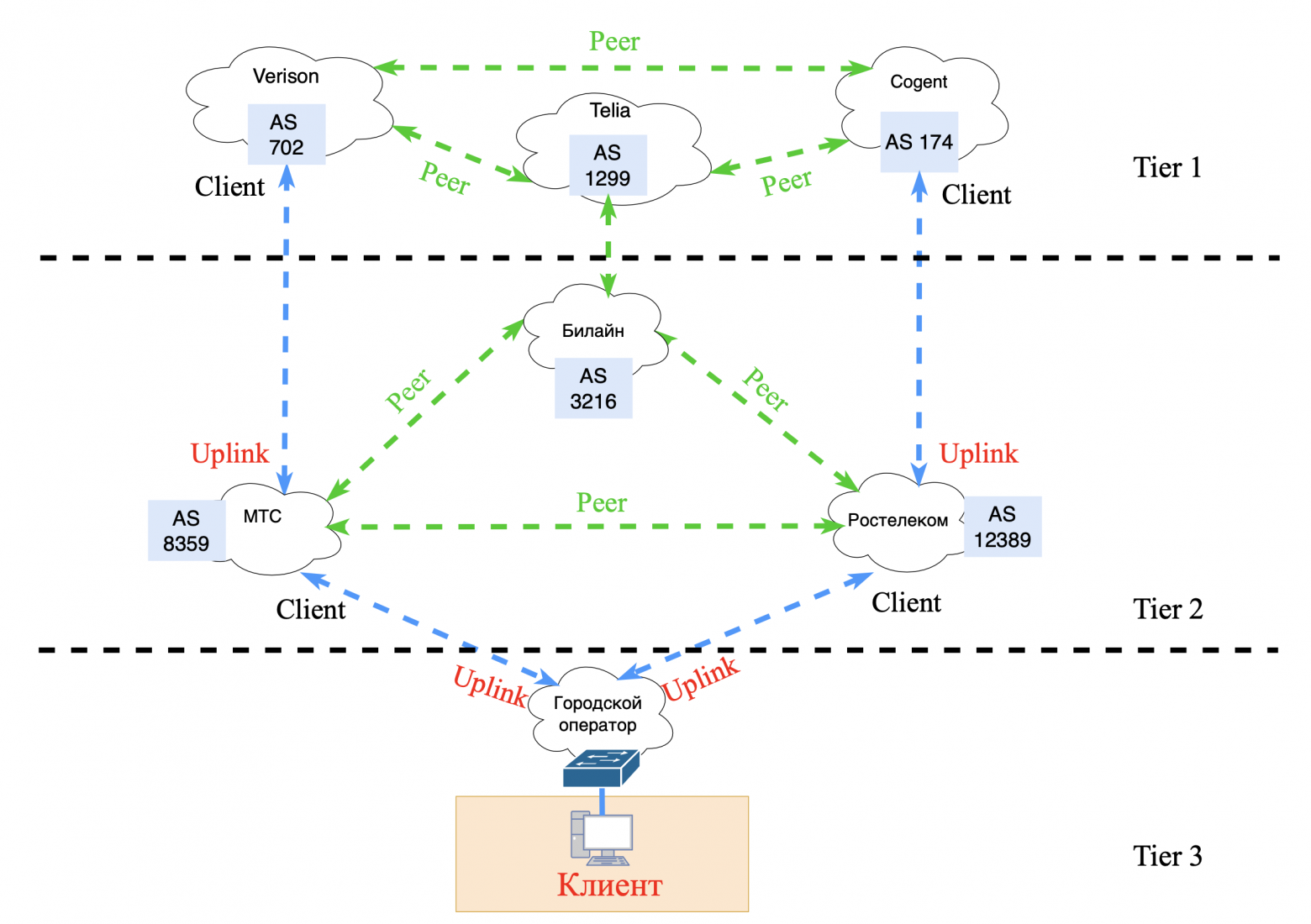
Provider hierarchy levels (ISP Tier 1, 2, 3)
Tier 1 (Global backbone providers):
• these are the largest providers that form the basis of the global Internet infrastructure;
• have direct connections with each other (peer-to-peer), which allows you to exchange traffic without having to pay other providers for it;
• examples: Lumen (formerly Level 3), AT&T, NTT Communications;
• use high-speed highways (400+ Gbit/s) and provide Internet access for Tier 2.
Tier 2 (Regional providers):
• do not have direct access to the entire global Internet and purchase transit from Tier 1 providers;
• often enter into peering agreements with other Tier 2s to minimize transit traffic costs;
• examples: providers serving individual countries or large regions (Rostelecom, Cogent).
Tier 3 (Local or retail providers):
• provide services to end users: individuals and organizations;
• buy Internet transit from Tier 2 or Tier 1 providers;
• the task is to deliver traffic to endpoints via local networks.
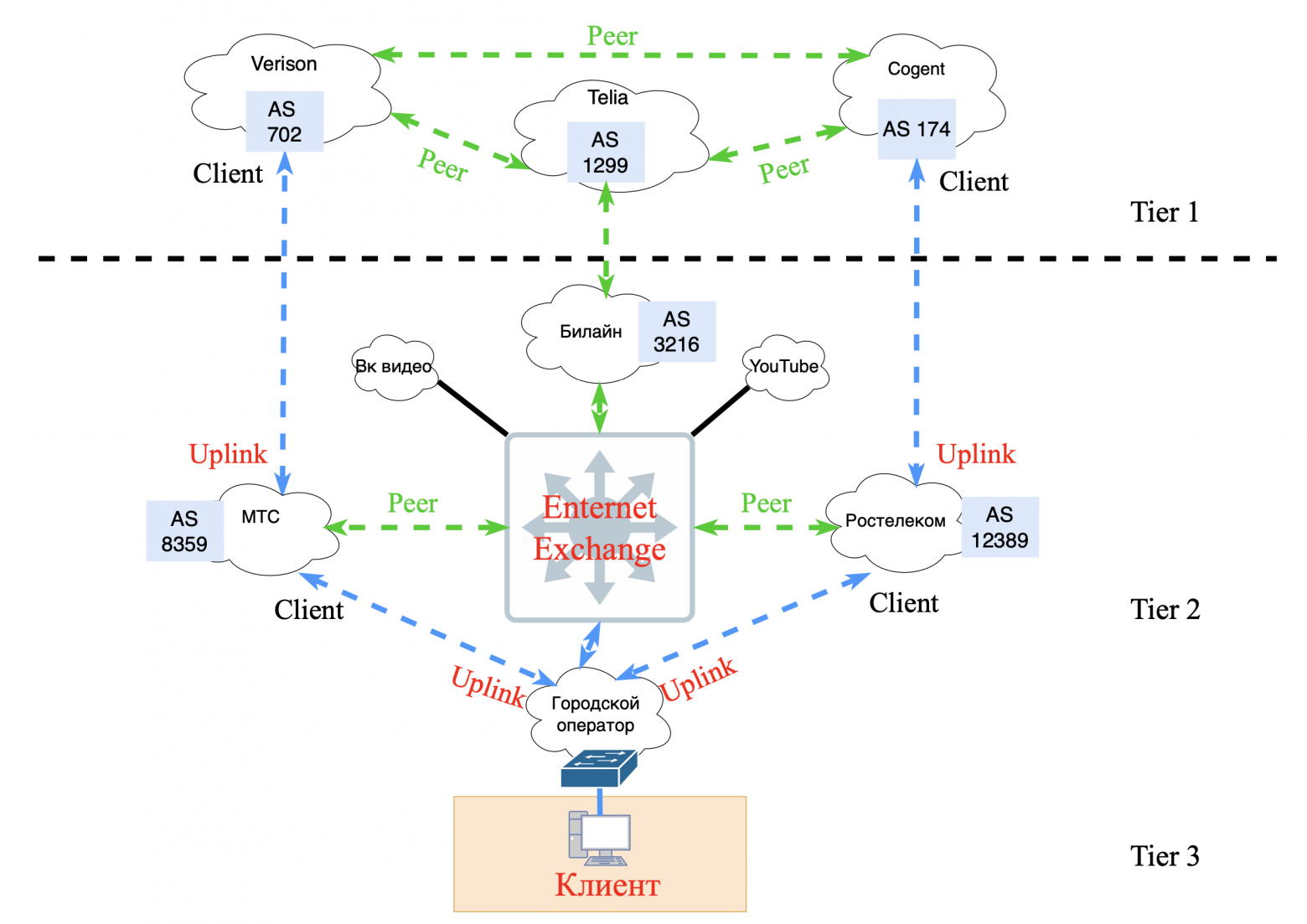
Internet exchange points (IXPs):
• Internet Exchange Points (IXP) - infrastructure platforms where Internet providers and large companies exchange traffic;
• reduce delays, optimize routes and reduce costs for data transmission through backbone networks.
Main components:
- switches (high-performance, usually levels 2 and 3);
- routers of IXP participants.
Examples of large IXPs:
- DE-CIX (Germany) - the largest in the world in terms of traffic;
- MSK-IX (Russia).
Peering and transit
Peering:
• this is a mutual agreement between two networks to exchange traffic directly, without payment;
• there are two types:
- public peering. Through traffic exchange points (IXP);
- private peering. Through a direct connection (for example, a link between two data centers).
Transit:
• this is a service in which one network pays another for access to the Internet;
• example: a local Tier 3 provider pays Tier 2 for connection to backbone routes.Backbone networks:
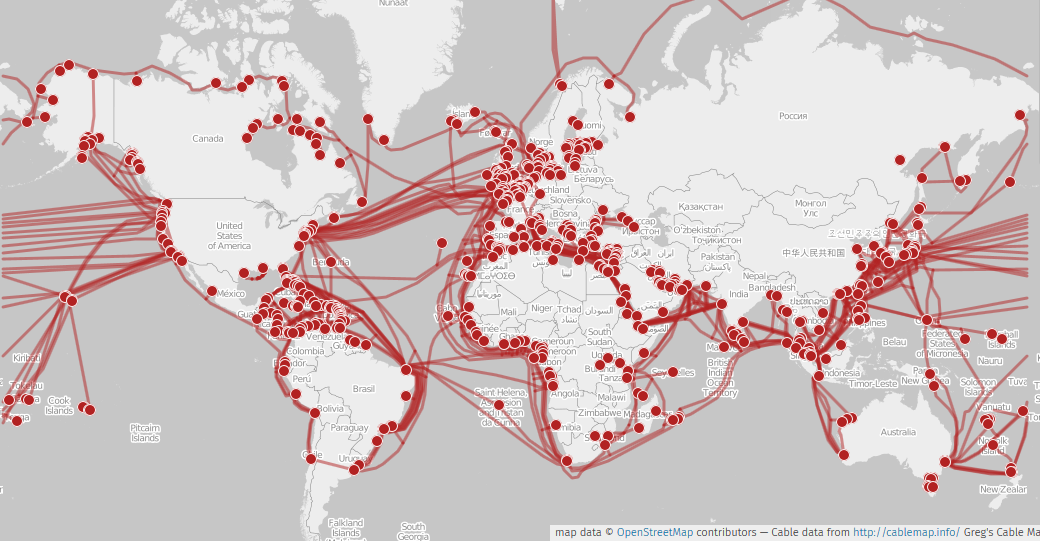
• Backbone — high-speed highways connecting large network nodes.
• Use:
- fiber optic communication lines (DWDM, 400G and above);
- Submarine cables;
- intercity and international connections.
• backbones ensure the stability of the Internet: if one line fails, traffic is rerouted along other routes.
Contracts and commercial models
Peering agreements:
• usually free if traffic volumes are approximately equal;
• if the imbalance is large, financial compensation may be introduced.
Transit agreements:
• Cost depends on the amount of bandwidth (usually measured in Gbit/s).Equipment
Backbone routers:
• examples: Cisco ASR, Juniper MX, Huawei NE;
• support multi-terabit traffic flows and complex routing protocols (BGP, MPLS).
Switches
• provide data transmission at OSI level 2;
• examples: Arista, Cisco Nexus switches.
Transceivers
• used to connect fiber optic lines: QSFP;
• support speeds up to 400 Gbps and higher.
Submarine cables
• an important part of the infrastructure. Example: MAREA cable between USA and Europe (160 Tbit/s).
The topic of the logical structure of the Internet is so broad that it includes many other aspects: from routing and QoS to cybersecurity.
❯ Hierarchy is the head of everything
Early networks, such as the ARPANET, did not have a distinction between LAN (local area networks) and WAN (wide area networks). In them, IMP (Interface Message Processor) devices performed the functions of routers, but with logic more reminiscent of the work of queue brokers: they were engaged in fragmentation and reassembly of packets, confirmation of delivery, and guarantee of queues.
With the advent of commercial organizations, the Internet replaced the non-profit ARPANET network and began to actively develop. Ethernet and other LAN technologies appeared that replaced outdated data transfer protocols. Switches replaced IMP, and IP addresses became an integral part of the new global network.
❯ The question arose, how to regulate this Internet of yours?
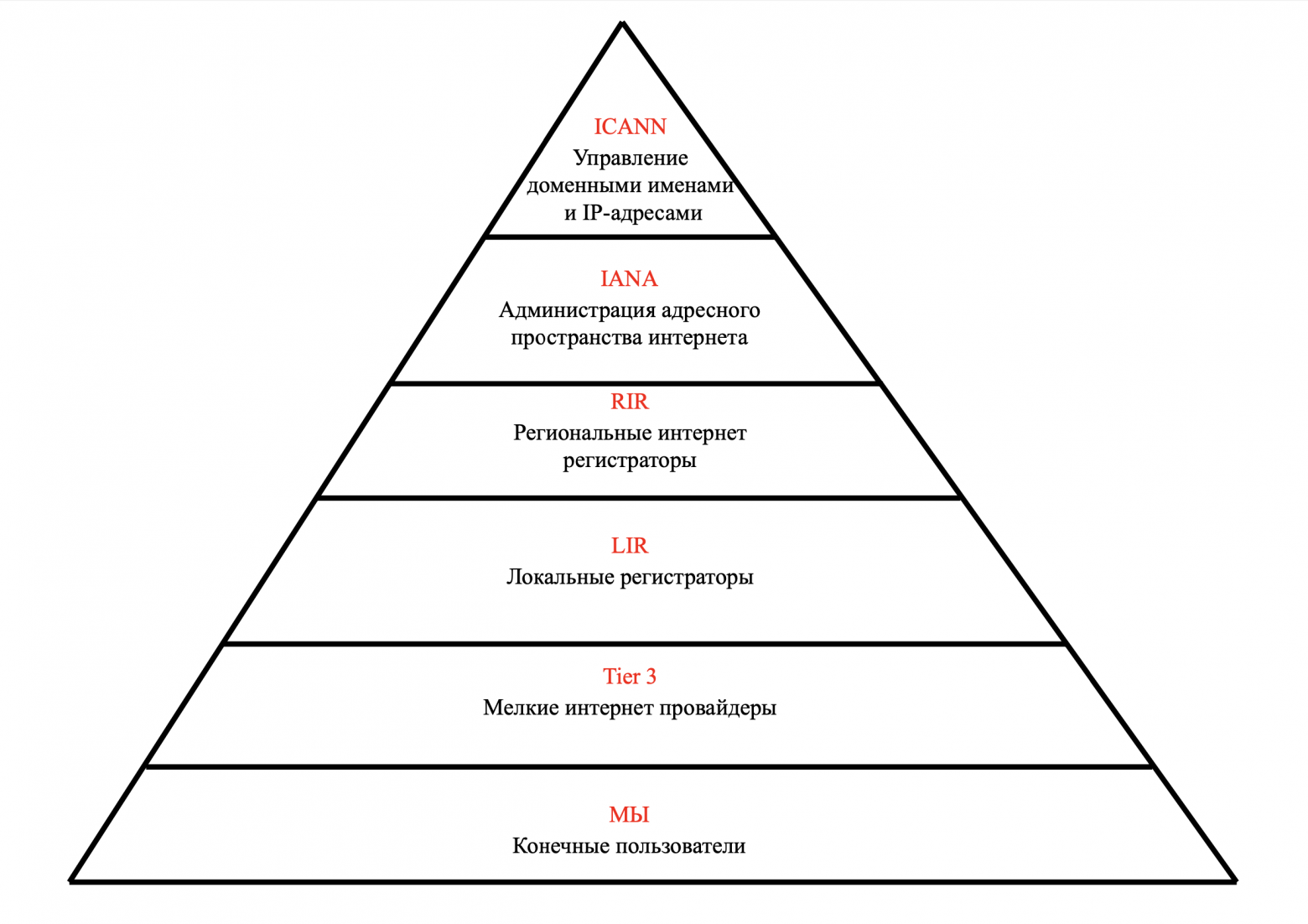
At the top of the pyramid is ICANN - the Corporation for the Management of Domain Names and IP Addresses.
Next, INNA took over the function of administering the Internet address space.
Regional registrars (RIRs) began issuing Autonomous System (AS) numbers to commercial organizations.
Local registrars (LIRs) receive address blocks from the RIPE NCC (one of five regional internet registrars) and assign IP addresses to their clients.
Smaller providers are engaged in connecting companies and end clients to the global Internet.
And you and I occupy the lowest, but at the same time very important role. You and I are consumers of information and are willing to pay for access to it.
❯ How does the Internet work? Brief summary
The Internet is a global network of networks where data is transmitted through a hierarchy of devices, operators and protocols. Here are the key steps:
Local networks (LAN):
- your computer, phone or laptop is connected to a router or Access Layer switch. VLANs and access/trunk ports are used here for traffic segmentation.Aggregation and routing:
- traffic from local networks arrives at the aggregation level (Distribution Layer), where L3 switches route it between subnets. Security policies (ACL, QoS) are also applied here.Global transmission (WAN/MAN):
- the data leaves the local network through the border router and enters the operator’s network (Tier-3). They are then transmitted over metropolitan (MAN) and wide area (WAN) links, often using high-speed cables.Role of operators (Tier-1, Tier-2, Tier-3):
- Tier-3 providers connect users to Tier-2, who, in turn, buy transit from Tier-1 backbone operators (for example, Lumen, Cogent). o BGP provides routing between autonomous systems (AS) by selecting optimal paths.Data centers and scaling:
- large services (Google, Netflix) store data in data centers built on Clos or Fat-Trees topologies. These architectures guarantee fault tolerance and high throughput. o To protect critical resources, a DMZ is used, isolating public services (web servers) from the internal network.Safety
- firewalls filter traffic at the edges of networks, and Private VLANs and segmentation limit the risks of hacking.
In this way, the Internet operates as a multi-layered ecosystem, with every part—from the cable in your apartment to the undersea highways—playing a role in delivering data. It is a combination of local infrastructure, global operators and smart protocols like BGP. Understanding these fundamentals helps you not only design resilient networks, but also be mindful of security and scaling.
In the last article of this series, we will talk about the future of networks. Why IPv6 was invented in 1992, they began to implement it in 2011, but by 2025 we had not fully switched to this wonderful protocol. We’ll also touch a little on SDN and Overlay networks.
News, product reviews and competitions from the team Timeweb.Cloud — in our Telegram channel ↩
Before payment, in the “Bonuses and promotional codes” section in the control panel, activate the promotional code and receive cashback on your balance.
For those who read to the end
Some important information
Colleagues, good afternoon! I created a Telegram channel from a networker for networkers.
If you are a network engineer, system administrator, developer, student, or just interested in networks - you here.
What awaits you?
Analysis of global failures and unexpected network problems.
Mini-articles with useful tips and explanations of complex topics in simple language.
Stories from the life of networkers - including from subscribers.
Channel link: https://t.me/ProstoKirReal
Why This Matters In Practice
Beyond the original publication, It's complicated about simple things. How the Internet works. Part 4. What are LAN, MAN, WAN, Clos networks and operator hierarchy matters because teams need reusable decision patterns, not one-off anecdotes. Greetings, colleagues! My name is @ProstoKirReal . I would like to discuss with you how the Internet works from twisted pair cables connecti...
Operational Takeaways
- Separate core principles from context-specific details before implementation.
- Define measurable success criteria before adopting the approach.
- Validate assumptions on a small scope, then scale based on evidence.
Quick Applicability Checklist
- Can this be reproduced with your current team and constraints?
- Do you have observable signals to confirm improvement?
- What trade-off (speed, cost, complexity, risk) are you accepting?
FAQ
What is this article about in one sentence?
This article explains the core idea in practical terms and focuses on what you can apply in real work.
Who is this article for?
It is written for engineers, technical leaders, and curious readers who want a clear, implementation-focused explanation.
What should I read next?
Use the related articles below to continue with closely connected topics and concrete examples.





