It's complicated about simple things. How the Internet works. Part 2. What is a network, subnet mask, network segmentation using VLAN and mask
Greetings, colleagues! My name is @ProstoKirReal I would like to discuss with you how the Internet works from twisted pair cables connecting simple local networks to submarine communication cables connecting continents and major operator networks. In the previous article, I talke
Editor's Context
This article is an English adaptation with additional editorial framing for an international audience.
- Terminology and structure were localized for clarity.
- Examples were rewritten for practical readability.
- Technical claims were preserved with source attribution.
Source: original publication
Series Navigation
- It's complicated about simple things. How the Internet works. Part 1. What is a switch, router and examples of how simple networks work
- It's complicated about simple things. How the Internet works. Part 2. What is a network, subnet mask, network segmentation using VLAN and mask (Current)
- It's complicated about simple things. How the Internet works. Part 3. What is Routing, Proxy ARP and Super VLAN
- It's complicated about simple things. How the Internet works. Part 4. What are LAN, MAN, WAN, Clos networks and operator hierarchy
- It's complicated about simple things. How the Internet works. Part 5. The future (is it?) of networks: IPv6, SDN and Overlay networks
Greetings, colleagues! My name is @ProstoKirReal I would like to discuss with you how the Internet works from twisted pair cables connecting simple local networks to submarine communication cables connecting continents and major operator networks.
In the previous article, I talked about switches, routers, their main differences and purposes, and also analyzed the operation of simple networks using the example of networks with a network hub (hub) and switches.
I recommend that you read the previous article before reading: It's complicated about simple things. How the Internet works. Part 1. What is a switch, router and examples of how simple networks work
In this series of articles, I will not teach you how to configure equipment and design networks. I will talk about the basic (and not only) principles of building a network, as well as the functioning of the network and network protocols in the stack TCP/IP.
I will often refer to previous articles where I have already described network protocols. This will allow me to shorten the lengthy text.
❯ Why is this article needed?
We need this article in order to understand the basic knowledge and understand:
what is a network, subnet, subnet mask;
what is network segmentation using a mask, VLAN;
examples of network operation divided into segments.
❯ What are network, subnet and subnet mask?
Net is a group of devices connected to each other to exchange data. An example would be a home Wi-Fi network where your smartphone, laptop and smart speaker are connected to the same router.
Subnet (subnet) is part of a larger network. It allows you to logically divide your network into smaller segments to reduce traffic and improve security. For example, in an office you can create subnets for departments: accounting, IT, information security, HR.
Subnet mask is a parameter that determines which part of the IP address belongs to the network and which part belongs to the host.
Example:
IP address: 192.168.1.10;
subnet mask: 255.255.255.0.
The subnet mask indicates that the first three octets (192.168.1) are the network address and the last (10) is the device ID.
An IP address can be thought of as a postal address: the first part (network address) is like a street name, common to all houses on that street, and the second part (node address) is like a house or apartment number, unique for each house on the same street.
If you look at an IP address from left to right, the network address comes first up to a certain character, and then the host address. The transition border is floating and can be adjusted using a mask.
IP addresses that appear identical may turn out to be the addresses of different computers on different networks.
To avoid confusion, we came up with subnet mask. A subnet mask is a set of ones and zeros, in which from left to right there are ones in a row until some character, and then only zeros until the end.
When overlaying an IP address on a mask, ones indicate that these bits in the address will not change, and zeros indicate that these bits will be unique and will change depending on the number of hosts.
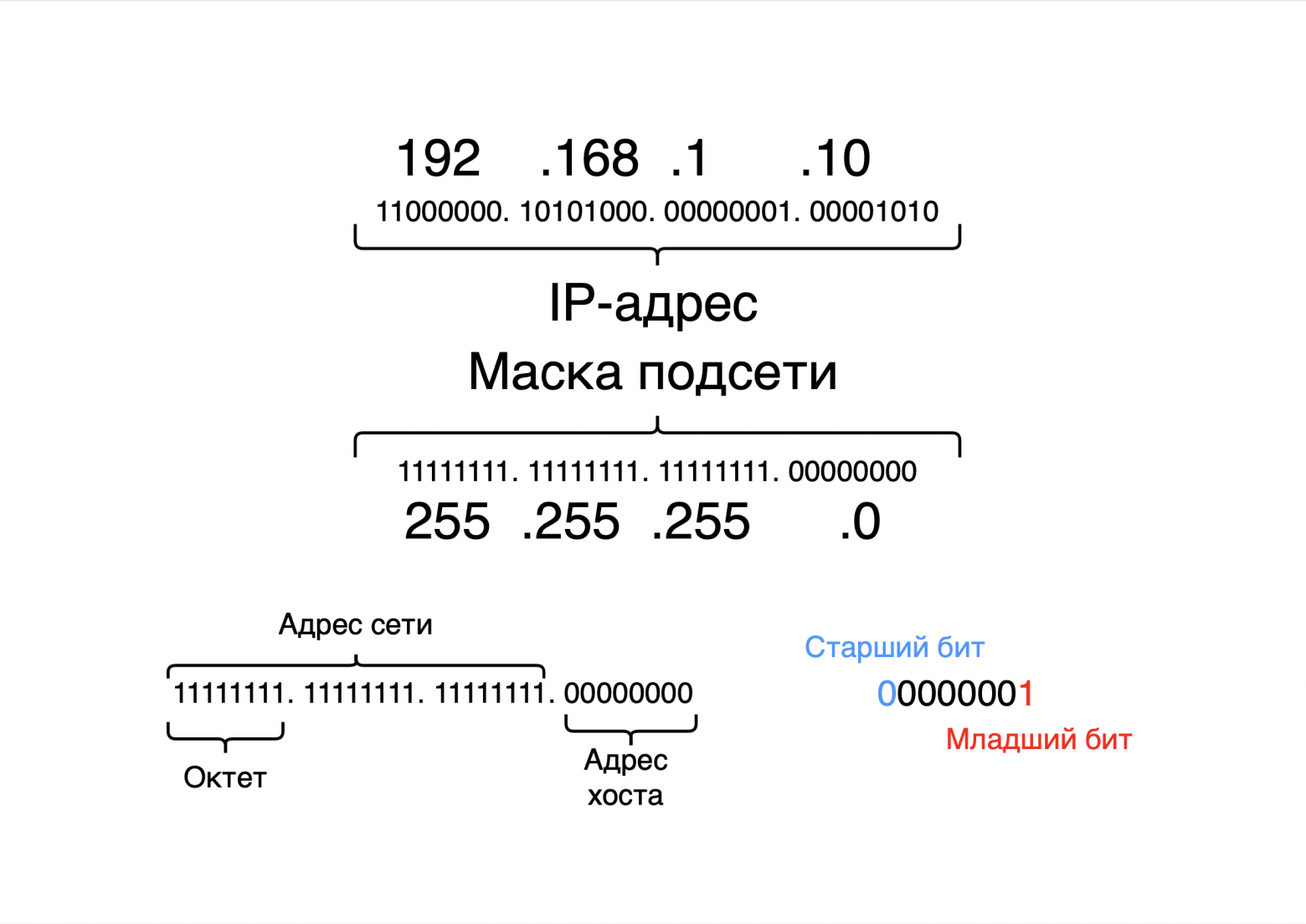
If we convert the mask 11111111.11111111.11111111.00000000 into the decimal system, we get the number 255.255.255.0, which we specify in the network card settings. Sometimes we say that this is the 24th mask, or in some IP address settings we enter the /24 prefix. This, in simple words, means the number of ones in the mask: first there are 24 ones, and then 8 zeros.
❯ Why do IP addresses look like this?
The IP addresses we see, for example 192.168.1.1, are their decimal representation, convenient for humans. But computers work with addresses in binary format, where each number is replaced by a sequence of zeros and ones.
Example of conversion to binary format:
number 0 → 00000000;
number 1 → 00000001;
number 2 → 00000010;
number 3 → 00000011;
...
number 255 → 11111111.
Each IP address consists of four parts called octets. An octet is 8 bits, or 8 ones and zeros.
Logic for changing numbers:
when the value increases by 1, the least significant bit changes;
if the least significant bit is already 1, the next higher bit is changed.
For example:
number 3: 00000011;
number 4: 00000100.
There can be a total of 256 values in one octet: from 0 to 255.
❯ How are an IP address and a subnet mask related?
To understand which part of an IP address belongs to the network and which part belongs to the host, the IP address and subnet mask are converted into binary form.
Example for 192.168.1.0/24:
IP address: 11000000.10101000.00000001.00000000
mask:11111111.11111111.11111111.00000000
The first three octets (24 bits, corresponding to the /24 mask) indicate the network. The last octet is used to identify the device.
❯ Network segmentation: why it is needed and how it works
Network segmentation is the process of dividing a network into logical or physical parts. Main reasons for segmentation:
1. Reducing traffic. In a segmented network, data packets are sent only to the desired segment, and not to all devices;
2. Reduce broadcast traffic. We increase the performance of the entire network by reducing broadcast packets (ARP, DHCP) in network segments;
3. Increased security. Sensitive data can be isolated in a separate segment (Wi-Fi guest network separated from the rest of the network);
4. Simplified management. It is easier to manage small subnets than one large network;
5. Construction of an independent logical network. The logical structure of the network is independent of the physical structure;
6. Improving the efficiency of the overall network. The totality of all factors increases the efficiency of the entire network.
Example
The company uses two subnets:
192.168.1.0/24 - for the development department;
192.168.2.0/24 - for the sales department.
Each subnet is isolated and data does not cross between them unless manually configured through a router.
❯ How to divide a network into subnets?
Let's assume that we have been allocated one network - 192.168.1.0/24, but it needs to be divided into several independent subnets.
To do this, you need to change the mask prefix. The subnet mask determines how a range of addresses is divided into parts.
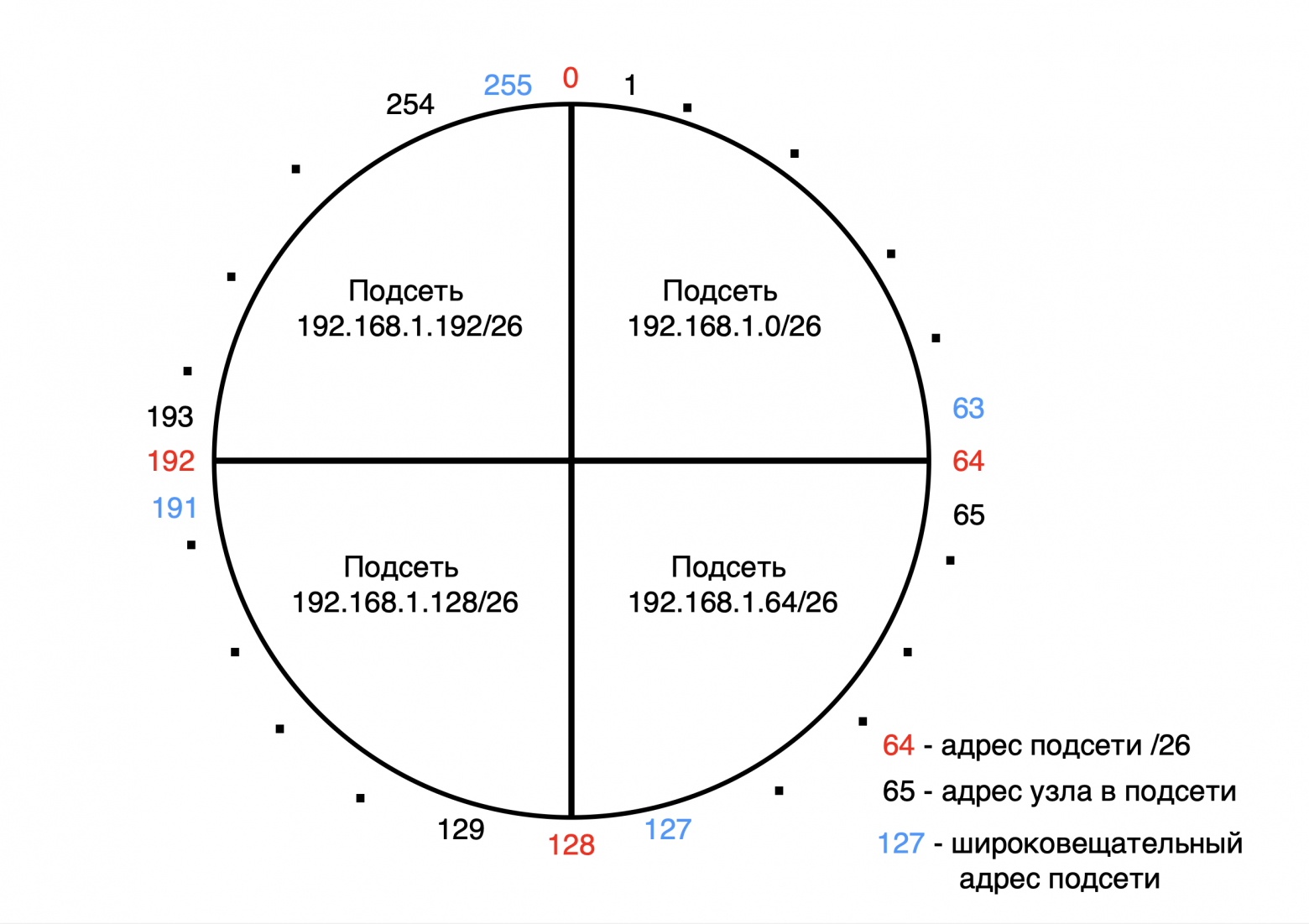
A network can be thought of as a circle, which we divide into parts using a subnet mask.
For example, in the network 192.168.1.0/24 there are 256 addresses (from 0 to 255).
If you want to divide this network into 4 independent subnets, each containing 60 addresses, you need to divide the 256 addresses into 4 equal parts.
Result:
first subnet: from 0 to 63;
second subnet: from 64 to 127;
third subnet: from 128 to 191;
fourth subnet: from 192 to 255.
Each subnet consists of 64 addresses. Now we need to define a mask prefix for these ranges.
❯ Determining the subnet mask
Subnet addresses in binary form:
From 0 to 63 is:
number 0 → 00|000000;
number 1 → 00|000001;
...
number 63 → 00|111111.
From 64 to 127 this is:
number 64 → 01|000000;
number 65 → 01|000001;
...
number 127 → 01|111111.
From 128 to 191 this is:
number 128 → 10|000000;
number 129 → 10|000001;
...
number 191 → 10|111111.
From 192 to 255 this is:
number 192 → 11|000000;
number 193 → 11|000001;
...
number 255 → 11|111111.
From the binary representation it can be seen that the first 2 most significant bits determine the subnet number, and the remaining 6 bits determine the unique addresses within it.
Subnet mask:
the two most significant bits are fixed to define the subnet, and the least significant 6 bits are used for addresses within the subnet;
this matches the mask /26, where 26 bits are the network part and the remaining 6 bits are for hosts.
To determine the mask, it is better to use the table of subnet masks; it can be easily found on the Internet.
Network division rules
On the 192.168.1.0/24 network, addresses can be divided as follows:
into 2 parts (/25) - 128 addresses in each subnet;
into 4 parts (/26) - 64 addresses;
into 8 parts (/27) - 32 addresses;
into 16 parts (/28) - 16 addresses;
into 32 parts (/29) - 8 addresses;
into 64 parts (/30) - 4 addresses.
Further division is not possible, since the mask /31 leaves only 2 addresses: one for the network and one for broadcast. There are no unique addresses left for devices.
❯ Formula for calculating addresses
The number of available addresses in a subnet can be calculated using the formula:
2^n - 2, Where n — the number of bits remaining for hosts.
Example:
for mask 255.255.255.192 (or /26) 6 bits remain for addresses;
total: 26=6426=64 addresses;
of which:
one address is used to designate the subnet (192.168.1.0);
one address is reserved for broadcast (192.168.1.63).
This leaves 62 host addresses available.
❯ Let’s look at an example of working on switches
I already told you in previous articlehow the network works when multiple devices are connected to one or more switches.
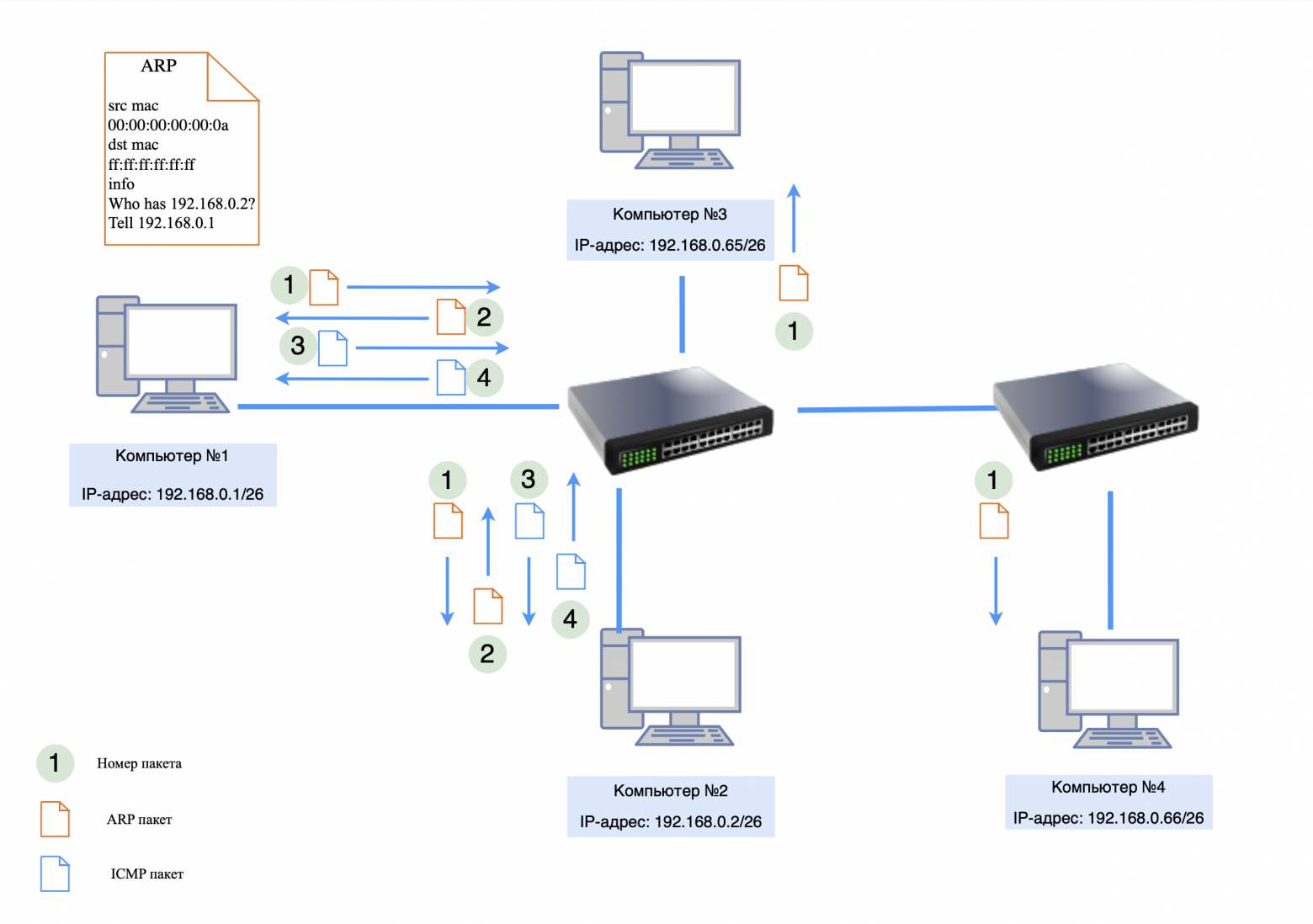
There are several computers on our network:
192.168.0.1/26 - from network 192.168.0.0;
192.168.0.2/26 - from network 192.168.0.0;
192.168.0.65/26 - from network 192.168.0.64;
192.168.0.66/26 - from network 192.168.0.64.
Behavior switch:
A switch at Layer 2 (Data Link Layer) does not parse IP addresses or masks. It works with MAC addresses and will forward traffic between ports based on its MAC address table;
When an ARP request is broadcast, it will be transmitted to every computer on the public network.
If computer 192.168.0.1/26 wants to exchange packets with the host (end device) 192.168.0.2/26, then ARP and ICMP exchange will occur between them without problems, since these devices are on the same subnet.
But if computer 192.168.0.1/26 wants to exchange packets with host 192.168.0.66/26, then an ARP request will go to this host, but there will be no ARP response, since 192.168.0.66/26 is on a different subnet.
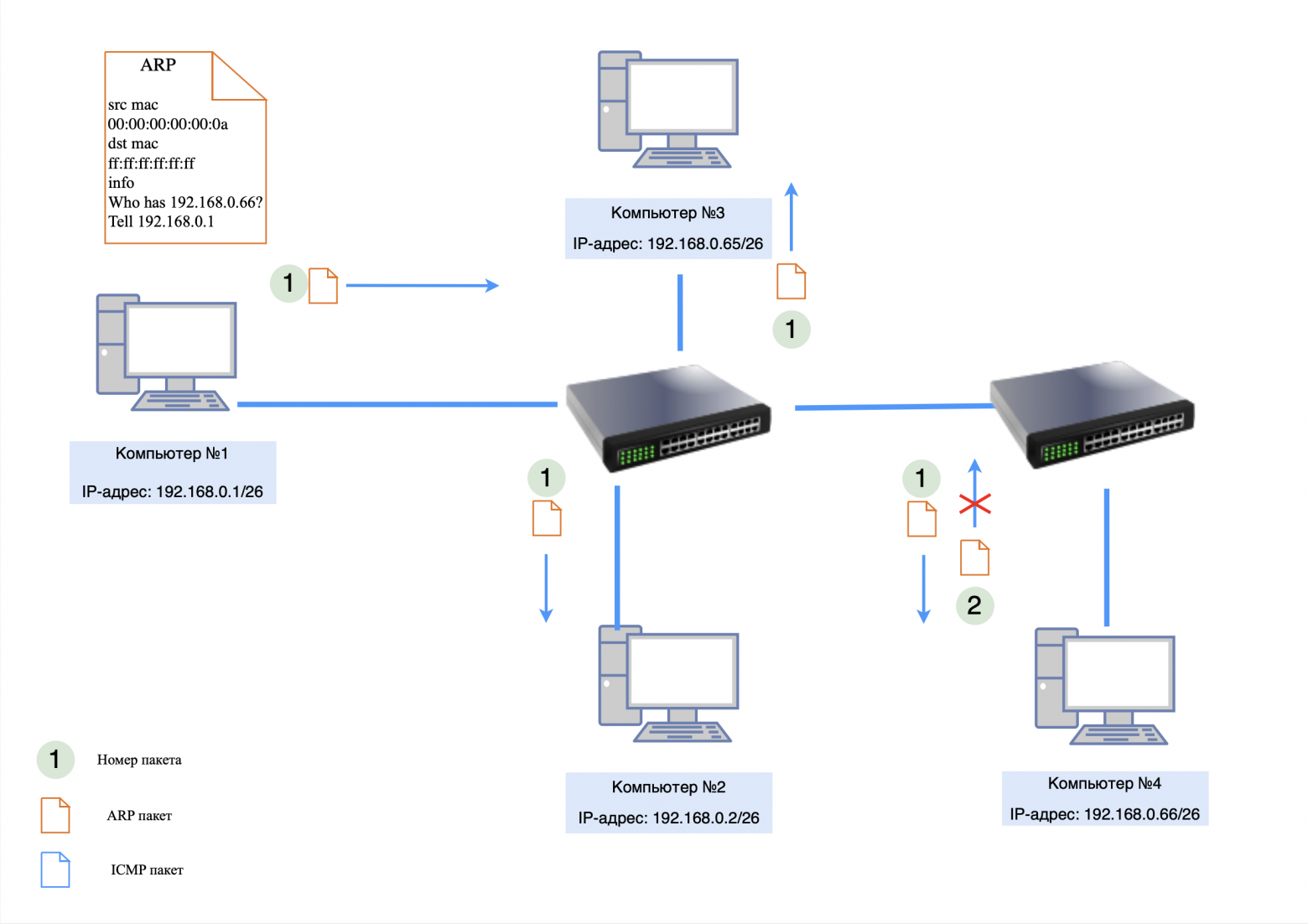
In order for devices from different subnets to exchange information with each other, it is necessary to configure packet routing through the gateway. I'll talk about routing in the next article.
❯ What if our network has IP addresses from different subnets?
There are several computers on our network:
192.168.0.1/24 - from network 192.168.0.0;
192.168.0.2/24 - from network 192.168.0.0;
192.168.0.65/26 - from network 192.168.0.64;
192.168.0.66/26 - from network 192.168.0.64.
Situation overview:
computers with mask /24 (255.255.255.0) believe that the entire network 192.168.1.0 - 192.168.1.255 is one subnet;
computers with mask /26 (255.255.255.192) interpret the same network as four separate subnets:
192.168.1.0 - 192.168.1.63;
192.168.1.64 - 192.168.1.127;
192.168.1.128 - 192.168.1.191;
192.168.1.192 - 192.168.1.255.
Because of this, computers with different masks “see” different network boundaries and may interpret differently where to send traffic.
Network Behavior
Data exchange between devices with the same masks:
computers with mask /24 will be able to communicate with each other without problems, since they believe that they are on the same subnet;
the same applies to computers with a mask /26, if they are in the same subnet range (for example, both are in the range 192.168.1.0 - 192.168.1.63).
Data exchange between devices with different masks:
if the computer is 192.168.0.1/24 trying to send data to device 192.168.0.65/26, it will consider this device to be part of its subnet and send the packet directly (via an ARP request);
however the computer with the mask is 192.168.0.65/26, interpreting its subnet, may believe that the sender is in a different subnet. In this case, it will expect a route through the gateway. If the gateway is not configured or is missing, communication will not take place.
Switch behavior:
A switch at Layer 2 (Data Link Layer) does not parse IP addresses or masks. It works with MAC addresses and will forward traffic between ports based on its MAC address table;
the switch will not be able to prevent conflicts due to different interpretations of subnets on the devices.
❯ Possible problems
Problems with node availability. Devices with different masks may not see each other or route packets incorrectly.
ARP conflicts:
devices with mask /24 can send ARP requests to the entire range of addresses 192.168.1.0 - 192.168.1.255, which will lead to unnecessary traffic;
devices with mask /26 will ignore requests if they believe the sender is from a different subnet.
No routing. If the gateway is not configured, devices with different masks will not be able to exchange data, even if they are physically on the same network.
Difficulties in diagnosis. It will be difficult for the administrator to understand why some devices cannot see each other.
If no action is taken, the network will become unstable and some devices will not be able to communicate. To fix this, you need to either unify the masks or correctly configure routing and VLAN.
❯ What is VLAN
VLAN (Virtual Local Area Network) is a technology that allows devices to be divided into different logical segments within the same physical network. The main purpose of VLAN is to increase security, improve manageability and optimize traffic in local networks.
VLAN usage example
On the switch, you can create a VLAN for accounting, assigning it ID 10, and a VLAN for IT with ID 20. Devices in different VLANs do not see each other, even if they are physically connected to the same switch. This allows you to isolate data and reduce the amount of broadcast traffic.
Main advantages of VLAN
1. Traffic isolation. Devices in different VLANs cannot communicate without routing through Layer 3 devices (routers or L3 switches).
2. Safety. VLANs prevent accidental or intentional access by devices from other network segments.
3. Optimization. Partitioning into VLANs reduces network load because broadcast requests remain within the VLAN.
4. Flexibility. Devices can be combined into one VLAN, even if they are connected to different physical switches (if available trunk connections).
802.1Q technology
IEEE 802.1Q is a standard for tagging Ethernet frames used to identify VLANs. When a frame passes through a VLAN-enabled switch, a special 802.1Q tag is added to its header. I spoke in more detail about the structure of such a package in this article.
VLAN interaction through trunk (trunk) ports
To transmit traffic of several VLANs between switches, main ports. The trunk port tags each frame with an 802.1Q tag so that the receiving end knows which VLAN it belongs to. This allows devices from the same VLAN that are on different switches to communicate with each other.
Example: If two switches are connected by a trunk port, and both have VLAN IDs 10 and 20 configured, then VLAN 10 devices on the first switch can communicate with VLAN 10 devices on the second switch.
Implementing and Configuring VLANs
The VLAN configuration process typically includes the following steps:
creating a VLAN on the switch and assigning it a unique identifier (ID);
assignment of VLAN ports, including selection of port type - access or trunk;
setting up trunk ports for VLAN interaction between switches;
configuring routing between VLANs (if data exchange between segments is required).
VLAN usage examples
1. Network segmentation by departments. Accounting, IT, HR - each department gets its own VLAN.
2. Guest access. Creating an isolated VLAN to connect guests without access to the main corporate network.
3. IP telephony support. Allocation of a separate VLAN for VoIP traffic to ensure communication quality.
4. Network Security. Traffic separation to minimize the risk of unauthorized access.
❯ Examples of VLAN operation on switches
For clarity, let’s look at how VLAN works in a network with several devices and two switches.
Devices on the network:
computer #1: 192.168.0.1, VLAN ID #2;
computer #2: 192.168.0.2, VLAN ID #2;
computer #3: 192.168.1.1, VLAN ID #3;
Switch #1 and #2: The MAC table is initially empty.
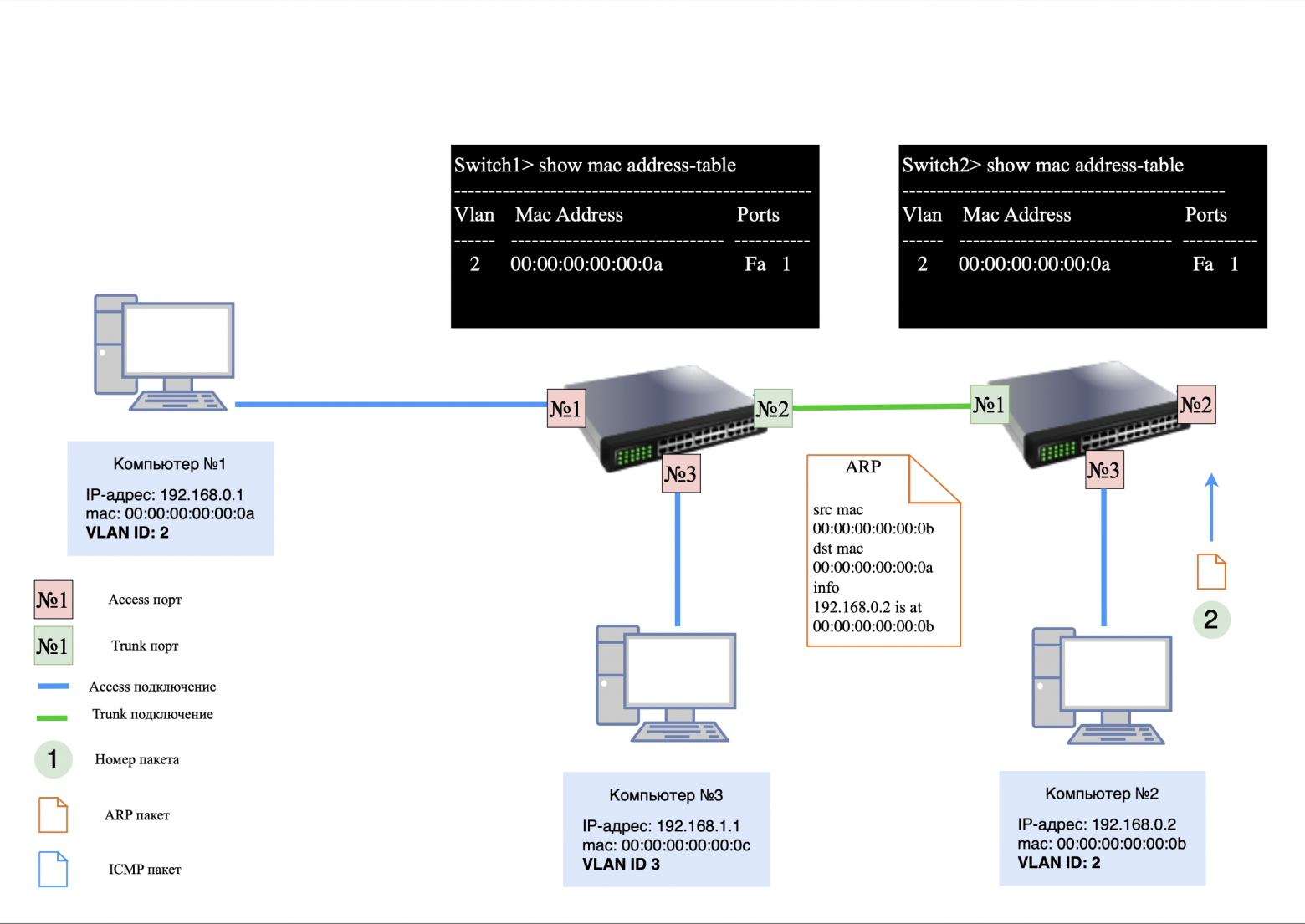
Step 1: ARP request
When computer #1 pings computer #2, it first issues an ARP request to determine the recipient's MAC address.
On the computer side: The ARP request does not initially contain a VLAN ID and does not have a tag in the header.
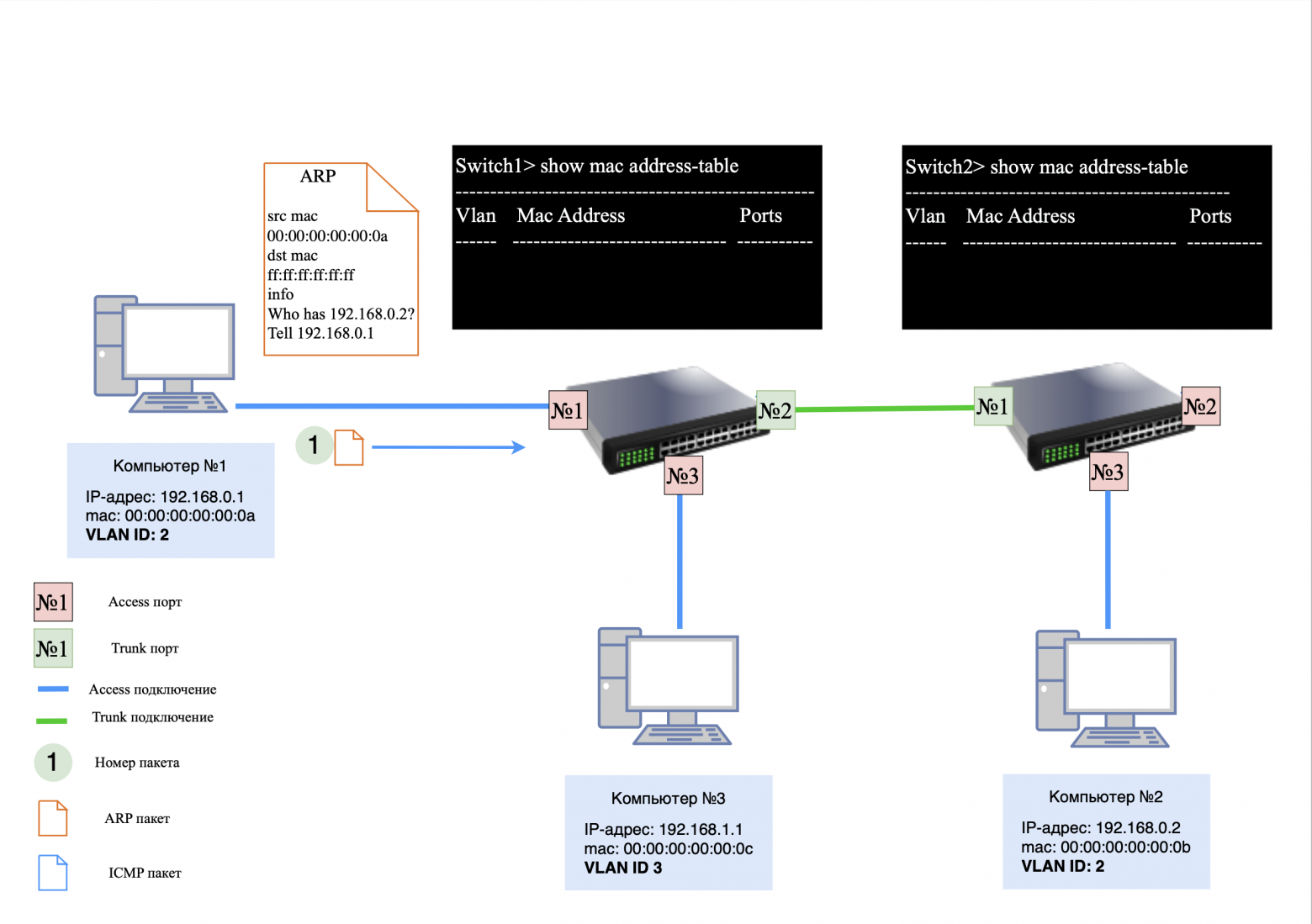
On switch #1: The request arrives at access port, where it is assigned VLAN ID 2 (since this VLAN is configured on the port).
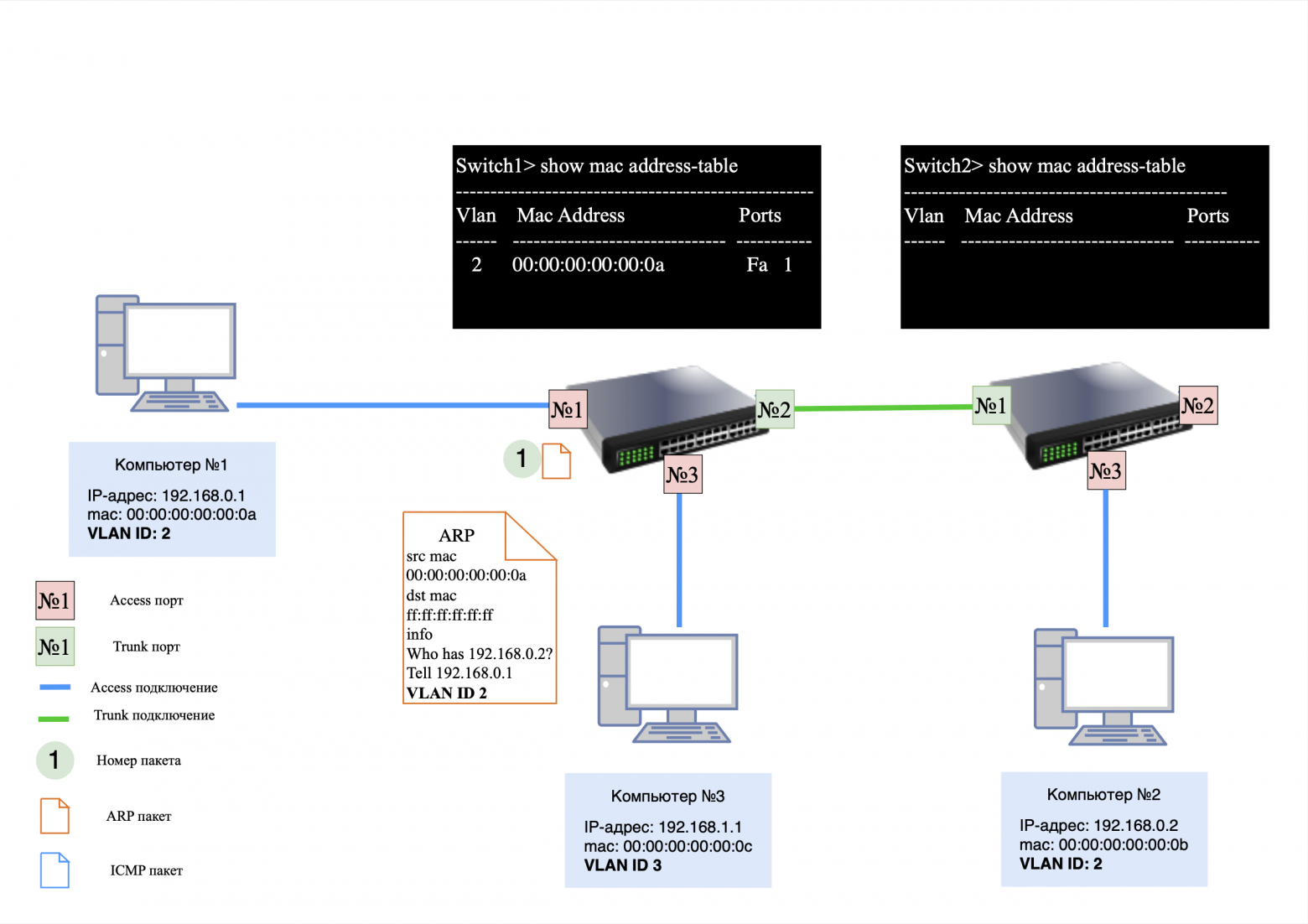
Actions of switch #1:
MAC address information is added to the MAC table Computer No. 1;
because MAC address Computer No. 2 is not yet known, the request is sent to trunk port with added VLAN ID 2.
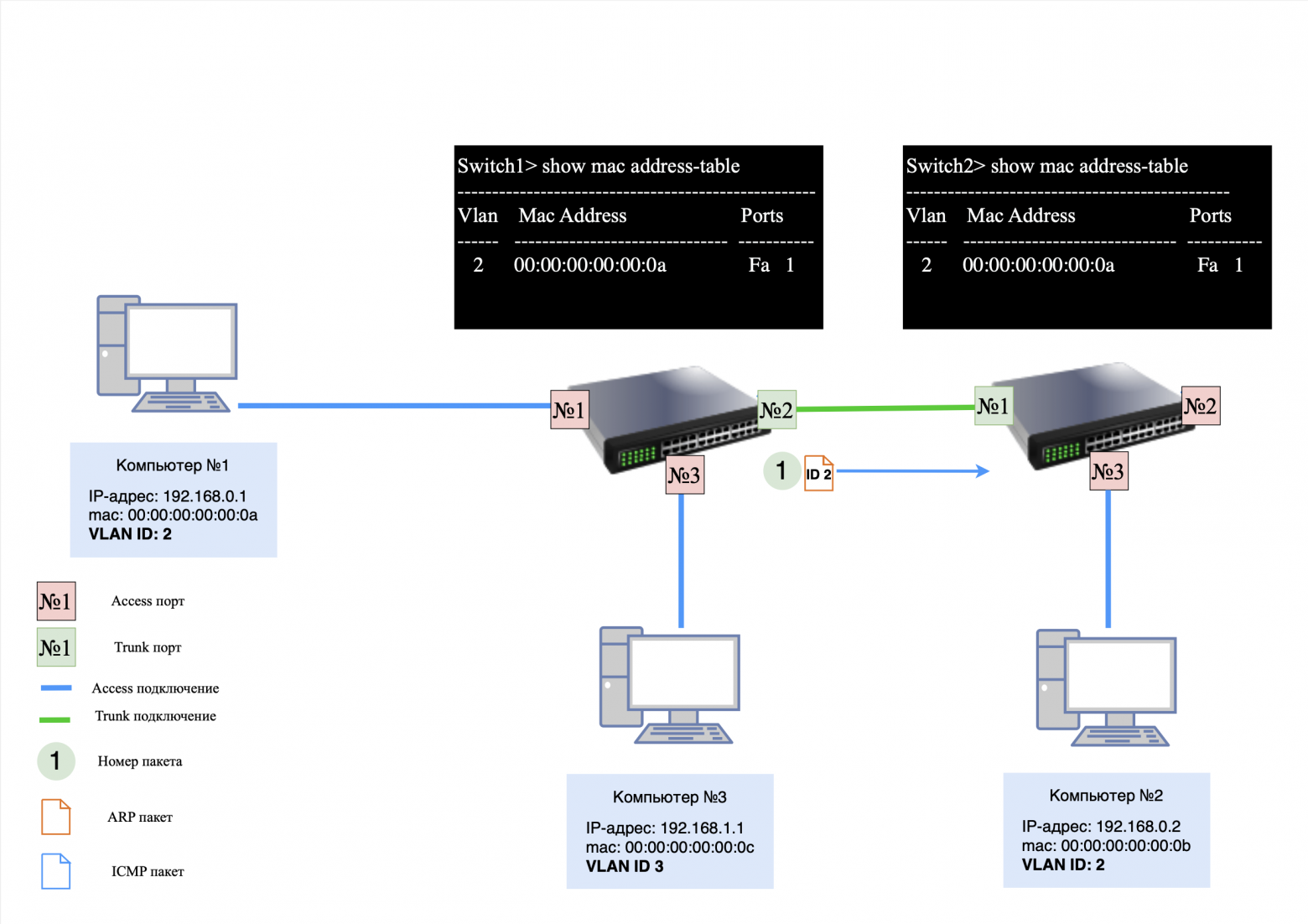
Actions of switch #2:
after receiving a packet on the trunk port, the switch adds a MAC address Computer No. 1 to your MAC table;
then the VLAN tag is removed and the request is sent to all active access ports with VLAN ID 2.
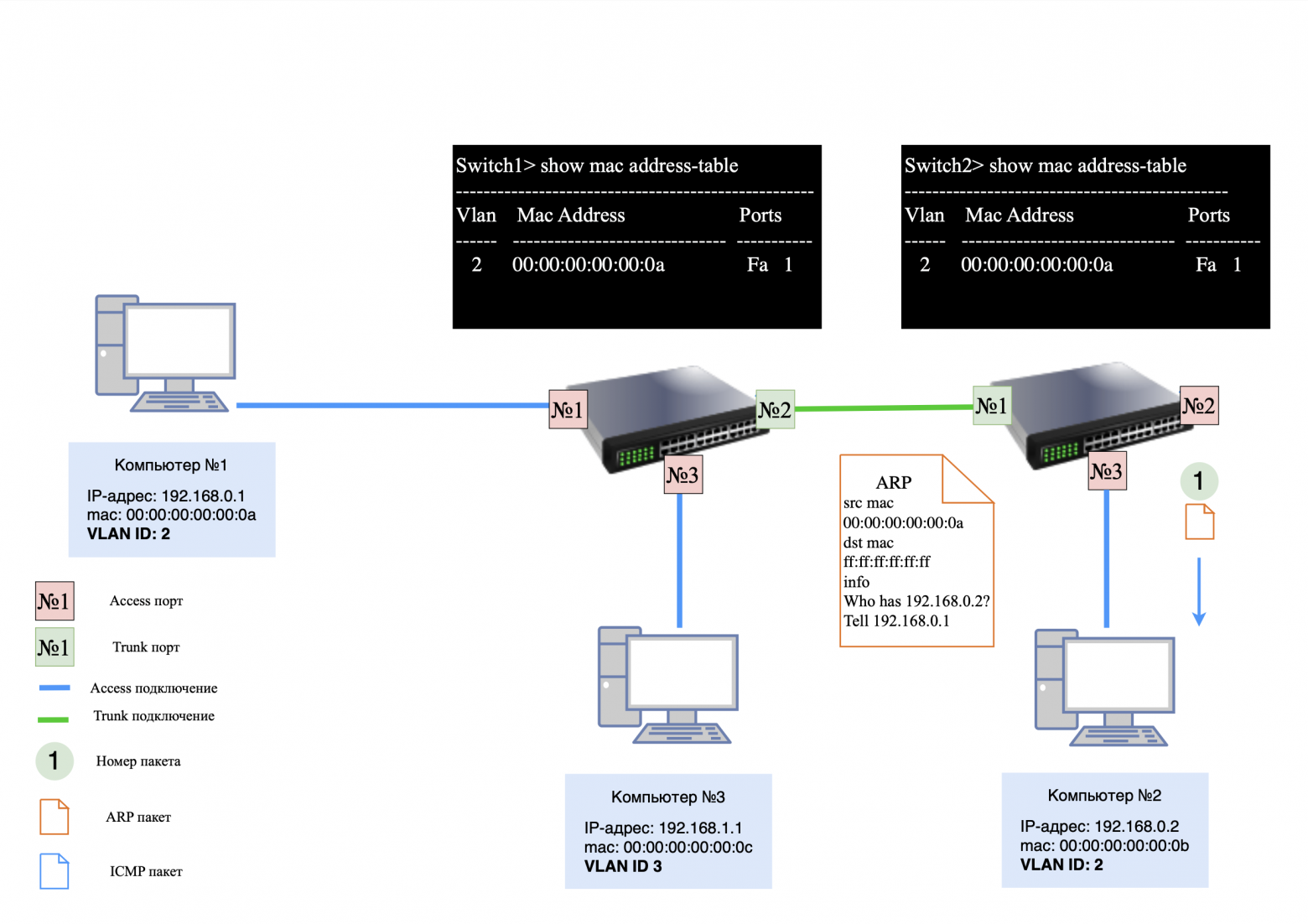
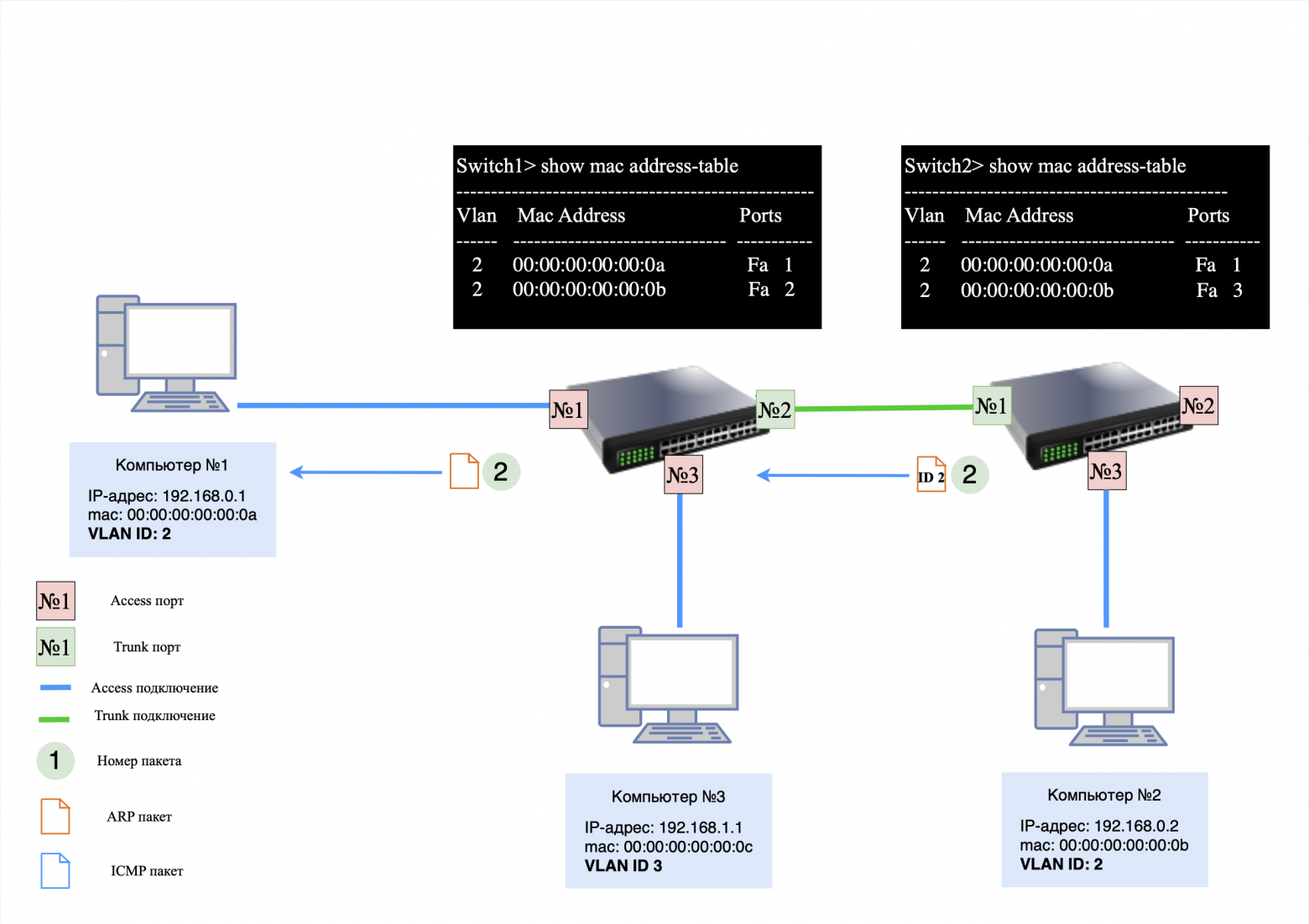
Reply from Computer #2:
computer #2 responds to the ARP request, generating a response packet. This packet does not initially contain a VLAN tag.
Switch actions:
on access port switch No. 2, the packet is again assigned VLAN ID 2;
the packet is transmitted via trunk-port to switch No. 1, which removes the VLAN tag and forwards it to the port corresponding to the MAC address Computer No. 1.
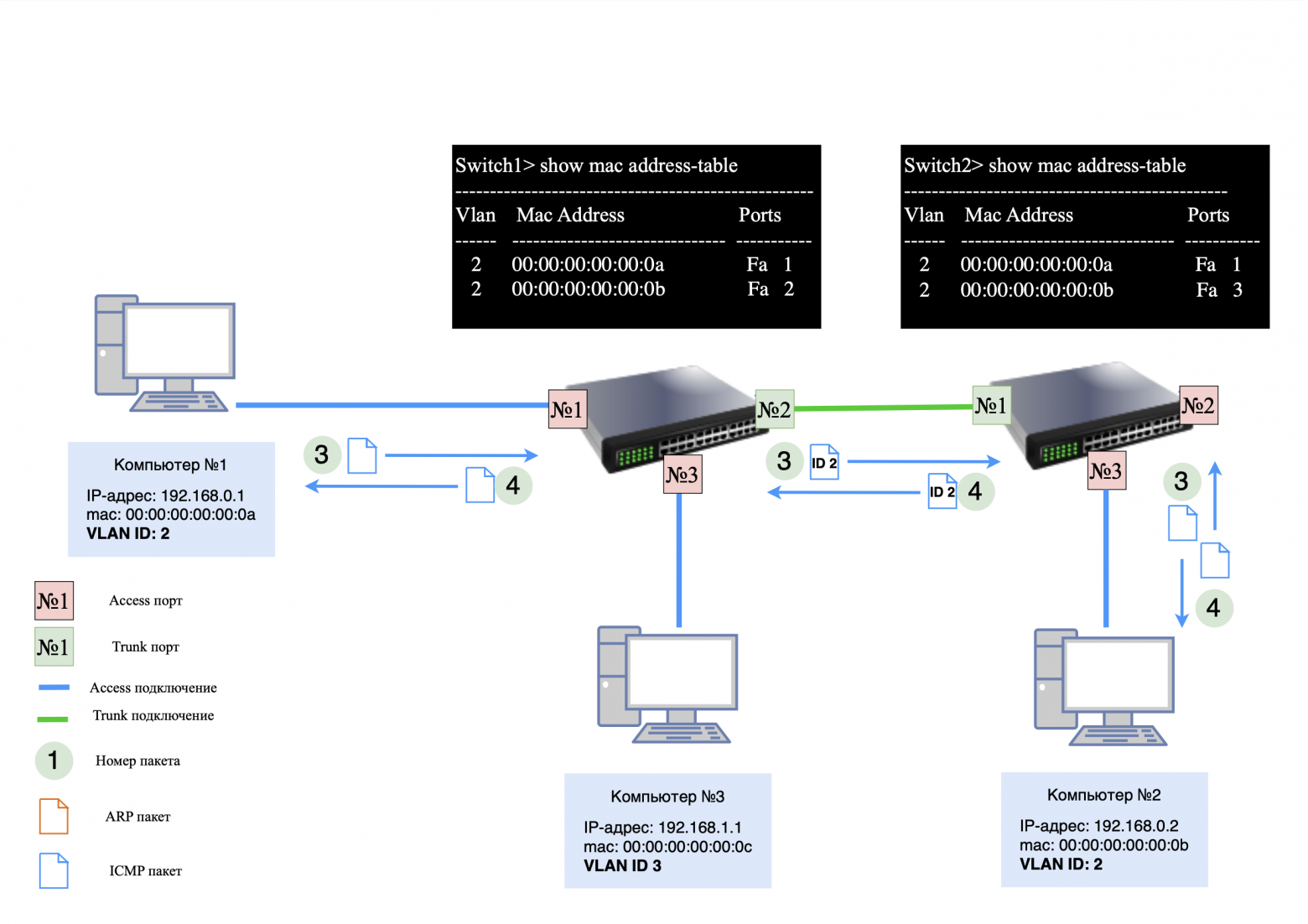
After the ARP exchange is completed, ICMP exchange begins between Computer No. 1 And Computer No. 2
ICMP request from Computer No. 1:
formed without a VLAN tag;
switch #1 assigns VLAN ID 2 to the packet and sends it through trunk-port;
switch #2 removes the VLAN tag and transmits the packet Computer No. 2.
ICMP response from Computer No. 2:
goes the same way, but in the opposite direction.
Adding a new device
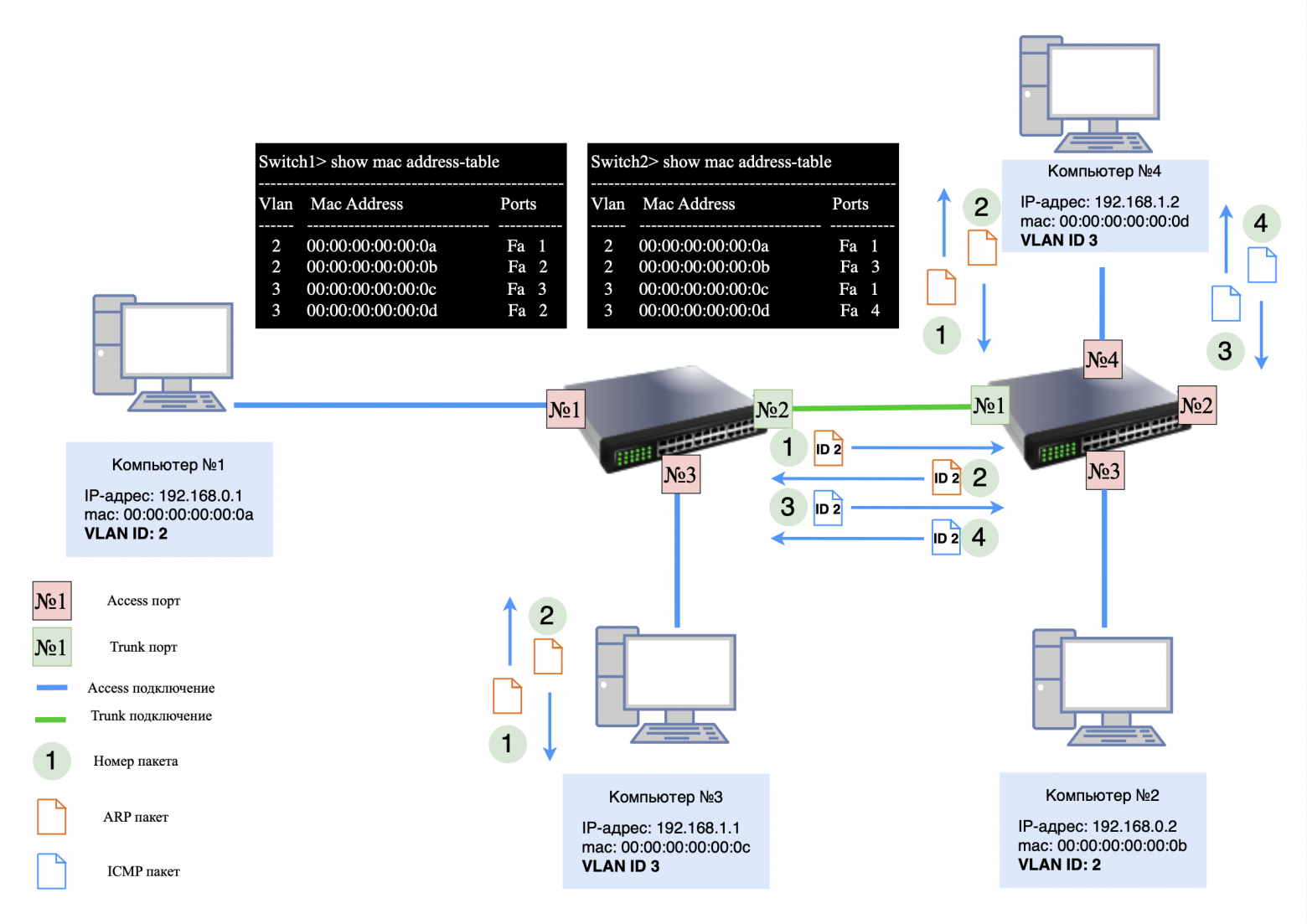
Now let's add it to the network Computer No. 4 with IP address 192.168.1.2 and VLAN ID 3. It is connected to access portswitch #2.
If Computer No. 3 sends a "ping" to Computer No. 4, the following process occurs:
ARP request from Computer No. 3:
the request does not have a VLAN tag;
switch No. 1 assigns VLAN ID 3 to the packet and transmits it through the trunk port to switch No. 2;
Switch #2 removes the VLAN tag and sends a request Computer No. 4.
ARP response from Computer #4. The response is returned in a similar manner, with the VLAN tag added and removed on each switch;
ICMP exchange.After the ARP exchange, an ICMP exchange occurs between Computer No. 3 And Computer No. 4using the same path.
❯ MAC table analysis
After the ARP and ICMP exchange is completed, you will notice in the MAC tables of the switches that:
U trunk port Each switch will have multiple MAC addresses, each associated with its own VLAN ID.
Important: The trunk port must be properly configured to carry traffic with multiple VLAN IDs. Configuration errors can lead to packet loss and incorrect network operation.
❯ Conclusion
In this article, we examined the key concepts: network, subnet, subnet mask, network segmentation using a mask and VLAN.
In the next article we will look at how network routing works.
This knowledge will help you better understand how to design and manage networks. If you have any questions, write in the comments and I will try to answer them!
Some important information
Colleagues, good afternoon! I created a Telegram channel from a networker for networkers.
If you are a network engineer, system administrator, developer, student, or just interested in networks - you here.
What awaits you?
Analysis of global failures and unexpected network problems.
Mini-articles with useful tips and explanations of complex topics in simple language.
Stories from the life of networkers - including from subscribers.
Channel link: https://t.me/ProstoKirReal
News, product reviews and competitions from the Timeweb.Cloud team — in our Telegram channel ↩

📚 Read also:
➤ It's complicated about simple things. The most popular protocols and principles of their operation. HTTP, HTTPS, SSL and TLS
➤ How to increase the speed of python scripts: C extensions and Python/C API
➤ Useful Engines: An Introduction to Railway Modeling
➤ Working with Terraform: Rules of Thumb
➤ From competitive play to mobile legend. Snake's story
Why This Matters In Practice
Beyond the original publication, It's complicated about simple things. How the Internet works. Part 2. What is a network, subnet mask, network segmentation using VLAN and mask matters because teams need reusable decision patterns, not one-off anecdotes. Greetings, colleagues! My name is @ProstoKirReal I would like to discuss with you how the Internet works from twisted pair cables connecting...
Operational Takeaways
- Separate core principles from context-specific details before implementation.
- Define measurable success criteria before adopting the approach.
- Validate assumptions on a small scope, then scale based on evidence.
Quick Applicability Checklist
- Can this be reproduced with your current team and constraints?
- Do you have observable signals to confirm improvement?
- What trade-off (speed, cost, complexity, risk) are you accepting?
FAQ
What is this article about in one sentence?
This article explains the core idea in practical terms and focuses on what you can apply in real work.
Who is this article for?
It is written for engineers, technical leaders, and curious readers who want a clear, implementation-focused explanation.
What should I read next?
Use the related articles below to continue with closely connected topics and concrete examples.





