It's complicated about simple things. How the Internet works. Part 1. What is a switch, router and examples of how simple networks work
Greetings, colleagues! My name is @ProstoKirReal . I would like to discuss with you how the Internet works from twisted pair cables connecting simple local networks to submarine communication cables connecting continents and major operator networks. Since it is impossible to cove
Editor's Context
This article is an English adaptation with additional editorial framing for an international audience.
- Terminology and structure were localized for clarity.
- Examples were rewritten for practical readability.
- Technical claims were preserved with source attribution.
Source: original publication
Series Navigation
- It's complicated about simple things. How the Internet works. Part 1. What is a switch, router and examples of how simple networks work (Current)
- It's complicated about simple things. How the Internet works. Part 2. What is a network, subnet mask, network segmentation using VLAN and mask
- It's complicated about simple things. How the Internet works. Part 3. What is Routing, Proxy ARP and Super VLAN
- It's complicated about simple things. How the Internet works. Part 4. What are LAN, MAN, WAN, Clos networks and operator hierarchy
- It's complicated about simple things. How the Internet works. Part 5. The future (is it?) of networks: IPv6, SDN and Overlay networks
Greetings, colleagues! My name is @ProstoKirReal. I would like to discuss with you how the Internet works from twisted pair cables connecting simple local networks to submarine communication cables connecting continents and major operator networks.
Since it is impossible to cover the entire topic in one article, I will divide the prepared material into several parts. Today we will start with the basic concepts.
It is important to understand that understanding all aspects of this topic is difficult, since there are narrow specializations and knowledge that are not available to the average network engineer. I won't go into internet history or talk about IP address classes and other outdated concepts. Instead, I'll focus on how the internet currently works.
In this series of articles, I will not teach you how to configure equipment and design networks. I will talk about the basic (and not only) principles of building a network, as well as the functioning of the network and network protocols in the stack TCP/IP.
I will often refer to previous articles where I have already described network protocols. This will allow me to shorten the lengthy text.
❯ Why is this article needed?
We need this article in order to understand the basic knowledge and understand:
- what is a switch, router, their main differences and why they are needed;
- examples of the operation of simple networks using network concentrators (hubs) and switches.
❯ What is a switch, router?
When we ask a question in a search engine: “What is the difference between a switch and a router?”, one of the most common answers that can be found on the Internet (for example, on Mail.ru) sounds like this:
in functionality. a router - routes, a switch - switches. it's simple :)))
This is perhaps the shortest and most succinct answer to this question.
However, if you take the issue seriously, you need to understand the concepts of switching and routing.
Switching is the process of redirecting data (frames) within the same network, based on analysis of the destination address. She works for link level models OSI (L2) using device MAC addresses.
Routing is the process of determining the path for data transmission between different networks. Powered by network level models OSI (L3) using IP addresses.
Switches And routers are two key devices in network infrastructures that perform different, albeit overlapping, tasks. Let's understand their functions, features and reasons for their appearance, and also consider modern realities in which their functionality increasingly intersects.
Why did routers appear?
Historically, routers appeared to connect networks with different data transmission technologies. At the beginning of the networking era, there were many local area networks (LANs) with different standards: Ethernet, Token Ring, modem pools, and others. These networks were physically and logically separated, since each of them used its own addressing protocols and data transfer methods.
To solve this problem, an abstraction was introduced in the form IP addresses — a universal protocol that is not tied to a physical medium. Routers have become devices capable of interconnecting networks with different data transmission technologies, providing routing based on IP addresses.
Basic functions
Switches:
operate primarily at layer 2 of the OSI model (link layer);
create MAC address tables that determine which physical port to send traffic through;
provide communication within one local network (LAN).
Routers:
operate at layer 3 of the OSI model (network layer);
use routing tables to determine the optimal path for data transmission;
provide communication between different networks, including those with different technologies (Ethernet, Frame Relay, ATM, DSL);
use routing protocols such as OSPF, BGP, IS-IS.
Switches and routers work together
Switches provide fast data exchange within the network.
Routers connect the local network to other networks, for example, the Internet, providing communication with servers.
❯ Current trends
Previously, these differences were enough to define the operation of a switch and a router, but in modern devices all these functions are often combined in L3 switches, which combine the advantages of both types of devices.
At the moment, the differences between them are blurred, since L3 and L3+ (Multilayer switches) switches can perform part of the functionality of a router, and the router can have additional physical ports for connecting local networks.
❯ Let's look at the differences between devices
L2 switches (link layer)
❯ Peculiarities
Working level: operate at layer 2 of the OSI model (link layer).
Functionality: Provide data transmission within a single local area network (LAN), using a table of MAC addresses to route Ethernet frames.
Restrictions: unable to route traffic between different VLAN or subnets.
❯ Pros
Easy setup.
High performance for peer-to-peer connections.
❯ Cons
Lack of IP addressing support.
Not suitable for complex network structures with multiple VLANs.
L3 switches (network layer)
❯ Peculiarities
Working level: operate at layer 3 of the OSI model (network layer).
Functionality:
perform the functions of a switch (L2) and a router (L3);
support inter-VLAN routing via SVI (Switch Virtual Interface) interfaces;
support IP addressing and static routing.
❯ Pros
Versatility.
Built-in routing support.
❯ Cons
Limited dynamic routing capabilities (compared to routers). Typically, “inter-vlan” routing is used, when the IP address is assigned to a VLAN, and not to a sub-interface.
More complex setup compared to L2 switches.
L3+ switches (advanced network layer capabilities)
❯ Peculiarities
Working level: also work at level 3, but with functions similar to routers.
Functionality:
full support for dynamic routing protocols (OSPF, BGP, EIGRP);
advanced traffic management functions: ACL, QoS, NAT;
Some models support MPLS to optimize data transfer.
❯ Pros
Dynamic routing capabilities.
Higher level of network management.
❯ Cons
Price.
Difficulty setting up.
Routers
❯ Peculiarities
Working level: operate at OSI Layer 3 and higher.
Functionality:
data transfer between different networks;
IPv4 and IPv6 routing;
full support dynamic routing (OSPF, BGP, RIP, etc.);
support VPN, NAT and part of the firewall functions.
❯ Pros
Support for working in wide area networks (WAN).
High level of security.
❯ Cons
Not intended for high-speed L2 switching.
May cause additional delays on local networks.
❯ Comparison table
Characteristic | L2 Switch | L3 Switch | L3+ Switch | Router |
OSI layer | 2 | 2 and 3 | 2 and 3 | 3 and above |
Main task | LAN switching | VLAN switching and routing | Advanced Routing | Internet connection |
Routing support | No | Mostly static | Dynamic | Dynamic |
VLAN | Yes | Yes | Yes | Yes |
QoS | Limited | Yes | Yes | Yes |
Internet connection | No | No | Yes | Yes |
L2 switches ideal for small networks where routing is not required.
L3 switches - the optimal solution for networks with VLANs and moderate complexity.
L3+ switches find application in large and complex infrastructures with the need for dynamic routing.
Routers — are necessary for connecting local networks with external networks, but do not replace switches within the LAN.
Each device has its own unique strengths and is used depending on the size and requirements of the network.
Although switches and routers originally performed strictly different tasks, modern developments in networking technology have led to significant overlap in their functions.
However, key differences remain: routers are better suited for communicating between networks of different technologies and for managing complex topologies, while switches are optimized for high throughput and switching within a single network. The choice between these devices depends on the specific tasks and network architecture.
❯ What is a network?
What is a network? If you connect two computers together and assign them IP addresses, will it be a network? The answer is simple: yes, this is already a local network.
A network is the connection of two or more computers, devices, or other components to exchange information.
Once we connect devices to our home router, they become part of the local network. The router serves as the default gateway for all connected devices and routes data packets to the Internet.
But let’s not get ahead of ourselves yet, let’s start with the simplest thing - with two computers connected to each other.
❯ Consider the simplest network
Let's say we have two computers. Computer #1 has a mac address of 00:00:00:00:00:0a, and computer #2 has a mac address of 00:00:00:00:00:0b.
We assign computer #1 an IP address of 192.168.0.1, and computer #2 an IP address of 192.168.0.2. We then connect their network cards "directly" using twisted pair cable.
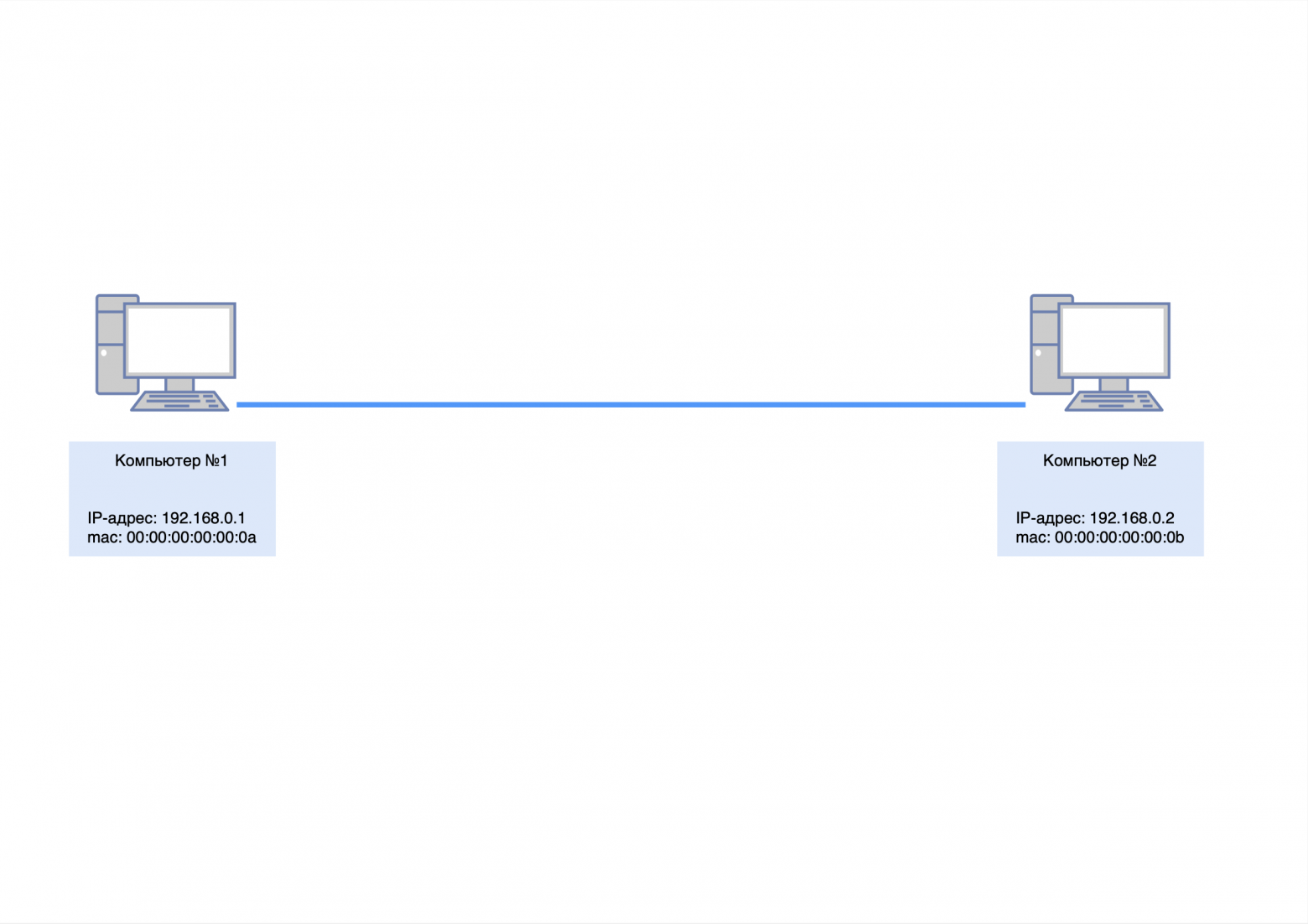
To check the availability of a nearby computer, you can use the “ping” utility and send a request to it.
However, there is a problem: computer No. 1 will not be able to immediately send ICMP request to computer No. 2, since it does not know its mac address. You can check this by entering the command "arp -a" at the command prompt (for Windows) and making sure that the ARP table is empty.
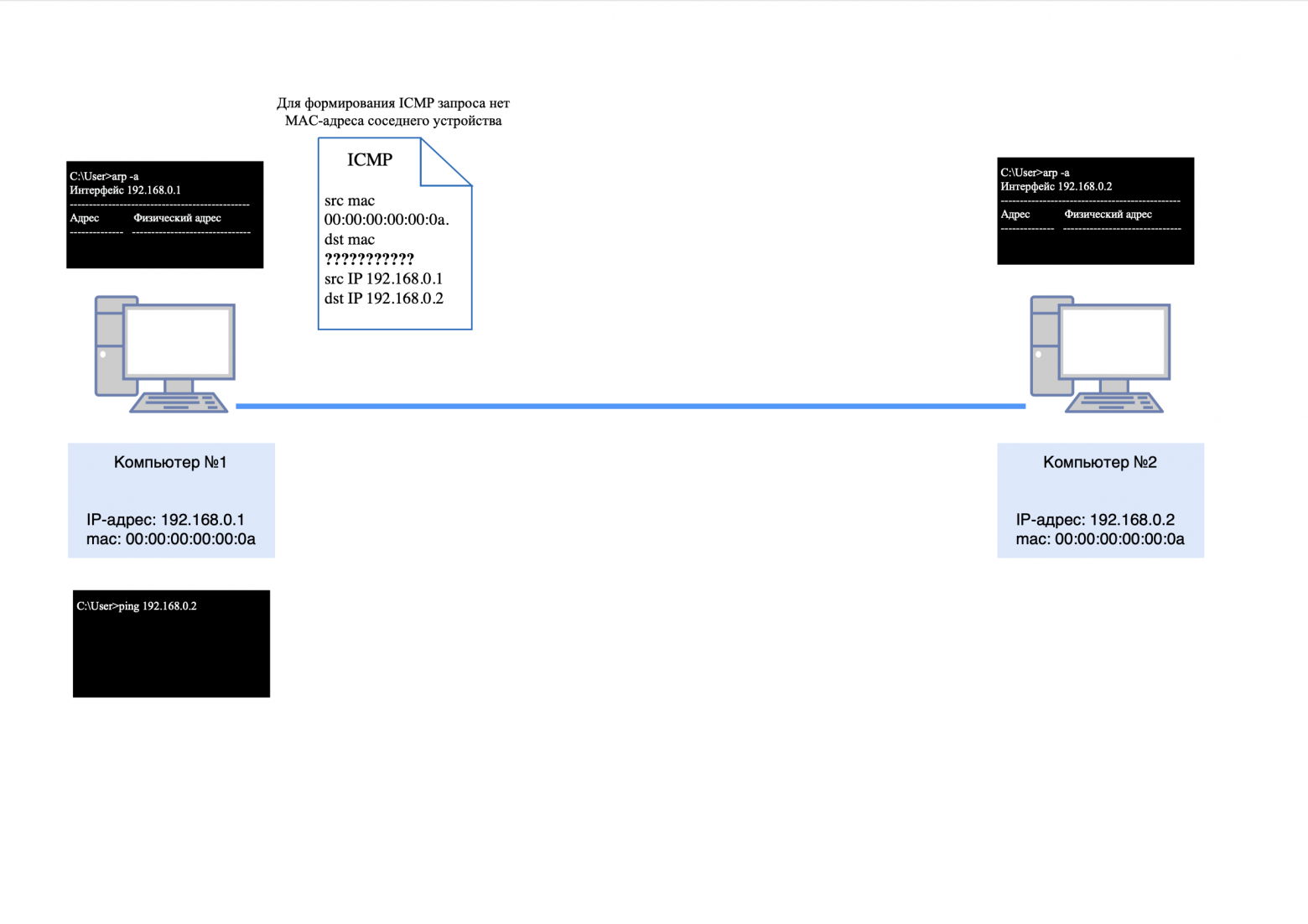
As stated in the previous article, ARP (Address Resolution Protocol) is an essential protocol in computer networks that is used to determine the MAC address of another computer from a known IP address.
The first thing computer #1 will do is send a broadcast request to the network to find out who 192.168.0.2 is.
The package will look like this:
src mac-address 00:00:00:00:00:0a;
dst mac address ff:ff:ff:ff:ff:ff (broadcast mac address);
There will be no IP addresses, since ARP operates at the L2 level;
the body of the packet will contain information: who is 192.168.0.2, asks 192.168.0.1.
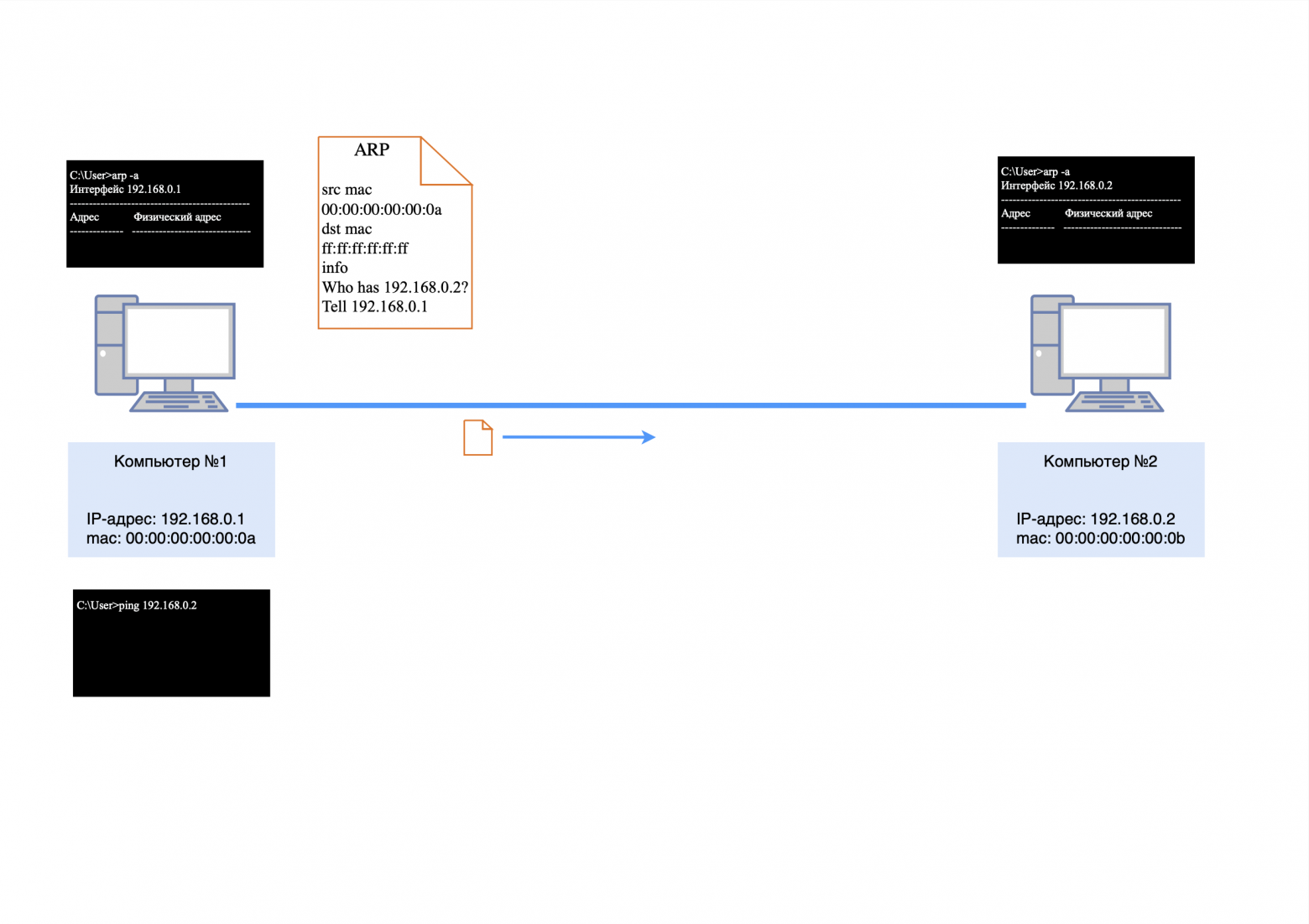
I talked more about L3 level headers (ARP, ICMP, etc.) in this article.
After the ARP response is received by computer No. 2, it will store information about the IP and mac address of computer No. 1 in its ARP table.
The computer now needs to send an ARP response.
The package will look like this:
src mac-address 00:00:00:00:00:0b;
dst mac-address 00:00:00:00:00:0a;
There will be no IP addresses, since ARP operates at the L2 level;
the body of the packet will contain the following information: IP address 192.168.0.2 has a mac address of 00:00:00:00:00:0b.
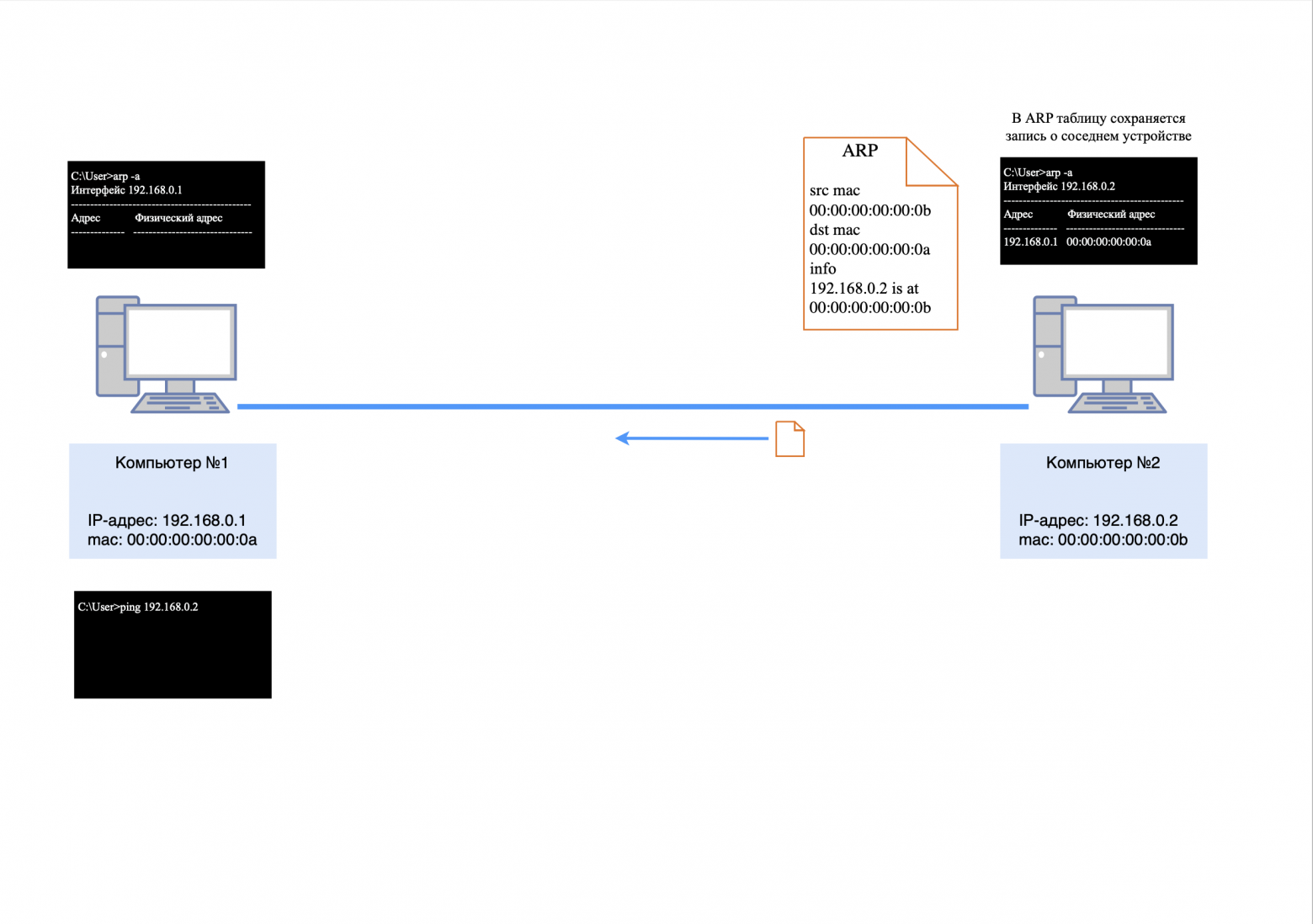
After the ARP response arrives at computer #1, it will store information about the IP and mac address of computer #2 in its ARP table.
Now all the information for generating an ICMP request is known, and the following packet will be generated from computer No. 1:
src mac-address 00:00:00:00:00:0a;
dst mac-address 00:00:00:00:00:0b;
src IP address 192.168.0.1;
dst IP address 192.168.0.2
the body of the packet will contain service information for the ICMP protocol (more details in this article).
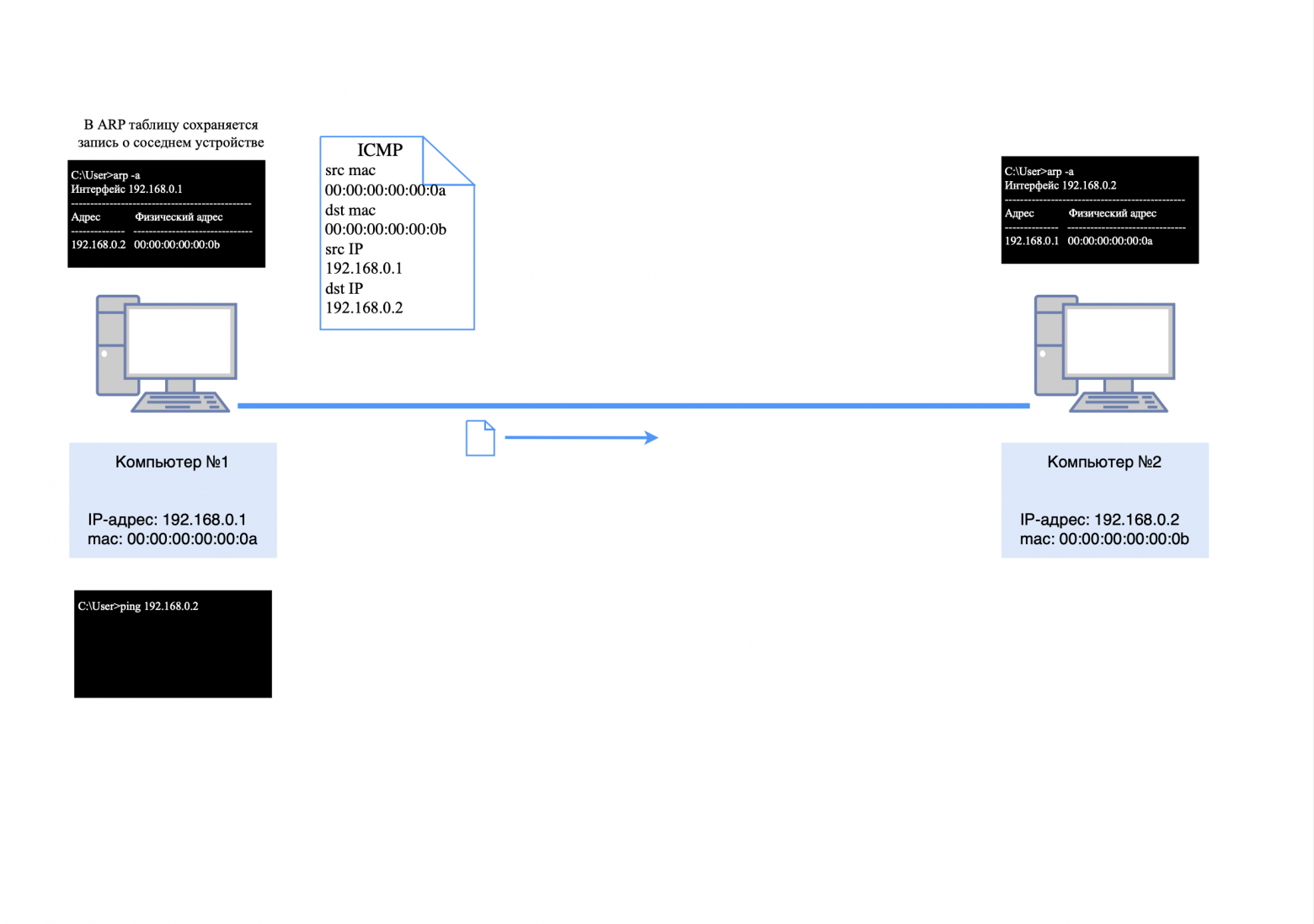
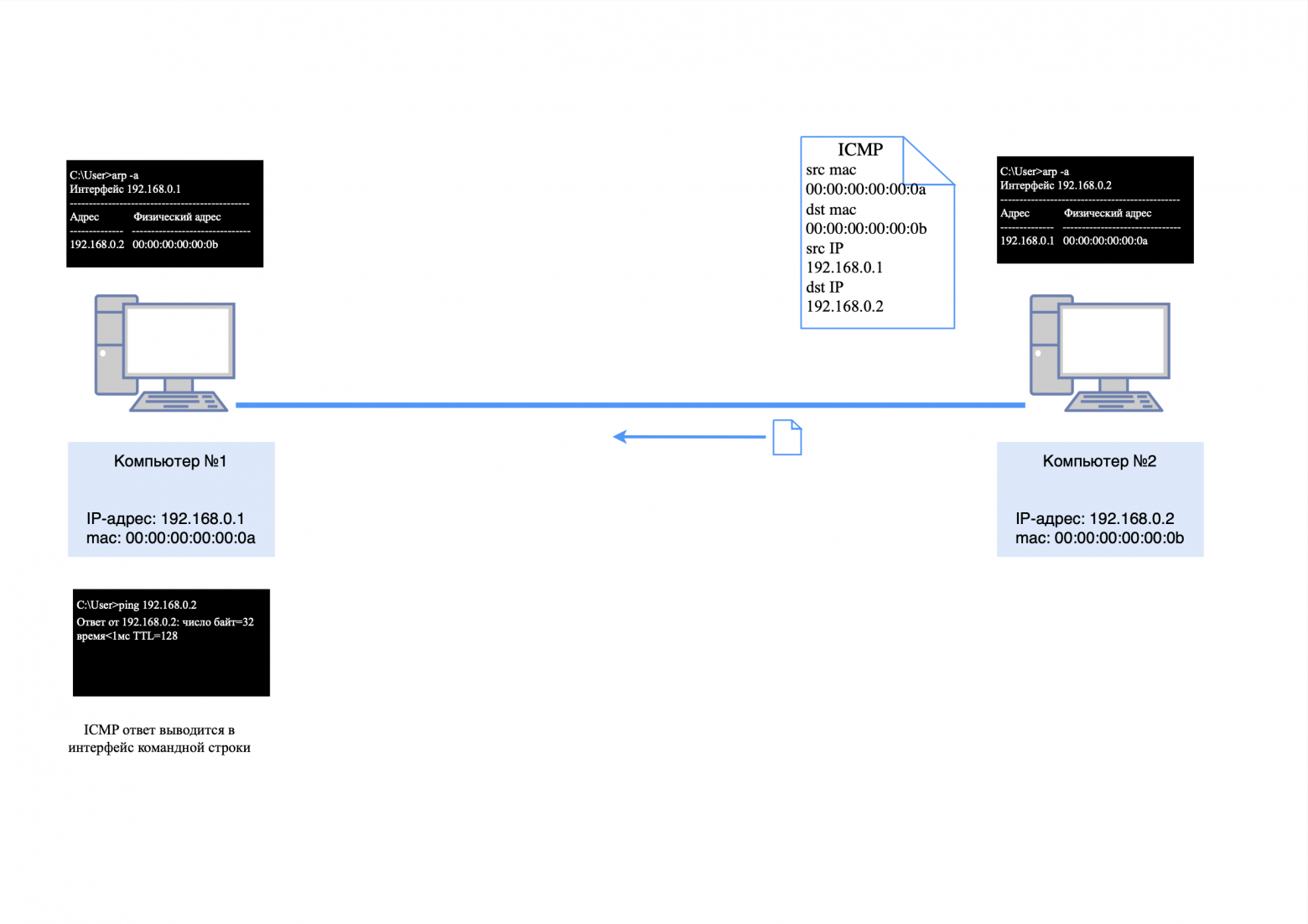
After the ICMP request arrives at computer No. 2, it will send an ICMP response, since it already knows the mac address of the neighboring device from its ARP table.
The answer will look like this:
src mac-address 00:00:00:00:00:0b;
dst mac-address 00:00:00:00:00:0a;
src-IP-address 192.168.0.2;
dst-IP-address 192.168.0.1;
the body of the packet will contain service information for the ICMP protocol.
After all these packets have traveled their short path, the first message about the availability of a neighboring device will appear in the “ping” utility.
❯ Three computers and a network hub (Hub)
❯ What if we need to connect more computers to the same network?
To do this, in simple networks they use network hub, aka hub/hub.
❯ How does the hub work?
The hub transmits data arriving on one of its ports to all other ports, allowing devices on the local network to exchange information without complex configuration. However, this approach has its pros and cons.
❯ Pros and cons of using a hub
A hub is an inexpensive network device that is suitable for connecting small local networks. However, if there are a large number of devices on the network, problems arise.
Efficiency: the hub works at the level L1 OSI model, which means it does not distinguish between addresses. All packets are transmitted to all devices except the sender, regardless of their destination.
Packet conflict: Since data is transmitted simultaneously to all devices, collisions may occur on the network. The more devices are connected, the higher the likelihood of collisions.
Bandwidth: Each hub port shares the overall network bandwidth, causing it to decrease as the number of connections increases.
Modern networks use switches that operate at the L2 level, which allows them to route packets only to destination devices.
❯ Example of hub operation
Let's assume we have a hub and three computers with IP addresses:
computer #1: 192.168.0.1;
computer #2: 192.168.0.2;
computer #3: 192.168.0.3.
All three computers are connected to the hub. Now, if we send a “ping” request from computer No. 1 to computer No. 2, the process will occur as follows.
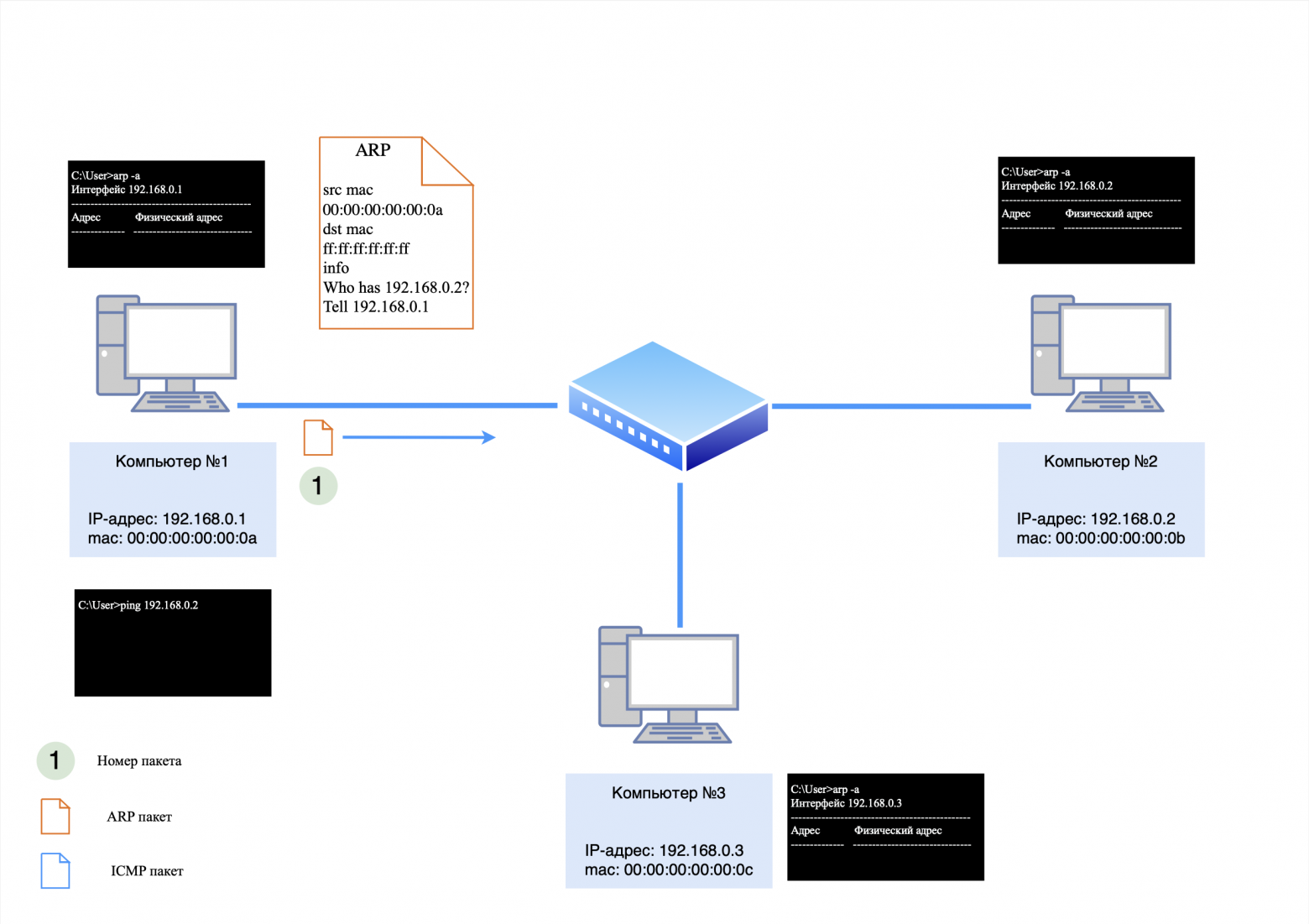
Step 1. ARP request
Computer #1 will first send an ARP request to the network to find out the MAC address of computer #2. This request will look like this:
src MAC address: 00:00:00:00:00:0a;
dst MAC address: ff:ff:ff:ff:ff:ff (broadcast address);
There are no IP addresses in the packet, since ARP operates at the L2 level.
Hub actions
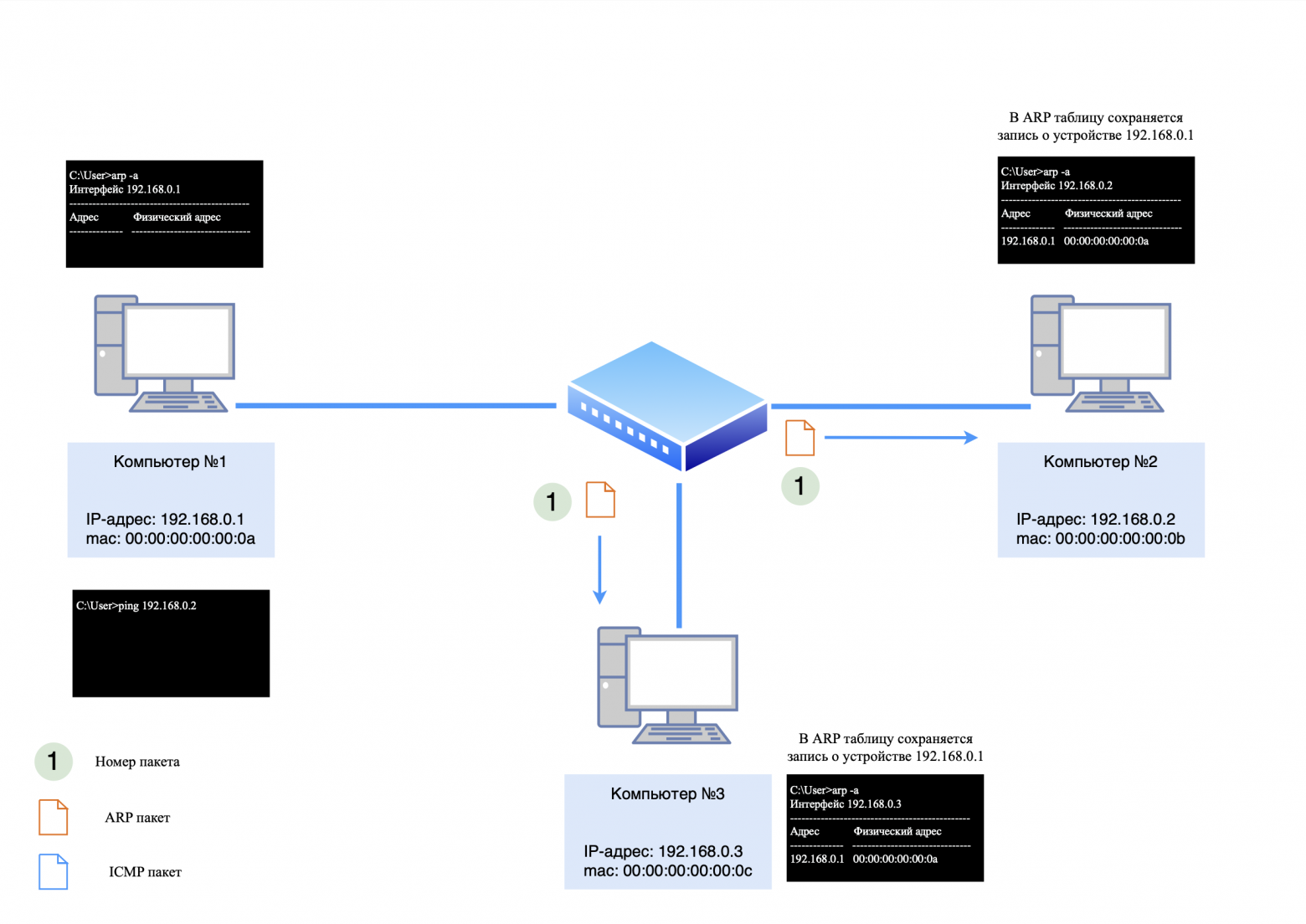
The hub will receive this packet through the port to which computer No. 1 is connected, and will transmit it to all other ports except the sending port. Thus, the ARP request will go to both computer No. 2 and computer No. 3. Computers No. 2 and No. 3 will save an entry about computer No. 1 in the ARP table, since the request was broadcast. However, only computer No. 2 will respond to it, since the IP address in the request matches its own.
Reply from computer #2
Computer #2 will send an ARP response, which will go through the hub and be delivered to computer #1. Computer #3 will ignore this answer since it is not intended for him.
The ARP response will look like this:
src MAC address: 00:00:00:00:00:0b;
dst MAC address: 00:00:00:00:00:0a;
There are no IP addresses in the packet, since ARP operates at the L2 level.
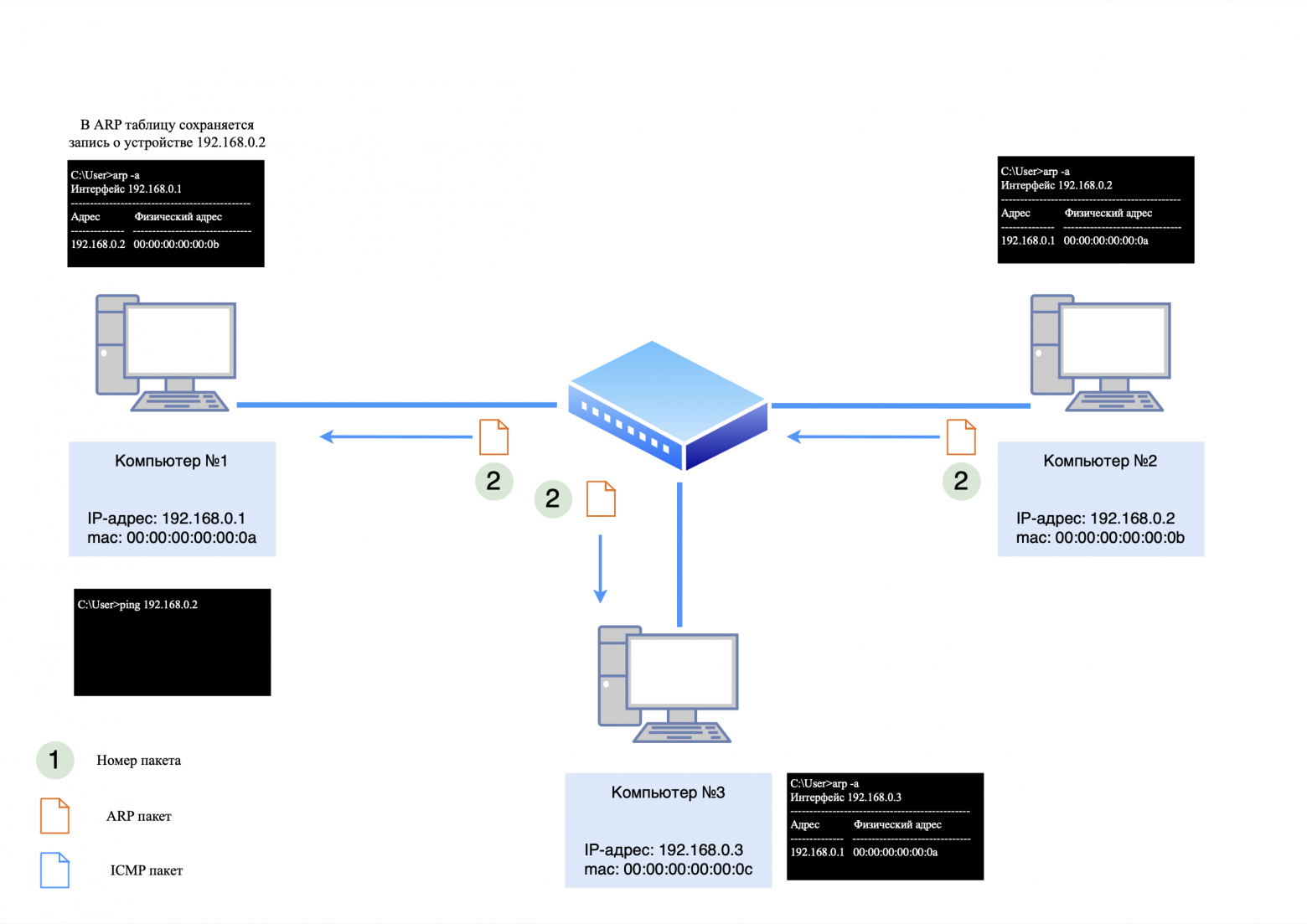
Step 2: ICMP Request and Response
After the ARP exchange is completed, computer No. 1 will generate an ICMP request and send it to computer No. 2. The request and subsequent response will be transmitted in the same way through the hub, but the packets will also reach all devices on the network, creating additional load.
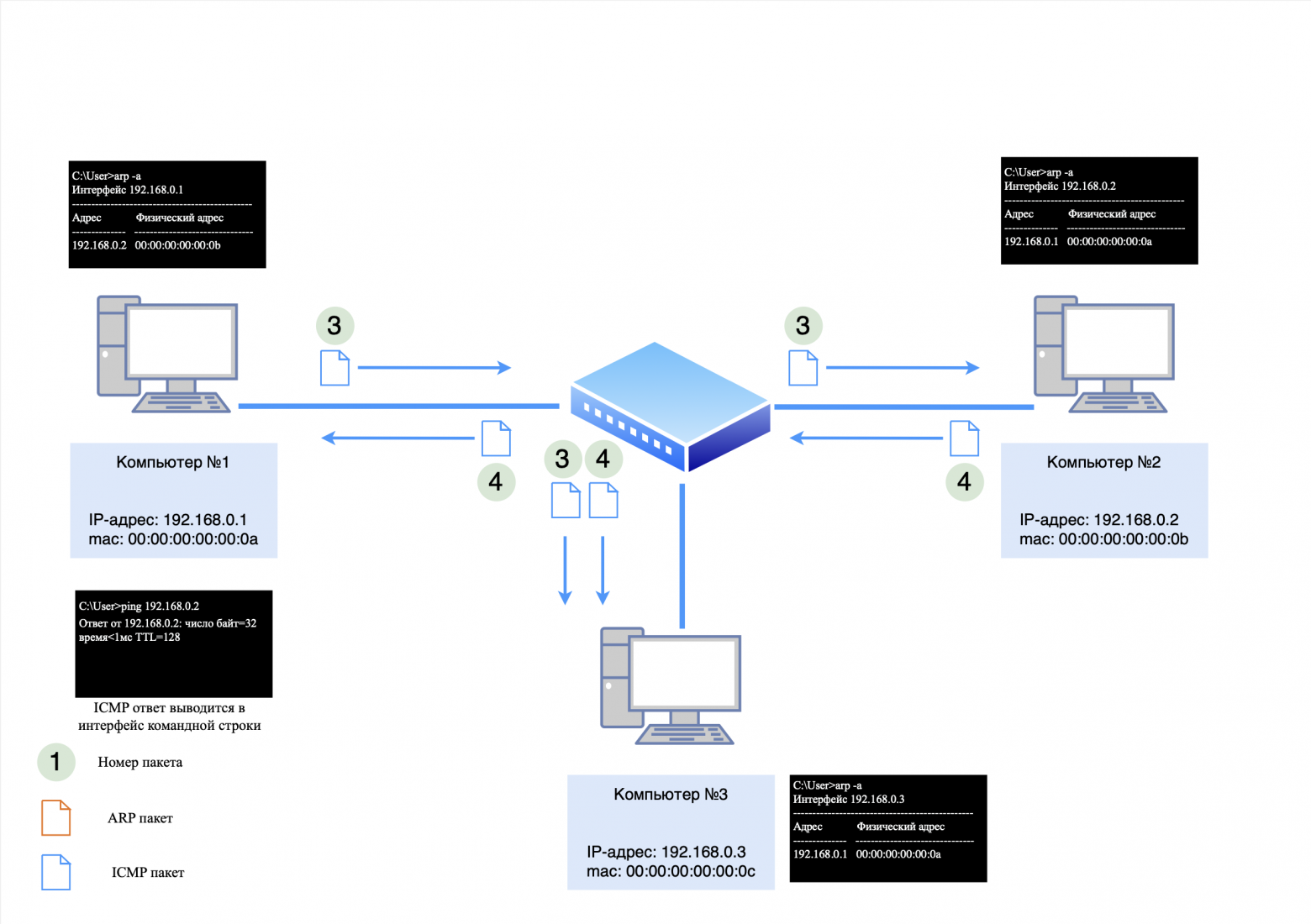
❯ Features of ARP in a network with a hub
In this scheme:
Computers #1 and #2 know about each other's existence;
Computer #3 knows about computer #1 because it received its ARP request, but does not know about computer #2.
A little explanation why
Computer #3 knows about Computer #1 from its ARP table, but does not know about Computer #2 for the following reasons:
Processing ARP requests.
ARP requests are processed by the computer's operating system, not the network card. However, since the ARP request has a destination MAC address broadcast (ff:ff:ff:ff:ff:ff), it reaches all devices on the local network and is accepted by the NIC;
Saving an entry in the ARP table.
Although Computer #3 receives an ARP request addressed to a different IP address (for example, Computer #1), it does not respond to it. However, the information from the packet body (the IP address and MAC address of Computer #1) may be stored in the ARP table of Computer #3 as part of a passive learning process;
Dropping the ARP response.
The ARP response sent by Computer #1 also reaches Computer #3. However, since the destination MAC address in this packet does not match the MAC address of Computer #3's network card, the packet is discarded by the network card at the hardware level. As a result, information about Computer No. 2 does not get into the ARP table of Computer No. 3.
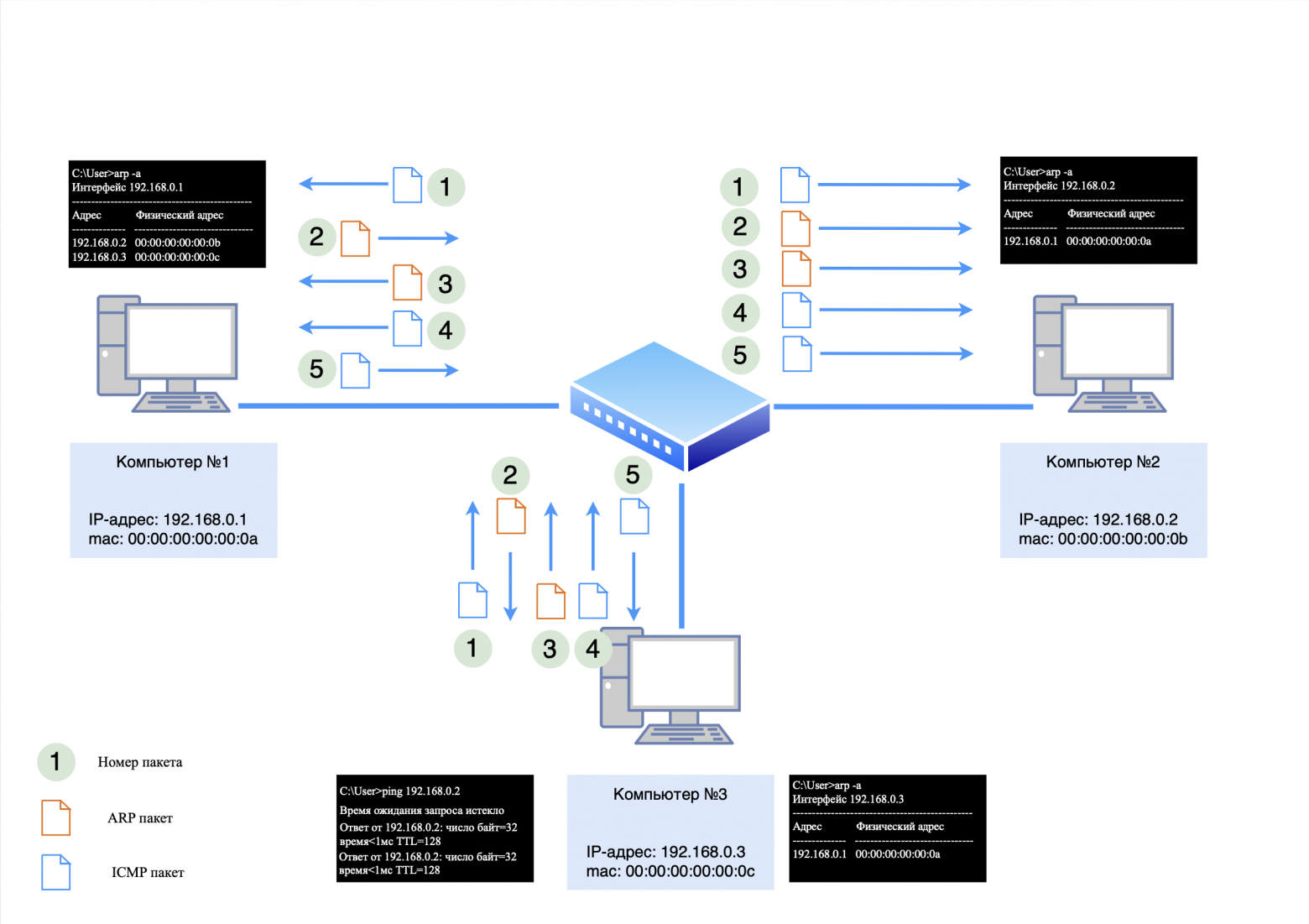
If we try to ping computer #3 from computer #2, an ARP exchange will occur, as in the example above. However, if we try to ping computer No. 1 from computer No. 3, the process will be as follows:
Computer #3, knowing the MAC address of computer #1 from its ARP table, will immediately send an ICMP request;
Computer #1, having no record of computer #3, will discard the request and send a broadcast ARP request;
After receiving the ARP response from computer #3, computer #1 will be able to respond to the ICMP request;
Computer #3 will send a new ICMP request, to which Computer #1 will successfully respond.
When we run the "ping" utility, some packets are lost. This occurs because ARP communication is required between all intermediate devices. This is why there is a need to exchange data using the ARP protocol between all devices located between the source and recipient of the data.
❯ Three computers and L2 switch
❯ How to ensure network stability and eliminate collisions?
The answer is simple: use an L2 switch.
❯ Operating principle of L2 switch
The switch operates at the data link layer of the OSI model and uses MAC addresses to forward data. Let's look at an example of how this happens.
Devices on the network:
computer #1: 192.168.0.1;
computer #2: 192.168.0.2;
computer #3: 192.168.0.3;
Switch #1: The MAC table is initially empty.
Step 1. ARP request
When computer #1 pings computer #2, it first issues an ARP request to determine the recipient's MAC address. This request arrives at the switch, which, having no entries in the MAC table, sends it to all active ports except the sending port.
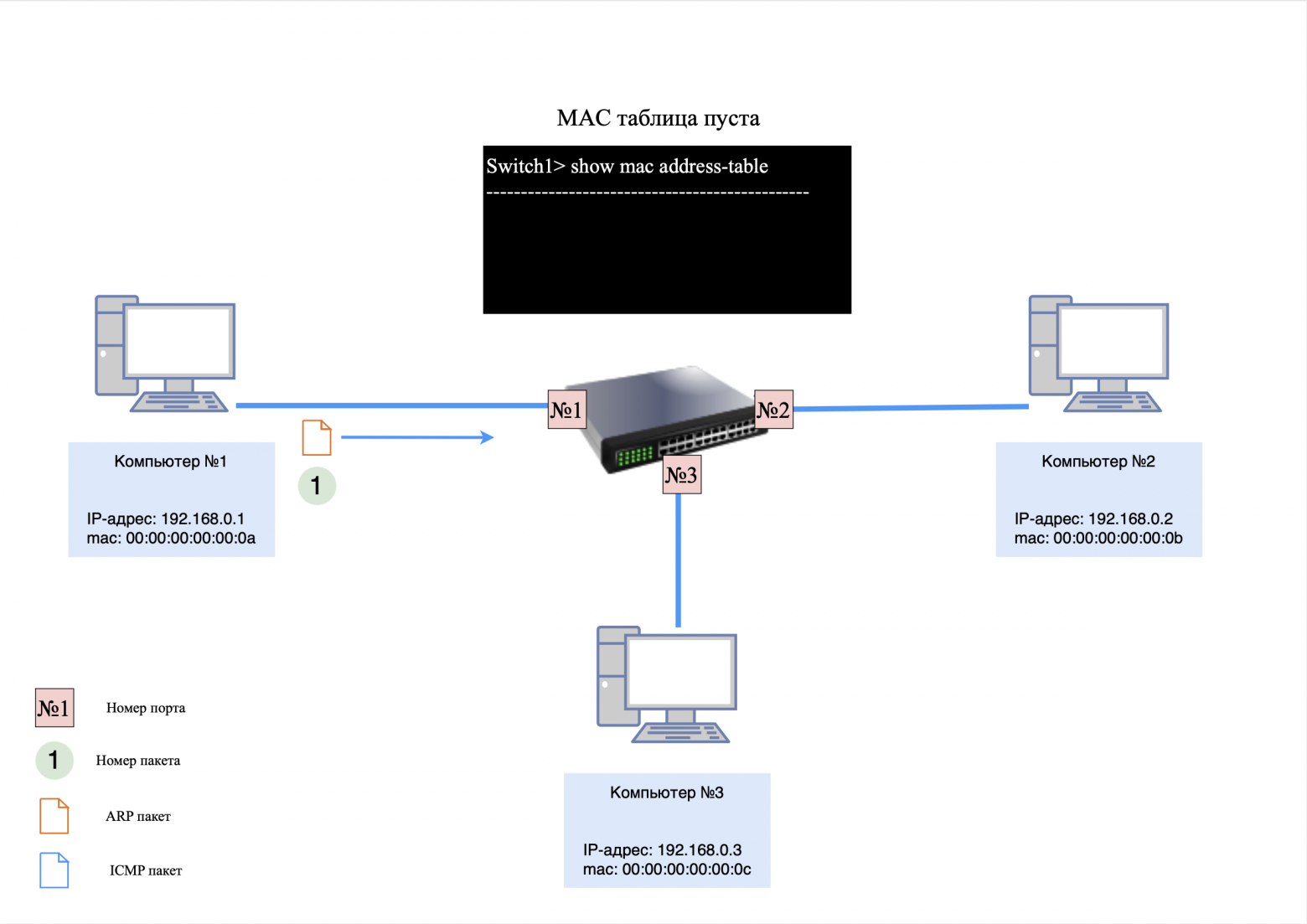
Switch actions:
The switch adds an entry about computer No. 1 to its MAC table, associating its MAC address with the port through which the request came;
The ARP request is delivered to computers #2 and #3.
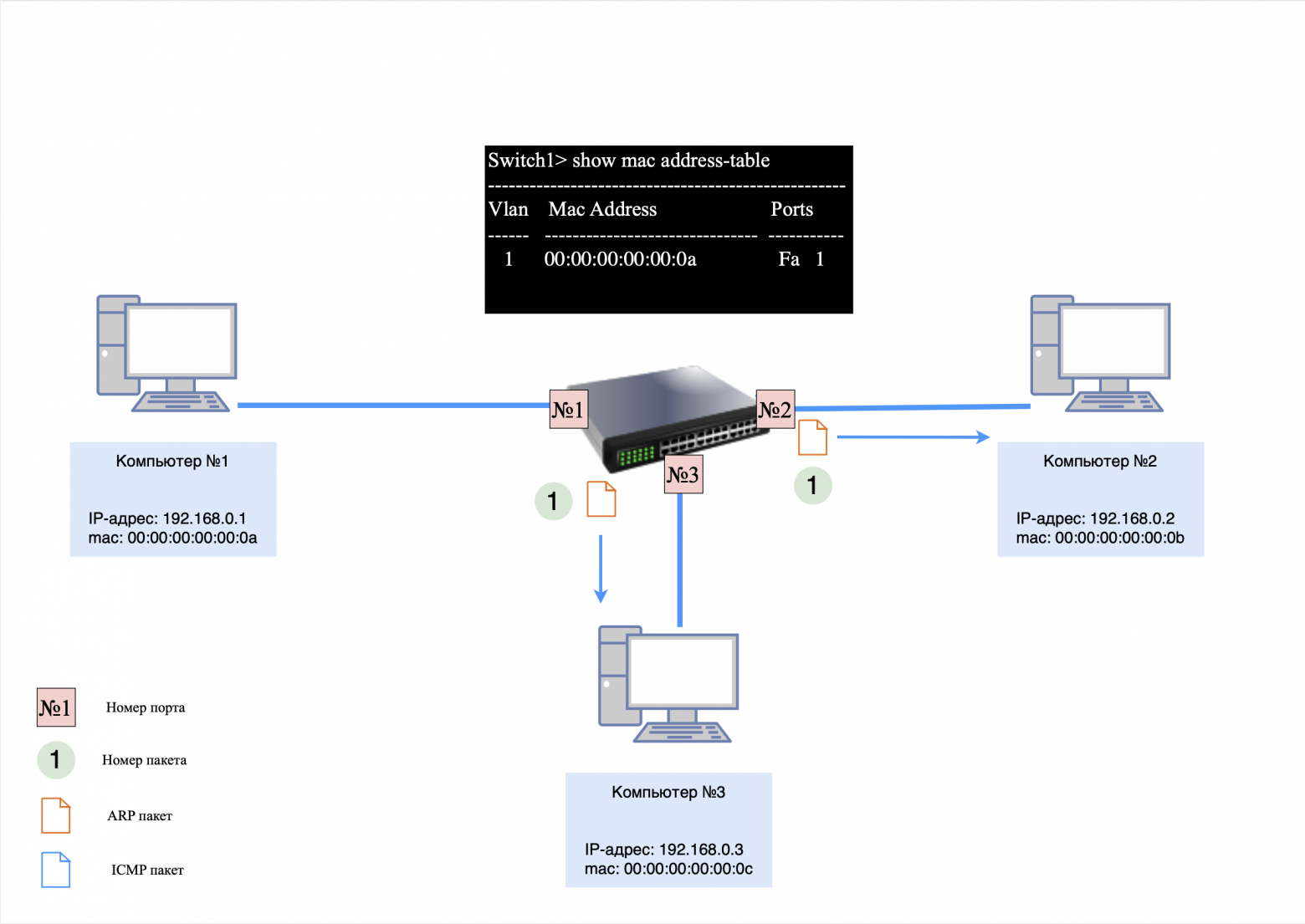
Computer responses:
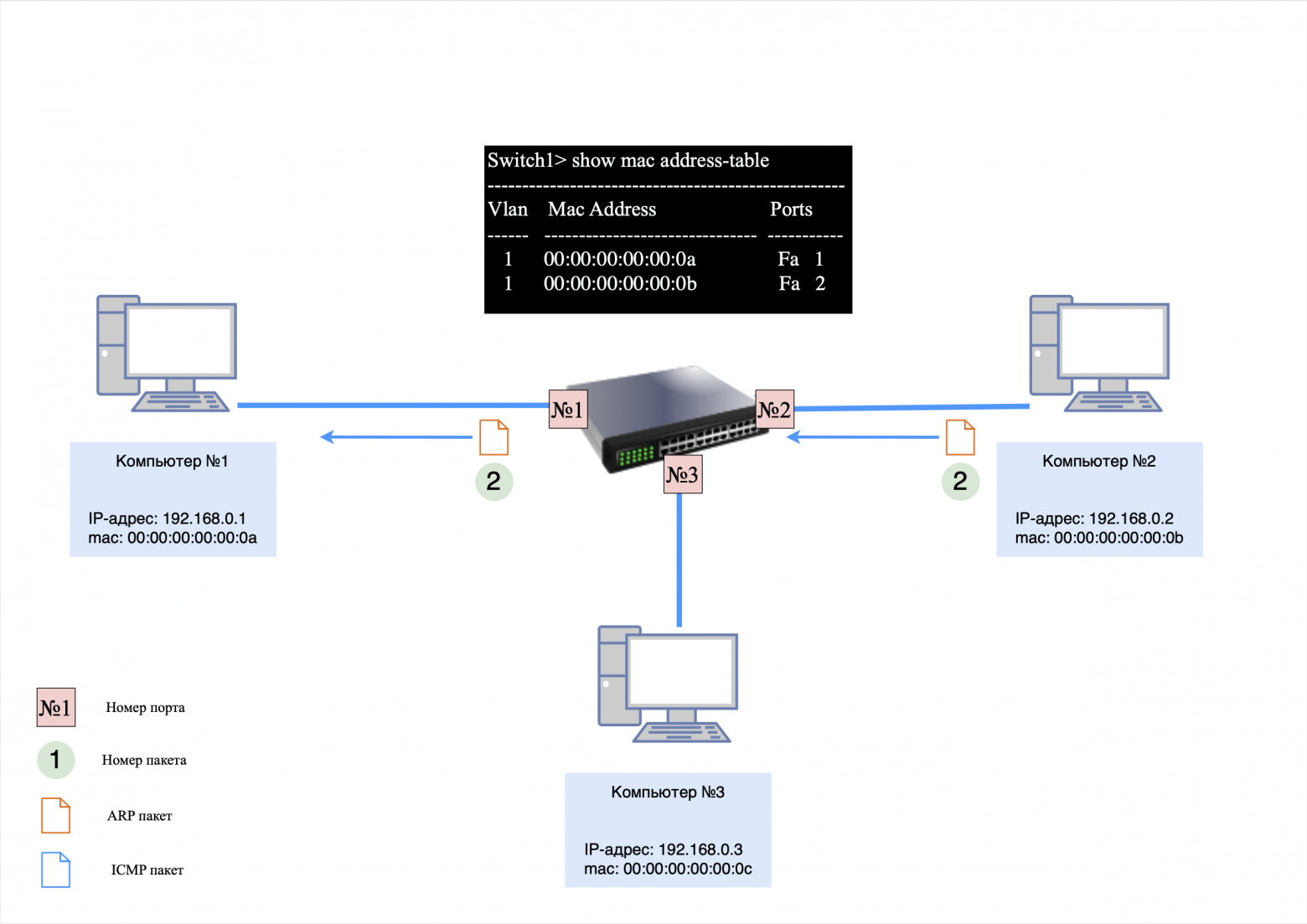
Computer No. 2, having recognized its IP address, sends an ARP response;
Computer #3 ignores the request, but stores an entry for the MAC address of computer #1 in its ARP table.
The switch, having received an ARP response from computer No. 2, updates its MAC table by adding an entry about the MAC address of computer No. 2.
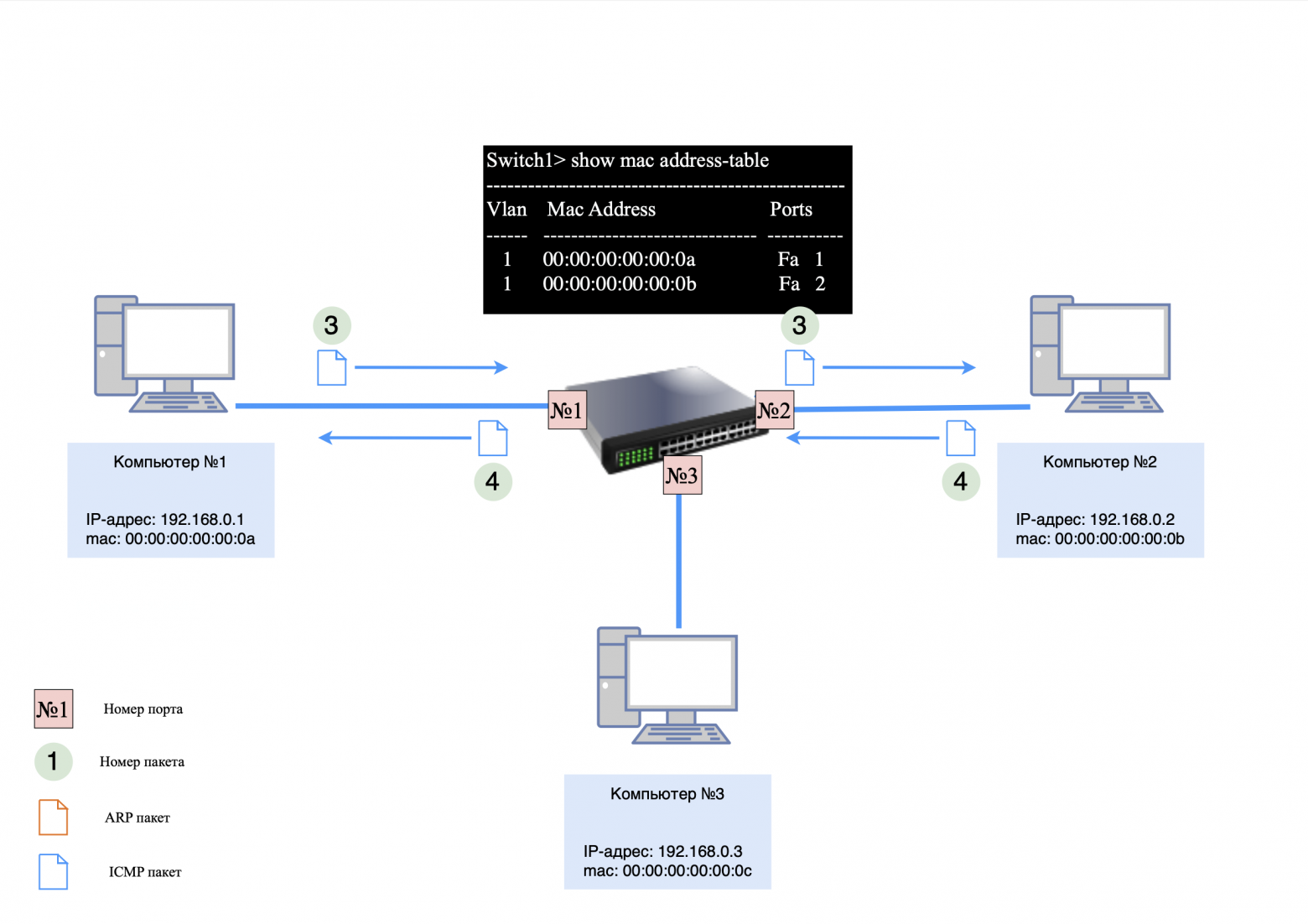
Step 2: ICMP Request and Response
After the ARP exchange is completed, computer #1 sends an ICMP request to computer #2. Thanks to the MAC table, the switch forwards packets only to the port connected to computer No. 2, avoiding unnecessary load on other devices.
❯ Features of ARP in a network with a switch
Computers #1 and #2 know about each other's existence;
Computer #3 knows the MAC address of computer #1, but does not know about the existence of computer #2;
There is no entry for computer #3 in the switch's MAC table.
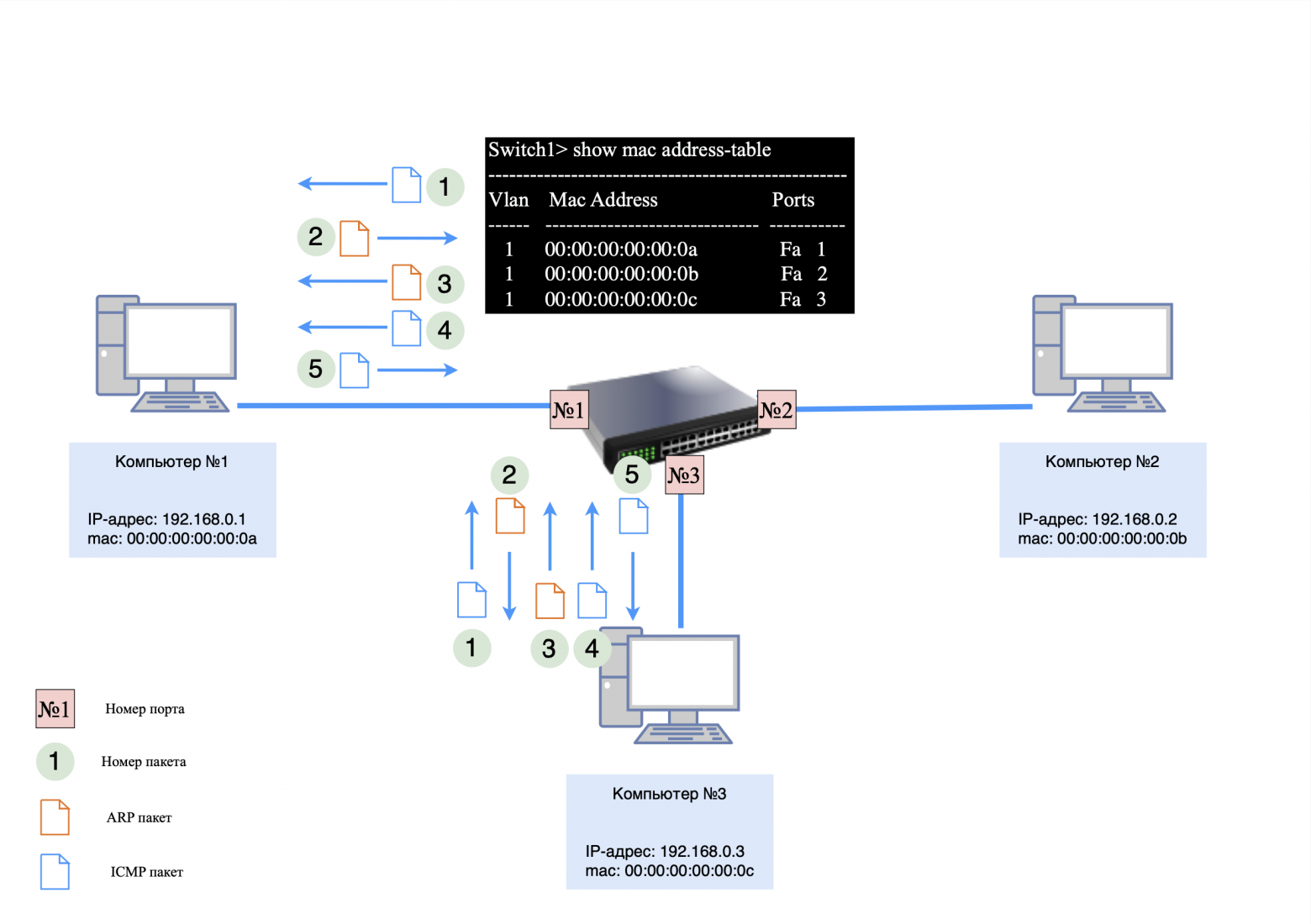
If computer #3 sends a ping request to computer #1, the process will be as follows:
Computer #3 immediately generates an ICMP request using the MAC address from its ARP table;
The switch transmits the packet to computer port No. 1;
computer No. 1, not having a record of computer No. 3, sends an ARP request;
After the ARP exchange is completed, computer #1 responds to the ICMP request.
❯ What happens if the switch reboots during operation?
If the switch reboots or its MAC table is cleared, it will temporarily act as a hub, forwarding packets to all ports until the MAC table is full.
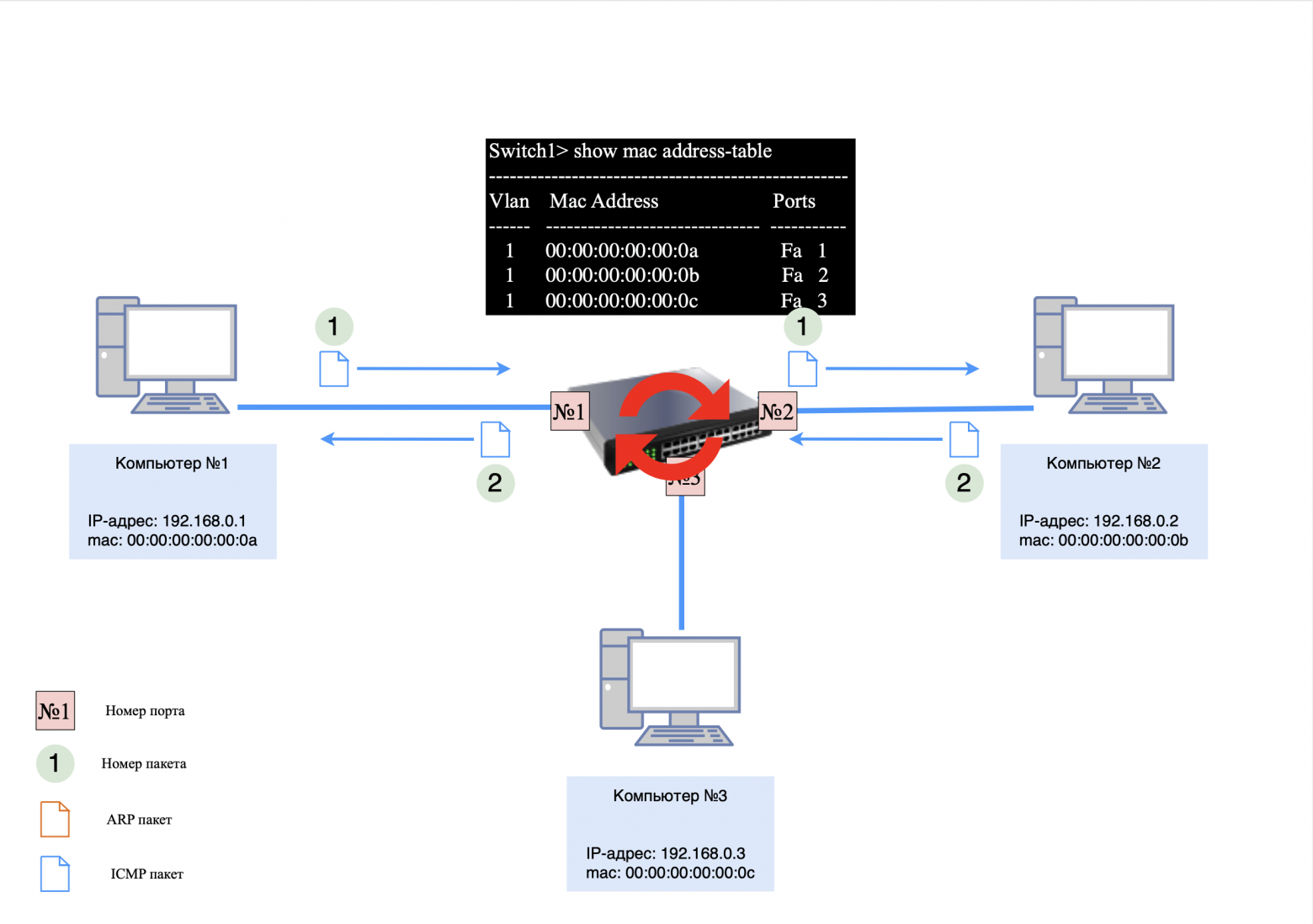
In this situation, the following happens:
The packet addressed to computer No. 2 arrives at the switch. Since the switch's MAC table is empty, to ensure proper network operation, the switch forwards these packets to all ports except the port through which they were received. Then the first entry about computer #1 is added to the switch's MAC table;
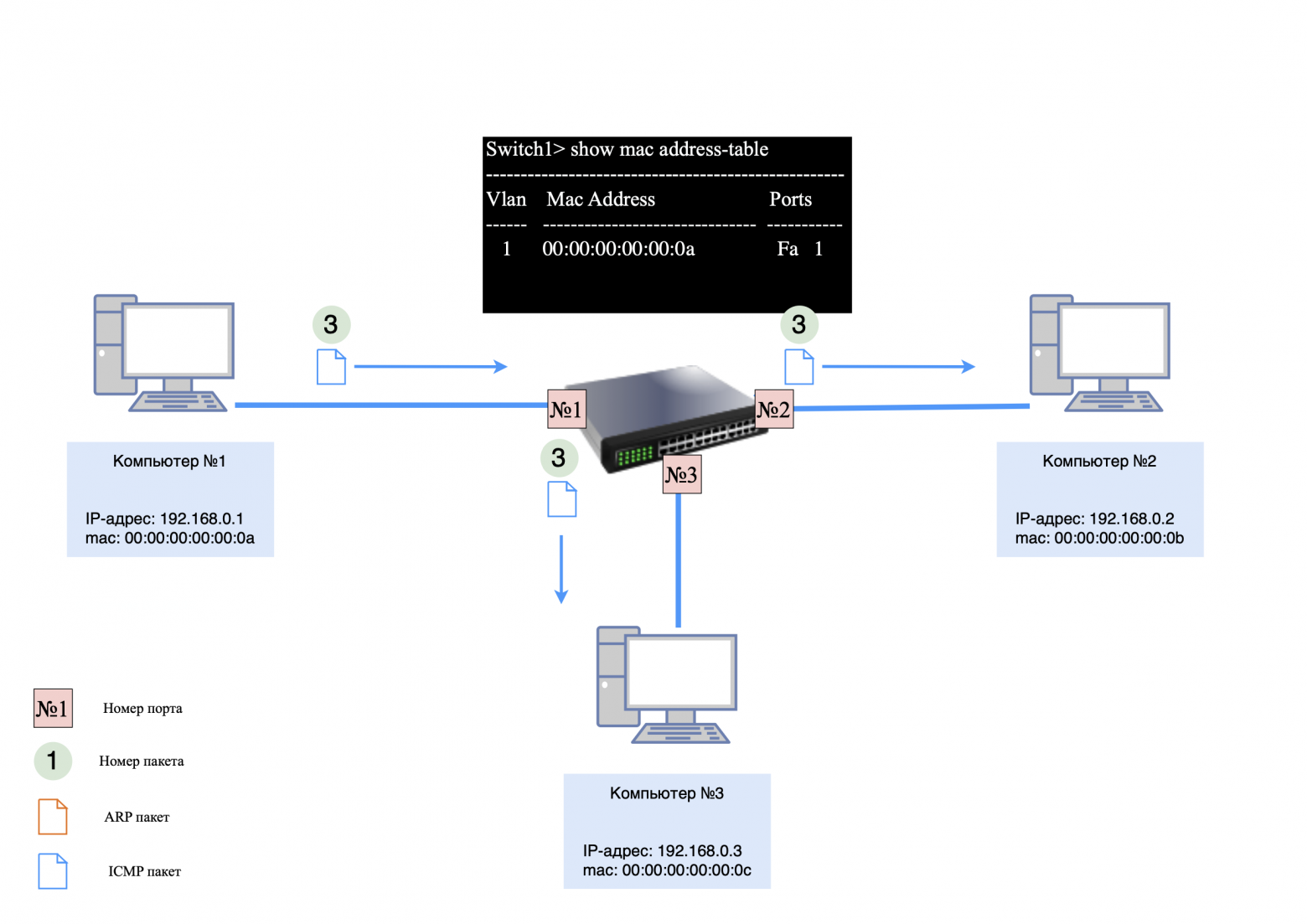
The switch will then receive the packet destined for computer #2. Since there is no entry for this computer in the MAC table, to ensure correct network operation, the switch will forward these packets to all ports except the port on which they were received. After this, the first entry about computer No. 2 will be added to the switch’s MAC table;
Then the network will work the same way as before rebooting or clearing the MAC table.
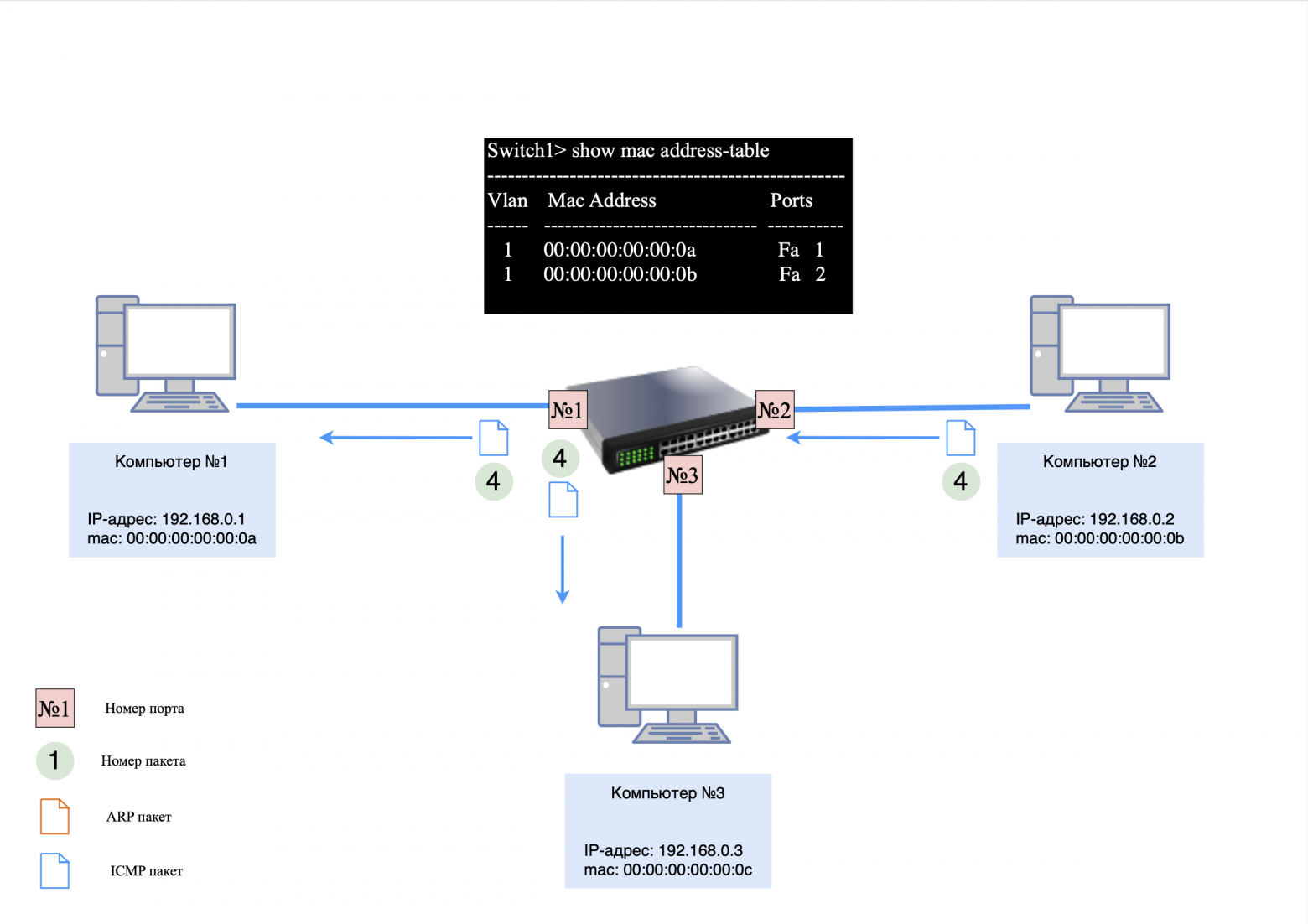
The key difference between a switch and a hub is the following: the hub, regardless of the circumstances, will always forward packets to all ports except the one from which the packet was received. In turn, the switch forwards packets to all ports until there are entries in its MAC table. As soon as entries appear in the table, the switch forwards packets to the appropriate ports.
❯ Three computers and several L2 switches
Let's look at how a network with multiple switches works.
Devices on the network:
computer #1: 192.168.0.1;
computer #2: 192.168.0.2;
computer #3: 192.168.0.3;
Switch #1 and #2: The MAC table is initially empty.
All three computers are connected to several switches. If computer #1 sends a ping request to computer #2, the ARP request will hit the switch and be sent to all active ports because it is a broadcast request.
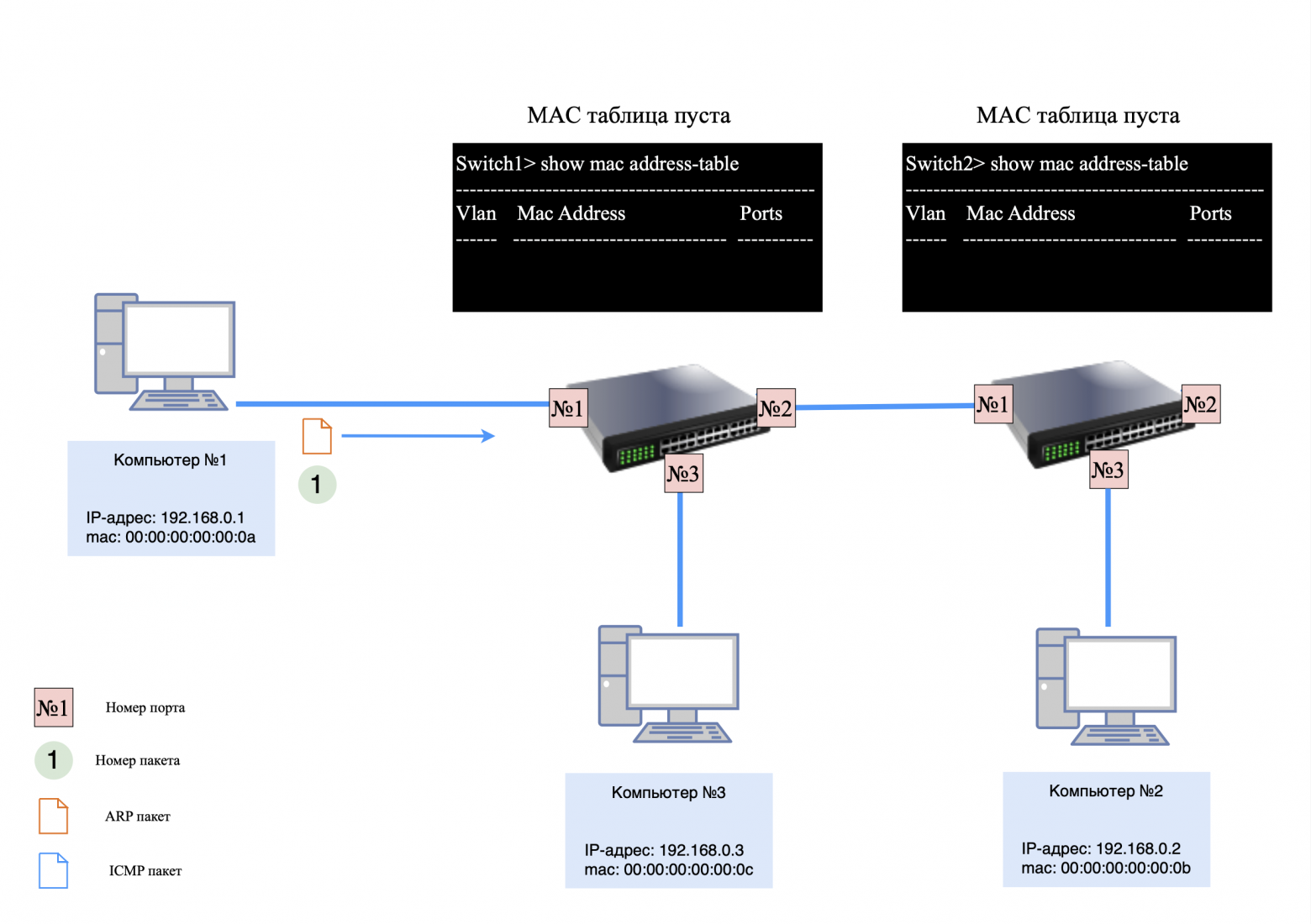
Step 1. ARP request
When computer #1 sends an ARP request to computer #2:
Switch #1:
transmits the request to all ports except the sending port;
saves a record about computer No. 1 in the MAC table.
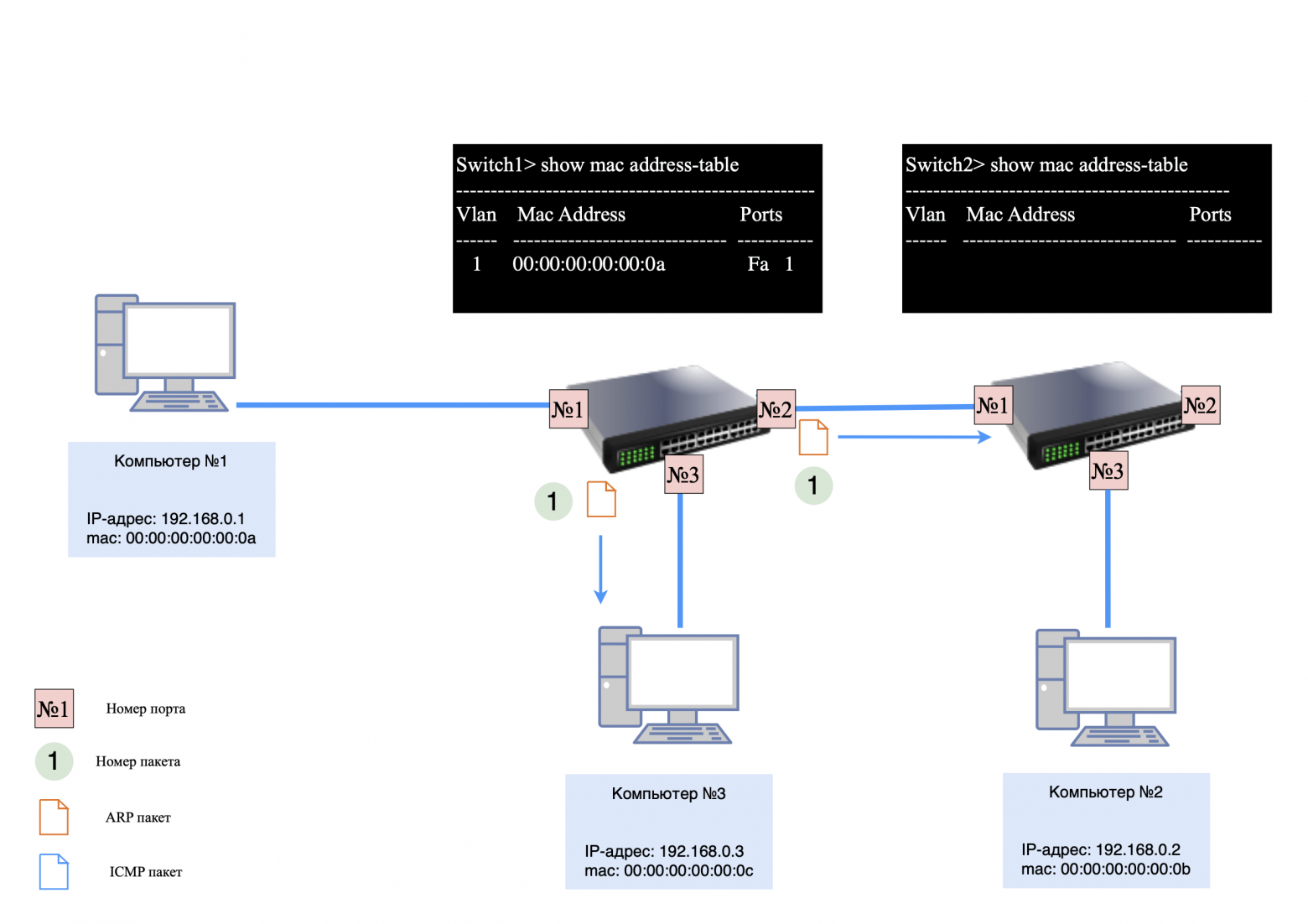
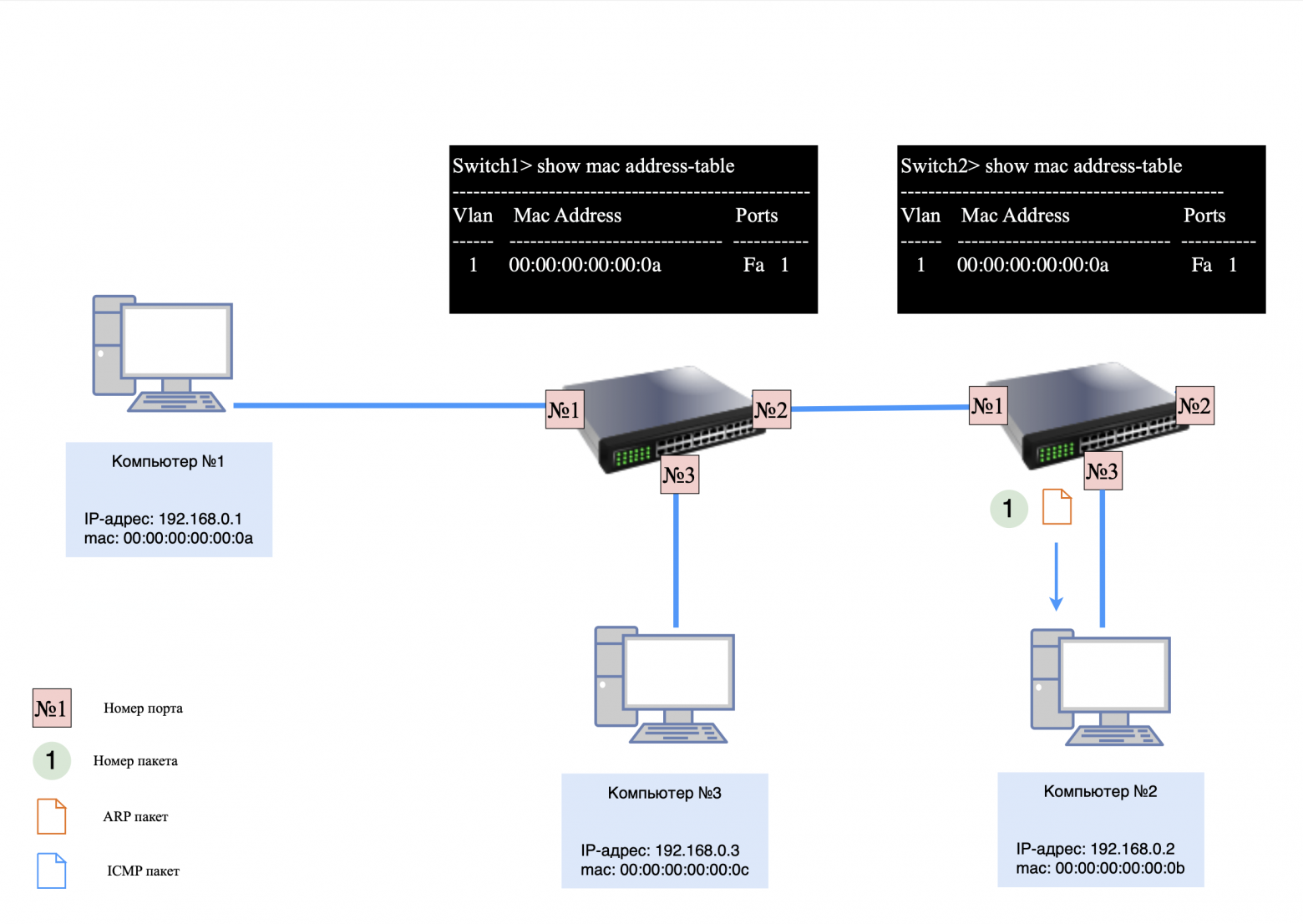
Switch #2:
receives a request from switch No. 1 and transmits it to its ports;
adds an entry to the MAC table about the MAC address of computer No. 1.
Computers #2 and #3 keep a record of the MAC address of computer #1.
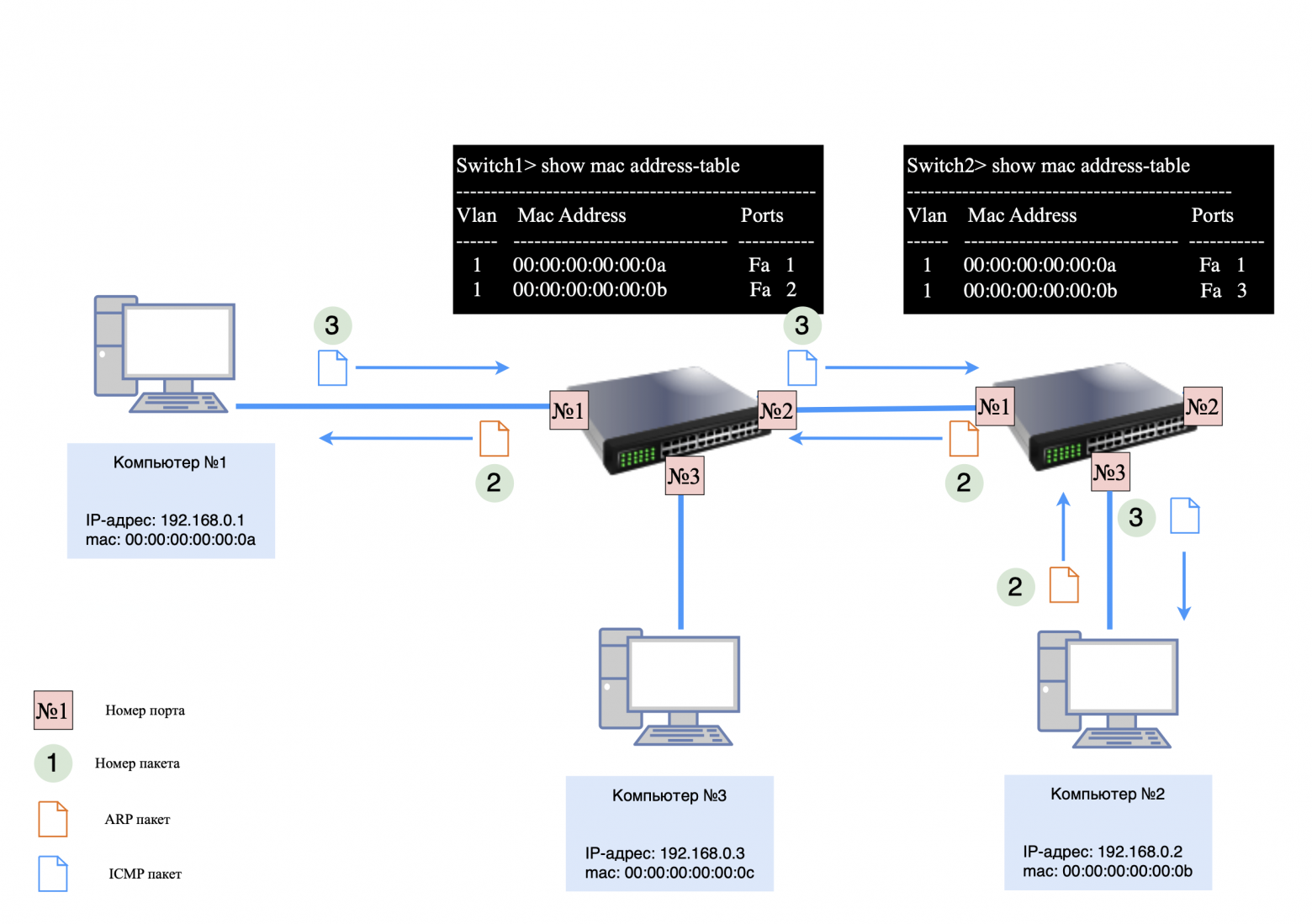
Step 2: ICMP Request and Response
When computers begin exchanging ICMP packets, each switch uses its MAC tables to forward packets only to the target ports.
If you send a “ping” request from computer #3 to computer #2, ARP data exchange will occur between the devices. The switches will store the necessary entries in their MAC tables, and ICMP packets will be transmitted according to these tables.
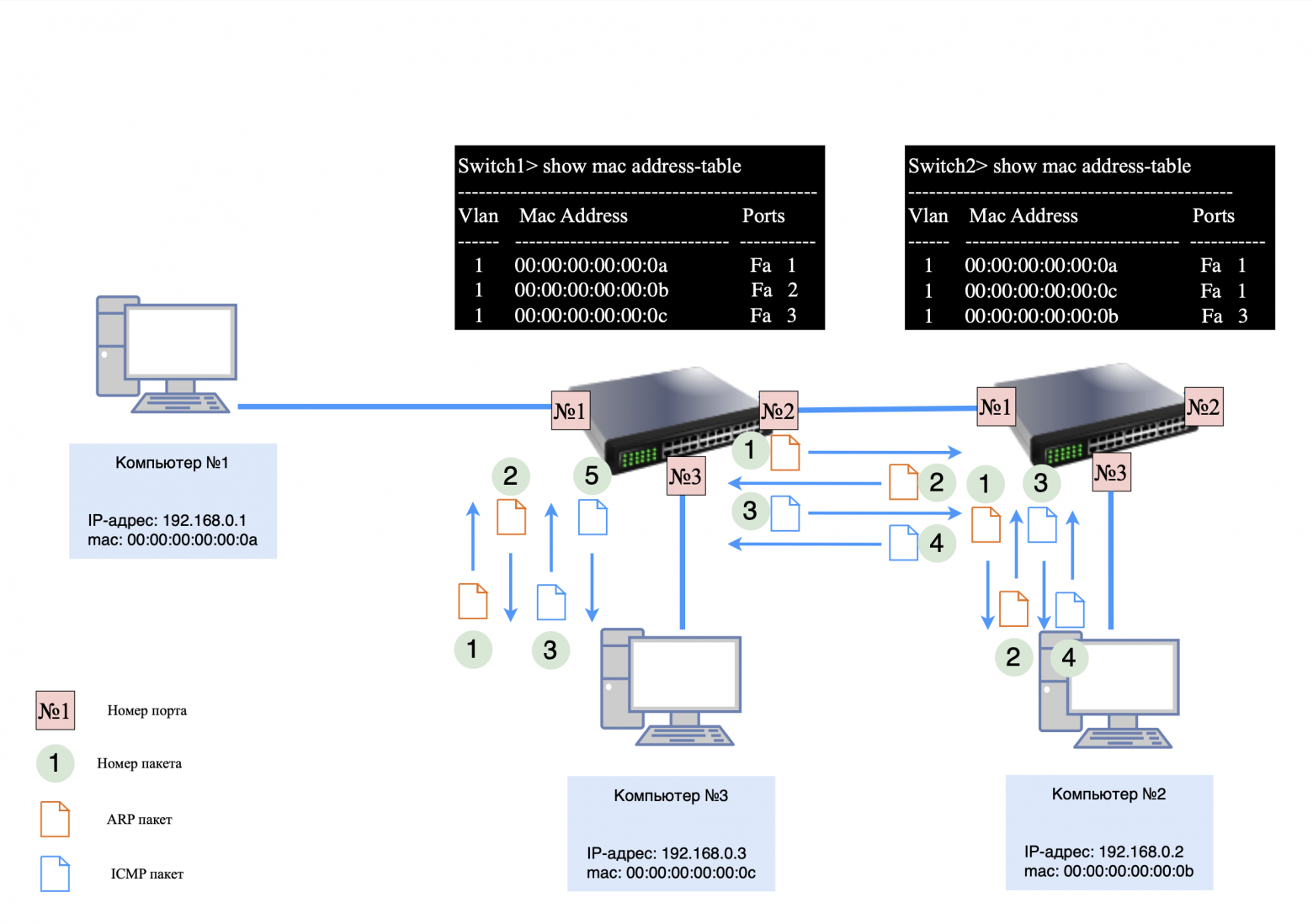
❯ Features of working with multiple switches
Each switch has its own unique MAC table.
Switch #2 may have one entry for a port with multiple devices connected through another switch.
Each switch builds its own MAC table based on the traffic passing through its ports. The more devices connected to one port, the more entries will be associated with that port. However, even in complex networks, switches handle packet transmission efficiently, minimizing the load on the network.
❯ Conclusion
To summarize, we have looked at the key devices and their functions in networks, such as switches and routers, their differences and applications. We also examined the basic principles of network operation using the example of several connected devices, ARP requests, the ICMP protocol and their interaction.
It is important to note that in this article we did not consider the operation of routers in more complex network topologies. In the next article, we'll look at how routers work, how to segment a network, why it's needed, and how it affects scalability and management.
This knowledge will help you better understand the basics of network design and the interaction of its components.
News, product reviews and competitions from the Timeweb.Cloud team — in our Telegram channel ↩

📚 Read also:
➤ It's complicated about simple things. The most popular protocols and principles of their operation. HTTP, HTTPS, SSL and TLS
➤ Writing an application for a SIM card
➤ City of childhood: what will happen if you continue playing SimCity 2000 after 25 years
➤ Not (loneliness online) NOW
➤ The rarest miniature ARM laptop from Korea that can turn into a tablet - look at the Inkel MU-d
Why This Matters In Practice
Beyond the original publication, It's complicated about simple things. How the Internet works. Part 1. What is a switch, router and examples of how simple networks work matters because teams need reusable decision patterns, not one-off anecdotes. Greetings, colleagues! My name is @ProstoKirReal . I would like to discuss with you how the Internet works from twisted pair cables connecti...
Operational Takeaways
- Separate core principles from context-specific details before implementation.
- Define measurable success criteria before adopting the approach.
- Validate assumptions on a small scope, then scale based on evidence.
Quick Applicability Checklist
- Can this be reproduced with your current team and constraints?
- Do you have observable signals to confirm improvement?
- What trade-off (speed, cost, complexity, risk) are you accepting?
FAQ
What is this article about in one sentence?
This article explains the core idea in practical terms and focuses on what you can apply in real work.
Who is this article for?
It is written for engineers, technical leaders, and curious readers who want a clear, implementation-focused explanation.
What should I read next?
Use the related articles below to continue with closely connected topics and concrete examples.





