Hysteria 2: The Protocol That Pretends to Be HTTP/3
A deep technical breakdown of Hysteria 2 — its QUIC foundation, the Brutal congestion algorithm, Salamander obfuscation, and port hopping — plus an honest account of where the protocol falls apart in 2026.
Most articles about Hysteria 2 follow the same template: "fast, simple, set up in 5 minutes, here is the config." This is not that article.
What I want to do is break down exactly what happens at the protocol level, why the engineering choices work against modern DPI systems, and where this protocol has real weaknesses — the ones the vendor carefully sidesteps in its documentation.
If you need a "copy the config and run" guide, close the tab. If you want to understand why this works, read on.
The Foundation: Why QUIC, Not TCP
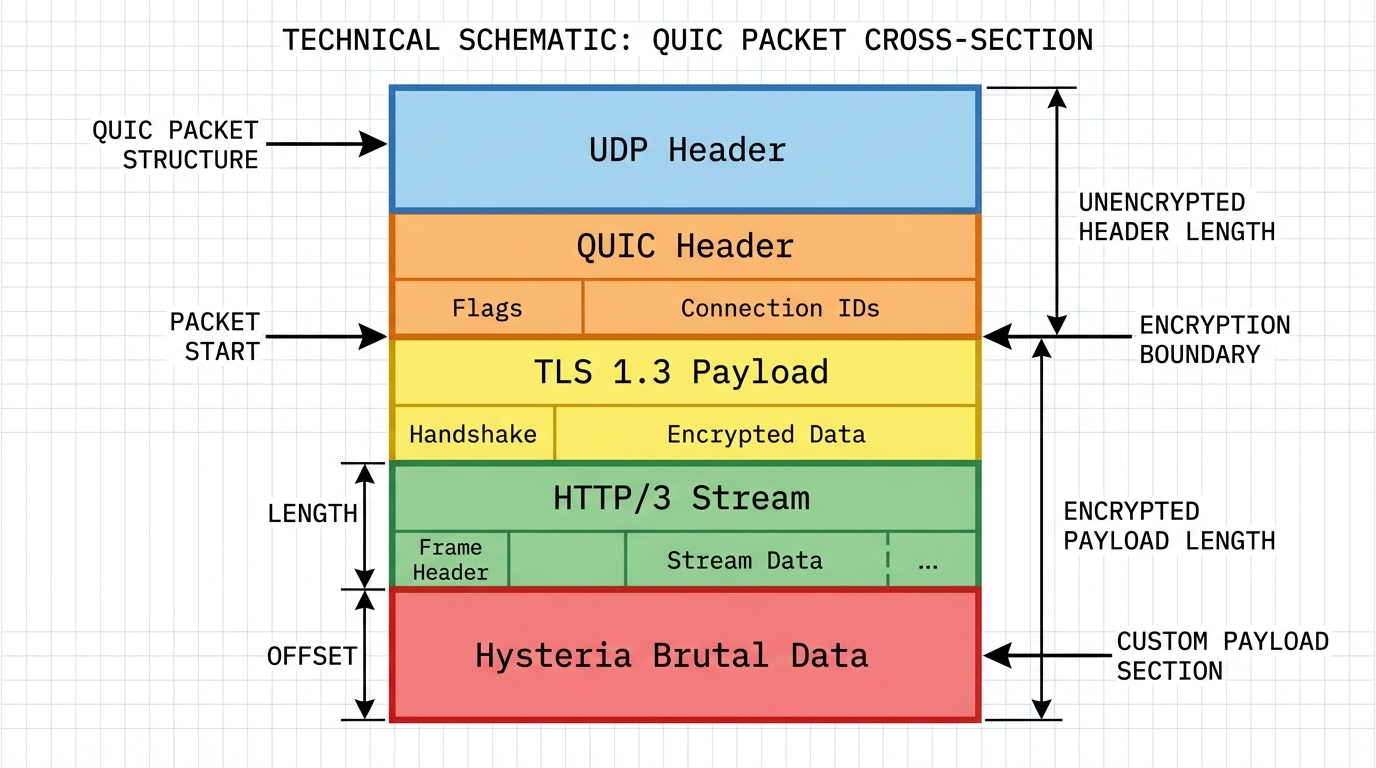
Hysteria 2 is built on top of QUIC. This is not a random choice or a fashion statement — it is an engineering decision with specific consequences.
QUIC (RFC 9000) is a transport-layer protocol developed by Google and standardized in 2021. It runs over UDP and implements internally everything that used to live in TCP + TLS: stream multiplexing, congestion control, reliable delivery, encryption. HTTP/3 is simply HTTP over QUIC.
Why does this matter for bypassing censorship? A TCP connection is easy to block. A censor sees the SYN packet, decides the connection is suspicious, sends RST to both sides — and the connection is dead. Cheap, reliable, has worked for years.
UDP is a different story. UDP is stateless: no handshake, no connection establishment, no obvious "start moment." There is nowhere to send a RST. To block a UDP flow, you either block all UDP on that port (crude, with collateral damage) or analyze every packet's content (expensive, with latency). Hysteria 2 exploits this difference in the cost of blocking.
There is a caveat, though — one we will come back to.
Brutal: When Packet Loss Works in Your Favor
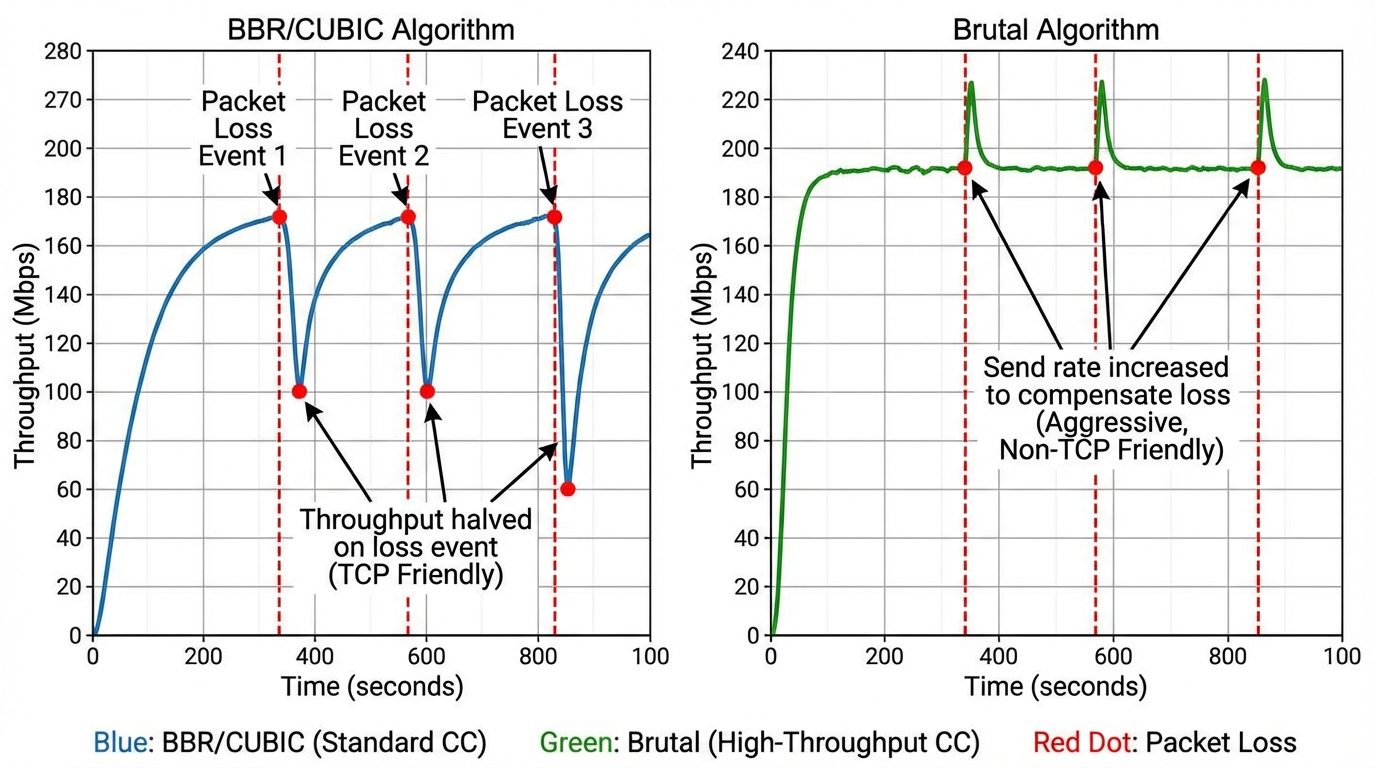
Standard congestion control algorithms — BBR, CUBIC, Reno — reduce sending speed when they detect packet loss. The logic: loss means network congestion, so yield.
Hysteria uses its own algorithm called Brutal.
Brutal works in reverse. When it detects loss, it increases the sending rate, compensating for dropped packets by sending more of them. The client declares a desired receive rate (rx rate) during authentication. The server tries to deliver it at any cost — including redundant transmission, betting that enough packets will get through.
This is useful in two scenarios:
- Unstable channels — mobile internet, satellite, networks with real packet loss. Where normal TCP degrades to a crawl, Brutal holds the declared throughput.
- Artificial packet loss — some ISPs in China and Russia apply rate limiting through deliberate packet loss rather than outright blocking. Brutal breaks this: the ISP drops 30% of packets, Hysteria simply sends 1.4x more.
This sounds aggressive — because it is. On the server side, Brutal can easily put visible load on the uplink. With a misconfigured bandwidth parameter, the server will flood the channel regardless of real network conditions.
# Without this, Brutal is disabled — BBR is used instead
bandwidth:
  up: 20 mbps
  down: 100 mbps
Masking: Two Modes with Different Philosophies
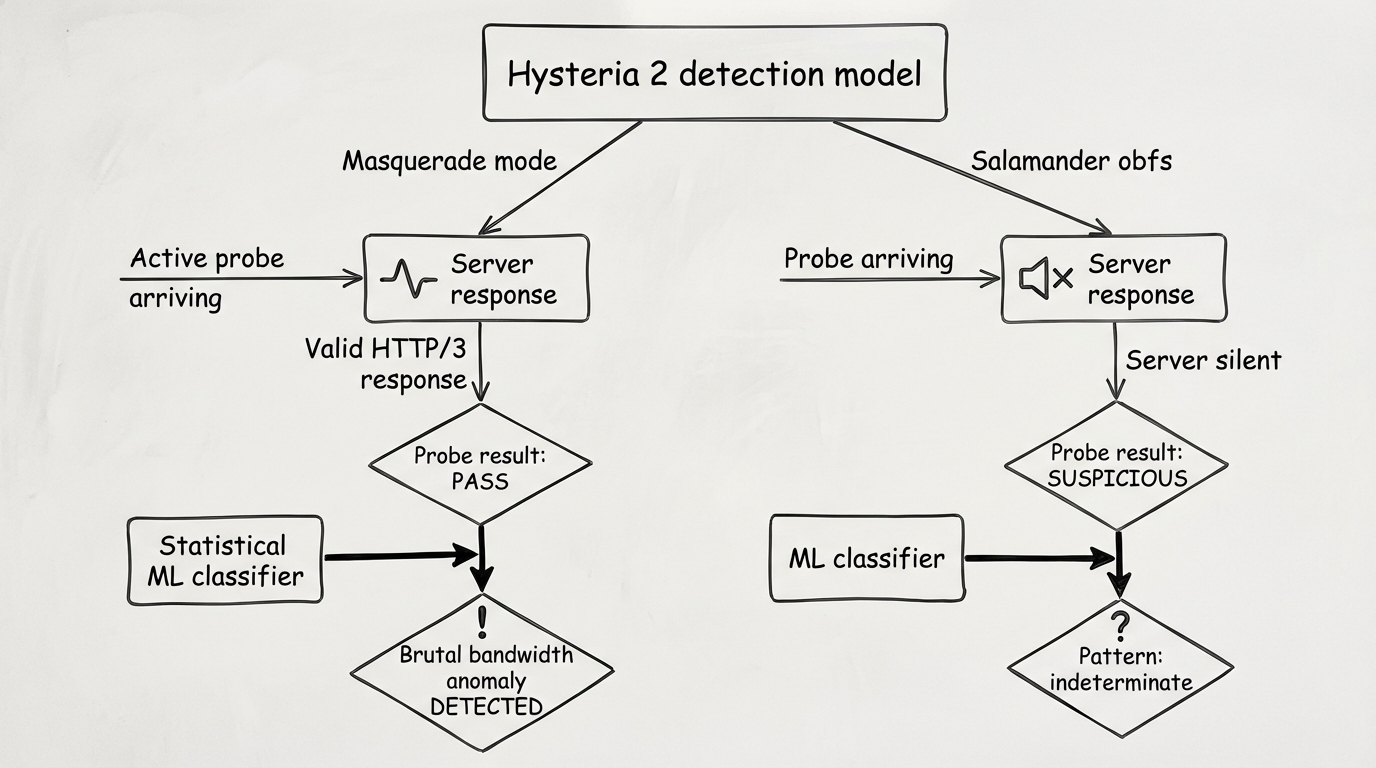
This is where things get interesting — and most frequently misunderstood. Hysteria 2 has two fundamentally different approaches to traffic masking. They are mutually exclusive. Choosing between them is choosing between different threat models.
Mode 1: Masquerade (without obfs)
The server operates as a genuine HTTP/3 server. If you connect to it with a browser or curl, it responds. By default it returns 404, but you can configure a reverse proxy to a real website:
masquerade:
  type: proxy
  proxy:
    url: https://www.bing.com
    rewriteHost: true
In this mode the server literally serves Bing pages to anyone who visits in a browser. A DPI system performing active probing gets a valid HTTP/3 response. Nothing suspicious.
Weakness: Standard QUIC traffic with correct certificates and fingerprints still has statistical differences from real browser traffic. Inter-packet intervals are different. The request pattern is different. An ML classifier will notice — not today, but eventually.
Mode 2: Salamander Obfuscation
Salamander wraps QUIC packets in an additional layer that injects random "noise" packets alongside legitimate data and alters the structure of the connection's initial packets. A traffic classifier cannot build a reliable statistical model — the data is too noisy.
obfs:
  type: salamander
  salamander:
    password: your_obfs_password
But there is a critical point from the documentation (source):
"Enabling obfuscation will make your server incompatible with standard QUIC connections and it will no longer function as a valid HTTP/3 server."
With Salamander enabled, the server does not respond to standard QUIC requests. Active probing returns silence. This itself is suspicious for advanced DPI systems: the server does not speak any known protocol.
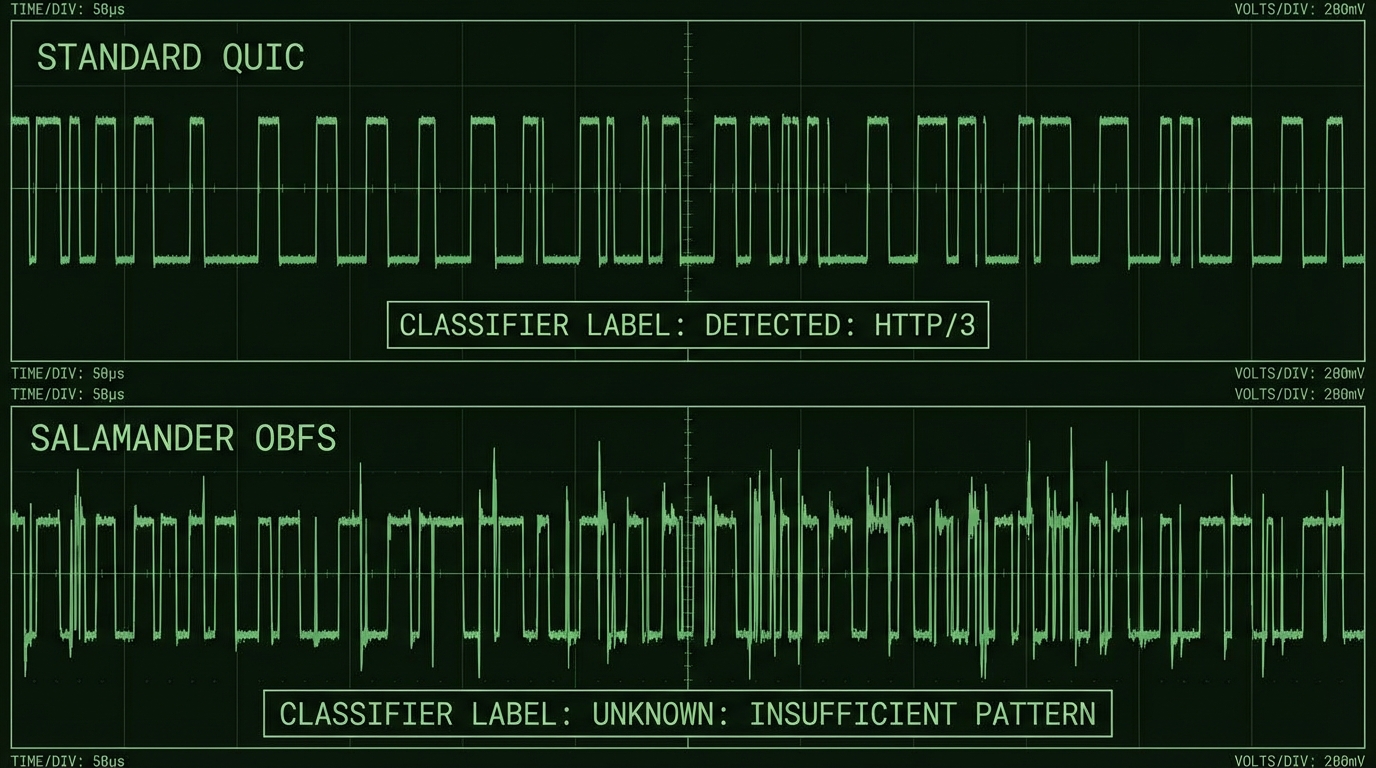
The dilemma: masquerade without obfs gives good cover but is vulnerable to statistical analysis. Salamander with obfs produces chaotic traffic but has no legend when probed. The right choice depends on what exactly you are defending against. On most Russian ISPs in 2026, Salamander yields better results — Russia's TSPU system actively detects QUIC patterns, and obfs at the Initial packet level breaks that detection before it can happen.
Port Hopping: An Elegant Solution That Requires Effort
The Hysteria developers noticed a specific behavior of China's GFW: when a suspicious protocol is detected, it blocks the IP+port pair rather than the IP address entirely. This creates a loophole.
Port hopping means the client jumps between ports when connections fail. Importantly, the server does not listen on a range of ports by itself — it listens on one port (e.g., 443), and the range is configured via packet redirection at the iptables/nftables level:
# nftables on the server — required; port hopping does not work without this
define INGRESS_INTERFACE = "eth0"
define PORT_RANGE = 20000-50000
define HYSTERIA_PORT = 443

table inet hysteria_porthopping {
  chain prerouting {
    type nat hook prerouting priority dstnat; policy accept;
    iifname $INGRESS_INTERFACE udp dport $PORT_RANGE \
    counter redirect to :$HYSTERIA_PORT
  }
}
On the client, you need a transport section with hopInterval:
transport:
  udp:
    hopInterval: 30s  # minimum 5s, default 30s

server: your.server.com:20000-50000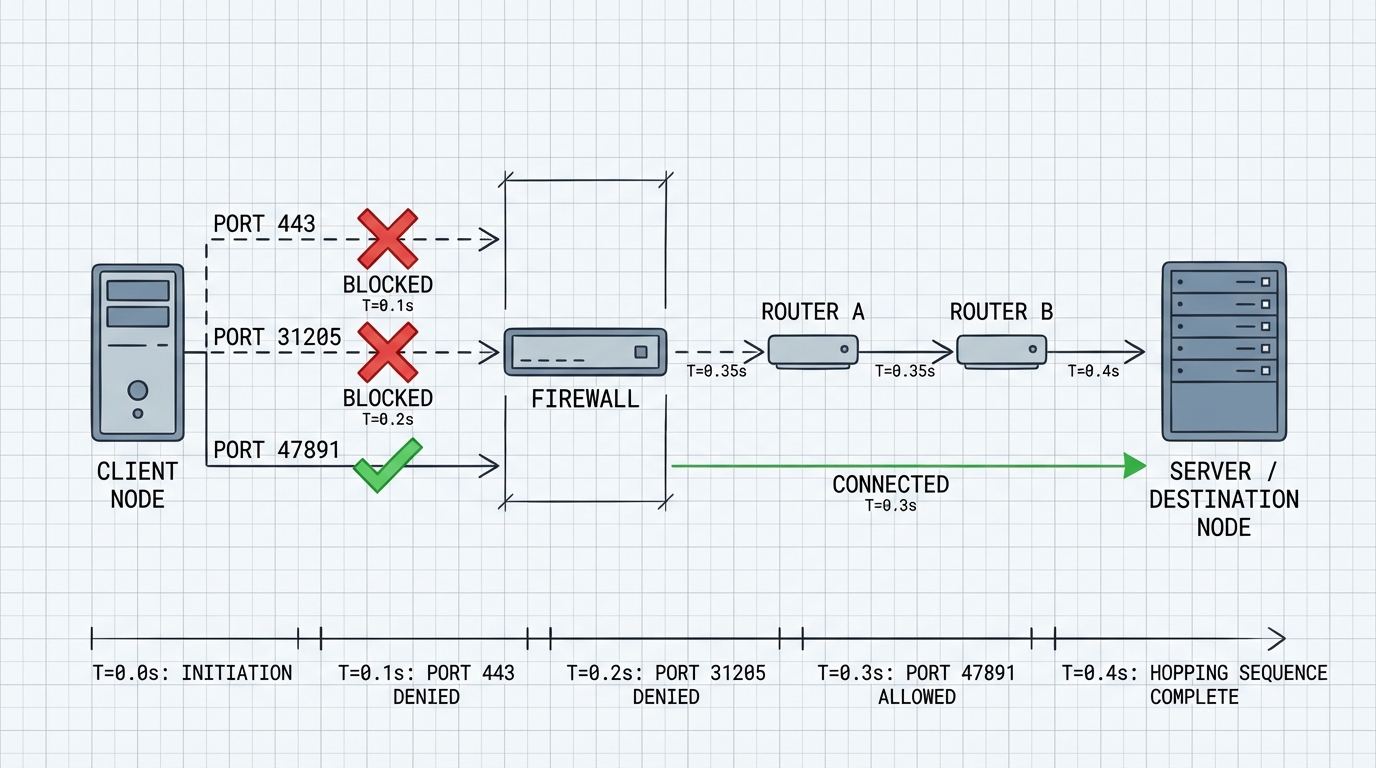
Important practical note: sing-box as a client does not support port hopping for Hysteria2 and has no plans to add it. If you use sing-box, this feature is unavailable — you need the native hysteria2 client.
In the Russian context, port hopping is less effective than in China: TSPU blocks by traffic pattern, not by IP+port pair. But against ISPs that simply block specific ports, it works.
Where Hysteria 2 Breaks Down in 2026
The honest part that articles usually skip.
Problem 1: QUIC Blocking. A number of Russian ISPs throttle UDP traffic on port 443 or slow QUIC traffic altogether. Hysteria 2 in a basic configuration performs worse than TCP-based protocols on such networks, or does not work at all. This is not a bug — it is a fundamental limitation of UDP-based architecture. FakeTCP mode (where UDP packets are disguised with TCP headers) theoretically addresses this, but it is only supported on Linux and requires root. In practice, it is not a "set it and forget it" option.
Problem 2: Anomalous Bandwidth. Brutal generates a traffic pattern that is statistically atypical for browser HTTPS. Constant high throughput without the pauses characteristic of page rendering is a signature. An ML classifier trained on real HTTP/3 browser traffic will distinguish Hysteria 2 from Chrome with good accuracy.
Problem 3: Obfs Incompatibility. With Salamander enabled, the server does not respond to standard requests. Active probing returns silence. TSPU can interpret silence as suspicion — this is exactly how some Shadowsocks servers get detected. This is an unsolved problem.
An Uncomfortable Question Without an Answer
Hysteria 2 with Brutal works excellently on unstable networks with real packet loss. But on a stable Moscow or St. Petersburg connection with low loss, Brutal is redundant and creates an anomalous traffic pattern.
So: the protocol's strongest feature is simultaneously its most detectable signature on a good channel. I do not know how to properly solve this within the current architecture. Possibly there is no way — it may be a fundamental tradeoff.
When to Use Hysteria 2 — and When Not To
| Scenario | Hysteria 2 | Alternative |
|---|---|---|
| Unstable channel, loss >5% | Excellent | VLESS degrades |
| ISP blocks UDP/QUIC | Poor | VLESS + XHTTP |
| Maximum stealth required | Medium | VLESS + Reality |
| Speed over stealth | Excellent | — |
| Mobile internet | Good | — |
| Corporate firewall without UDP | Does not work | Any TCP-based |
A Config That Actually Works in 2026
# Server
listen: :443

tls:
  cert: /path/to/cert.pem
  key: /path/to/key.pem

auth:
  type: password
  password: strong_password_here

masquerade:
  type: proxy
  proxy:
    url: https://www.bing.com
    rewriteHost: true

quic:
  initStreamReceiveWindow: 26843545
  maxStreamReceiveWindow: 26843545
  initConnReceiveWindow: 67108864
  maxConnReceiveWindow: 67108864
# Client — with port hopping
server: your.server.com:20000-50000
auth: strong_password_here
tls:
sni: your.server.com
insecure: false
bandwidth:
up: 20 mbps
down: 100 mbps
transport:
udp:
hopInterval: 30s
socks5:
listen: 127.0.0.1:1080What Next
Hysteria 2 is not a replacement for VLESS+Reality when maximum stealth is the goal. It is a different tool with different tradeoffs: speed and resilience to packet loss in exchange for a more visible traffic pattern.
It makes sense to keep both in your toolkit. Hysteria 2 on a good UDP channel delivers speeds that TCP-based protocols simply cannot match physically. VLESS+Reality is for when you need the cover.
The code is open source: https://github.com/apernet/hysteria. The documentation is honest — weaknesses are acknowledged there, which is itself rare in this ecosystem.



