How I Convinced a Virtual Machine It Has a Cooler Fan
Some malware detects virtual machines by checking for hardware components like cooling fans via WMI. This article shows how to inject custom SMBIOS data into Xen and QEMU/KVM to make a VM appear to have a real CPU fan.
Some malware samples perform various checks to determine if they are running inside a virtual machine. One method involves checking for specific hardware components that are typically not emulated in virtual environments. A common example: the malware queries the WMI class Win32_Fan:
wmic path Win32_Fan get *The goal is to make analysis harder for security researchers by refusing to run in a virtual environment.
Malicious software can detect virtual machines in many ways, including through WMI classes: Win32_CacheMemory, Win32_VoltageProbe, and others.
How Does a Computer Know About Its Fan?
The computer reads SMBIOS (System Management BIOS) data. When disassembling cimwin32.dll, we can see that SMBIOS type 27 records are used to retrieve fan information.
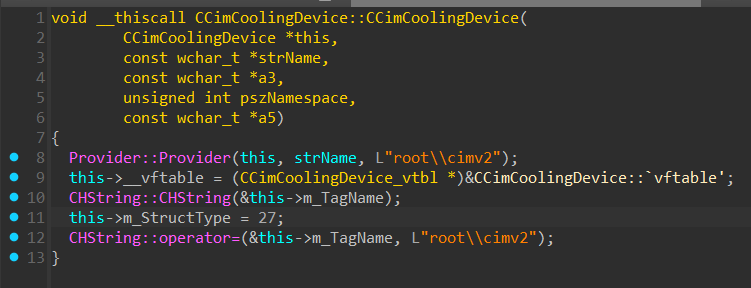
SMBIOS Type 27
According to the System Management BIOS Reference Specification, type 27 is defined as a Cooling Device.
Dumping SMBIOS with dmidecode:
root@host:/# dmidecode -t27 -u
Handle 0x1B00, DMI type 27, 15 bytes
Header and Data:
    1B 0F 00 1B 00 1C 65 00 00 DD 00 00 E0 15 01
Strings:
    43 50 55 20 46 61 6E 00
    CPU Fan
Interpreted output:
root@host:/# dmidecode -t27
Handle 0x1B00, DMI type 27, 15 bytes
Cooling Device
    Temperature Probe Handle: 0x1C00
    Type: Chip Fan
    Status: OK
    Nominal Speed: 5600 rpm
    Description: CPU Fan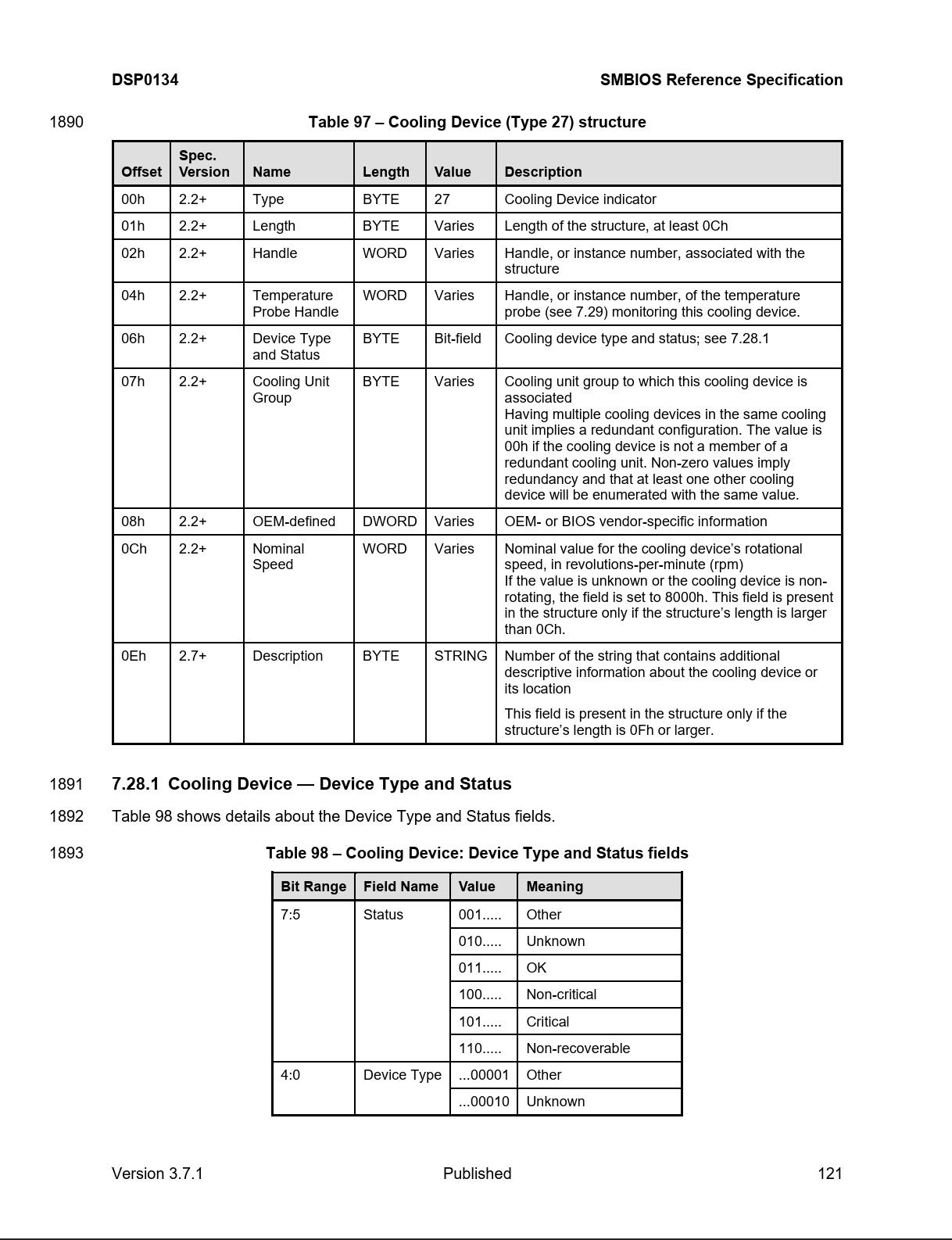
Setting Arbitrary SMBIOS in Xen
You can set arbitrary SMBIOS data by assigning the smbios_firmware option in the domain configuration to a file path containing the data.
Creating the smbios.bin file with the following byte content:
1B 0F 00 1B 00 1C 65 00 00 DD 00 00 E0 15 01 43
50 55 20 46 61 6E 00 00
According to the SMBIOS specification, an additional terminating byte 00 is required.
Per Xen documentation, each element must be preceded by a 32-bit integer (size in little-endian). The structure is 24 bytes, so:
18 00 00 00 1B 0F 00 1B 00 1C 65 00 00 DD 00 00
E0 15 01 43 50 55 20 46 61 6E 00 00
Adding to the domain configuration:
smbios_firmware = "/path/to/smbios.bin"Starting the VM:
root@host:/# xl create /path/to/windows/domain.cfgChecking in Windows:
PS C:\> wmic path Win32_Fan get *
No Instance(s) Available.
The Problem Discovered
The documentation has a limitation: only types 0, 1, 2, 3, 11, 22, and 39 can be overridden. Type 27 is not in this list.
The solution: apply a patch from the xen-devel archive to add support for types 7, 8, 9, 26, 27, and 28.
Type 28: Temperature Probe
The cooling device references a temperature probe (type 28), which was missing. Dumping from the host:
root@host:/# dmidecode -t28
Handle 0x1C00, DMI type 28, 22 bytes
Temperature Probe
    Description: CPU Thermal Probe
    Location: Processor
    Status: OK
Byte representation:
1C 16 00 1C 01 63 00 00 00 00 00 00 00 00 00 00
00 DC 00 00 00 00 43 50 55 20 54 68 65 72 6D 61
6C 20 50 72 6F 62 65 00 00
The structure is 41 bytes (0x29 in hex), with the size prefix:
29 00 00 00 1C 16 00 1C 01 63 00 00 00 00 00 00
00 00 00 00 00 DC 00 00 00 00 43 50 55 20 54 68
65 72 6D 61 6C 20 50 72 6F 62 65 00 00
The Final smbios.bin File
18 00 00 00 1B 0F 00 1B 00 1C 65 00 00 DD 00 00
E0 15 01 43 50 55 20 46 61 6E 00 00 29 00 00 00
1C 16 00 1C 01 63 00 00 00 00 00 00 00 00 00 00
00 DC 00 00 00 00 43 50 55 20 54 68 65 72 6D 61
6C 20 50 72 6F 62 65 00 00
Starting and verifying:
PS C:\> wmic path Win32_Fan get Description,Status
Description     Status
Cooling Device  OK
Success!
Setting Arbitrary SMBIOS in QEMU/KVM
QEMU is simpler — no patching required. Use the -smbios option:
qemu-system-x86_64 ... -smbios file=/path/to/smbios.binOr in libvirt:
<qemu:commandline>
  <qemu:arg value='-smbios'/>
  <qemu:arg value='file=/path/to/smbios.bin'/>
</qemu:commandline>
QEMU does not require size prefixes before structures, so raw data is used:
1B 0F 00 1B 00 1C 65 00 00 DD 00 00 E0 15 01 43
50 55 20 46 61 6E 00 00 1C 16 00 1C 01 63 00 00
00 00 00 00 00 00 00 00 00 DC 00 00 00 00 43 50
55 20 54 68 65 72 6D 61 6C 20 50 72 6F 62 65 00
00
QEMU will automatically handle the remaining records. You can also copy the host's SMBIOS:
cat /sys/firmware/dmi/tables/DMI > /path/to/smbios.binReferences
FAQ
What is this article about in one sentence?
This article explains the core idea in practical terms and focuses on what you can apply in real work.
Who is this article for?
It is written for engineers, technical leaders, and curious readers who want a clear, implementation-focused explanation.
What should I read next?
Use the related articles below to continue with closely connected topics and concrete examples.





