How DNS Works in Linux: From getaddrinfo to resolv.conf
A detailed walkthrough of the DNS resolution chain in Linux, from the getaddrinfo() call through NSS, glibc/musl, libresolv, and resolv.conf, with a practical strace analysis of curl.
Translation of an article by Anatoly Kokhan (K2Tech company blog)

Introduction
When users type server names into a browser or run ping, the operating system must convert domain names into IP addresses — a process called domain name resolution. Although this seems transparent, behind it lies a multi-layered mechanism.
The name resolution process in Linux is not simply a "DNS call" but a chain of libraries, configuration entries, and system calls. Engineers often wonder: is an application restart required after changing a DNS server address? To diagnose errors and timeouts, it's critically important to understand the entire chain from getaddrinfo() to resolv.conf.
The Tip of the Iceberg
Almost all modern applications in Linux (curl, systemd, and others) use the getaddrinfo() function from the standard C library (glibc or musl). This function does the main work of translating a domain name into IP addresses (A, AAAA records) depending on settings and the request.
getaddrinfo() doesn't just perform DNS queries — it also handles other types of data. For example, it converts the network service name "http" to port 80 using /etc/services. This makes it a universal tool for network applications.
The function returns a list of addrinfo structures, each containing an IP address, socket type, protocol, and other parameters, allowing applications to choose the most suitable address for connection.
Example of using getaddrinfo() in pseudocode:
struct addrinfo hints, *res;
zero_memory(hints);
hints.ai_family = ANY_FAMILY;
hints.ai_socktype = TCP;

err = getaddrinfo("example.com", "http", hints, &res);
if (err == 0) {
    for each addr in res:
        use(addr)
    freeaddrinfo(res);
} else {
    print(gai_strerror(err));
}
getaddrinfo() is the tip of the iceberg. To obtain an IP address, it calls a chain of internal mechanisms defined in the system's configuration data. One of these mechanisms is NSS (Name Service Switch).
NSS (Name Service Switch)
NSS is implemented using loadable modules — dynamic libraries such as libnss_dns.so, libnss_files.so, libnss_myhostname.so, and others. They function as plugins loaded by glibc at runtime, each responsible for a specific method of IP address resolution. The order and set of sources is defined in the configuration file /etc/nsswitch.conf.
Example nsswitch.conf contents:
# /etc/nsswitch.conf

passwd:         files systemd
group:          files systemd
shadow:         files
gshadow:        files

hosts:          files dns myhostname
networks:       files

protocols:      db files
services:       db files
ethers:         db files
rpc:            db files

netgroup:       nis
The line hosts: files dns means that a match is first searched for in the local file /etc/hosts, and if the files module returns a result, subsequent modules (such as dns) will not be called.
If the hosts line in nsswitch.conf does not include the dns module, the resolv.conf configuration file will be ignored and no DNS query will be formed.
NSS can also use the following modules:
- mdns (for Zeroconf/Avahi)
- nis (in older systems)
- myhostname (part of systemd for resolving the local hostname)
The myhostname module is not always present in minimalist systems such as Alpine Linux.
Libraries
Glibc
The most common implementation of the standard C library. It implements high-level functions such as getaddrinfo(). It interacts with NSS to determine name resolution sources (e.g., /etc/hosts, DNS) and uses the libresolv library to perform DNS queries.
Glibc can use system calls (sendto and recvfrom) to send and receive DNS queries over UDP or TCP. It's widely used in most Linux distributions (Ubuntu, Debian, Fedora, etc.).
Musl
An alternative standard C library designed with a focus on minimalism, performance, and POSIX standards compliance. Used in lightweight distributions such as Alpine Linux.
Musl implements domain name resolution directly, without using NSS. It reads /etc/hosts and /etc/resolv.conf on its own and sends DNS queries without using external libraries like libresolv. However, musl has limitations in supporting some resolv.conf parameters, such as rotate or complex search directives.
libresolv.so
Part of glibc, it implements low-level DNS work, performing queries like res_query() and res_send(). It can be used independently in some applications like nslookup (which allows performing DNS queries directly, bypassing standard name resolution mechanisms).
libresolv is used by glibc to perform DNS queries when NSS indicates that DNS should be consulted. It reads /etc/resolv.conf, forms DNS packets, and sends them to the specified servers over UDP or TCP.
Some applications, for example those written in Go, can completely bypass glibc/musl and use their own DNS resolvers.
How resolv.conf Is Processed
The file /etc/resolv.conf contains the main DNS client settings: server list, parameters, search domains.
Example:
nameserver 192.168.1.1
search dev.local
options timeout:2 attempts:3
Glibc and libresolv parse it manually when needed.
Important points and limitations:
- Options like
rotate,ndots,timeout, andattemptsaffect query behavior - The
rotateoption is used for cyclic selection of servers from thenameserverlist, but is not supported in musl searchis used for auto-completion: if the namedb01is not an FQDN, domains from thesearchdirective will be appended one by one
It's important to note that the resolv.conf file can be dynamically modified by a DHCP client, NetworkManager, or the resolvconf utility, which can cause confusion when troubleshooting DNS issues.
What Does res_query() Do?
This is a function from libresolv, called internally during name resolution. It manually forms a DNS packet and sends it to the DNS servers specified in resolv.conf. It's used by utilities like nslookup, as well as some programs that bypass getaddrinfo().
The function sends DNS queries using res_send() over UDP, and switches to TCP when necessary (for example, when responses exceed 512 bytes).
Important: when using res_query() you won't get information from /etc/hosts, NSS, or other sources. This is a DNS query in its pure form. That's why dig or nslookup may get one result, while ping or curl get a completely different one.
res_query() is considered a deprecated function. For more convenient and secure DNS work, it's recommended to use getaddrinfo() or libraries such as:
- c-ares — a lightweight library for asynchronous DNS queries, often used in high-load applications (curl, Node.js)
- libunbound (from the Unbound project) — a more powerful library with DNSSEC support and flexible query configuration
Request Processing Order and Priorities
The typical name resolution order in Linux when using glibc and NSS:
- The application calls
getaddrinfo() getaddrinfo()queries the NSS system and follows the order specified innsswitch.conf- If
filesis listed first, the name is looked up in/etc/hosts - If the
dnsmodule is enabled, NSS callslibnss_dns.so, which in turn calls functions fromlibresolv libresolvforms a DNS query viares_query()and sends it usingres_send()to the DNS server addresses specified inresolv.conf, then receives and returns the IP address
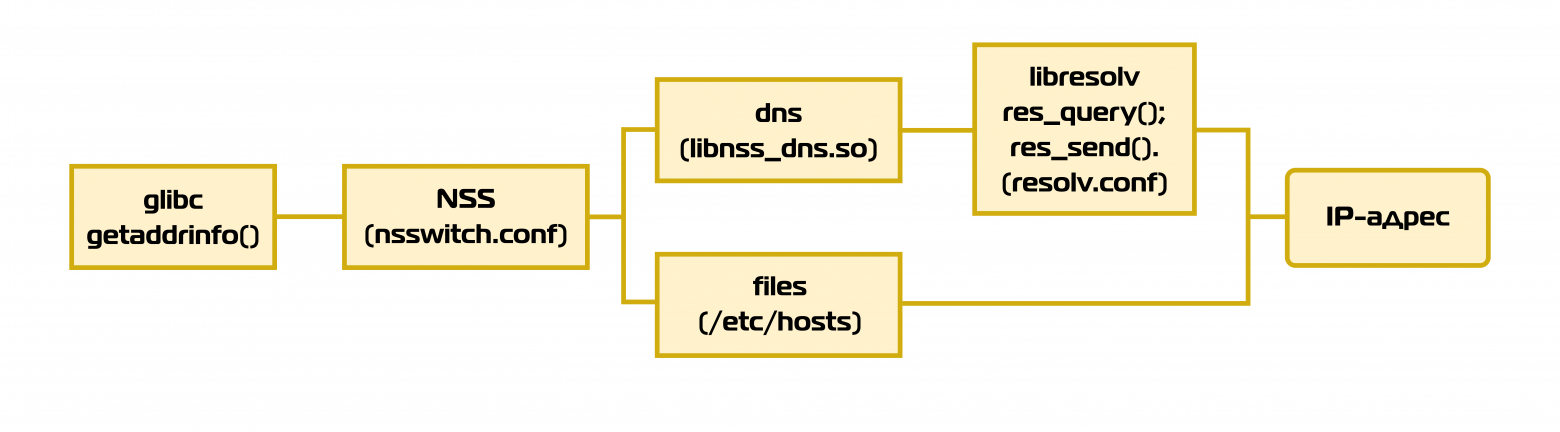
The diagram illustrates the basic path, but other sources in NSS may be used. The order of sources (files/dns) is configured in /etc/nsswitch.conf. Modern systems may also use DNS caching (systemd-resolved, nscd).
Important: if a name is found at one of the steps (e.g., in hosts), subsequent sources are not used.
In minimalist systems (Alpine Linux with musl), the order may differ since musl doesn't use NSS and implements DNS queries directly, reading /etc/hosts and resolv.conf on its own.
Some applications and languages (Go, Java, Node.js) may use their own DNS resolvers, completely ignoring system settings.
Analyzing curl's Behavior with strace
Command:
strace -f -e trace=network curl -s download.astralinux.ru > /dev/nullAbbreviated strace output:
socket(AF_INET6, SOCK_DGRAM, IPPROTO_IP) = 3
socketpair(AF_UNIX, SOCK_STREAM, 0, [3, 4]) = 0
socketpair(AF_UNIX, SOCK_STREAM, 0, [5, 6]) = 0
strace: Process 283163 attached
[pid 283163] socket(AF_UNIX, SOCK_STREAM|SOCK_CLOEXEC|SOCK_NONBLOCK, 0) = 7
[pid 283163] connect(7, {sa_family=AF_UNIX, sun_path="/var/run/nscd/socket"}, 110) = -1 ENOENT
[pid 283163] socket(AF_INET, SOCK_DGRAM|SOCK_CLOEXEC|SOCK_NONBLOCK, IPPROTO_IP) = 7
[pid 283163] connect(7, {sa_family=AF_INET, sin_port=htons(53), sin_addr=inet_addr("172.24.31.107")}, 16) = 0
[pid 283163] sendmmsg(7, [{msg_hdr={..."download.astralinux"..., iov_len=40}...}], 2, MSG_NOSIGNAL) = 2
[pid 283163] recvfrom(7, "...download.astralinux"..., 2048, 0, {...}, [...]) = 56
[pid 283163] recvfrom(7, "...download.astralinux"..., 65536, 0, {...}, [...]) = 114
[pid 283163] sendto(6, "\1", 1, MSG_NOSIGNAL, NULL, 0) = 1
[pid 283163] +++ exited with 0 +++
socket(AF_INET, SOCK_STREAM, IPPROTO_TCP) = 5
connect(5, {sa_family=AF_INET, sin_port=htons(80), sin_addr=inet_addr("130.193.50.59")}, 16) = -1 EINPROGRESS
Interpreting the strace Output
1. Attempt to use NSCD (Name Service Cache Daemon):
connect(..., "/var/run/nscd/socket", ...) = -1 ENOENTglibc first tries to use the name cache from NSCD if it's running. On this system it's absent, so the request continues.
2. socket() and connect() calls to the DNS server:
socket(AF_INET, SOCK_DGRAM|..., IPPROTO_IP) = 7
connect(7, ..., sin_addr=inet_addr("172.24.31.107")...)
A UDP socket is created for communicating with the DNS server specified in /etc/resolv.conf.
3. sendmmsg() call — sending DNS queries:
sendmmsg(7, [ { "download.astralinux.ru" }, { "download.astralinux.ru" } ], ...)Queries are sent to resolve the name.
4. Response from DNS:
recvfrom(...) = 56
recvfrom(...) = 114
Now the IP address is known. 56 is the size in bytes of the DNS response containing the A record (IPv4 address). 114 is the size of additional data (CNAME, authoritative servers in the case of a recursive query).
5. TCP connection by IP:
connect(5, ..., sin_addr=inet_addr("130.193.50.59"))curl establishes a TCP connection to the IP address returned by getaddrinfo().
Conclusions from the Analysis
When curl is called, DNS queries aren't visible directly — they're made by the glibc library inside getaddrinfo(). However, strace reveals indirect signs: among the calls you'll see an attempt to connect to nscd, a connect() call to the DNS server, a UDP packet sent via sendmmsg(), and then a standard TCP connection by IP.
It's important to note that getaddrinfo() behavior can depend on the libc implementation. For example, in glibc, results may be cached, which affects performance and data freshness.
Summary and Key Points
- A DNS query in Linux is not necessarily a query to a DNS server. The call chain may include hosts, NSS, glibc, and other sources.
- NSS and
nsswitch.confdetermine the order and sources for name resolution. - glibc uses NSS and may cache results; musl implements DNS resolution directly with limited support for
resolv.confoptions. - resolv.conf manages resolver settings but can be changed dynamically.
- getaddrinfo() is the main interface for name resolution, handling both DNS and other sources.
- Different programming languages (Go, Java, Python with
dns.resolver, Node.js) may use their own DNS query mechanisms.
In the next part, we'll examine DNS record caching — a key mechanism that directly affects performance, reliability, and application behavior during IP address changes.



